
'Book Value
$40 802.11g CardBus WiFi Card for OS X 10.3 and Later
Charles Moore - 2009.03.10 - Tip Jar
Internal wireless cards, which Apple calls AirPort Cards, have been available for all iBooks from the original 300 MHz clamshell models back in 1999, as well PowerBooks beginning with the Pismo in March 2000. However, an awful lot of iBooks, Pismos, and Titanium PowerBooks shipped without an AirPort Card, which was a configure-to-order option or user-installable upgrade in the early years, not standard equipment. Neither of my two Pismos nor my G3 iBook came with AirPort Cards, and no pre-Pismo PowerBooks had an AirPort option
With iBooks, the only internal WiFi option is an AirPort Card, with eBay a likely source, but all PowerBooks from the 1998 WallStreet on (save for the 12" aluminum models) have a CardBus or PC Card slot, which gives you another, more versatile option: a PC Card or CardBus wireless adapter, which is the easiest and quickest way to add WiFi support to these machines.
Another potential advantage of a non-Apple wireless adapter for users of metal-skinned PowerBooks, especially those early Titanium models, is that these WiFi cards, with their antenna protruding outside the metal case, can provide substantially better range than the metal-surrounded internal antenna does.
For many users, wireless connectivity is becoming more indispensable than modem support; indeed no Intel-based Mac notebooks has ever shipped with an internal modem. If you're among the minority that still needs a modem for a dialup Internet connection, as I am, or to send and receive faxes, Apple will sell you an external USB dongle modem for US$50. My new Unibody MacBook is so-equipped.
But wireless zones - WiFi hot spots, home networks, or office/institutional wireless networks - are becoming more ubiquitous, and these days a laptop without wireless support has to be considered partly crippled.
I went for more than half a decade after AirPort's introduction without missing it much. I don't have a home AirPort network; I use hard-wired ethernet instead, and there is only one WiFi hot spot within 50 miles of where I live - at the local public library 12 miles away. Consequently, the first Mac I owned with AirPort support was my 17" G4 PowerBook purchased in early 2006, now joined by the MacBook.
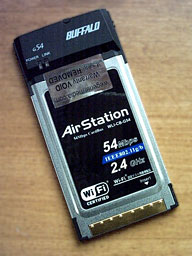 My "road" Pismo has also been WiFi capable for the
past couple of years, thanks to a very cool little Buffalo G54 802.11g
Wireless CardBus Adapter I got from Wegener Media. This card
supports all PowerBooks with a CardBus slot from the G3 Series
WallStreet on running OS X. OS 9, alas, is not supported.
My "road" Pismo has also been WiFi capable for the
past couple of years, thanks to a very cool little Buffalo G54 802.11g
Wireless CardBus Adapter I got from Wegener Media. This card
supports all PowerBooks with a CardBus slot from the G3 Series
WallStreet on running OS X. OS 9, alas, is not supported.
Installing the Buffalo card is simplicity itself. Essentially, you just insert the card into the PowerBook's PC Card slot and you're good to go.
On my Pismo, running OS 10.4.11, AirPort automatically recognized the card. No driver or other software installs were necessary.
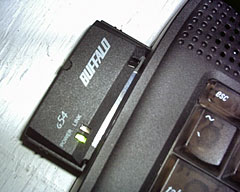 The Buffalo G54 802.11g
Wireless CardBus Adapter transforms the old Pismo into a very
satisfactory platform for wireless Internet surfing. However, it's not
the only solution. Fellow LEM columnist Simon Royal has posted an
excellent resource listing all
WiFi PC Cards that work in the CardBus slots of PowerBooks, pre-G3,
G3, and G4. Simon says he's been searching and buying on eBay for the
purpose of finding which cards work straight out of the box or with
third-party drivers, noting that some cards do come with specific Mac
drivers and some work with Ralink
ST2500 drivers, and that WirelessDriver.Souceforge
has released a Mac driver that enables a lot of Prism/Prism2 wireless
cards, such as the WaveLAN/Orinoco, Cabletron, SkyLINE, and D-link
among them, to work with Mac OS X 10.2 and Darwin. Simon also
notes that some Broadcom based chipset cards work without any drivers;
these come up as an original AirPort Card, and the Mac thinks no
different.
The Buffalo G54 802.11g
Wireless CardBus Adapter transforms the old Pismo into a very
satisfactory platform for wireless Internet surfing. However, it's not
the only solution. Fellow LEM columnist Simon Royal has posted an
excellent resource listing all
WiFi PC Cards that work in the CardBus slots of PowerBooks, pre-G3,
G3, and G4. Simon says he's been searching and buying on eBay for the
purpose of finding which cards work straight out of the box or with
third-party drivers, noting that some cards do come with specific Mac
drivers and some work with Ralink
ST2500 drivers, and that WirelessDriver.Souceforge
has released a Mac driver that enables a lot of Prism/Prism2 wireless
cards, such as the WaveLAN/Orinoco, Cabletron, SkyLINE, and D-link
among them, to work with Mac OS X 10.2 and Darwin. Simon also
notes that some Broadcom based chipset cards work without any drivers;
these come up as an original AirPort Card, and the Mac thinks no
different.
There's more information in the Wireless FAQ for Older Apple PowerBook Computers.
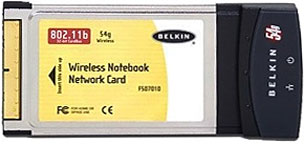 Unfortunately, CardBus cards are getting harder to
find, as the world switches to the newer ExpressCard expansion format.
Wegener Media is currently out of stock of the Buffalo cards, but
happily they still do have a limited stock of the quite similar
Belkin 802.11g
cards selling at the same $39.99 price, which also offer an AirPort
Extreme level 54 Mbs transfer rate and will work with the Lombard,
Pismo, and Titanium PowerBooks running OS X Panther & Tiger
(10.3 & 10.4) with no driver software installation required. You
just slide the card in and reboot. (I can sometimes get the Buffalo
card to work without a reboot, but it's hit-or-miss.)
Unfortunately, CardBus cards are getting harder to
find, as the world switches to the newer ExpressCard expansion format.
Wegener Media is currently out of stock of the Buffalo cards, but
happily they still do have a limited stock of the quite similar
Belkin 802.11g
cards selling at the same $39.99 price, which also offer an AirPort
Extreme level 54 Mbs transfer rate and will work with the Lombard,
Pismo, and Titanium PowerBooks running OS X Panther & Tiger
(10.3 & 10.4) with no driver software installation required. You
just slide the card in and reboot. (I can sometimes get the Buffalo
card to work without a reboot, but it's hit-or-miss.)
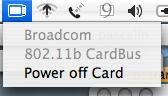 Wegeners claim these are the only current
cards that are fully interoperable using your OS X AirPort menu
and controls. The Buffalo card in my Pismo seems to work exactly as if
it were a real AirPort Card.
Wegeners claim these are the only current
cards that are fully interoperable using your OS X AirPort menu
and controls. The Buffalo card in my Pismo seems to work exactly as if
it were a real AirPort Card.
For WallStreet users, OS X 10.2, which is the latest officially supported Mac OS version, is compatible, but it requires minor scripting. Wegeners include instructions for configuring 10.2 to support the Belkin card but doesn't offer technical support for 10.2. There is more information available about configuring OS X 10.2 available on the Wegener Website. I'm not sure how it would work with hacked Panther or Tiger installs on the WallStreet. If it's of interest, Windows 2000 and XP support software is also included in the Belkin Card's packaging.
One cautionary note on the latter: In some cases, although reportedly not all, it will be necessary to remove the internal AirPort Card, if present, to prevent risk of kernel panics at startup when the Buffalo card is inserted, presumably due to the OS becoming confused by the presence of two wireless cards.
About LEM Support Usage Privacy Contact
Follow Low End Mac on Twitter
Join Low End Mac on Facebook
Favorite Sites
MacSurfer
Cult of Mac
Shrine of Apple
MacInTouch
MyAppleMenu
InfoMac
The Mac Observer
Accelerate Your Mac
RetroMacCast
The Vintage Mac Museum
Deal Brothers
DealMac
Mac2Sell
Mac Driver Museum
JAG's House
System 6 Heaven
System 7 Today
the pickle's Low-End Mac FAQ
Affiliates
Amazon.com
The iTunes Store
PC Connection Express
Macgo Blu-ray Player
Parallels Desktop for Mac
eBay

