
2009 – My first Pismo PowerBook, acquired in October 2001 in an even trade for a six-month-old Power Mac G4 Cube, has gone through many transformations during the eight years and a bit that I’ve owned it.
Acquisition and Metamorphosis
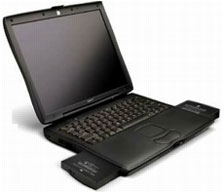 The first upgrade was to swap out the original 20 GB 4200 RPM Toshiba hard drive, replacing it with a 5400 RPM 40 GB unit (also Toshiba) with an 8 MB buffer. That speeded up performance noticeably, although the faster drive was noisier than they OEM. unit. Fairly early on, the Pismo also got a FireWire 800 CardBus adapter.
The most significant metamorphosis came in January 2004, when the original 500 MHz G3 processor was replaced with a 550 MHz G4 upgrade from DayStar (long since discontinued). Up to that point, my 700 MHz dual USB iBook had begun to displace the Pismo, but the G4 transplant truly gave the black PowerBook a new lease on life.
Not long after that, the Pismo received a FastMac 4x DVD burning SuperDrive, which was ultimately replaced by the 8x unit that is still in it. I also upgraded the system memory from 64 MB of RAM to 576 MB by adding a 512 MB module, and after a couple of OEM battery failures it got extended life replacement batteries from FastMac and NewerTech, which, used in tandem, would (when fresh) give me 10 to 12 hours battery runtime – better than a new MacBook with its built-in battery.
All of these tweaks helped keep the Pismo from fading into practical obsolescence after three or four years, as is typically the case with non-upgradable laptop systems.
Moving to Utility Status
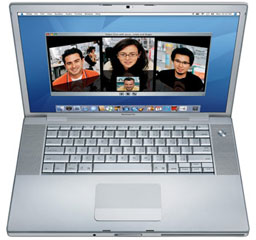 In early 2006, an Apple certified refurbished 2004 vintage 17″ 1.33 GHz aluminum PowerBook displaced the iBook and Pismo as my primary production machine. My wife took over the iBook, and the Pismo became my utility platform and road computer, still typically logging three or four hours use per day. In May 2007, I picked up another Pismo in excellent condition from Wegener Media, which subsequently alternated with the existing unit for similar service.
Unfortunately, after a year of excellent service, the power manager board in the “new” Pismo got fried in a fluke incident involving a suspect flying saucer power adapter and/or an arcing extension cord connection. I consulted with David Wegener of Wegener Media, and he suggested that while it would be possible to replace the power board, there was also a chance the damage had extended to the motherboard, so it was determined that my best bet for a hassle free repair would be to buy another Pismo chassis and swap the removables in from the damaged machine.
The replacement Pismo bare bones carcass wasn’t quite as pristine as the previous Wegener acquisition had been, but it was quite decent as well, and I have the other for spare parts in any case. That unit has a 100 GB Seagate 4200 RPM hard drive, a 550 MHz G4 processor upgrade from Wegener, a FastMac 8x SuperDrive module, and 640 MB of RAM. It’s been a faithful and steady performer as well. (I junked that possibly defective flying saucer power adapter.)
I added a Buffalo G54 CardBus WiFi card when I got the second Pismo in order to take advantage of my local library’s WiFi hotspot, which was my only local access to broadband until three months ago – when we finally got wireless high-speed service, which is distributed through the house via a wireless router. That Buffalo card has been in daily service since then, swapped between my two Pismo’s.
The Maximum RAM Upgrade
The old Pismos have been doing surprisingly well as broadband terminals, but with only 576 MB and 640 MB of RAM respectively, I’ve been getting a lot of swapfile activity unless I reboot every two or three days, which is tedious, so I decided it was long past time I maxed out at least one of the machines to 1 GB of memory. Also, the Buffalo PC Card hasn’t proved quite up to the challenge in some parts of the house, obliging me to carry the computer into the room where the router is situated in order to establish a connection, although after that it’s okay elsewhere.
I ordered a 512 MB memory module from Other World Computing for $33.97, and Dan Knight mentioned he had an old Apple AirPort Card left over from his erstwhile 2001 Titanium PowerBook, which he sent my way.
Coincidentally, both items arrived on consecutive days, so I was able to execute a double-barreled upgrade upon the old Pismo on the weekend.
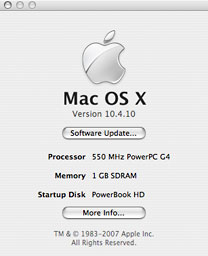 I had hoped that the 64 MB RAM module would be in the upper slot, but no such luck, so I had to pop the processor daughter card out in order to swap in the half-gigabyte module. However, that’s a trivial matter when you’ve done it as many times as I have, and the whole operation took about 10 minutes, without hurrying. Since it involved removing the processor heat sink, I also put a fresh dab of silver thermal paste on the contact point, buttoned things up, and hit the power button. The faithful old Pismo fired right up, and a check of About This Mac confirmed it was recognizing a full gigabyte of RAM.
Genuine Apple AirPort
Installing the AirPort Card was even simpler, since it resides in the upper left-hand top corner of the Pismo’s internal componentry bay, and I only needed to pop the keyboard again and remove the processor heat shield (two Torx 8 screws) in order to slide the card in into its slot and connect the antenna wire.
Once rebooted, the AirPort Card connected to the Linksys router instantly, and reception is excellent, even stronger than with my Unibody MacBook. I attribute this to the relatively large antenna housed in the Pismo’s polycarbonate plastic display bezel.
Another New Lease on Life
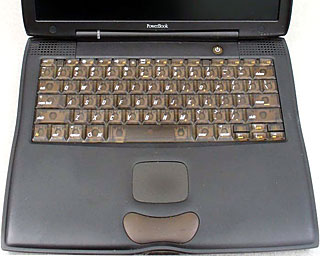 To say I’m delighted with the upgraded performance of the old Pismo is an understatement. The venerable machine has taken on yet another new lease on life. Its capability, considering its age, is remarkable. For most Web surfing, I really don’t notice a dramatic speed difference between it and the MacBook. I know for sure I would rather be using this Pismo than a new PC netbook – the great keyboard, nice trackpad, decent screen, and rock-solid reliability – and the Mac OS of course: OS X 10.4 Tiger is a smooth kitty on these machines, and 10.5 Leopard can be hack-installed, with some function limitations.
Speaking of limits, at some point the Pismo will inevitably reach its limit as a practical computer, but I don’t perceive the end of the line approaching any time soon; I expect to be using one or both of these machines for a at least a couple more years yet.
Where to Buy a Pismo
Pismos are where you find them these days, and I’ve heard of people picking them up for as little as $100 to $150. At reseller prices, to put together a hot-rodded Pismo specced out more or less like mine, Wegener Media currently has 400 MHz models on special with 40 GB hard drives and 256 MB of RAM for $289.99. With discounts available with a purchase of the computer, adding a 550 MHz G4 processor upgrade, a 6000 mAh extended life battery, a 1 GB RAM upgrade, and a Belkin 802.11g CardBus WiFi card will set you back $659.95. A FastMac 8x Dual layer SuperDrive will set you back another $99.95 for a grand total of $759.90.
And there’s the rub. For only $140 more ($899), Apple will put you in a Certified Refurbished Aluminum Unibody MacBook like mine with a 2.0 GHz Intel Core 2 Duo CPU, 2 GB memory, a 160 GB hard drive, and an 8x SuperDrive – and polycarbonate MacBooks, when available (none in stock at this writing), go for less than that.
As much as I love the Pismo, the choice is a no-brainer. But whether to upgrade a Pismo already in hand is another matter and a subjective value judgment. Here are some prices to ponder.
Wegener Media
- Currently on special G3/400 MHz/1 MB Cache. 14.1″ TFT LCD, 40G/256/DVD/AC/battery – $289.99
- 400 MHz Pismo (128 MB RAM/6 GB HDD/DVD) – $299.99
- 500 MHz Pismo (128 MB RAM/6 GB HDD/DVD) – $349.99
- Pismo G4/550, (128 MB RAM, 40 GB HDD, Combo drive) – $499.99
- Upgrade RAM to 1 GB with purchase of Pismo – $69.99
- AirPort Wireless card with purchase of Pismo – $109.99
- Belkin 802.11g PC CardBus WiFi card – $39.99
- High-Capacity 6000 mah battery with purchase of Pismo (normally $109) in place of OEM battery – $69.99
- G4/550 MHz upgrade card with purchase of Pismo (regularly $249) – $189.99
FastMac
- SuperDrive 8x dual-Layer for Pismo -$99.95
- Extended Life Battery – 149.95
- 550 MHz G4 processor upgrade – $239.95
- 512 MB 144 Pin SODIMM, PC133 – $99.95
Other World Computing
- 512 MB PC133 CL3/PC100 CL2 SODIMM for iMac G4/700-800 MHz, PowerBook FireWire G3/400-500 MHz (a.k.a. Pismo/2000). Lifetime Warranty – $33.97
- 160 GB Western Digital Scorpio 5400 RPM 9.5mm SuperSlim IDE notebook drive with 8 MB data buffer. 3 year Western Digital warranty more – $79.99
Keywords: #pismo #pismopowerbook #powerbookpismo
Short link: http://goo.gl/9ysl5U
searchword: 1gnpismo
