
'Book Value
TruePower AC Adapter for iBooks and PowerBooks Is Rugged, Reliable, and Affordable
Charles Moore - 2008.08.14 - Tip Jar
Rating: 
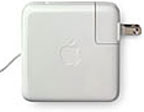 The 65
watt power adapter that came with my 17" PowerBook looks nice,
and it works fine, but it always seems a bit fragile and "delicate" for
serious road work, what with its removable plugin modular long cord or
short flip-out prong AC connector - stuff that can go adrift and too
easily get lost - at least if you're absent-minded like me. A notebook
power adapter used on the road leads a rough life, so it's nice if its
components are all permanently connected - and above all other
qualities it needs to be rugged.
The 65
watt power adapter that came with my 17" PowerBook looks nice,
and it works fine, but it always seems a bit fragile and "delicate" for
serious road work, what with its removable plugin modular long cord or
short flip-out prong AC connector - stuff that can go adrift and too
easily get lost - at least if you're absent-minded like me. A notebook
power adapter used on the road leads a rough life, so it's nice if its
components are all permanently connected - and above all other
qualities it needs to be rugged.
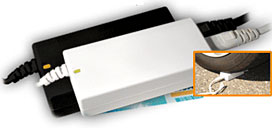
Happily, FastMac has a solution - the TruePower AC Adapter is built for the road well traveled. The TruePower adapter is designed to be tough, with solid and fixed cord connections, sturdy cords, and a rugged housing. It provides 12 feet of extension between your 'Book and the power socket.
It's not as pretty as the Apple adapter, but it's an inexpensive, heavy duty alternative to the latter with no removable components, and it's built so robustly that it looks like you could throw it under a truck and not worry about damage.
Oh, wait; FastMac actually did throw one under a truck. Read on for more about that.
If you're a serious user of notebook computers, sooner or later you're likely be shopping for a replacement AC power adapter, either because the original one that came with your 'Book has failed, been damaged, or gotten lost - or simply because you've determined that it's a smart idea to have a spare.
You could just buy a second Apple adapter to replace the original or to carry as a spare, at least if your 'Book is a 400 MHz TiBook or iBook or newer (Apple no longer lists replacement adapters for older 'Books).
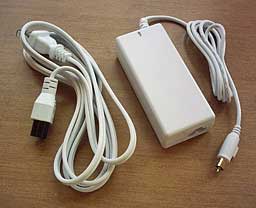 Or you can save some money and go with a third-party adapter -
the tough FastMac TruePower unit being a logical candidate. The
TruePower unit supplies 65 watts, which is plenty to support a 17"
PowerBook G4 like mine. It's offered in two models - one that works
with most older PowerPC 'Books (except for the PowerBook 5300), including the PowerBook 1400 through the Pismo PowerBook G3 and Clamshell iBooks. The companion model
supports the metal PowerBooks and white iBooks. (At this point, nobody
is licensed to make a replacement adapter using Apple's proprietary
MagSafe connection.)
Or you can save some money and go with a third-party adapter -
the tough FastMac TruePower unit being a logical candidate. The
TruePower unit supplies 65 watts, which is plenty to support a 17"
PowerBook G4 like mine. It's offered in two models - one that works
with most older PowerPC 'Books (except for the PowerBook 5300), including the PowerBook 1400 through the Pismo PowerBook G3 and Clamshell iBooks. The companion model
supports the metal PowerBooks and white iBooks. (At this point, nobody
is licensed to make a replacement adapter using Apple's proprietary
MagSafe connection.)
AC power adapters for notebooks have never been one of Apple's strongest points, although Apple is pitching the magnetic-attachment MagSafe adapter that ships with its Intel-powered notebooks as a major feature. It's hard to fault the functional objective of MagSafe, which is designed to disengage from the computer under sudden shock loads, such as someone tripping over the power cable, thus preempting possible serious damage to the notebook.
One off my offspring once tripped on the Lombard PowerBook's adapter cord, launching the unfortunate laptop off the chair it had been perched on to land on the floor across the room. Amazingly, while the coaxial plug that connected the power cord to the computer was mangled beyond repair, the Lombard itself sustained no noticeable damage and remained in fine fettle through three subsequent owners that we know of over several years until we lost track of it. Still, that's the sort of thing you would rather avoid, so the MagSafe gets a qualified thumbs-up.
One downside so far is that there are so far no less-expensive third-party alternatives to the Apple-branded MagSafe units, presumably because the technology is patented and Apple wants a stiff price for licensing, if willing to granted it at all. But I digress.
Conventional power adapter technology used with PowerPC PowerBooks and iBooks is not protected by exclusive patents, so there is a variety of other-branded adapters that can be used with these older machines.
Apple's own notebook power adapters in the PowerPC era have had a spotty reputation. The adapter that shipped with the PowerBook 5300 was relatively big and clunky, but robust enough. It was the motherboard socket that the audio jack-like DC connector plugged into that gave trouble, having a baneful tendency to come unsoldered.
The PowerBooks 1400, 3400, 3500, and 2400 used basically the same adapter unit as the 5300, but with a stronger and better-designed "barrel ring" coaxial plug that remained standard until the introduction of the Titanium PowerBook in 2001.
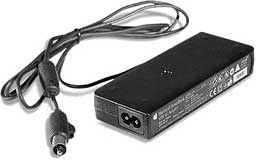 The PowerBook G3
Series WallStreet and Lombard power adapters were recalled in 1999
with reference to a potential fire hazard and replaced with the oddball
"flying saucer" or "yo-yo" AC adapter that shipped with the original
Clamshell iBook and PowerBook G3 2000 Pismo. The purported functional
advantage of the disc-shaped adapter was that its yo-yo configured
housing formed a reel upon which you could coil the DC cord, but the
thing was bulky to stow and carry, strange-looking, and not especially
rugged, with cord failures and sometimes consequent electrical arcing a
fairly common complaint. Some of us wondered if Apple had recalled the
wrong adapter.
The PowerBook G3
Series WallStreet and Lombard power adapters were recalled in 1999
with reference to a potential fire hazard and replaced with the oddball
"flying saucer" or "yo-yo" AC adapter that shipped with the original
Clamshell iBook and PowerBook G3 2000 Pismo. The purported functional
advantage of the disc-shaped adapter was that its yo-yo configured
housing formed a reel upon which you could coil the DC cord, but the
thing was bulky to stow and carry, strange-looking, and not especially
rugged, with cord failures and sometimes consequent electrical arcing a
fairly common complaint. Some of us wondered if Apple had recalled the
wrong adapter.
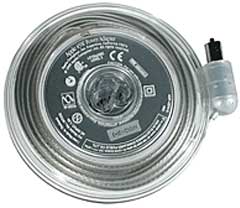 I still have a couple of the recalled G3 PowerBook adapters,
and they have been in pretty much constant service for nearly a decade
years with no fires yet or any evident heat issues. That is not a
recommendation, however, and my advice is to follow Apple's and replace
these questionable adapters. The FastMac TruePower adapter would be an
excellent and affordable replacement.
I still have a couple of the recalled G3 PowerBook adapters,
and they have been in pretty much constant service for nearly a decade
years with no fires yet or any evident heat issues. That is not a
recommendation, however, and my advice is to follow Apple's and replace
these questionable adapters. The FastMac TruePower adapter would be an
excellent and affordable replacement.
The square white AC adapters that shipped with the metal PowerBooks and white iBooks are arguably the best of the pre-MagSafe lot - at least I've encountered no problems with them. They use a smaller connector barrel-ring plug than the G3 PowerBook and flying saucer adapters, so they are not interchangeable with the latter, although they would otherwise be compatible. However, with their flip-out AC plug prongs and relatively small diameter DC connector cords, they are not the most robust units, and they have a reputation for premature failure.
Apple has posted a Knowledge Base tutorial on troubleshooting of these power adapters, particularly addressing the following issues:
- Your power adapter won't charge the computer.
- The LEDs in the adapter don't light when the adapter is connected.
- The adapter only charges the computer intermittently.
 I mentioned in the preamble to this review that the
FastMac TruePower adapter is a rugged little unit.
I mentioned in the preamble to this review that the
FastMac TruePower adapter is a rugged little unit.
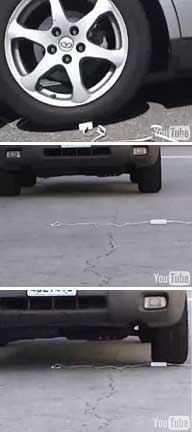
How rugged? Well, FastMac drop-kicked one of the TruePower adapters several times, then ran over it repeatedly with a minivan, as the pictures illustrate.
"Our TruePower AC adapter is not only smaller than most third-party replacements, it's more durable. It can be dropped, kicked, and even run over by a truck and still work," says Michael Lowdermilk, Business Development Manager for FastMac. "We know because we did it and have the video to prove it."
As with the old Timex watch torture-test TV commercials,the scuffed but still intact TruePower adapter worked just fine after its ordeal.
The cool thing is that you can buy two of these adapters - one for your desktop workstation and another for your computer bag, for less than the price of one Apple-brand adapter.
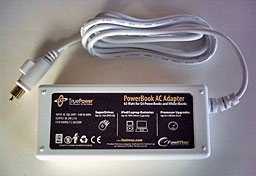 The
TruePower adapter provides constant wattage output that meets or
exceeds Apple-Branded adapters.
The
TruePower adapter provides constant wattage output that meets or
exceeds Apple-Branded adapters.
One thing you will miss with this adapter is the Apple OEM unit's colored status LEDs, located in the head of the DC Barrel ring connector that plugs into the computer indicating charging status. an amber ring showing while the battery is charging, and a green ring indicating a full charge. However, the FastMac adapter does have a power on LED.
The FastMac adapter isn't as swish and stylish-looking as the Apple adapter, but while FastMac pitches it as "not pretty," it's presentably attractive in white, with matching white cables of generous diameter and 10 feet of extension length which look and feel very robust. Its simple, no-frills design minimizes vulnerability to damage. I've always been impressed with the quality of FastMac products, and this one is no exception.

Apple notebook models officially supported by the white $39.95 FastMac APP-6265 power adapter include:
- Clamshell iBook
- 12" & 14" iBook G3
- 12" & 14" iBook G4
- PowerBook G3
- Titanium PowerBook G4
- 12", 15", & 17" Aluminum PowerBook G4
Apple notebook models officially supported by the black $35.95 FastMac APP-5553 power adapter include:
- Clamshell iBook
- 12" & 14" iBook G3
- 12" & 14" iBook G4
- PowerBook G3
- Titanium PowerBook G4
- 12", 15", & 17" Aluminum PowerBook G4
And as noted above, there is no reason why the APP-5553 adapter can't be used with a PowerBook 1400, 3400, or 2400.
I've been using one of these FastMac TruePower AC adapters with my PowerBook for about a year and a half. I haven't run over it with any automobiles or drop-kicked it, but it's been completely trouble-free, puts out plenty of power, and runs cooler than the Apple adapter.
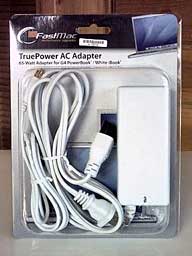 Features
- TruePower AC Adapter available for all iBooks & G3/G4 PowerBooks
- 65 Watts, dual voltage (100-240 volts). 10-foot reach. 1-Year Warranty.
- Compact Design, Extremely Portable
Specifications
- Input: AC 100-240V
- Output: DC 24V, 2.7A, 65W
- Fuse rating: 2.5A/250V
- Dimensions: 1.1" x 2 "x 4.3" (29mm x 51mm x 109mm)
- Length: 10 feet
The TruePower adapter is covered by a 1-year warranty and a 30-day money back guarantee.
There is also a FastMac TruePower Auto/Air Power Adapter (for the later model, small-plug machines only) that sells for $10 more if you need to be able to charge from mobile power sources.
Join us on Facebook, follow us on Twitter or Google+, or subscribe to our RSS news feed
Charles Moore has been a freelance journalist since 1987 and began writing for Mac websites in May 1998. His The Road Warrior column was a regular feature on MacOpinion, he is news editor at Applelinks.com and a columnist at MacPrices.net. If you find his articles helpful, please consider making a donation to his tip jar.
Links for the Day
- Mac of the Day: Motorola StarMax 3000, introduced 1999.09.07. This inexpensive clone used lots of off-the-shelf parts.
- Support Low End Mac
Recent Content
About LEM Support Usage Privacy Contact
Follow Low End Mac on Twitter
Join Low End Mac on Facebook
Favorite Sites
MacSurfer
Cult of Mac
Shrine of Apple
MacInTouch
MyAppleMenu
InfoMac
The Mac Observer
Accelerate Your Mac
RetroMacCast
The Vintage Mac Museum
Deal Brothers
DealMac
Mac2Sell
Mac Driver Museum
JAG's House
System 6 Heaven
System 7 Today
the pickle's Low-End Mac FAQ
Affiliates
Amazon.com
The iTunes Store
PC Connection Express
Macgo Blu-ray Player
Parallels Desktop for Mac
eBay

