
'Book Value
PowerBook G3 Press Release
1997.11.10
Apple Canada's Press Release for the Original PowerBook G3
AppleDesigns Different: Extends Leadership in Notebooks with PowerBook G3
Apple Introduces World's Fastest Notebook for People Who Think Creatively
MARKHAM, Ontario - Nov. 10, 1997 - Targeting the needs of creative "road warriors" who require the most in performance and advanced multimedia capabilities from a notebook computer, Apple Computer, Inc. today introduced the Macintosh® PowerBook® G3. PowerBook G3 is based on the third generation PowerPC G3 processor, a high-performance microprocessor optimized for the Mac® OS.
"The PowerBook G3 combines next generation processor technology with the latest in Mac OS system software to provide creative professionals with a new standard in mobile computing," said Phil Schiller, Apple's vice president of Worldwide Product Marketing. "There is more of everything for Macintosh customers with the PowerBook G3¬more speed, more memory, more storage. This is high- end desktop performance in a mobile Macintosh."
The PowerBook G3 builds upon the innovative feature set of the fast PowerBook 3400 series, previously the world's fastest notebook, by adding the high-performance PowerPC G3 processor running at 250 MHz, with a 512K L2 cache and a 50 MHz system and memory bus. A host of other innovative features, such as a 5 GB hard disk, 20x CD drive, built-in ethernet/modem, hot swappable expansion bay modules, Apple® Location Manager and four speaker sound system, provide Mac OS customers with the fastest notebook for creating, presenting, sending and receiving media rich information anytime, anywhere.
"Apple continues to demonstrate the ability to develop PowerBooks with industry leading performance," said J. Gerry Purdy, Ph.D., president of Mobile Insights in Mountain View, Calif. "The customer who is using a Macintosh desktop can be assured that the PowerBook G3 will provide them with true Power Macintosh performance in a portable."
Performance
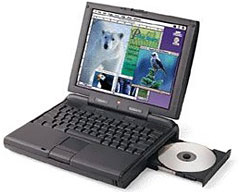 The
PowerBook G3 delivers high-end desktop performance in a mobile
solution. The product is based on the PowerPC G3, the third generation
PowerPC G3 processor from Motorola and IBM and the first processor
specifically designed to optimize the Mac OS and associated
applications. System enhancements include a 50 MHz system bus (25
percent faster than previous PowerBook models), 32 MB of EDO RAM
expandable to 160 MB, and a 5 GB ATA IDE hard disk drive. The notebook
also boasts 512K level 2 backside cache and 64K on-chip level 1 cache.
The new backside cache design boosts performance significantly by
allowing the processor and level 2 cache to communicate at much higher
speeds than previously possible. A 20x CD drive provides fast access to
CD-based information.
The
PowerBook G3 delivers high-end desktop performance in a mobile
solution. The product is based on the PowerPC G3, the third generation
PowerPC G3 processor from Motorola and IBM and the first processor
specifically designed to optimize the Mac OS and associated
applications. System enhancements include a 50 MHz system bus (25
percent faster than previous PowerBook models), 32 MB of EDO RAM
expandable to 160 MB, and a 5 GB ATA IDE hard disk drive. The notebook
also boasts 512K level 2 backside cache and 64K on-chip level 1 cache.
The new backside cache design boosts performance significantly by
allowing the processor and level 2 cache to communicate at much higher
speeds than previously possible. A 20x CD drive provides fast access to
CD-based information.
Although higher-performance components are used in the PowerBook G3, the low-power consumption of the new PowerPC processor combined with a higher-capacity 47-watt/hour Lithium ion battery enables customers to enjoy two to four hour battery life.
"Apple and Motorola have delivered the fastest processor available to mobile customers," said Bud Broeker, corporate vice present and general manager of Motorola's Personal Computing Division. "This latest PowerPC design combines performance with minimal power requirements, which eliminates the necessity of choosing either top-end performance or portability."
Multimedia
The PowerBook G3 is designed for creative professionals and authors in all markets who demand desktop performance yet need mobility. Enhanced multimedia features include 2 MB of VRAM which supports 24-bit video out, enabling millions of colors on an external monitor; 16-bit color is supported on the notebook's 12.1" (diagonal) active-matrix SVGA color display. The PowerBook G3 also provides an enhanced Chips and Technology 65554 PCI video controller that supports hardware acceleration for faster graphics.
The PowerBook G3 has a unique four speaker sound system, PCI video controller with hardware acceleration, industry standard VGA connector for 24-bit video out, 16-bit stereo in/out, Zoomed Video support and software-based MPEG-1 decompression. All of these features combined provide users with one of the most robust systems available today and the key elements they need to create and present multimedia rich information.
"I do everything on the PowerBook G3. It has become an indispensable piece of equipment in my camera bag that lets me create what I see in my head, wherever I am, quickly and easily in a manner I had never dreamed would be possible when I used my first PowerBook," said Carlan Tapp of Tapp Studio, based in Seattle, Wash." In the beginning, the thought of doing serious Photoshop work was still limited to the desktop Macs in the studio, but with the PowerBook G3, Photoshop runs very quickly and is the total answer to do VR authoring. No more stitching on our current desktop systems. The PowerBook G3 outruns and finishes on an average VR pano up to six minutes faster than our 8500."
Communications
The PowerBook G3 features a number of communications capabilities including built-in 10 Mbps ethernet and 33.6 Kbps modem, in addition to an RJ-45 connector that can accept either ethernet or telephone cable. Other communications capabilities include built-in 1 MB industry standard IrDA for transferring information wirelessly to other infrared capable devices. In addition, PowerBook users will have access through the serial port to GeoPort technology for ISDN and analog modems.
Expansion
A flexible expansion bay on the PowerBook G3 accepts a variety of modules including a floppy drive, CD-ROM drive, additional hard drive, magneto-optical drive, and internal AC adapter; a Zip[TM] drive from VST Technologies, Inc. is also expected to be available. In addition, expansion bay modules from the PowerBook 3400, 5300, and 190 series can be used with the PowerBook G3. For more expansion options, two PC Card slots are provided to support two Type II or one Type III card. The PowerBook G3 allows users to "hot swap" modules while the system is running unlike other notebook systems that require a user to shut down or sleep their system prior to the removal of an expansion bay module.
Software
The PowerBook G3 comes configured with Mac OS 8 and a variety of productivity, communications, and compatibility software applications to provide a complete, mobile computing solution right out of the box. Productivity software includes Now Software Inc.'s Now Up-To-Date and Now Contact. Communications software provided includes Internet tools such as Mac® OS 8 Internet Assistant, Netscape Navigator 3.0, Microsoft Internet Explorer 3.0 and ForeFront Group's WebWhacker 3.0 for browsing the Internet off line.
The PowerBook G3 also ships with Apple Location Manager, a software utility which allows users to save system settings that are location dependent including networking, printer, time zone, file sharing and sound. Once a defined location is set up, a user simply selects that location and the system automatically reconfigures to reflect the chosen environment. Apple® Remote Access is also included for easily connecting to a desktop or network from a remote location. Compatibility software includes Macintosh PC Exchange for reading and writing PC-formatted floppy disks, Macintosh Easy Open and MacLinkPlus from DataViz for reading and translating PC-formatted files.
Availability, Pricing, and Configuration
The PowerBook G3 is available immediately in the United States with an estimated retail price of $8,199 CDN. Additionally, the PowerBook G3 is expected to be available in Europe in late November, and Japan and other countries in December; pricing may vary per region. The PowerBook G3 will be sold in one configuration: 250 MHz PowerPC G3 processor, 512K level 2 backside cache, 32 MB EDO RAM, internal 5 GB IDE hard drive module, 12.1" (diagonal) active-matrix SVGA color display, built-in 1.4 MB Apple SuperDrive floppy disk drive, and internal 20x CD-ROM drive module.
Apple Computer, Inc. ignited the personal computer revolution in the 1970s with the Apple II, and reinvented the personal computer in the 1980s with the Macintosh. Apple is now recommitted to its original mission - to bring the best personal computing products and support to students, educators, designers, scientists, engineers, business persons and consumers in over 140 countries around the world.
About LEM Support Usage Privacy Contact
Follow Low End Mac on Twitter
Join Low End Mac on Facebook
Favorite Sites
MacSurfer
Cult of Mac
Shrine of Apple
MacInTouch
MyAppleMenu
InfoMac
The Mac Observer
Accelerate Your Mac
RetroMacCast
The Vintage Mac Museum
Deal Brothers
DealMac
Mac2Sell
Mac Driver Museum
JAG's House
System 6 Heaven
System 7 Today
the pickle's Low-End Mac FAQ
Affiliates
Amazon.com
The iTunes Store
PC Connection Express
Macgo Blu-ray Player
Parallels Desktop for Mac
eBay

