
'Book Value
Kensington Ci95m Wireless Mouse: Great Battery Life, Smooth Performance
Charles Moore - 2008.11.13 - Tip Jar
Rating: 
The latest trend in non-Bluetooth wireless computer mice, especially notebook-oriented ones, is slimmed down "plug-and-stay" RF receiver modules that can be left in a USB slot (in most instances) when the computer is carried in a sleeve, case, or backpack. Such designs have been embraced by market leaders Kensington and Logitech.
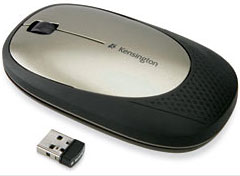
One of the newer models in Kensington's slim line family of computer mice, the Ci95 Wireless Mouse with Nano Receiver features a slim profile - roughly 30% thinner than is typical with computer mice.
 In appearance, the Ci95m closely resembles
Kensington's older model Ci75m mouse, but is a bit heavier, since
it uses AA batteries rather than the older unit's smaller AAA cells.
The AAs have presumably been given the nod because they offer longer
battery life - claimed to be up to six months. My personal preference
would be to live with shorter battery life in order to get the lighter
weight, but that's a subjective preference - and Kensington gives you
the choice, since the Ci75m is still available.
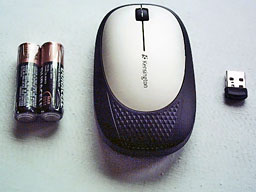
In appearance, the Ci95m closely resembles
Kensington's older model Ci75m mouse, but is a bit heavier, since
it uses AA batteries rather than the older unit's smaller AAA cells.
The AAs have presumably been given the nod because they offer longer
battery life - claimed to be up to six months. My personal preference
would be to live with shorter battery life in order to get the lighter
weight, but that's a subjective preference - and Kensington gives you
the choice, since the Ci75m is still available.
However, aside from improved battery life, the Ci95m Wireless Mouse's marquee feature is the aforementioned "Nano" wireless USB receiver dongle. The Ci95m operates on the 2.402 - 2.479 GHz frequency with a nominal range of up to 10 feet.
This has advantages and disadvantages compared with Bluetooth mice. On the one hand, you don't have to be bothered with the tedium of Bluetooth pairing and wake-up lag; on the other, it eats up a precious USB port, and the little receiver module is another loose bit with the potential to get lost - especially this extremely tiny unit.
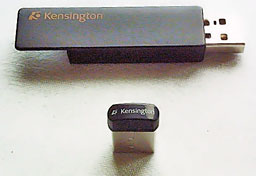 A few more notes on the Nano receiver (the picture shows how
small it is compared with the Ci75m mouse's receiver).
A few more notes on the Nano receiver (the picture shows how
small it is compared with the Ci75m mouse's receiver).
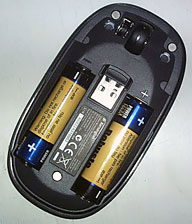
While the latter stows in a recess in the base of the mouse when not in use, the Ci95m's Nano receiver is carried inside the mouse housing in a recess with a magnetic holder situated between the two battery bays. The upper and lower halves of the mouse housing are also held together magnetically, and access to the receiver storage or batteries is quick and slick.
The Nano receiver, incidentally, is not compatible with other Kensington products like the Ci75m wireless mouse and the Ci70 Wireless Desktop Keyboard and Mouse set, which use a different frequency (27 MHz) and have a range of up to 30 feet.
I found the Ci95m comfortable to use, with its low profile contributing to keeping your wrist angle flat as well as looking cool and contemporary. The sides and palm contact area of the mouse housing are clad in a rubbery traction material for a positive grip, and notwithstanding the weight of those two AA cells, the mouse glides easily and smoothly on the mouse pad.
The light action and relatively short travel of the mouse buttons are much appreciated as well. The mouse's split-top panel flexes for the left/right button click functions, which have a positive feel. I also like the scroll wheel, which is clickable for a third-button function and likewise has a positive, high-quality feel, with perhaps just a bit stiffer resistance to rolling than I would prefer.
Happily, the Ci95m Wireless Mouse requires no driver installation or other software and is supported by OS X default mouse drivers.
As for wireless performance, the mouse is instantly recognized by the system without having to muck around with pairing connections (like you have to do with Bluetooth mice). Unfortunately, this mouse, like most mice I've used, is afflicted with a degree of latency in response to user-input. I'm happy to report that there seems to be progress on this issue, and this recent generation of Kensington mice - as well as the current generation of Logitech wireless RF mice, which also use 2.4 GHz frequencies - are the least troubled by this characteristic of any wireless mice I've sampled to date.
 It's just a tiny micro-millisecond lag between the time you
move the mouse and when the movement registers with the cursor, as
opposed to the right now response you get with wired mice that
bothers some folks more than others. The most significant aggravation
associated with this for me is that it causes me to overshoot onscreen
targets. It might also be less of an issue on machines faster than my
old 1.33 GHz PowerBook
G4.
It's just a tiny micro-millisecond lag between the time you
move the mouse and when the movement registers with the cursor, as
opposed to the right now response you get with wired mice that
bothers some folks more than others. The most significant aggravation
associated with this for me is that it causes me to overshoot onscreen
targets. It might also be less of an issue on machines faster than my
old 1.33 GHz PowerBook
G4.
If you prefer a hard-wired mouse for maximum precision, Kensington makes a notebook mouse with a retractable USB cord, the Ci25m Notebook Optical Mouse, which sells for a modest $19.99, looks great.
The Ci95m is a cleverly designed little rodent, one of its coolest features being the aforementioned magnetic closure clamshell housing, which opens to reveal the battery bay and hideaway Nano receiver storage by simply pulling the cover and bottom modules apart, with no screws to remove or latches to manipulate for literally instant access.
Speaking of sleep, one minor glitch I experienced is that the mouse drops its connection when the computer goes through a sleep/wake-up cycle. The drill to restore the connection is simply to hold the left button down for a second or two. (This is normal for USB-powered dongles and not peculiar to Kensington. On notebook compupters, power to the USB port is disabled during sleep, disrupting the link between the receiver and the wireless devices.)
The Ci95m mouse has a laser sensor, presumably 1,000 dpi, although I wasn't able to confirm that spec, and I expected it to feel "nervous" with that high a resolution, but it doesn't. Other than the aforementioned wireless latency issue, the mouse is nicely responsive and precise.
Overall, this mouse has a high standard of finish, the feel of quality materials and workmanship, and a five year warranty to back up the impression.
While it is perfectly usable with desktop computers, the Ci95m makes an excellent notebook mouse; its slim profile and light weight make it easy to take along on the road in one self-contained package with the wireless receiver stowed in the mouse body.
Rating: 3 LEMs out of 4
Features in summary:
- Plug-and-stay nano receiver is so small you plug it in once and leave it in.
- Rugged, ultra-thin design, up to 30% thinner than a standard notebook mouse to eliminate bulk from your travel bag, withstands whatever the road dishes out, fits great in your hand
- 2.4 GHz wireless for reliable performance in any environment
- Rubberized exterior for a non-slip grip - sleek, ergonomic design provides comfort and mobility
Specifications
- 2.4 GHz wireless
- PC and Mac compatible
- Plug and Play
- Up to 6-months battery life
Ci95m Wireless Mouse with Nano Receiver is backed by Kensington's 5-Year Warranty and free technical support. The suggested retail price is $39.99, and this mouse is available at Amazon.com, Kensington.com, and major retailers.
Amazon.com Purchase Links (prices subject to change)
- Ci95 Wireless Mouse, $41.39 with free ground shipping.
- Ci75m Wireless Mouse, $34.16 in silver, $34.95 in black with free ground shipping.
- Ci25m Notebook Optical Mouse, $19.99 ($25 minimum for free ground shipping).
- Ci70 Wireless Desktop Keyboard and Mouse, $66.24 in titanium, $66.94 in black from Amazon.com with free ground shipping.
Join us on Facebook, follow us on Twitter or Google+, or subscribe to our RSS news feed
Charles Moore has been a freelance journalist since 1987 and began writing for Mac websites in May 1998. His The Road Warrior column was a regular feature on MacOpinion, he is news editor at Applelinks.com and a columnist at MacPrices.net. If you find his articles helpful, please consider making a donation to his tip jar.
Links for the Day
- Mac of the Day: PowerBook 5300, introduced 1995.08.25. The first PowerPC PowerBook was known for 'flaming' performance.
- Support Low End Mac
Recent Content
About LEM Support Usage Privacy Contact
Follow Low End Mac on Twitter
Join Low End Mac on Facebook
Favorite Sites
MacSurfer
Cult of Mac
Shrine of Apple
MacInTouch
MyAppleMenu
InfoMac
The Mac Observer
Accelerate Your Mac
RetroMacCast
The Vintage Mac Museum
Deal Brothers
DealMac
Mac2Sell
Mac Driver Museum
JAG's House
System 6 Heaven
System 7 Today
the pickle's Low-End Mac FAQ
Affiliates
Amazon.com
The iTunes Store
PC Connection Express
Macgo Blu-ray Player
Parallels Desktop for Mac
eBay

