
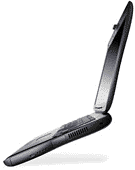
The Lombard PowerBook G3 (officially the PowerBook G3 Bronze Keyboard) was rolled out on May 10, 1999 – exactly a year after the first WallStreet iteration of Apple’s PowerBook G3 Series laptop line debuted, also at the Worldwide Developers’ Conference (WWDC). While the Lombard superficially looks similar to the WallStreet family, it had taken a trip to the fat farm, which pared away about 2 pounds of weight and 20% of WallStreet’s thickness. The Lombard was slim in the context of Apple laptops up to that point.
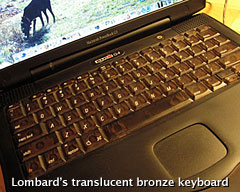 Apple distinguished the new ‘Book as the “bronze keyboard” PowerBook G3, referring to the new ochre/mocha color of the keyboard and trackpad, but it became better known by its development code name, Lombard.
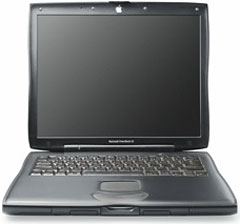 Other changes included substitution of two USB ports for the Serial and ADB ports of the WallStreet. A PowerBook HDI-30 SCSI port is still there, but one of the PC Card bays is gone, and the left-hand battery bay no longer supports expansion bay devices. More whimsically, the white Apple logo on the screen lid is now illuminated when the PowerBook is in use.
The PowerBook G3 model lineup was also substantially substantially simplified with the advent of Lombard, with just two models and one monitor screen choice available:
- The base Lombard came with a 333 MHz G3 processor, 512 KB Level 2 (L2) cache, a 66 MHz system bus, 64 MB of RAM, a 4 GB hard drive, and a 24x CD-ROM drive.
- The top-of-the-line unit had a 400 MHz G3 processor with 1 MB L2 cache, a 66 MHz system bus, 64 MB of RAM, and a 6 GB hard drive – plus a DVD-ROM drive, making it the first Apple laptop ever with DVD capability as standard equipment.
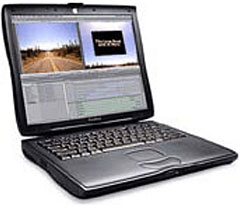 All Lombards have a 14.1″ 1024 x 768 LCD screen and 8 MB of VRAM with an ATI Rage LT Pro graphics processor. Lombard also came with restored support for monitor spanning (rather than just mirroring to an external monitor), a feature that had gone missing from PowerBooks since the 5300 was discontinued in 1996.
Lombards continued essentially unchanged through their entire nine month production run.
WallStreet’s analog Volume and Brightness rocker switches and Mute button were banished from the facia below the display, and those functions moved to faster-acting keyboard commands. The “rubbery” feeling center panels on the top and bottom of the WallStreet machines was continued with Lombard, but is reportedly of a more durable composition than the easily scratched material on the WallStreets.
Lombard was the first PowerBook that wouldn’t boot from a RAM Disk, a consequence of Apple’s “New World” ROM in RAM configuration. The 333 MHz Lombard did not come with built-in DVD drive support, but it could be upgraded.
The reset switch was back with Lombard (the keyboard command also works), and another returning feature was that Lombard can run safely with the lid closed when using an external monitor (up to 21″), since it generates significantly less heat than WallStreet. There ias also a new PowerBook SCSI Setup control panel that makes the computer wake from sleep faster.
 Lombard’s official maximum operating spec was for 384 MB of onboard memory, but the machine can address 512 MB. The Lombard is officially supported up to Mac OS X 10.3.9 Panther, although 10.4 Tiger can be installed using the XPostFacto installer hack. (There is a remote possibility that a G4-upgraded Lombard could be coaxed to run 10.5 Leopard, but nobody has reported success at this.)
Lombard brought with it some new issues, among the first to crop up being whining power inverters on some early units, apparently caused by a bad batch of capacitors from one of two suppliers of that particular part. Another that manifested after a few months of use was that in the quest for thinness, clearance between the display screen and the keyboard when the ‘Book is closed had been eliminated, resulting in smearing of finger grease, and eventually chafing and scratching of the screen surface.
Thanks to its removable processor daughter card, the Lombard accepts processor upgrades conveniently. The lone Lombard processor upgrade available as of 2008 was Daystar’s XLR8 MAChSpeed G4 433 MHz product, which used a low-power PowerPC 7410500LE chips running at 433 MHz with 1 MB 250 MHz L2 cache. If you have a nice Lombard in top working condition, it’s worth considering. As of September 2008, neither Daystar nor Wegener Media are producing Lombard CPU upgrades.
One potential caveat is that Sleep issues do exist. The Lombard is well known for various sleep/wake problems. When running a PowerPC G4, these issues were reportedly fixed by Apple in OS X 10.3.9 (and, MAChSpeed Control fixed it in OS X 10.2). Some Mac OS 9.2.2 installs may still have a problem waking from sleep. Workarounds do exist, such as opening and closing the MAChSpeed Control panel before going to sleep.
Previously limited to “system based upgrades”, where the user had to send their PowerBook to Daystar for installation, the company offered complete upgrade kits. The kits allowed Apple Techs or technically handy end users to install the XLR8 MAChSpeed G4 Lombard without having to send the computer to Daystar
“Our G4 upgrade transforms the Lombard into an excellent OS X performer,” said Gary Dailey, president of Daystar. “The addition of our zero-downtime kits delivers a simple and fast worldwide solution for extending the life of the user’s current PowerBook.”
The XLR8 433 MAChSpeed G4 Lombard Upgrade Kit included all components and tools needed for completing the upgrade onsite:
- XLR8 Upgraded 450 G4 CPU Card with 250 MHz Cache
- XLR8 MAChSpeed Control CPU Software.
- Daystar Modified High Performance Metal Heat Sink.
- Flathead and Philips Screwdrivers.
- Arctic Silver Premium Thermal Compound.
- Instruction/Installation Sheet.
- Daystar $55 Rebate Form
- Free Telephone Installation Information
The basic Lombard 433 MHz G4 upgrade sold for $229.
These days, my recommendation would be to look for a good Pismo PowerBook G3 if you’re interested in acquiring a G3 PowerBook. Compared with the Lombard, which is a near-twin in appearance and accepts the same batteries and expansion bay devices, the Pismo is considerably more advanced with a fast 100 MHz system bus, more powerful and robust video support, officially supports up to OS X 10.4.11, and supports G4 upgrades to 550 MHz.
However, if you could find the Lombard’s SCSI connectivity useful or just happen upon an especially well-preserved example, the Lombard is a very nice computer that shares the Pismo’s excellent keyboard and timeless form factor.
Appendix 1: Lombard Specifications
333 MHz Lombard PowerBook G3
- 333 MHz PowerPC 750 (G3)
- 512 KB Level 2 cache
- 66 MHz System Bus
- Maximum RAM 512 MB (64 MB standard)
- 4 GB hard drive (4.6 GB on later units); supports up to 128 GB
- 24x CD-ROM drive
- ATI Rage LT Pro video controller with 8 MB SDRAM video RAM
- Active-matrix 14.1″ color display (1024 x 768)
- Lithium Ion battery (up to 5 hours use)
- tappable trackpad
- 2 built-in speakers and microphone
- 1 PC card slot
- 10/100 Base-T ethernet
- Built-in 56k Fax/Modem
- infrared support and S-video out
- 16-bit stereo sound input/output
- supports SCSI Disk Mode
- 2 USB 1.1 ports
- 16-bit CD-quality stereo input/output
- Size: 10.4″ x 12.7″ x 1.7″
- Weight: 5.9 pounds
- MacBench (Processor) Score: 1,031
400 MHz Lombard PowerBook G3
Only differences from 333 MHz model are listed.
- 400 MHz PowerPC 750 (G3)
- 1 MB Level 2 cache
- 6 GB or 10 GB hard drive; supports up to 128 GB
- 2x DVD-ROM drive
- MPEG-2 and audio decoder chip on the logic board for DVD support
Appendix 2: Lombard vs. WallStreet
Compared with WallStreet, here’s a summary of how Lombard shaped up.
Advantages
- A thinner and lighter form factor – 20% thinner and almost 2 pounds lighter (5.9 pounds) than its predecessor.
- Faster than WallStreet
- Still has a SCSI port for legacy peripherals (FireWire support is available through PC Card adapters)
- 2 USB 1.1 ports
- DVD-ROM standard in 400 MHz model
- Supports external monitor spanning
- 64 MB RAM standard
- Standard 100Base-T ethernet
- ATI Rage LT Pro video controller with 8 MB video RAM (two to four times as much as WallStreet)
- Easier access to RAM expansion and removable hard drive via flip-up keyboard.
- A better cooling fan and more efficient ducting with a new exhaust port added on left where the Series I and II modem port resides
- The big, white Apple logo on the lid lights up
Disadvantages
- Not as robust structurally as Wall Street
- Only one PC Card slot
- No legacy ADB or Mac serial ports
Previous model: Compleat Guide to WallStreet PowerBooks
Next model: Compleat Guide to the Pismo PowerBook
* No, it isn’t a typo. Compleat is a legitimate, albeit archaic, spelling for complete. As Kenneth G. Wilson says in The Columbia Guide to Standard American English: “This obsolete spelling of the adjective complete suggests an air of antiquity that seems to please some of those who name things….” We find that fitting for Low End Mac’s Compleat Guides to “obsolete” hardware and software.
Keywords: #compleatlombard #lombardpowerbook
Short link: http://goo.gl/pe6opi
searchword: compleatlombard
