
Apple’s 17″ PowerBook G4, announced at Macworld Expo in January 2003, essentially eliminated any reason other than lower cost for owning a desktop computer for most of Mac users. With that big screen, plenty of speed, and an inventory of features undreamed of even in high-end desktops only a handful of years prior, this PowerBook could definitely be “the computer to have when you’re only having one” with no excuses necessary.
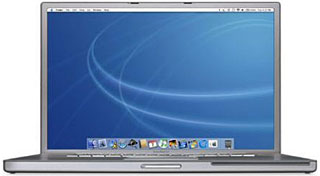 The 17″ PowerBook G4, which some at the time called the Cadillac Escalade of laptops, was the world’s first notebook computer with a 17″ display, the largest ever in a notebook up to that point. Its 1.3 million (1440 x 900) pixels offered the same viewing area as a 19″ CRT monitor. With its aluminum alloy case, the 17″ PowerBook is one inch thick, 15.4 inches wide, 10.2 inches deep, and weighs 6.4 pounds, making it the heaviest PowerBook since the G3 Series WallStreet.
On the performance front, the original 17″ AlBook had the same 1 GHz clock speed as the November 2002 high-end Titanium PowerBook, but it sported a faster system bus (167 MHz vs. 133 MHz), faster RAM (PC2700 DDR SRAM vs. PC133 SDRAM), and a a faster hard drive interface (ATA/100 vs. ATA/66), all of which combined to provide a nice speed boost over the last TiBook.
The 17-incher was also equipped with built-in 802.11g AirPort Extreme 54 Mbps wireless networking, a high-speed FireWire 800 port, a backlit keyboard with ambient light sensor activation, built-in Bluetooth 1.1 for wirelessly connecting to cell phones and other Bluetooth peripherals, and GPRS connectivity to check your email from anywhere.
The FireWire 800 port requires a FireWire 800 cable, but there was a bundled adapter that permits use of legacy FireWire 400 peripherals, although the 800 Mbps port only supports 400 Mbps throughput with the adapter.
The 17″ display offered 1440 x 900, 100 dpi resolution in a widescreen 16:10 aspect ratio with a 1 GHz PowerPC G4 processor with a 256 KB onboard level 2 (L2) cache and 1 MB of level 3 cache and 512 MB of Double Data Rate (DDR) memory running at 333 MHz, Nvidia GeForce graphics with 64 MB of VRAM, a 60 GB 4200 rpm hard drive, and a slot-loading 2x SuperDrive for playing and burning CDs and DVDs.
The Big AlBook’s SuperDrive can burn DVDs twice as fast the SuperDrive in the last generation TiBook. The fiber-optic backlit keyboard’s ambient light sensors also control the brightness of the display and automatically regulate the keyboard backlighting. In low light, they automatically illuminate the keyboard and lower the display brightness. As light levels increase, the display brightness is automatically adjusted and the keyboard backlighting turned off.
The original 17″ PowerBooks shipped with a special build of Mac OS X 10.2.4 Jaguar (6J11) that includes required drivers for the backlit keyboard and auto-adjusting screen sensor features found in the 17″ PowerBook.
AirPort Extreme, based on the new 802.11g standard, transmitts data wirelessly at up to 54 Mbps – almost five times the data rate of previously common 802.11b wireless networks – yet it was fully compatible with the millions of 802.11b devices in use around the world (albeit at their slower speed). The 17″ PowerBook had new “Lithium Prismatic” batteries, a lithium-ion battery cell in a square shape.
1.33 GHz 17″ PowerBook
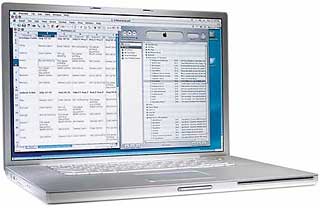 For its first update and speed bump in September 2003, the 17″ PowerBook got a 1.33 GHz Motorola 7457 processor – but elimination of the 1 GHz machine’s L3 cache. However, the 512 MB L2 cache configuration doubled the BigAl’s former 256 MB L2 cache capacity.
Other changes included increasing the standard hard drive capacity to 80 GB, replacing the Nvidia GeForce video accelerator with ATI Mobility Radeon 9600 video and 64 MB DDR SDRAM, and upgrading the USB ports to USB 2.0.
The price of entry into the widebody PowerBook club was reduced by $300 to $2,999, and that was pretty much it for changes from the original 17″ ‘Book. Your humble servant bought one of these second generation 17″ PowerBooks, an Apple Certified Refurbished unit, in February 2006. It didn’t missed a beat in more than 30 months of intensive use as my number one production machine and has to rank as one of the very best computers I’ve ever owned.
1.5 GHz 17″ PowerBook
In April 2004, the 17″ PowerBook was speed bumped again, this time to 1.5 GHz. Other changes included a build-to-order option of an 80 GB 5400 rpm hard drive, an ATI Mobility Radeon 9700 graphics controller operating on the AGP 4x bus along with 64 MB of DDR video SDRAM. An ATI Mobility Radeon 9700 with 128 MB memory was available as a build-to-order option, and the computer had a built-in 4x SuperDrive. Other specifications were carried over from the previous model.
1.67 GHz 17″ PowerBook
Along with the rest of the PowerBook range, the 17″ PowerBook got a substantial refreshment at the end of January 2005.
The form factor remained unaltered, but the standard hard drive spec was bumped to 5400 rpm and SuperDrives to 8x speed. Apple also added a couple of completely new features – both Apple patent-pending technologies – a scrolling TrackPad and a Sudden Motion Sensor.
The scrolling TrackPad works with any application or document. To implement the feature, you touched the trackpad with two fingers instead of one to scroll or pan within the active window.
The Sudden Motion Sensor technology integrated what Apple called “a tri-axis accelerometer” to help protect your spinning hard drive if the PowerBook was accidentally dropped.
Also enhanced in this revision was the backlit keyboard with ambient light sensors for working in low-light conditions, up to ten times brighter than previously.
The 1.67 GHz PowerPC G4 processor became standard on the 17″ PowerBook, as did an ATI Mobility Radeon 9700 graphics processor with 128 MB of VRAM and Dual Link support to drive Apple’s 30″ Cinema HD Display as an external monitor.
Hi-res 17″ PowerBook (Dual-layer SuperDrive)
 In October 2005, the G4 17″ PowerBook received its final makeover, with a higher-resolution 1680 x 1050 pixel display (36% more pixels than the previous generation’s 1440 x 900), a slot-load 8x SuperDrive with double-layer support, a claimed one hour increase in battery life, and a 120 GB hard drive.
The 1.67 GHz G4 17″ PowerBook ceased production in April, 2006, after it was superseded by the 15″ Intel-based MacBook Pro. All models of the 15″ aluminum PowerBook are supported by Mac OS X 10.5 Leopard, but don’t expect scintillating performance, especially with the 1 GHz and 1.33 GHz models especially. Mac OS X 10.4 Tiger will be a more lively performer on those machines.
Upgrading Your 17″ PowerBook
Memory Upgrades
The first phase of any 17″ PowerBook hotrodding project should normally be a RAM upgrade, and I recommend maxing it out to 2 GB from the get-go, especially if you plan on installing OS X 10.5 Leopard, although that will involve removing and probably discarding an OEM 512 MB stick from one of the two memory slots.
The Hard Drive
Early 17″ AlBooks came with 4200 rpm ATA hard drives, although some of the later models had 5400 rpm drives. Capacities ranged from 60 GB on the earlier models to 120 GB on the last ones, so a hard drive upgrade to a 160 GB or a 200 GB unit rotating at 5400 or 7200 rpm can increase both your performance and data storage capacity.
As with RAM upgrades, various vendors offer hard drive upgrades for the 15″ and 17″ PowerBooks, which take standard IDE/ATA (pre-SATA) 2.5″ hard disks of 9.5mm thickness or less.
Four places to look and compare are:
The downside is that getting at the AlBooks’ hard drives involves substantial disassembly of the computer (unlike, say, the Pismo PowerBook, in which it’s an easy 10-15 minute job). If you think you have the skill and patience to tackle the job yourself, or want more information to help determine whether you do or not, check out iFixIt.com’s free illustrated teardown guide for the appropriate model PowerBook.
iFixit also has a selection of parts and upgrade items for the 17″ PowerBook.
The SuperDrive
A variety of DVD-burning SuperDrives came these machines. My 1.33 GHz unit, for example, has a 2x SuperDrive, which does the job but is a bit of a slug compared with the FastMac and Wegener Media 8x Dual-Layer SuperDrive upgrades I have in my old Pismo PowerBooks. The 1.67 GHz 17″ PowerBook got 8x SuperDrives in January 2005 and dual-layer 8x drives in the final (November 2005) revision.
If you have one of the older models with a 2x or 4x SuperDrive, several vendors supply SuperDrive upgrades for the aluminum PowerBooks:
- FastMac offers an 8x dual-layer unit for $149.95. FastMac SuperDrive upgrades in my Pismo have been excellent performers.
- MCE Technologies also offers 8x DVD±R/RW SuperDrive upgrades with both Double Layer and Dual Layer support for the 17″ PowerBook G4 that allows users to author professional-quality DVDs as well as create, store, and share their collections of videos, music and photography, priced at $99.
- Other World Computing offers the OWC Mercury PBG4 SuperDrive Dual-Layer upgrade for 15″ and 17″ PowerBook models for $84.99.
The Battery
Another hotrodding tweak that should especially appeal if your ‘Book’s battery is getting more than a bit past its prime is a high-capacity battery replacement.
- FastMac offers TruePower extended life 5400mAh batteries for the PowerBook G4 Aluminum 17″ for $99.95.
- Newer Technology also offers a 62 watt-hour extended life battery for the 17″ AluBooks – up to 12% greater capacity than Apple’s original. The NuPower 62 watt-hour battery retails for $95. NewerTech also offers an Intelligent Battery Charger/Conditioner for the 17″ PowerBook G4 at $149.95.
Flash Card Readers
As we noted, the aluminum PowerBooks came pretty comprehensively equipped, but one feature Apple has for some reason never offered on any of its notebooks is a built-in Compact Flash reader – which is available on many Windows laptops. Fortunately there are a variety of CF card readers available that interface through the PowerBook’s PC CardBus slot.
- Delkin CardBus 32 CompactFlash Adapter (discontinued). Mac drivers for Tiger are available. $39.99 direct from Delkin.
- Lexar Media CF 32 Bit CardBus Adapter (discontinued). Highly rated. Look on eBay.
- SanDisk 6-in-1 PC Card Adapter (discontinued). Supports Secure Digital, MultiMedia, Memory Stick, Memory Stick Pro, SmartMedia and xD Picture card.
- SanDisk SDDR-64-768 Compact Flash to PC Card Adapter. $492.99 from Amazon.com.
The ultimate hot rod tweak for the 17″ PowerBook, a processor upgrade, used to be available from Daystar Technology, but has alas been discontinued.
17″ PowerBook G4 Models
Only specifications that differ from the previous model are listed.
1 GHz 17″ PowerBook G4 (Early 2003)
- 1 GHz PowerPC 7410 (G4)
- 1 MB Level 3 cache
- 166 MHz System Bus
- 512 MB PC2700 DDR SRAM expandable to 1 GB
- 60 GB hard drive standard
- slot-loading 1x SuperDrive
- active-matrix 18-bit 17″ color display (1440 x 900)
- VGA video output supports dual display mode and video mirroring (S-video out requires included adapter)
- tappable trackpad
- built-in speakers and microphone
- 10/100/1000 Base-T ethernet
- Built-in 56k Fax/Modem
- 16-bit CD-quality stereo sound input/output
- 1 FireWire 400 Port
- 1 FireWire 800 port
- 2 USB 1.1 ports
- PC Card slot
- built-in Bluetooth 1.1
- audio line-in and audio line-out ports
- Nvidia GeForce graphics card with 64 MB of VRAM
- Fiber-optic backlit keyboard with ambient light sensor activation
- Lithium Prismatic battery
- AirPort Extreme (802.11g WiFi) standard
- Size: 10.2″ x 15.4″ x 1.0″ (259 x 392 x 26 mm)
- Weight: 6.8/6.9 pounds (3.1 kg)
1.33 GHz 17″ PowerBook G4 (September 2003)
- 1.33 GHz PowerPC 7457 (G4)
- 80 GB hard drive standard
- slot-loading 2x SuperDrive
- 2 USB 2.0 ports
- ATI Mobility Radeon 9600 video card with 64 MB DDR SDRAM
1.5 GHz 17″ PowerBook G4 (April 2004)
- 1.5 GHz PowerPC 7457 (G4)
- slot-loading 4x SuperDrive
- DVI, VGA, S-video and composite video support
- 80 GB Ultra ATA/100 hard drive (5400 rpm build-to-order option)
1.67 GHz 17″ PowerBook (January 2005)
- 1.67 GHz PowerPC 7457B (G4)
- 100 GB 5400 rpm Ultra ATA/100 hard drive
- Sudden Motion Sensor
- slot-loading 8x SuperDrive
- ATI Mobility Radeon 9700 graphics with 128 MB video memory
- DVI (Dual Link for 30″ support), VGA, S-video and composite video support
- Bluetooth 2.0+EDR
- optical digital audio input and output
- scrolling TrackPad
17″ hi-res PowerBook G4 (October 2005)
- 1.67 GHz PowerPC 7457B (G4)
- 512 MB of PC2-4200 DDR2 SDRAM running at 333 MHz, expandable up to 2 GB
- 120 GB Ultra ATA/100 (5400 rpm) hard drive with Sudden Motion Sensor
- slot-loading 8x SuperDrive with double-layer support
- High resolution 1680 x 1050 pixel widescreen display
- analog and optical digital audio input and output
* No, it isn’t a typo. Compleat is a legitimate, albeit archaic, spelling for complete. As Kenneth G. Wilson says in The Columbia Guide to Standard American English: “This obsolete spelling of the adjective complete suggests an air of antiquity that seems to please some of those who name things….” We find that fitting for Low End Mac’s Compleat Guides to “obsolete” hardware and software.
Keyword: #17inchpowerbook
Short link: http://goo.gl/6Sn35m
searchword: 17inchpowerbook
