
The 15″ PowerBook (or AlBook) was rolled out by Steve Jobs at Macworld Paris in September 2003. After eight months of anticipation following the release of the 17″ and 12″ aluminum PowerBooks in January of 2003, it turned out to be pretty much what PowerBook fans had been hoping for and expecting.
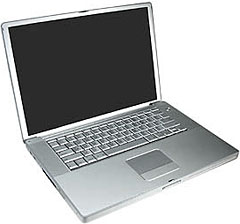
The puzzling delay in Apple’s releasing a 15″ aluminum PowerBook, which might reasonably have been (and was) expected in May 2003 (or, failing that, in July), might have been attributable to a change of plans on display size. There had been a reported supply bottleneck with the 15.4″ screens and scuttlebutt about technical problems with the first ones ones being used in Dell notebooks.
If 15″ AlBook had to be reengineered to use the slightly smaller 15.2″ display that had been used in the Titanium PowerBook, that might have explained its long hello. Indeed, the 15.4″ screens were not fully debugged by September, with many early adopters experiencing “white spots” appearing on the display screen, a problem Apple got sorted out over the first few months of production. There were also battery recalls with this model.
The 15″ PowerBook G4 weighed in at 5.6 pounds and sported a raft of high-end features including AirPort Extreme (optional on the 1 GHz model), Bluetooth, FireWire 800, USB 2.0, gigabit ethernet, a backlit keyboard with ambient light sensors for working in low-light conditions (optional on the low-end machine), The PowerBook form factor was now aluminum across the board, making the three PowerBooks a nicely matched set.
Late 2003
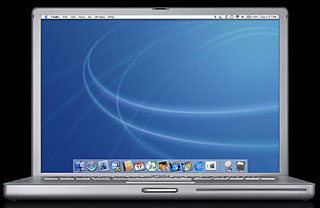 The first generation 15″ aluminum PowerBooks used a 1.0 or 1.25 GHz Motorola 7457 G4 processor, which includes 512 MB level 2 cache, 256 MB or 512 MB DDR SDRAM (with support for up to 2 GB), a 60 GB or 80 GB Ultra ATA/100 hard drive, a Combo (DVD-ROM/CD-RW) optical drive on the 1 GHz model and a SuperDrive (DVD-R/CD-RW) optical drive on the 1.25 GHz unit, and an ATI Mobility Radeon 9600 video accelerator card with 64 MB DDR RAM. The backlit keyboard feature pioneered in the 17″ PowerBook was standard on the high-end $2,999 model and available as a $69 option on the $1,999 machine.
The 15″ PowerBooks were available with either a 4200 or 5400 rpm 80 GB hard drive. The 5400 rpm drive was a $125 option. There was an audio line-in jack, a built-in microphone, and two stereo speakers with a “midrange enhancing” third speaker.
The first 15″ PowerBooks shipped with Mac OS X 10.2.7 Jaguar installed plus Apple’s iLife suite of applications, which included iTunes, iPhoto, iMovie, and iDVD.
Mid 2004
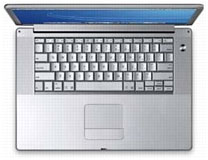 In April 2004, the midsize aluminum PowerBook got its first upgrade and speed bump, with the new models clocked at 1.33 GHz and 1.5 GHz. Other changes included 512 MB of standard RAM (up from 256 MB), and an 80 GB hard drive standard on the 1.5 GHz model, an ATI Mobility Radeon 9700 graphics controller operating on the AGP 4x bus with 64 MB of video RAM (128 MB of video RAM optional on the 1.5 GHz configuration). The 54 Mbps AirPort Extreme was now standard in both models.
Early 2005
The 15″ PowerBook got another fairly major revision at the end of January 2005. The hard drive was bumped to 5400 rpm and SuperDrives to 8x, plus a couple of completely new features – a scrolling trackpad and a Sudden Motion Sensor. Unfortunately, there were initially widespread problems reported with these new trackpads, which were partly dealt with by OS X 10.3.9 Panther. Also enhanced was the backlit keyboard, which was up to 10 times brighter than previously. Processor speeds were bumped to 1.5 GHz and 1.67 GHz with ATI Mobility Radeon 9700 graphics processors and 64 MB or 128 MB of VRAM.
Late 2005 (Hi-Res)
The 15″ PowerBook got its final revision in October 2005, with the model range simplified to a single, 1.67 GHz unit, and the ATI Mobility Radeon 9700 graphics processors and 64 MB or 128 MB of VRAM carried over.
The major enhancement with that last update was a higher-resolution 1440 x 960 pixel display (26% more pixels than the previous generations, which matched the original 17″ PowerBook’s screen resolution), plus a claimed one hour additional battery life, and an 8x SuperDrive with double-layer support.
The 1.67 GHz G4 15″ PowerBook ceased production in March 2006 after being superseded by the 15″ Intel-based MacBook Pro. All models of the 15″ aluminum PowerBook are supported by OS X 10.5 Leopard, although don’t expect scintillating performance, especially with the 1.0 GHz, 1.25 GHz, and 1.33 GHz models. OS X 10.4 Tiger will be a more lively performer on those machines. If you do choose to run Leopard, maxing out the RAM to 2 GB is recommended.
Upgrading the 15″ PowerBook
There are lots of memory vendors, and a good place to compare prices is Other World Computing.
Hard Drive
Early 15″ AlBooks came with 4200 rpm ATA hard drives, although some of the later models had 5400 rpm drives. Capacities ranged from 60 GB on the earlier models to 120 GB on the last ones, so a hard drive upgrade to a 100 GB or a 160 GB unit rotating at 5400 or 7200 rpm can increase both your performance and data storage capacity.
As with RAM upgrades, various vendors offer hard drive upgrades for the 15″ and 17″ PowerBooks
Three examples are:
The downside is that getting at the AlBooks’ hard drives (unlike with, say, the Pismo PowerBook, in which it’s an easy 10-15 minute job) involves substantial disassembly of the computer. If you think you have the skill and patience to tackle the job yourself, or want more information to help determine whether you do or not, check out iFixIt.com’s free illustrated teardown guide for the appropriate model PowerBook.
iFixit also has a selection of parts and upgrade items for the PowerBook.
Optical Drive
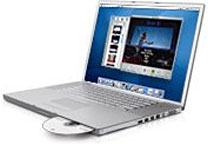 The very early 15″ AlBooks were sold with Combo optical drives on the entry-level model and a variety of DVD-burning SuperDrives came with the top-end machines. My 1.33 GHz PowerBook, for example, has a 2x SuperDrive, which does the job but is a bit of a slug compared with the FastMac and Wegener Media 8x Dual-Layer SuperDrive upgrades I have in my old Pismo PowerBooks. The 1.67 GHz 15″ PowerBook got 8x SuperDrives in January 2005 and dual-layer 8x drives in the October 2005 revision.
If you have one of the older models with a 2x or 4x SuperDrive (or a Combo drive), several vendors supply SuperDrive upgrades for the aluminum PowerBooks:
- FastMac, 8x dual-layer SuperDrive, $149.95 (I have FastMac SuperDrive upgrades in both of my Pismos, and they’ve been excellent performers.)
- MCE Technologies, 8x dual-layer SuperDrive upgrade, $69 plus shipping
- Other World Computing OWC Mercury PBG4 8x SuperDrive, $84.99
Battery
Another hot rodding tweak that should especially appeal if your ‘Book’s battery is getting more than a bit past its prime is a high-capacity battery replacement.
- FastMac, TruePower extended life battery $99.95
- Newer Technologies, NuPower 58 Watt-Hour battery, $83. NewerTech also offers an Intelligent Battery Charger/Conditioner for the 15 PowerBook G4″ at $59.
I have both FastMac and Newer Technology extended life batteries for my Pismos, and they’re both great products that have performed as advertised.
Compact Flash Reader
As we noted, the aluminum PowerBooks came pretty comprehensively equipped, but one feature Apple has for some reason never offered on any of its notebooks is a built-in Compact Flash reader – which is available on many Windows laptops. Fortunately there are a variety of CF card readers available that interface through the PowerBook’s PC CardBus slot.
- Delkin CardBus 32 CompactFlash Adapter. Mac drivers for Tiger are available. Discontinued.
- Lexar Media CF 32 Bit CardBus Adapter. Highly rated, but discontinued. Look on eBay.
- SanDisk 6-in-1 PC Card Adapter. Supports Secure Digital, MultiMedia, Memory Stick, Memory Stick Pro, SmartMedia and xD Picture card. Discontinued.
- SanDisk SDDR-64-768 Compact Flash to PC Card Adapter. $49.99 from Amazon.com.
The ultimate hot rod tweak for the 15″ PowerBook, a processor upgrade, used to be available from Daystar Technology, but has alas been discontinued.
15″ PowerBook G4 Aluminum Models
Only specifications different from the preceding model are listed.
1 GHz 15″ Aluminum PowerBook G4 (Late 2003)
- 1 GHz PowerPC 7457 (G4)
- 512 KB on-chip cache
- 167 MHz System Bus
- 256 MB SDRAM, expandable to 2 GB
- AT ATI Mobility Radeon 9600 with 64 MB DDR SDRAM graphics memory
- Active-matrix 18-bit 15.2″ color display (1280 x 854)
- DVI, DVI to VGA adapter, S-video port
- Lithium Ion battery (up to 4.5 hours use)
- tappable trackpad
- 2 built-in speakers and microphone
- 1 PC Card slot
- 10/100/1000 Base-T ethernet
- Built-in 56k Fax/Modem
- 16-bit stereo sound input/output
- Combo (DVD-ROM/CD-RW) optical drive
- 60 GB hard drive standard, 80 GB optional
- 1 FireWire 400 port
- 1 FireWire 800 port
- 2 USB 2.0 ports
- audio line-in and audio line-out ports
- 16-bit CD-quality stereo input/output sound
- AirPort Express enabled with integrated antennas, card optional
- Size: 9.5″ x 13.7″ x 1.1″
- Weight: 5.6 pounds
15″ Aluminum PowerBook G4/1.25 GHz (Late 2003)
- 1.25 GHz PowerPC 7457 (G4)
- 512 MB SDRAM, expandable to 2 GB
- 2x SuperDrive (DVD-R/CD-RW) optical drive
- 80 GB hard drive
- preinstalled AirPort Card
15″ Aluminum PowerBook G4/1.33 GHz (Mid 2004)
- 1.33 GHz PowerPC 7457 (G4)
- 256 MB SDRAM, expandable to 2 GB
- Combo (DVD-ROM/CD-RW) optical drive
- 60 GB 4200 rpm hard drive standard, 80 GB 5400 rpm optional
- ATI Mobility Radeon 9700 graphics on AGP 4x bus with 64 MB of video RAM
15″ Aluminum PowerBook G4/1.5 GHz (Mid 2004)
- 1.5 GHz PowerPC 7457 (G4)
- 512 MB SDRAM, expandable to 2 GB
- 4x SuperDrive (DVD-R/CD-RW) optical drive
- 80 GB 4200 rpm hard drive standard, 80 GB 5400 rpm optional
15″ Aluminum PowerBook G4/1.5 GHz (Early 2005)
- 1.5 GHz PowerPC 7457B (G4)
- 80 GB 5400 rpm Ultra ATA/100 hard drive with Sudden Motion Sensor
- Combo (DVD-ROM/CD-RW) optical drive
- scrolling trackpad
- illuminated keyboard with ambient light sensor
15″ Aluminum PowerBook G4/1.67 GHz (Early 2005)
- 1.67 GHz PowerPC 7457B (G4)
- slot-load 8x SuperDrive (DVD±RW/CD-RW) optical drive
- ATI Mobility Radeon 9700 graphics with 64 MB video memory with Dual Link DVI functionality
- Bluetooth 2.0+EDR
15″ Aluminum PowerBook G4/1.67 GHz (Late 2005)
- 512 MB of PC2-4200 DDR2 SDRAM running at 333 MHz, expandable up to 2 GB
- hi-res active-matrix 18-bit 15.2″ color display (1440 x 960)
- slot-load 8x dual-layer SuperDrive (DVD±RW/CD-RW) optical drive
- analog and optical digital audio input and output
* No, it isn’t a typo. Compleat is a legitimate, albeit archaic, spelling for complete. As Kenneth G. Wilson says in The Columbia Guide to Standard American English: “This obsolete spelling of the adjective complete suggests an air of antiquity that seems to please some of those who name things….” We find that fitting for Low End Mac’s Compleat Guides to “obsolete” hardware and software.
Keywords: #compleat15inchalbook #compleat15inchpowerbook #compleat15inchaluminumpowerbook
Short link: http://goo.gl/PUFmfv
searchword: http://goo.gl/PUFmfv
