
There’s nothing like the original iBook, even twelve years after it was first made. The unique styling, the tough case, and the optional built-in AirPort 802.11b WiFi all make it a very functional notebook computer. Add to that the incredible battery life for its day, and you’ve got the makings of a great road warrior on your hands.
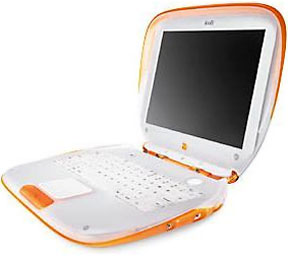 Or rather, I have the makings of a great road warrior on my hands.
Four years after I bought it, my tangerine iBook is back in my hands again, albeit a little worse for wear. With a dead battery, a dead Yo-Yo AC adapter, a noisy 6 GB hard drive, and no wireless card, it’s not exactly a wonder machine at the moment. But I’m about to change that….
[heroic music plays]
This iBook is coming back. You’d better believe it.
Initial Explorations
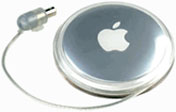 After wiping some dust off the tough plastic case, I carefully plugged my Pismo‘s Yo-Yo power adapter into the iBook’s power jack. A comforting green glow radiated from the charge indicator ring around the plug.
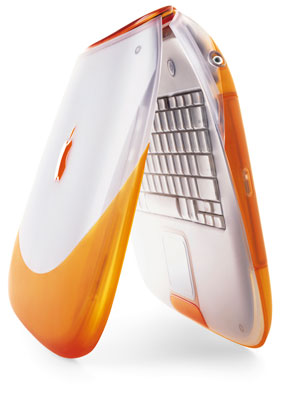 After Cainon, my younger brother, tripped over the iBook’s Yo-Yo cord while my youngest brother, Cavin, was using it, I was afraid some damage had been done to the DC input board. If this had been the case, this would mark the second time I’d have had to replace it – the original had been too loose to maintain a good connection, which made things even more difficult when the cheap aftermarket battery went belly up.
 Fortunately, I could see that the DC board was still good. In fact, the light quickly turned to amber, indicating that it was charging the battery – or at least it was trying to. Since the battery failed so suddenly – and since replacing the DC board, charger board, and logic board (ugh!) had done nothing to remedy the situation – I believe the problem had been a faulty circuit board in the battery all along, perhaps finally killed by the power fluctuations from the faulty DC board. But that’s just my theory.
At any rate, juice was flowing through the iBook normally, and it was ready to go. For the first time in months, I pressed the power button – and waited.
No bong greeted me.
After I had installed Ubuntu Linux, the bong was noticeably absent for some reason. It wasn’t irritating, but it did make working with the iBook feel a little less magical. The screen, however, did power up right away, as did the hard drive and CD-ROM drive. The iBook was running again.
After booting into Ubuntu to make sure the hard drive was okay, I shut down the iBook, then dug through the original software CDs that came with my iMac G4 for a little while. After thirty seconds of shuffling through the discs, I found my quarry.
Back to Mac OS 9
 The gray disc read, in a white Apple Garamond typeface, iMac Mac OS 9 Install. Above that and to the right was the very informative: “To start up from this CD, hold down the C key as the computer starts up.” So, I did just that, and, sure enough, I was greeted by the comforting “happy Mac.” Mac OS 9 booted quickly – much more quickly than either OS X or Ubuntu.
Why can’t we make computers boot this fast anymore?, I wondered, and then remembered the upcoming speed demon called Mac OS X 10.7 Lion. Well, it is nice to see Apple returning to its roots to some degree.
I was soon greeted by the familiar sight of Mac OS 9.2.2, sporting its CD install wallpaper. For some reason, it didn’t seem as old now as it did back when I was using my Pismo (ah, the Aqua-coated dream of Mac OS X). I initialized the disk, knowing that Ubuntu’s EXT4 file system was not going to play nice with OS 9. Then I began the install process – which, in all its beautiful simplicity, took only fifteen minutes or so.
And then came the moment. Clicking Restart, I waited….
BONG!
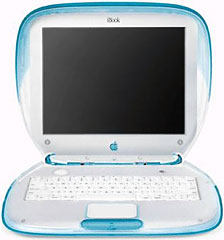
Warm fuzzy feelings welled up inside of me – and then were quickly replaced by puzzlement when I found myself face-to-face with a blueberry iBook’s desktop. It took me a moment, but then I remembered: I’d installed a blueberry iBook’s logic board into my tangerine iBook’s case. Incredible how Mac OS 9 was programmed to recognize the logic board.
Yo-Yo and Battery Woes
In spite of how well things were going, the iBook still didn’t recognize the battery. Or rather, it saw the battery, but it didn’t see that it had a charge – business as usual.
Well, not for much longer!
The dead Yo-Yo did get one last resuscitation attempt, though. Taking a few dead headphones, I proceeded to divest them of their audio connectors, which, as it turns out, can power the iBook if wired correctly. Unfortunately, none of the connectors I tried wanted to play nice with the Yo-Yo’s wiring, so I eventually gave up, left with a headless Yo-Yo and some tailless headphones as collateral damage.
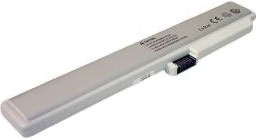 The dead battery, on the other hand, did divulge a few secrets when I disassembled it. First off, it was cheap – really, really cheap. It basically fell apart when I started prying it open. Secondly, I could see what appeared to be heat damage on a few of the Panasonic cells – not a good indication at all. And third, it probably wouldn’t be too hard to jury-rig up some sort of NiMH AA pack to fit inside there.
What’s Next
The first step for me is to get the iBook functioning normally again – that is, to install a working battery and get a good AC adapter for it. Once that’s done, I’ll start my upgrades.
Until next time, viva la iBook!
Continued in Resurrecting a Clamshell iBook, Part 2.
Keywords: #clamshellibook
searchword: clamshellresurrection
