
Thought I was done after Part 4? Well, so did I, but there are a few discoveries I made I felt I had to report.
SLC vs. MLC
All flash drives are not created equal. There are two basic types of NAND flash memory that you have to take into account: Single-Layer Cell (SLC) and Multi-Layer Cell (MLC).
What’s the difference? Well, as it turns out, there are a lot of differences – such as the fact that MLC flash wears down ten times as fast as SLC flash: 10,000 cycles for MLC vs. 100,000 cycles for SLC. In Mac OS X, where virtual memory is always on, constantly moving data between RAM and drive, MLC could spell disaster.
MLC is slower, cheaper, and more power-hungry than SLC, although “power-hungry” is relative in the world of flash memory, since the most power-hungry SSD will likely use much less energy than the most efficient hard drive.
Still, advances are being made in MLCs, and thanks to a process known as “wear-leveling” (which my SanDisk Extreme CompactFlash employs automatically), MLCs now last much longer than before. William Van Winkle, of tomsguide.com, estimates that those 10,000 cycles in an MLC, if perfectly wear-leveled, couldn’t start to be exceeded for 75 years.
I’m skeptical of such a high claim, but I’ll let you know if my CompactFlash starts to show any signs of failure.
One More Thing
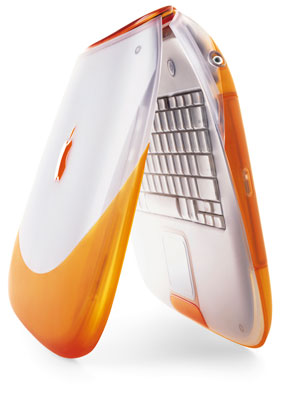 My iBook can run Mac OS 9.2.2 and OS X 10.3.9 Panther just fine. It will run for about ten hours in OS X and twelve in OS 9, giving it the ability to keep running right alongside my iPad all day long.
But as it turns out, there’s one more thing I have to tell you – I’ve unleashed a Tiger!
 Yes, Mac OS X 10.4 Tiger will indeed run on my clamshell. It’s not a huge feat – it’s been done before, but after searching Google for a while, I was only able to find brief mentions of Tiger running on original (300 MHz) iBooks with SSDs, so what you’re about to read is basically a Low End Mac exclusive.
Unleashing the Tiger
First off, Tiger normally shipped on DVDs, which means I had a choice to make: Hunt for CD-ROM images of Tiger or find some alternative. As it turns out, the alternative is quite simple – if you have a Tiger DVD and a DVD-equipped Mac.
Using my Pismo PowerBook (which I have, at least for the time being, hijacked from my sister), I copied my Tiger install DVD to a 16 GB USB 2.0 flash drive. Why 2.0? Just to make sure it’s also compatible with USB 1.1, which the iBook uses.
I pulled this off rather easily (if not quickly) using Disk Utility on the Pismo. Using the “Restore” process, I restored the install volume (choose the volumes under the drives, not the drives themselves – drives will have their capacities listed in their names) to my flash drive volume, erasing the flash drive in the process. While waiting for the install disk to copy, I took a shower, did some reorganizing, and ate lunch – in other words, prepare for a long wait if you’re using a Mac as old as the Pismo, since they have built-in USB 1.1.
The next step was taken from John Sharp’s guide to installing Tiger on a Lombard, but it also works with the iBook, which goes by the same identifier, PowerBook 2,1.
On your newly-created USB installer drive (another tip of the hat to the MacBook Air, which was the first Mac to officially support this option), go to /System/installation/Packages/OSInstall.mpkg. Don’t open the mpkg file – just Ctrl-click it and click Show Package Contents. Inside the contents, you’ll find a file called OSInstall.dist. Open that file in TextEdit and find the list called badMachines. I changed the PowerBook 2,1 entry to read PowerBook 3,1, but deleting all the names of unsupported machines would probably work as well. After you’ve done that, save your changes and shut down the computer.
Stick the flash drive in your iBook while it is off, then boot up your iBook while holding down the Option key. This will bring up the boot disk selector, from which you can choose to boot from USB and install Tiger. (Update: You can also hold down the C key, as long as there is no disc in the CD-ROM drive. A big thanks to Simon Royal for sharing this discovery!)
Simple, huh? To be honest, I thought it was going to be much more complicated, but nope – that’s all it took. Within another half-hour, my iBook had completed an unprecedented flash-to-flash (USB flash drive to CompactFlash) install of Tiger.
The Numbers
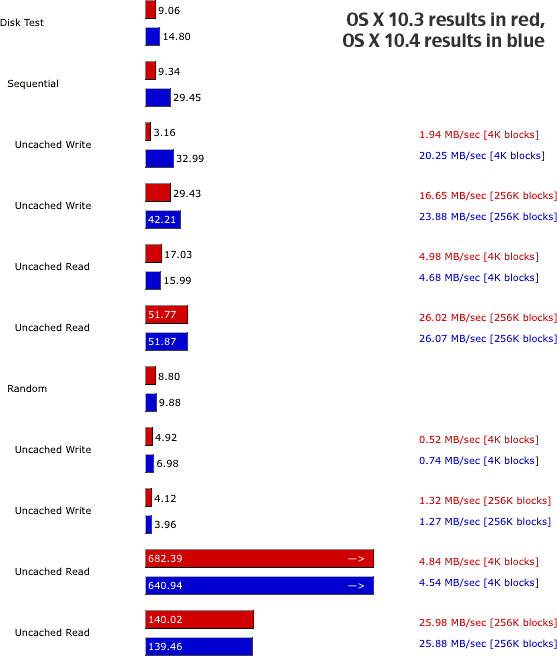
After running through all the system updates, I downloaded Xbench again to see if Tiger had altered the iBook’s performance in any way. Needless to say, I was stunned to find that my composite rating had actually increased, going from 6.37 to 7.00!
As you can see, certain CPU and RAM processes are increased, others are decreased, and some stayed the same. A noticeable difference occurred in the hard drive test (below), where sequential uncached writes were significantly faster than before. A very slight decrease occurred in random reads, but with only a few hundred KB/s difference, it’s not even noticeable.
The Feeling
Tiger feels much faster than Panther overall, although it does boot in about 65 seconds rather than 45. Camino is much, much faster – I’m actually able to use Facebook with almost no lag now. Engadget loads quickly as well. Just make sure you have a decent amount of RAM (I have 320 MB, and I may max mine out shortly).
Since graphics performance isn’t going to get any better than in Mac OS 9, I didn’t even try SNES9x or VGS in Tiger. (I don’t even think VGS is Mac OS X compatible.)
Battery life in Tiger is roughly equal to that in Panther, although the Tiger battery meter tends to pull a Windows progress meter every now and then.
Conclusion
Overall, Tiger is a much better version of OS X than Panther with the iBook.* It’s faster, more compatible, and generally nicer to work with. If you’re going to attempt to resurrect your old clamshell, give Tiger a try!
* Publisher’s note: In my experience, Tiger is a much better version than Panther on any Mac with at least 256 MB of memory that can run it. Like Austin, I have Panther on my 366 MHz iBook, which also has 320 MB. I don’t really care for Panther; Tiger spoils you compared to any previous version of OS X. dk
Keywords: #clamshellibook #compactflash #osxtiger
searchword: clamshellresurrection
