
Apple Everywhere
PowerBook 180 Still Useful at Nearly 18 Years Old
- 2010.07.06 - Tip Jar
Recently, my
PowerBook Duo's hard drive died, leaving our household without a
working 680x0 Macintosh. As some sort of weird twist of fate (or act of
God), only a few weeks later, 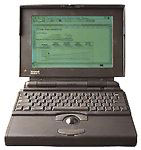 I was offered a PowerBook 180 by a couple in Ames, Iowa,
which I gladly accepted (I'm a sucker for the classics).
I was offered a PowerBook 180 by a couple in Ames, Iowa,
which I gladly accepted (I'm a sucker for the classics).
Unlike my Duo, the PowerBook 180 isn't crippled by lack of ports, and it features a built-in floppy drive, greatly increasing its usefulness around here.
Given that 18 years have passed since the introduction of the PowerBook 180 (well, 17 until October 19, 2010), I figured it would be neat to stack up the old PowerBook against the local mobile heavyweights, my PowerBook G3 Pismo and my 16 GB WiFi iPad - not on the usual speed and power-oriented level, however, but on a usefulness and comfort level.
First Impressions
The first thing that came to mind when I saw the PowerBook 180 sitting in its bag was, "Wow, that's big." Being acclimated to thin computers like the PowerBook Duo and Pismo, I hadn't really seen any of the old "fat" (2.25" thick) PowerBooks before. I think my internal response was something like one scene from the live-action Fat Albert movie: "I know big, and you, my friend, are big."

Pismo PowerBook, Clamshell iBook, PowerBook 180, and iPad.
But big doesn't necessarily mean uncomfortable, as I quickly found out. Sitting on a desk or perched in my lap, the PowerBook 180 is very comfortable. The raised keyboard puts my hands right where they need to be, and I can't stop geeking out about the travel on these keycaps (I received this PowerBook while I was helping out with an adult tech class at DMACC, and one of the other helpers commented, "Man, that looks like a desktop keyboard").
The whole arrangement - the raised keyboard, the fat body, the set-forward, big trackball and clickers, and the rear feet - all make for incredibly comfortable usage. Luxurious is the word I would use to describe it, and for an original price of $4,110, I think comfort would have been a carefully considered part of its design.
First Impressions Rating: 4.5/5. Big, but cool and comfortable.
Display
The PowerBook 180 features a 9.8" grayscale active-matrix LCD. Given that it's only 0.1" off from my iPad, the comparison is interesting. The iPad's stunning color display becomes virtually useless in bright light, while the PowerBook 180's low-res (640 x 400) grayscale is viewable at any light level, from the dead of night to high noon.
Display Rating: 3/5. Grayscale limits usability for and compatibility with color applications, but viewability is superb.
Feature Set
Armed with over two dozen floppy disks, ranging from the original PowerBook 145/145B/160/180 System 7.1 software (and a System 7.0.1 set from a Mac IIvx) to Super Muncher (an educational game modeled loosely on Pac-Man), this PowerBook has got the hookup, so to speak. The built-in floppy, like the Pismo's DVD-ROM drive, allows for easy installation of ye olden software of yore. But floppies can both read and write, unlike my DVD-ROM, so transferring files (including this review, written with an old version of Microsoft Word) to one of my few floppy-supporting PCs is a snap.
I'd eventually like to get a USB floppy drive for the Pismo, but for now, using one of the PCs will work fine.
That said, the PowerBook 180's plethora of ports, built-in microphone and speaker, and floppy drive allowed it to take advantage of almost every piece of software and hardware created in its day. With much of this software and hardware still available on eBay (or LEM Swap), the PowerBook 180 is still a full-featured computer and can do everything I would ever ask it to do.
Feature Set: 5/5. Excellent set of ports and removable media allows for maximum usability in a variety of circumstances.
Battery Life
Two hours. I think that says it all, but I'll elaborate for those who don't understand what two hours means for computing. Two hours means work really fast, endure eight hours of no computer on a 10-hour flight, be sure to set every power-saving feature on, and turn off the backlight whenever possible.
Even so, batteries for the PowerBook 180 are so inexpensive ($30 apiece - see sources at end of article), that you should buy at least two. Two fresh batteries gets you roughly four to five hours. Buy four, and you're not looking too shabby (except for your bandolier of batteries).
Batteries: 2/5. Hey, it could be worse, but it could also be better. Way better.
Upgradeability and Repairs
Compared to the PowerBook Duo, the PowerBook 100 series (PowerBook 140 through 180c, with the 150 as an exception in several respects) is like a desktop, at least in terms of upgradeability. The PowerBook 180 can take any SCSI notebook hard drive (possibly Compact Flash, once I get the connections and adapter[s] figured out), accepts 14 MB of RAM (using 10 MB with RAM Doubler would probably yield better, more wallet-friendly results), and has a whole set of ports on the back for peripherals. The PowerBook 180 can also be upgraded to Mac OS 8.1 using Born Again.
Repairs, likewise, should be pretty easy. The PowerBook 180 is easy to get into, with the case held together with only five screws. Prices vary widely, but the large case probably accommodates third-party repair parts better than a PowerBook Duo would. (Special thanks to Bill Brown for information on how to get into the PowerBook 180, as well as some information on some of its features.)
Upgradeability and Repairs: 4/5. Some parts can get expensive, but at least disassembly and reassembly should be easy.
Overall
Overall, the PowerBook 180, as with the whole 100 series, was well-designed and has remained useful long beyond its intended life cycle. So long as parts remain available (and USB remains the standard for peripherals, so that USB floppy drives also stay useful), the PowerBook 180 and its sister 'Books will continue to faithfully serve their devoted owners.
My PowerBook 180 certainly has an eventful life in front of it, full
of word processing and old-school gaming - and stunning those who think
you have to buy a new laptop every two years.

Battery Sources
Don't buy a used battery or one that's been sitting around for years if you want good battery life. The vendors listed here appear to be selling the same 4200 mAh NiMH battery. Prices checked as we post this article. Prices and availability may change. Shipping additional.
- kanchun on eBay, $30 shipped
- 1000battery.com, $26.42
- SalesAdapter.com, $32.88
- PowerBattery.org, $33.65
- more sources can be found using Google Shopping.
About LEM Support Usage Privacy Contact
Follow Low End Mac on Twitter
Join Low End Mac on Facebook
Favorite Sites
MacSurfer
Cult of Mac
Shrine of Apple
MacInTouch
MyAppleMenu
InfoMac
The Mac Observer
Accelerate Your Mac
RetroMacCast
The Vintage Mac Museum
Deal Brothers
DealMac
Mac2Sell
Mac Driver Museum
JAG's House
System 6 Heaven
System 7 Today
the pickle's Low-End Mac FAQ
Affiliates
Amazon.com
The iTunes Store
PC Connection Express
Macgo Blu-ray Player
Parallels Desktop for Mac
eBay

