
Collection Spotlight
The Incredible Transforming PowerBook 1400
- 2007.11.07 - Tip Jar
It's no Optimus Prime, but the PowerBook 1400 series is a very customizable and transformable PowerBook.
These machines introduced a number of features to the PowerBook line when they were released in October 1996. For starters, the 1400 was the first PowerBook with an internal optical drive, a CD-ROM to be exact. It is not built-in, but instead sits in a "sleep swappable" expansion bay - another first for PowerBooks, because with all earlier ones you had to shut the machine off before you could change out a drive in the expansion bay, which most people didn't do, using the floppy drive module most of the time. But there were some that used hard drive, Zip drive, and other modules in the bay.
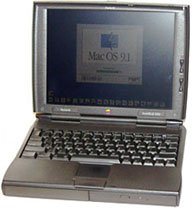
The PowerBook 1400
Another innovation - or should I say oddity, since these are the only machines that use it - is "stackable" RAM. What this means is that if you got more RAM for the 1400, which shipped with either a 12 MB or 16 MB module in a factory slot, you could get a module with a pass through port on it for another module (or not). Using two 24 MB modules plus the 16 MB factory one, you get the maximum 64 MB. Unfortunately, 64 MB is as high as it goes, an artificial limit that is hard coded into the ROM.
The coolest transformable feature of this machine, which was sadly only offered with this machine, was the BookCover. Every PowerBook 1400 that shipped had a gray cover, a clear cover, and six inserts. This let you take the clear cover, put an insert in it, hook it all together, and customize your PowerBook. Plus, if you didn't like the inserts that came with the machine, included in the extras on the restore CD (which has Mac OS 7.6.1 on it in my case) is a ClarisWorks template so you can make your own BookCover insert. I haven't done it myself, but I have seen some very original designs. There was also a very cool BookCover insert that would give you a solar panel and plug in to the power jack, so you could go literally forever with the 1400 if you wanted too.
Officially, you can run up to Mac OS 9.1 on a 1400, but since this is a "NuBus" PowerBook (the last one, in fact, which makes it the last PowerBook with a death chime), you can get Mac OS 9.2.2 running on them.
NewerTech, Vimage, and Sonnet all made G3 upgrades for the 1400, ranging in speed from 233 MHz to 466 MHz. Sonnet still sells its 466 MHz card (with a 1 MB cache) for $300.
I don't suggest you attempt an XPostFacto Mac OS X install; you would just wind up with a major headache. Unless you have more than 32 MB of RAM, stick with Mac OS 8.6 or lower. These make great System 7.6.1 machines, so that's an idea if you have one you don't know what to do with....
These machines also had an internal expansion slot, but the options are limited. I have only ever seen the Apple branded video card (gives you an external video port and more VRAM), a third party video card with a VGA port, and a rare ethernet card giving the 1400 built-in networking without chewing up a PCMCIA slot (it has two). The best option would be the video card, because it's slightly more common, and you can always add WiFi to these machines (more on that later).
You can also replace the hard drive with flash memory, such as using a Compact Flash card in an IDE adapter (see Low End Mac's review of one from Addonics). Benefits include increased battery life and no hard drive noise.
My PowerBook 1400
What have I done to mine?
Well, when I bought it about a year ago, I actually bought it from the original owner. It came with most of the contents of the original box (sadly not the box itself). About the only things I see that are missing would be the gray cover, and five of the six inserts. It is the 1400c (active matrix display - the 1400cs has a dual scan passive matrix), 133 MHz with 16 MB or RAM, a 1.3 GB hard drive, and floppy drive and 8x CD-ROM modules. It had been upgraded with an additional 16 MB of RAM, bringing the total to 32 MB. (I even have the documentation for the RAM upgrade.)
I love this machine, both for it's wonderful keyboard and the fact it is the same footprint as my Dual USB iBook - just much thicker. I upgraded the hard drive from 1.3 GB to a "huge" 3 GB, which is actually much slimmer than the stock one (which appears to be custom made, because the newer hard drive does not fit the bracket). I wiped the install of Mac OS 7.6.1 from the 1.3 GB hard drive just because (including all personal documents, asked before I did if they made a backup or they wanted any of the data, which is usually #1 on my to do list when I get a new Mac to my collection). I then installed Mac OS 8.5 and upgraded to 8.6. It was responsive, but slower than what I am used to.
I used this for several months, including with a Lucent WaveLAN Gold wireless card, and it actually made a fairly descent web browser and IRC machine with an hour or so of battery life with the WiFi card. The only problem I can see, aside from the one mentioned in the next paragraph, is that the CD-ROM's faceplate broke off. This is a common issue with these machines, and it doesn't bother me, as the drive is still operable.
However, sometimes your toys can break, as this one did. The PRAM started messing up really bad, and I ended up resetting it every time I started it up, even if I had it plugged in. So I need a new PRAM battery.
I already removed the 3 GB hard drive and put that in my WallStreet Series II to get it running Jaguar again (more on that later). Since I have the 1.3 GB drive wiped, I plan on installing System 7.6.1 again to make it a very fast machine.
Thanks to a fellow on the 68kmla, I acquired a 24 MB RAM module for this machine, but it doesn't seem to want to work with the other 16 MB module I have under Mac OS 8.6, causing a whole big unbootable mess. If I recall correctly, they worked together under System 7.6.1, so if I get that running I'll have a whopping 56 MB of RAM.
I might also turn my 1400 in to a development platform for older Mac programs - and even for my Newton MessagePad 2000. It will definitely be used as a Newton sync machine, unless I get the serial ports running on my beige G3 or WallStreet under OS X (another challenge).
I might even take up the challenge Tommy Thomas proposed a few weeks back and develop a better classic Mac OS web browser - if I ever learn how to program. Or I could just use it as a good writing machine, since it has a great keyboard, but I think I am too used to the one on my Dual USB iBook, as mushy as it may be.
I would defiantly recommend this machine (when do I not?). It has
that awesome keyboard everyone raves about, is quite expandable (save
for the RAM limit), and really customizable. Those exchangeable
BookCover inserts alone make it a great purchase. About the only thing
wrong with the design of the machine is it is missing feet....

Further Reading
Join us on Facebook, follow us on Twitter or Google+, or subscribe to our RSS news feed
If you find Leo's articles helpful, please consider making a donation to his tip jar.
Today's Links
- Mac of the Day: PowerBook 190cs, introduced 1995.08.28. The last 680x0-based PowerBook could take a PowerPC upgrade.
- Support Low End Mac
Recent Content
About LEM Support Usage Privacy Contact
Follow Low End Mac on Twitter
Join Low End Mac on Facebook
Favorite Sites
MacSurfer
Cult of Mac
Shrine of Apple
MacInTouch
MyAppleMenu
InfoMac
The Mac Observer
Accelerate Your Mac
RetroMacCast
The Vintage Mac Museum
Deal Brothers
DealMac
Mac2Sell
Mac Driver Museum
JAG's House
System 6 Heaven
System 7 Today
the pickle's Low-End Mac FAQ
Affiliates
Amazon.com
The iTunes Store
PC Connection Express
Macgo Blu-ray Player
Parallels Desktop for Mac
eBay

