
Collection Spotlight
Why the Blue and White G3 Is the Workhorse of the Mac World
- 2007.10.26 - Tip Jar
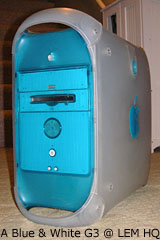
With the release of Mac OS X 10.5 Leopard, I figured it would be fitting to write about the Blue & White G3 as the oldest supported Macintosh in Apple's lineup - well, under OS X 10.4 Tiger.
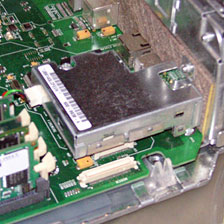
The FireWire module is a separate
component on the logic board.
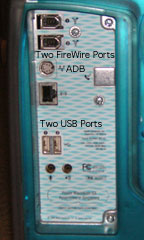
When it was introduced in 1999, it matched the color styling of the iMac. It introduce FireWire to the Mac, but it was technically on an expansion card, not integrated with the logic board. It also introduced USB to the professional Power Mac line, dropped the floppy entirely, and introduced the industry standard VGA port to the desktop Mac. It wasn't the first Mac to accept a gigabyte of RAM - that was the Power Macintosh 8500, introduced way back in 1995.
Other than dropping the floppy, it also did away with built-in SCSI, something the Mac had since the Macintosh Plus in 1986. The Lombard PowerBook G3 would be the last Mac with SCSI built in, and built-in SCSI on the Mac died in 2000 when Apple introduced the Pismo Powerbook G3. However, there was an option on higher end B&W G3s for a SCSI PCI card, but this ate up a precious expansion card slot.
 One thing I should note is that there was a silent revision for
this machine. The earlier motherboards used a lower quality IDE
controller for the hard drives (the optical/Zip drive used a separate
controller, which was better quality). If you used a master/slave
configuration on the primary controller, you could end up with
corrupted data. The Revision 2 motherboards fixed this. You can tell
the difference between the two boards because the 2nd revision's IDE
chip (located by the PCI card openings) has "402" on it. The Rev. 2
machines also shipped with a different drive bracket for the first hard
drive bay (there are three of them in the machine), which allowed it to
hold two drives, one on top of the other, and a double connector IDE
cable.
One thing I should note is that there was a silent revision for
this machine. The earlier motherboards used a lower quality IDE
controller for the hard drives (the optical/Zip drive used a separate
controller, which was better quality). If you used a master/slave
configuration on the primary controller, you could end up with
corrupted data. The Revision 2 motherboards fixed this. You can tell
the difference between the two boards because the 2nd revision's IDE
chip (located by the PCI card openings) has "402" on it. The Rev. 2
machines also shipped with a different drive bracket for the first hard
drive bay (there are three of them in the machine), which allowed it to
hold two drives, one on top of the other, and a double connector IDE
cable.
Other options for this beast included your choice of a CD-ROM drive, a DVD-ROM drive (something new at the time), or the odd man out DVD-RAM drive (it was very slow). In order to watch DVD movies, Apple offered a hardware DVD decoder that "piggybacked" on to the ATI Rage 128 card, which included an at the time generous 16 MB of VRAM. You could even order a Zip 100 drive for your B&W G3, sort of a floppy replacement.
 In terms of what operating systems this machine can run, it is
second only to the venerable Macintosh Plus in its range of official
Apple OS support. When it came out, Apple included a copy of Mac OS
8.5.1. Later machines shipped with Mac OS 8.6. These were some of the
first New World machines (second only to the original iMacs). They can run Mac OS X
10.0 all the way up to the latest and greatest version of Tiger, Mac
OS X 10.4.10. That's an incredible 8 years of Mac OS support. And
because they have a New World ROM, if Linux is your thing, it's really
easy to install.
In terms of what operating systems this machine can run, it is
second only to the venerable Macintosh Plus in its range of official
Apple OS support. When it came out, Apple included a copy of Mac OS
8.5.1. Later machines shipped with Mac OS 8.6. These were some of the
first New World machines (second only to the original iMacs). They can run Mac OS X
10.0 all the way up to the latest and greatest version of Tiger, Mac
OS X 10.4.10. That's an incredible 8 years of Mac OS support. And
because they have a New World ROM, if Linux is your thing, it's really
easy to install.
What about my machine? It's my main workhorse. I have had it almost two years now, since December 2005. I have run a number of operating systems on it. First I ran Ubuntu Linux 5.10. Then Mac OS 9 for six months. I then had Ubuntu 6.06 on it, then Mac OS X 10.3 for a week, and finally Mac OS X 10.4 for a year now. Running the same installation for a full year is incredible.
My B&W G3 is also quite tricked out. Has a 120 GB hard drive (the closest I could get to the 128 GB hard drive limit without wasting space), a 4+1 USB 2.0 PCI card, an overclocked 350 MHz G3 running at 400 MHz, a DVD-ROM/CD-RW "combo" drive, and my latest addition - 1 GB of RAM. I have also snagged one of those nice matching model M4551 LCDs with the video inputs for it, and it plugs in to the B&W's power supply, saving a plug. I also added a Zip drive, but it doesn't match the machine. I have no faceplate for the Zip drive, but it works. It is also on it's second motherboard, both of which are unfortunately Revision 1.
My future plans are to purchase a 1 GHz G4 upgrade for it so I can hopefully run Leopard (about the same price as a compatible G4 machine right now, and it's faster). I also want a revision 2 motherboard for it, and possibly replace the side panels, because they are cracked in a few places. After that, I think I will have a great machine for at least another five years.
I would say these are just about the perfect Mac. Great long OS support (they were six years old when Tiger came out), are easily overclockable, and can handle just about anything you can throw at them. Plus the blueberry plastics give it a touch of that original iMac charm.
I highly recommend them for anyone who wants to run Tiger and don't
need the latest and greatest. If you're looking at running two internal
hard drives, pick up a Rev. 2 machine. They
can be had for very cheap nowadays. I got mine for $60 shipped in
2005, and I imagine they are even cheaper now.

Join us on Facebook, follow us on Twitter or Google+, or subscribe to our RSS news feed
If you find Leo's articles helpful, please consider making a donation to his tip jar.
Today's Links
- Mac of the Day: Motorola StarMax 3000, introduced 1999.09.07. This inexpensive clone used lots of off-the-shelf parts.
- Support Low End Mac
Recent Content
About LEM Support Usage Privacy Contact
Follow Low End Mac on Twitter
Join Low End Mac on Facebook
Favorite Sites
MacSurfer
Cult of Mac
Shrine of Apple
MacInTouch
MyAppleMenu
InfoMac
The Mac Observer
Accelerate Your Mac
RetroMacCast
The Vintage Mac Museum
Deal Brothers
DealMac
Mac2Sell
Mac Driver Museum
JAG's House
System 6 Heaven
System 7 Today
the pickle's Low-End Mac FAQ
Affiliates
Amazon.com
The iTunes Store
PC Connection Express
Macgo Blu-ray Player
Parallels Desktop for Mac
eBay

