
Collection Spotlight
My First Mac, a Plus, Shocked Me
- 2007.07.18 - Tip Jar
I'd like to talk about my first Mac.
I remember the experience so well. I was in the 10th grade at the time and had just entered biology. My teacher, Mr. Kline, was in his 60s (I think), and he had a collection of Apple IIes in his classroom. I became fascinated with them, because it was 2003 and these machines hadn't been manufactured for a decade. (Actually, some were about two decades old at the time, but still alive and kicking.) He used these machines to load some data analysis programs, as well as run the original AppleWorks.
Around November or so, after going around and looking at all of the other teachers with their fancy 500 MHz iBooks, I asked him if he had ever used Macs. He said he did (his personal machine was a Power Mac 5500, which I learned about much later) - and then he asked me if I would like one.
 He said
he had recently saved about half a dozen machines from the
dumpster. So I went with him to the Grow Room, and there, sitting
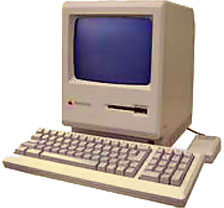
in a little box, was a Macintosh
Plus with it's keyboard, mouse, and power cable.
He said
he had recently saved about half a dozen machines from the
dumpster. So I went with him to the Grow Room, and there, sitting
in a little box, was a Macintosh
Plus with it's keyboard, mouse, and power cable.
He said I could have it for free if I wanted it. I said sure, and I came by at the end of the day to pick it up. When I did, he said he also had another compact Mac for me, a Macintosh SE FDHD. However, this one didn't have a mouse or keyboard, and when I plugged it in, it didn't work. Something was wrong with the CRT, and that machine eventually got parted out.
When I got home, I didn't immediately plug in the Plus. I got on my father's PC and researched the machine to figure out what it had and what it could do. I found out it didn't have a hard drive - I was rather surprised that at one time people ran their operating system, applications, and documents all from a floppy disk!
My Mac Plus didn't come with any software, so I had to find it. I was surprised to find that Apple was offering a lot of it's older operating systems as free, legal downloads. I downloaded System 6.0.8 and found an application to write Mac floppies on the PC.
After I got everything prepared, I ran to the machine and spent 15 minutes setting it up, double checking everything. I flipped the power switch, inserted the floppy disk, and my first Macintosh happily began booting.
Another shock came when it booted from the floppy disk in less than 30 seconds.
I remember spending several hours - as well as the following week - playing with that machine and enjoying the simplicity of System 6.0.8.
I soon began wanting more, so I did some research and found out that the machine could take a hard drive. Not internally, but externally. So, I hopped on eBay and quickly won an Apple HD-20. This was the original 20 MB Apple drive that connected to the floppy port; it was sold for the Mac 128K, 512K, and 512Ke. I didn't know what SCSI was at the time and didn't know it was faster. However, I didn't care - I was just happy to have the space for whatever I needed.
I eventually installed a finely tuned copy of 6.0.8 and a bunch of classic apps, mostly games, on that hard drive.
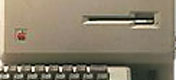 Over the four years since I acquired this machine, I
have learned many things about it, the most important being that it
had been upgraded. It still has the stock 1 MB of RAM, but if
you look at the front of my Mac Plus, the placement and styling of
the Apple logo gives it away - it's an upgraded 128K or 512K. You
can tell by looking at the Apple logo - if it's in the corner and
raised, it's an upgraded Mac. However, if the Apple logo is
silk-screened and lines up with the floppy drive slot, then it's a
factory Plus. You can also tell because a factory Plus actually
says Macintosh Plus on the front, just right of the Apple logo. My
machine only has it on the back cover.
Over the four years since I acquired this machine, I
have learned many things about it, the most important being that it
had been upgraded. It still has the stock 1 MB of RAM, but if
you look at the front of my Mac Plus, the placement and styling of
the Apple logo gives it away - it's an upgraded 128K or 512K. You
can tell by looking at the Apple logo - if it's in the corner and
raised, it's an upgraded Mac. However, if the Apple logo is
silk-screened and lines up with the floppy drive slot, then it's a
factory Plus. You can also tell because a factory Plus actually
says Macintosh Plus on the front, just right of the Apple logo. My
machine only has it on the back cover.
Other bits I've added to this machine include an external floppy drive (FDHD, which I got with the Plus, and it works fine in 800K mode), as well as an Asante EN/SC device, an ethernet adapter that connects to SCSI. I have never gotten the machine online, but I have had it on my home network. I must say, sharing files between a modern machine and a 21-year-old Mac is a pretty sweet concept.
I also found a mouse from an Apple IIc, and it works just fine on the Plus. I like it better than the original mouse because the button is wider and it has less wear than my Plus mouse, which I will only use if I put the machine on display.
So where is my Mac Plus now? As much as it pains me to say it, it's currently sitting in storage. I just don't have the room, and I know it seems sacrilege to pack away your first Mac.
I have thought about digging it out and attempting to get it fully online, perhaps turning it into a dedicated IRC machine. (IRC is another one of my passions, and you can find me on a number of channels any given night, chatting it up.)
Once I get this machine up and running again, I plan on writing a bit more about it. It was such a technological breakthrough for Apple, and amazingly they sold it basically unchanged for almost five years. I have an Apple VHS tape from 1990, and in it they prominently display the Macintosh Plus being used in a business environment.
Even in storage, this machine lives on in one way: It's dumped
ROM (in a file) is the key player in my Mini vMac setup on almost all of the
machines (Mac and PC) I own. So I guess you can say that I am using
the machine, only in a different capacity. 
Join us on Facebook, follow us on Twitter or Google+, or subscribe to our RSS news feed
If you find Leo's articles helpful, please consider making a donation to his tip jar.
Today's Links
- Mac of the Day: PowerBook 5300, introduced 1995.08.25. The first PowerPC PowerBook was known for 'flaming' performance.
- Support Low End Mac
Recent Content
About LEM Support Usage Privacy Contact
Follow Low End Mac on Twitter
Join Low End Mac on Facebook
Favorite Sites
MacSurfer
Cult of Mac
Shrine of Apple
MacInTouch
MyAppleMenu
InfoMac
The Mac Observer
Accelerate Your Mac
RetroMacCast
The Vintage Mac Museum
Deal Brothers
DealMac
Mac2Sell
Mac Driver Museum
JAG's House
System 6 Heaven
System 7 Today
the pickle's Low-End Mac FAQ
Affiliates
Amazon.com
The iTunes Store
PC Connection Express
Macgo Blu-ray Player
Parallels Desktop for Mac
eBay

