
Collection Spotlight
PowerBook 180 Reincarnated
- 2009.09.01 - Tip Jar
I wrote a while back in The Death, Salvage, and Resurrection of Old Macs that two beloved PowerBooks had not survived the move. The PowerBook 100, which I had written about before, has a busted screen. It may just be kept around for parts if and/or when I get another one.
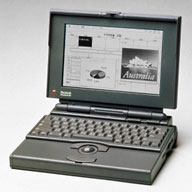 The
second is a model that fared quite a bit better, but it still took
quite a beating - it never even got it's own article before it died.
Actually, most of the damage to the PowerBook 180 happened when I first got it
and opened it up to tinker. Not realizing that a 10+ year old machine
would be fragile, as I opened it, parts of the brittle plastics snapped
off. This was accelerated by the move. The plastic behind one of the
hinges started to crack apart, and this put me off using it. Plus, when
I first got the machine, somehow the machine's charging circuitry
fried, so I could not charge the good battery any more.
The
second is a model that fared quite a bit better, but it still took
quite a beating - it never even got it's own article before it died.
Actually, most of the damage to the PowerBook 180 happened when I first got it
and opened it up to tinker. Not realizing that a 10+ year old machine
would be fragile, as I opened it, parts of the brittle plastics snapped
off. This was accelerated by the move. The plastic behind one of the
hinges started to crack apart, and this put me off using it. Plus, when
I first got the machine, somehow the machine's charging circuitry
fried, so I could not charge the good battery any more.
Well, time goes on, and some months back I acquired an excellent looking PowerBook 165. It came in a case, a Zip 100 drive, and the truly awesome QuickTake 150. This thing was just about mint. It even had the port door on the back.
Similar PowerBooks
I began to notice some similarity between the two models and began to regain hope that the mighty 180 would live on. There are many names for the creature that was about to be born: FrankenMac, FrankenBook, and to some extent, a Hackintosh. The 165 differs from the 180 in offering a passive matrix screen versus the crystal clear active matrix, and the 180 has a powerful 68882 FPU for some heavy lifting. The display in the 165 not only looked muddy, but something in it was starting to go, as the screen had a mind of it's own, changing contrast and brightness all by itself.
 After some extensive research and some converging of
minds on 68kmla, it was
determined that I should go ahead with this project. I downloaded the
service manual for the PowerBook 165, and it read PowerBook
160/165/180. Three machines shared a common platform.
After some extensive research and some converging of
minds on 68kmla, it was
determined that I should go ahead with this project. I downloaded the
service manual for the PowerBook 165, and it read PowerBook
160/165/180. Three machines shared a common platform.
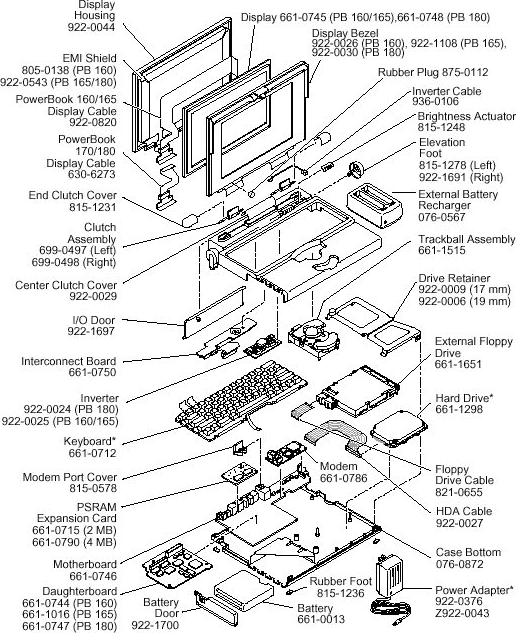
I went into this thinking I had to do a motherboard swap, but after reading the manual, I made a discovery. To keep costs of these machines down, Apple used a single motherboard for all three and had a swappable daughterboard that contains the CPU, FPU, memory connector, and Inter-Connect Board (ICB) main cable plug. The ICB is a small board that sits in the upper case of most 100-series PowerBooks and provides a connection for the keyboard, trackball, inverter, LCD, and PRAM battery, then has one single umbilical running to the rest of the machine. Pretty clever, but the main cable can be a bear to plug in and unplug.
I browsed to the exploded view, which lists the parts numbers, and noted the 180 uses a different inverter board and display cable. To make this conversion, I just needed to swap the screen, inverter, display cable, daughter card, RAM board, and the 1 GB IDE hard drive (with IDE-to-SCSI adapter). There was a moral dilemma of whether or not to swap the display bezel, but I decided to leave the 165's in place, so as to disguise it. It would still identify itself as a PowerBook 180.
PowerBook Surgery
With my parts list complete, I went digging in the 180. Removal of these pieces was simple, only taking about 30 minutes. The hard part was ahead. As I did not want to damage the 165's plastics, this was very delicate surgery, this time taking about an hour. Everything snapped in well and was basically plug and play. However, on first boot, the machine did the dreaded chimes of death - but there was no Sad Mac. A quick bit of research revealed the longer tones experienced were from the RAM.
Once again the machine came apart, and the RAM card was reseated. A quick reassembly, and it booted right up to System 7.6.1. No blood, sweat, or tears for this operation, but there was a bit of nail biting with routing the delicate display cable around the hinge. Also, remember the port door that I mentioned earlier? It was a casualty too. One of the pegs snapped off, though not in the hole, so it is fixable if I got another one, but the port doors on the 100 Series were really flimsy to begin with, and you have to open them every time you want to turn the machine on, as the power button lives on the back.
Why would anyone go through the trouble of such intricate repair? Well, the PowerBook 180 was quite possibly the king of the 100 Series. Sure, there were two color models, but the screens were quite a bit smaller, and the battery life was horrid at 1 hour on the standard PowerBook battery of the time. The 180 has an active matrix screen plus a 33 MHz 68030 and 33 MHz 68882 working together, which made it a road warrior's dream come true in 1992. It is still a very dependable model today and could be very tempting as a portable word processor. The batteries may be shot, but it's a nice lightweight option, and the screen is a pleasure to work on. It also provides a much needed distraction free environment.
Left to Do
About the only thing left to do on this machine is to put System 7.5.3 on it, and then the 7.5.5 update, as 7.6.1 feels a tad sluggish with only 14 MB of RAM. But that's another weekend/rainy day project, requiring either writing 23 floppies or the much easier method of doing a network install. It's very slow, taking about 3 hours the last time I did it, but it's much less tedious - almost an unattended process. Look for a very detailed how-to on that later.
I know this does not technically fall under the category of
collection spotlight, more of a vintage Mac hardware hack, but this
shows you how similar three seemingly different models really are on
the inside. 
Join us on Facebook, follow us on Twitter or Google+, or subscribe to our RSS news feed
If you find Leo's articles helpful, please consider making a donation to his tip jar.
Today's Links
- Mac of the Day: 17" MacBook Pro Core Duo, (2006.04.24. The top-end MacBook Pro has a 1680 x 1050, 2.16 GHz Core Duo CPU, and supports Apple's 30" Cinema Display.)
- Support Low End Mac
Recent Content
About LEM Support Usage Privacy Contact
Follow Low End Mac on Twitter
Join Low End Mac on Facebook
Favorite Sites
MacSurfer
Cult of Mac
Shrine of Apple
MacInTouch
MyAppleMenu
InfoMac
The Mac Observer
Accelerate Your Mac
RetroMacCast
The Vintage Mac Museum
Deal Brothers
DealMac
Mac2Sell
Mac Driver Museum
JAG's House
System 6 Heaven
System 7 Today
the pickle's Low-End Mac FAQ
Affiliates
Amazon.com
The iTunes Store
PC Connection Express
Macgo Blu-ray Player
Parallels Desktop for Mac
eBay

