
Digital Fossils
Fossil WallStreet PowerBook G3 Still Useful after 10 Years
- 2008.05.05 -Tip Jar
This column is supposed to be about fossils. Digital fossils.
The machine on which I am typing is one such fossil by any objectivedefinition. It feels weird to refer to it as such, however.
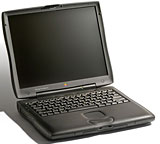 When it debuted, the PowerBook G3 "WallStreet" wasanything but a fossil. It was a racehorse of a laptop: a big, seriousmachine with a big, serious screen and a big, serious keyboard. Mine isa 250 MHz model with a 14" display sporting as much viewable turf asthe 17" CRT hooked up to my primary desktop at the time.
Only the littlest of touches remind one that this is no longercutting edge computing. There are no USB ports, for instance. That'sprobably the most noticeable piece of evidence: no built-in way toconnect a flash drive, USB mouse, or iPod.
The iPod - that brings up another glaring difference. While theWallStreet G3, backed up with over a quarter gigabyte of RAM, willstumble along in OS X, it is so fast and smooth in Mac OS 9.2 thatit seems a shame to hobble it with the newer, bulkier OS. So much foriTunes and docks and so forth.
On the other hand, OS 9's classic interface is as comfortable as anold shoe. Lord knows there's an absolute ton of software out there forit. With an 802.11 PC Card, AirPort is hardly missed; my Farallon cardlets me surf the Web as easily as the internal AirPort card in my iBook.
And the keyboard - oh, the keyboard! No modern Apple 'Book has akeyboard to match it. (Note: I finished writing the rough draft of thiscolumn and, reluctant to part with the keyboard, went on to writeanother 1,500 words for my book project....)
There are prices to pay for this, of course. The big, long-strokekeyboard and roomy screen mean the WallStreet is a hoss of a laptop.Produced before Slim was In, the WallStreet is a burden for most laps;not just big, but heavy, too. By modern standards, it's really more ofa portable than a true laptop. It was targeted as a desktop replacementfor people who needed serious computing power on the go. (And peoplewho had access to a table or desk while on the go at that, because theheat from this beast will barbecue your lap in short order should youset it there for too long.)
When you're on the go, however, the WallStreet still gets respect.Mac fans at the coffee bar will see it and nod at you; they recognize amachine still much loved among the cognoscenti. People with Wintelbooks will ogle it out of the corners of their eyes.
Its bold styling marked the PowerBook's return to the hautecouture days of the Blackbirds after several years ofwandering in the plebian-looking charcoal gray wilderness of PowerPC'Books. The swoopy case, with its neoprene-textured panels and organiccurves, is so different from the run-of-the-mill notebook:businesslike, still modern in appearance, maybe even faintly menacing.The person using a computer that looks like this is obviously writinganother New York Times bestseller, leveraging a corporatebuyout, or hacking into a Russian aerospace company's mainframes in aHollywood thriller.
Worries include the display on 13" models, which suffered from wonkyribbon cable connections, and especially the hinges on all WallStreets.That heavy lid with its big screen comes at a price, and it is best toopen and close your WallStreet gently, paying careful attention tosupport it evenly on both sides so that the torque of its own weightdoesn't damage anything. Replacementbatteries on these pre-Lombard/Pismo G3s are priced likeimported sin as well, so it's important to practice good chargingbehavior.
So, is it still useful? There's no doubt that it is; it's anoutstanding writer's tool with a fantastic keyboard, and the batterieshave more life than a Led Zeppelin album if you ditch the optical drivein the extra bay and double up on the juice. It's no portablemedia-editing suite, but it's just fine for surfing the 'net, playingolder games, or doing scutwork in MS Office. With the availability ofPC Card WiFi, files are easily transferred to more serious productionmachines as well without having to resort to sneakernet.
WallStreets can sometimes be snagged quite cheaply on eBay, but anyone who watches the selling prices on no-reserveauctions or notes the prices that these old 'Books fetch fromcommercial resellers can tell that they're still held in quite highesteem. [Editor's note: See Low End Mac's Best PowerBook G3Deals for current pricing.]
There's no denying it has its drawbacks and no use pretending thatit's not a fossil, but as anyone who's ever gotten careless with apetrified shark's tooth knows, fossils can still do what they weredesigned to do years and years ago. 
Archaeological Notes: This column was written inMicrosoft Word98 on a 250 MHz WallStreet with 288 MB of RAM runningMac OS 9.2.2. It was sent as an .rtf attachment through Gmail using aFarallon WiFi card to my G4 "Sawtooth", where finalediting was done in TextEdit before being emailed to Low End Mac. Thereis was massaged in TextSoap, pasted into Claris Home Page, then styled,proofread, edited, and uploaded in Classic Mode on a Mirror Drive Door G4.
Join us on Facebook, follow us on Twitter or Google+, or subscribe to our RSS news feed
If you find Tamara's articles helpful, please consider making a donation to her tip jar.
Today's Links
- Mac of the Day: Motorola StarMax 3000, introduced 1999.09.07. This inexpensive clone used lots of off-the-shelf parts.
- Support Low End Mac
Recent Content
About LEM Support Usage Privacy Contact
Follow Low End Mac on Twitter
Join Low End Mac on Facebook
Favorite Sites
MacSurfer
Cult of Mac
Shrine of Apple
MacInTouch
MyAppleMenu
InfoMac
The Mac Observer
Accelerate Your Mac
RetroMacCast
The Vintage Mac Museum
Deal Brothers
DealMac
Mac2Sell
Mac Driver Museum
JAG's House
System 6 Heaven
System 7 Today
the pickle's Low-End Mac FAQ
Affiliates
Amazon.com
The iTunes Store
PC Connection Express
Macgo Blu-ray Player
Parallels Desktop for Mac
eBay

