
Recycled Computing
Through a Scanner, Darkly Indeed
- 2010.01.08
It's always man against technology, and in the case of recycling oldtech, the struggle is squared.
Way back before Christmas break, my boss had found a couple of oldCanoScan LiDE 50 scanners hiding in our school. In sort of a banzaichallenge, he gave them to me to see if "Mr. Legacy" could get themworking.
I have always felt that you can never have too many scanners andthat you should never let old tech go to waste. I thought it would bean easy matter to download the drivers from Canon's website, install them, andstarting scanning.
"Ha, ha", laughed the Tech Gods. "This puny mortal has no chanceagainst Planned Obsolescence."
It turns out that Canon does not support the LiDE 50 in OS X"Leopard". To be fair, it proved to be difficult to install Canon'sscanner utility in Mac OS X10.4 "Tiger" (maybe it was due to the G3 processor) or Windows XPand get the scanner to work.
Of course, XSane (the scannerapplication include with Ubuntu)works fine.
A Commercial Solution
This the time for the third party software! In fact, there is awonderful application called VueScan that supports all sorts ofscanners. It also is one of the most complete scanner programs that Ihave seen. It offers a level of control that is not present in themanufacturer's software. If you do a lot of scanning and need toproduce a quality product, you might want to shell out $40 forVueScan.
And therein lies the rub. Schools do not have $40 to shell out tomake $50 scanners work. I needed something free.
SANE Doesn't Like Tiger
This lead to fruitless searches on the Internet. Mr. Mike, our inhouse computer hardware and software repairman, pointed me towardsSANE (Scanner Access NowEasy), some free software for Linux. Mr. Mike is also "Mr. Linux"around here and has been encouraging me when I installed Linux on my homeDell computer. As I mention above, the XSane software included withUbuntu works fine with the CanoScan LiDE 50.
So SANE, the version ported for Mac OS X, should work, shouldn'tit?
"Not so fast, monkey-boy," pronounced the Tech Gods. SANE would justnot play nice with the scanner. I couldn't seem to get Image Capture torecognize the hardware. The SANE Preference Pane just didn't seem toconfigure the Canon scanner.
I would have pulled out my hair, but I have so little of itleft.
Help from the Mac Community
So I went to MacForums, started a new thread, and waited hopefully for some one togive me a solution. A member with the nom de plume of"wherehouse" had an old LiDE 30 that worked with an application namedSnac, whichwas written specifically to make SANE easy to use for OS X users.I downloaded the free application and found that it was written toreplace the SANE front-end, which the author of Snac had discovered wastoo unstable for his liking. I used SANE's back-end with the Snacfront-end, and Zowey! The CanoScan LiDE 50 worked!
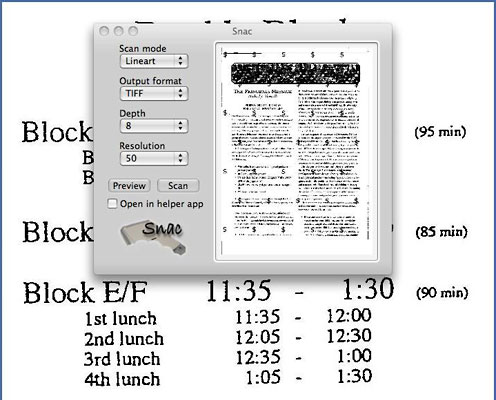
Snac lets you preview and crop your scans.
Snac is a very simple front-end that is perfect for my high schoolstudents. Yes, they can play complex video games, use Facebook andTwitter, and email like crazy, but scanning....
This does not bode well for our Social Security checks.
Once again, thanks "wherehouse" and Mac Forums! Problem solved! 
Join us on Facebook, follow us on Twitter or Google+, or subscribe to our RSS news feed
Today's Links
- Mac of the Day: PowerBook 500 Series, introduced 1994.05.16. 'Blackbird' includes a 25 to 33 MHz 68040 along with smart batteries and grayscale or color displays.
- Support Low End Mac
Recent Content
About LEM Support Usage Privacy Contact
Follow Low End Mac on Twitter
Join Low End Mac on Facebook
Favorite Sites
MacSurfer
Cult of Mac
Shrine of Apple
MacInTouch
MyAppleMenu
InfoMac
The Mac Observer
Accelerate Your Mac
RetroMacCast
The Vintage Mac Museum
Deal Brothers
DealMac
Mac2Sell
Mac Driver Museum
JAG's House
System 6 Heaven
System 7 Today
the pickle's Low-End Mac FAQ
Affiliates
Amazon.com
The iTunes Store
PC Connection Express
Macgo Blu-ray Player
Parallels Desktop for Mac
eBay

