
Recycled Computing
Bringing Back the Pismo
- 2010.09.23
It's all because I really couldn't get my iSub to work withMac OS X 10.5 Leopard. So Idecided that I would use my Pismo to play music, since theiSub worked fine with it.
Out of Storage
So I dragged it out of storage and discovered that I had forgottento register OS X 10.4Tiger when I did my last reinstall (after I updated to Leopard andthe 12" PowerBookG4). Time had passed. So I got out my Tiger Install DVD andproceeded to put in my DVD burner module into the Pismo.
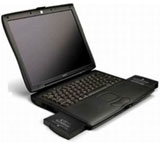 Let's stop and reconsider the modular approach to laptops. Backin the day, every manufacturer had a laptop that allowed users toreconfigure their hardware to meet different needs. For instance, youcould install two batteries - or one battery and an optical drive orfloppy drive or hard drive module. The Pismo uses this modular approachto laptop design and construction, and that's one of the reasons I amfond of it.
Back to the reinstall.
After the Tiger disc finished installing, it rebooted the Pismo andprompted me to select a computer to download my "old" information from(user accounts, applications, data, etc.). Out came my DVD module, andin went my hard drive module with a duplicate of my Pismo's startupdisk. In no time flat, I had reinstalled Tiger and all my accountinformation.
This time, of course, I remembered to register Tiger with the Applemothership.
The fly in the ointment was updated Safari and iTunes. Due toApple's move away from PowerPC processors, I could only update Safarito version 4, not the current 5.
No iTunes 10, but 9 Works
As for iTunes, version 10 was out of the picture. Apple had a linkfor G3 processors to iTunes 8.2.1. The problem is that this version ofSafari does not have HomeSharing, a feature that I cannot live without. With my old sageiMac DV G3 repurposed asa digital jukebox and attached to my home stereo, I have to have a wayto update it from the iTunes library on my PowerBook G4. And, ofcourse, update the Pismo from the PowerBook.
Apple be darned. I updated to iTunes 9.1.1 (the last versionthat doesn't require a G4 or newer) and started importing songs. Sofar, so good. Another victory for "left behind" technology. I amlistening to Marvin Gaye right now. All you have to do is search theApple site for iTunes 9 and download it from there. I suppose ifyou don't mind losing the Home Sharing feature, you could followApple's link to iTunes8.2.1, but I cannot live without Home Sharing.
Besides, I always want to see if I can get the latest and greateston the old Pismo.
Moving Files from Your iPod to Your Mac
Occasionally you might find the need to transfer your library fromyour iPod back to your computer. This happened to me not long ago.Senuti used to be free,but times have changed, and my search of the Internet for a free app tomove songs from my iPod touch to my PowerBook was long and exhausting.I needed to have something that would work with the Pismo's G3processor and my (relatively new) first generation iPod touch.
Did I mention it had to be free?
I noticed that Windows users have all sorts of options, but Ifinally found Expod.(Expod has been replaced by DeTune, but DeTune requiresLeopard.) I found Expod a little clunky to use, but it did move mysongs from the iPod to my Pismo.
I know Apple doesn't support this type of move, but my iTuneslibrary consists of non-DRM material from my own collection of CDs,record albums, and cassette tapes, so I don't feel guilty about movingmy iTunes Library around. 
Additional Links
- iTunes 9:Understanding Home Sharing
- iTunes 9.2.1download (requires G4 or newer)
Join us on Facebook, follow us on Twitter or Google+, or subscribe to our RSS news feed
Today's Links
- Mac of the Day: PowerBook 500 Series, introduced 1994.05.16. 'Blackbird' includes a 25 to 33 MHz 68040 along with smart batteries and grayscale or color displays.
- Support Low End Mac
Recent Content
About LEM Support Usage Privacy Contact
Follow Low End Mac on Twitter
Join Low End Mac on Facebook
Favorite Sites
MacSurfer
Cult of Mac
Shrine of Apple
MacInTouch
MyAppleMenu
InfoMac
The Mac Observer
Accelerate Your Mac
RetroMacCast
The Vintage Mac Museum
Deal Brothers
DealMac
Mac2Sell
Mac Driver Museum
JAG's House
System 6 Heaven
System 7 Today
the pickle's Low-End Mac FAQ
Affiliates
Amazon.com
The iTunes Store
PC Connection Express
Macgo Blu-ray Player
Parallels Desktop for Mac
eBay

