
Recycled Computing
Upgrading a Pismo PowerBook with a Slot-load Drive Salvaged from an iBook
- 2009.10.01
Well, I wasn't dissatisfied with the DVD-ROM drive that came with myPismo. In fact, I hadtwo of the modules; one from another Pismo. They played movies, readCDs, and allowed me to install software from them.
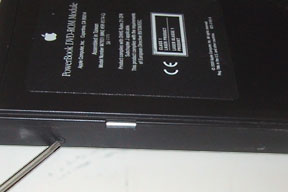
Pismo's original DVD-ROM drive.
However, wouldn't it be nice if I could burn CDs and DVDs from myPismo?
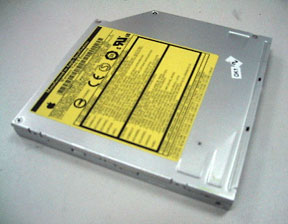
I just happen to have a burner (photo below), salvaged from a iBookG4. This might be tough, I thought, but since I had two of the originalDVD-ROM drives, I could use one to made the conversion and not be outanything.
 Now, I know this topic has been covered before (Simon Royalwrote ReplacingYour Lombard or Pismo Optical Drive with a SuperDrive), but it'salways nice to review how easy it is for a motor moron such as myselfto install things in the Pismo (the world's easiest computer toupdate).
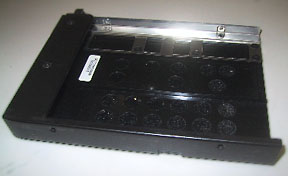 The first thing to do is take the donor drive apart so you cansalvage the sled that slides in and out of the Pismo. There are twoscrews on the left side of the drive. There are also two screws on theright side. Pop the four screws off, remove the silver drive, and youhave the empty sled.
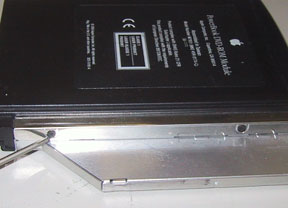 I had to remove some bits and pieces from the G4's drive,including the ribbon cable, to get it in shape for the install.Fortunately, the newer drive has screw holes that line up with thePismo's sled. You just slide it in, fasten all the screws, and you haveupdated the disc drive on your Pismo.
Funny how it just seems easier on the Pismo.
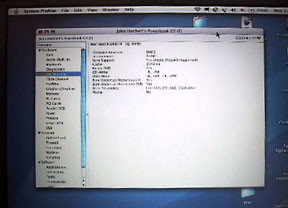 As you can see by the screenphoto, the Pismo recognizes the new drive. I have even burned a CD (offa Genius playlist) for use in my car. I haven't burned a DVD, but Imight give it a shot for Christmas presents.
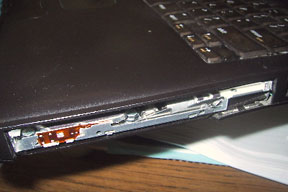 Now the only drawback is the appearance. It looks like the Borghave hacked my Pismo to make the new drive fit. However, I plan to takea Dremel tool to an old Zip drive module and then attach it (somehow)to the new drive to make things look neater.
It's a pity that Apple's design mavens would have a hissy fit if yousuggested that Apple build a "Pismo II". It's so easy to work on andupdate that it would probably become an instant classic that would lastfor years and years.
Okay, maybe that's the reason they won't build one. 
Join us on Facebook, follow us on Twitter or Google+, or subscribe to our RSS news feed
Today's Links
- Mac of the Day: PowerBook 500 Series, introduced 1994.05.16. 'Blackbird' includes a 25 to 33 MHz 68040 along with smart batteries and grayscale or color displays.
- Support Low End Mac
Recent Content
About LEM Support Usage Privacy Contact
Follow Low End Mac on Twitter
Join Low End Mac on Facebook
Favorite Sites
MacSurfer
Cult of Mac
Shrine of Apple
MacInTouch
MyAppleMenu
InfoMac
The Mac Observer
Accelerate Your Mac
RetroMacCast
The Vintage Mac Museum
Deal Brothers
DealMac
Mac2Sell
Mac Driver Museum
JAG's House
System 6 Heaven
System 7 Today
the pickle's Low-End Mac FAQ
Affiliates
Amazon.com
The iTunes Store
PC Connection Express
Macgo Blu-ray Player
Parallels Desktop for Mac
eBay

