Taking Apart a Tray-Loading iMac
- 2008.09.29
Popularity: ![]()
![]()
![]()
Low End Mac Reader Specials
Memory To Go Special: MacPro 8 Core 8GB kit $232 / 4GB kit $116 / 2GB kit $72. New Macbook 2GB DDR3-$65. HARD DRIVES available -- Free shipping / LIfetime warranty.
Download Typestyler, still the Ultimate Styling Tool for Internet, Print and Video Graphics. Works great in Classic with a Native OS X Version on the way. Free Tryout: www.typestyler.com
LA Computer Company: Specials on AppleCare, iMac's, Apple Batteries and Apple A/C Adapters. Also Great prices on Used Apple Computers. Call 1-800-941-7654 Click Here.
Mac users can finally play Party Poker for Mac. Not only that, they can also learn how to play PokerStars for Mac.
Laptop Hardware Provided by TechRestore - Overnight Mac & iPod Repairs.
Compare products like desktop computers, laptops, and LCD TVs side by side! All the information and reviews to make the best purchasing decision for a new cell phone GPS products or MP3 players. The Ciao network makes searching products easy for you.
You've always wanted to look inside the first iMac, right? I mean, this was the first computer to come out that was designed after the all glorious, all powerful Steve Jobs returned to Apple.
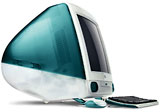
The Bondi blue iMac launched the small "i" revolution, and we
all know what that led to.
At any rate, we're tossing out our Revision A iMacs at school - about 10 of them - because of they don't have FireWire. That means that restoring a hard drive is not as easy as it in on a Mac with FireWire.
They also lack the power that we need to run Tiger. Face it, they're old and tired.
But waste not, want not - so I'm strippin' and rippin' the Rev. A iMacs to mine them for useful stuff. (The Rev. B through D iMacs are put together the same way.)
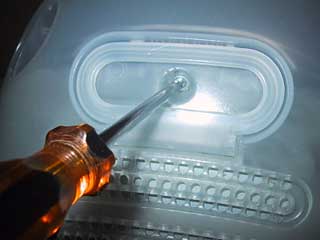
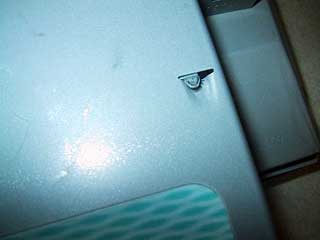
The first thing you do after you pulled the power cord and any other cables (remember, safety first!) is to turn the Rev. A upside down. Then you unscrew this single screw on the back under the small handle.

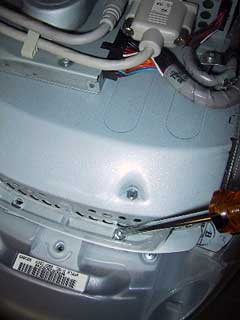
Now, take that handle and pull the plastic shroud off. It's not that easy. You may have to run a small straight blade screw driver around the seam.
It will come off; it just requires some time.
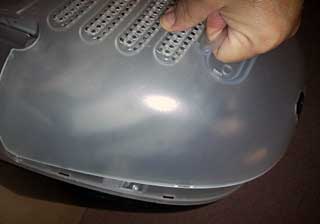
Now you're going to have to remove the two screws that lurk under the handle of the (for lack of a better word) sled that has all the electronic goodies on it.

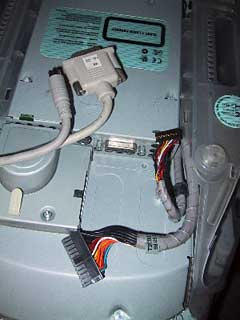
Don't get crazy. There are a whole bunch of cables that you are going to need to remove before you can remove the sled.
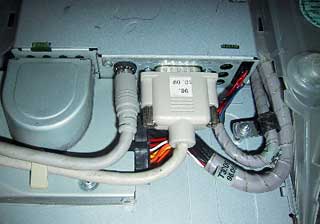
All four of these cables need to be detached to remove the "guts " of the Rev. A.

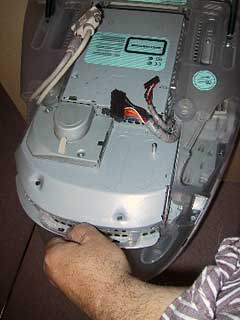
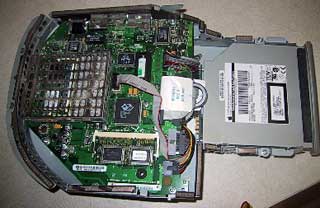
Now you can grab the handle and pull out the sled with all the guts.

Now you have the good stuff to look over. It's all here: the hard drive, the CD-ROM drive, the system, and the RAM chips- all in one weird looking package.

The memory is easy to snap out. You are going to have to remove a metal cage to get at one of the memory cards.
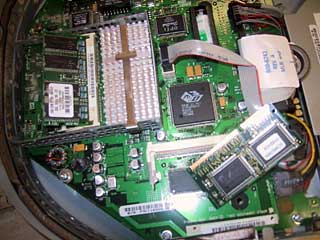
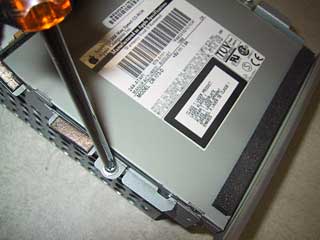
There are two screws on either side of the housing that hold the CD-ROM drive. These screws also hold the hard drive in. Remove the screws.

Now push the CD drive back about a half an inch and then pull it up and out. You need to push the hard drive back as well, to free up the drive. Make sure the that the two tabs on the hard drive sled will clear the housing.

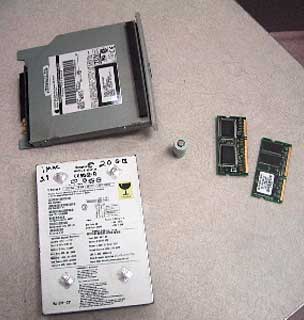
The hard drive and sled can now come out.
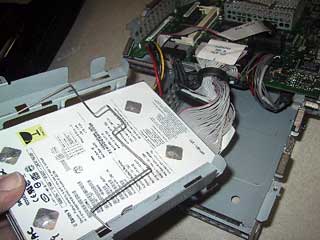
You need to take out the hard drive and pile it with the other spoils.

I'm not saying that the iMac - the computer that started up the second Mac revolution - needs to be stripped and thrown out. The Rev. A can be networked, and you can upgrade the hard drive and memory. I think that OS 9.2 might be the operating system to go with, but there are folks who do run OS X on the old girl. It might be a good email machine for those who need a minimum computer platform.
Either way, it's an easy computer to take apart.
Recent Recycled Computing Columns
- Old Macs in the New Economy, 11.25. "We are the kings of making our computers last, last, and last some more."
- Backing Up Your G3 PowerBook Quickly and Easily, 10.27. Who needs Leopard and Time Machine? With an expansion bay hard drive and the right software, you can have a bootable clone ready for use.
- Taking Apart a PowerBook G3 (Lombard or Pismo) Battery, 09.24. Step by step instructions for opening up a Lombard/Pismo battery to get to the lithium-ion cells inside.
- Reconfiguring and Repurposing a Power Mac G4, 09.18. These 1999 'Sawtooth' Power Macs would be perfect for the science lab with more RAM, bigger hard drives, and a newer version of Mac OS X.
- More in the Recycled Computing index.
Links for the Day
- Mac of the Day: 17" iMac G4/800 MHz, July 2002 - The iMac 'grows up' with a 17" 1440 x 900 display.
- Group of the Day: MichiMac is our list for Mac users in Michigan.
- December 3 in LEM history: 01: The future of low-end Macs - Internet charges and Low End Mac - 02: A smooth switch with Move2Mac - 04: Upgrading from Mac OS 9 to 10.3 - PC malware: The best reasons to use a Mac - No sympathy for bashing Macs in schools - 'Book fragility - 07: Switching to Mac tripled my productivity - Leopard on a G3 iMac (with a G4 upgrade)
Recent Content on Low End Mac
- OS X More Efficient than Linux, Snow Leopard and PowerPC Macs, and Eudora Woes, Charles W. Moore, Miscellaneous Ramblings, 12.03. A user reports both Panther and Leopard run more smoothly and use memory more efficiently than Linux. Also thoughts on PowerPC abandonment in Snow Leopard and replacing Eudora in Leopard.
- The Leopard Experience at 867 MHz, Simon Royal, Mac Spectrum, 12.02. Mac OS X 10.5 requires an 867 MHz G4 with 512 MB of memory, but is performance really acceptable on a minimum spec system?
- A Used 17" PowerBook as a Budget Notebook Alternative, Charles W. Moore, 'Book Value, 12.02. Sure, you can buy a refurbished 13.3" MacBook for under $900, but you could also have an expansive, feature laden 17" PowerBook in the same price range.
- The Very Best Macs: Sometimes Apple Just Nails It, Andrew J Fishkin, Best Tools for the Job, 12.01. Apple has produced lots of good Macs, a few dogs, and some 'best of breed' models that stand apart from the pack.
- Apple Could Buy Dell, and Linux Is No Threat to Mac OS X, Charles W. Moore, Miscellaneous Ramblings, 12.01. Apple has the cash to buy Dell outright, and the idea has some merit. Also, why Linux still isn't ready to displace the Mac OS.
- More links in our archive.
Recent Deals
- Best PowerBook G3 Deals, 12.03. Used 14" WallStreet G3/266 MHz, $90; Lombard G3/400 MHz, $150; Pismo G3/400 MHz, $300; 500 MHz, $350.
- Best 17" PowerBook G4 Deals, 12.03. Used 1.5 GHz, $685; 1.67 GHz, $699.
- Best Intel iMac Deals, 12.03. Used 17" 1.83 GHz, $550; 20" 2.0, $650; refurb 20" 2.4, $999; 2.66, $1,299; 24" 2.8, $1,549; 3.06, $1,899; rebates and free shipping on new.
- Best Mac OS X 10.4 'Tiger' Deals, 12.02. DVD upgrade from 10.3, $75; full version, $129; family pack, $200; 10-user Server, $350; unlimited users, $400.
- Best iMac G5 Deals, 12.02. Used 17" 1.6 GHz Combo, $400; 1.8 SuperDrive, $450; 1.9 iSight, $599; 20" 1.8 GHz, $500; 2.0, $600; 2.1 iSight, $700. Shipping additional.
- Best 17" MacBook Pro Deals, 12.02. Used 2.16 GHz Core Duo, $1,330; 2.33 Core 2, $1,499; close-out, 2.4, $1,800 after rebate; new 2.5, $2,000 a/r; new hi-res, $2,499 a/r; refurb 2.6, $2,399.
- Best iPod nano Deals, 12.01. Refurb 3G/4 GB, $79; new, $105; refurb 8 GB, $99; new, $115; 3G/8 GB, $134; 16 GB, $174. Prices include ground shipping.
- Best 12" PowerBook G4 Deals, 12.01. Used 1.5 GHz SuperDrive, $481/C$599 plus shipping.
- Best Mac Pro Deals, 12.01. Used 3.0 GHz 4-core, $2,102; new 2.66 GHz 4-core, $1,949 after rebate; 2.8 4-core, $2,099 a/r; 8-core, $2,515 a/r; 3.0 $3,320 a/r; 3.2, $4,099 a/r.
- More deals in our archive.
About LEM | Support | Usage | Privacy | Contacts