
Recycled Computing
Apple QuickTake Digicam Found, but How Can You Use It?
- 2008.04.10
Did I ever tell you I work in an Apple museum?
It's true. Our school has used Apple computers for most (if not all) of its twenty year history. The old Information Technology guy saved everything - and I mean everything. Our new IT guy has no intention of running a mixed network with OS X, Windows, and OS 9. He likes Unix - really, what's not to like?
We are ditching all System 9 hardware and software. As a result, we have been cleaning our some of the darker corners of our IT realm and have been discovering some rare gems from Apple's past.
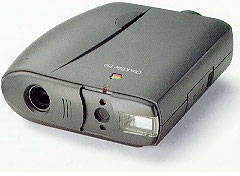
When my boss discovered an old Apple QuickTake 150 camera, he immediately thought of me. Okay, I do own a couple of Newtons, a Pismo, and a Sage iMac, but does that make me the keeper of old Mac oddities?
I guess it does.
Everyone thought that it would make a great relic for an avid photographer and old Mac buff such as myself. It was one of the first digital cameras made and looks like a prop from a cheesy sci-fi movie. But I thought that it would be great if I could actually use it to take pictures. Silly me.
I should advise anyone with such crazy thoughts to reconsider. Or read the manual. Still thinking you can do it? Remember, there is no removable memory with the QT 150; all the images are stored in the camera.
Well, let's keep on keeping on.
One big problem is that Apple no longer has drivers for the QT 150 on its website. You will have to go to the Mac Driver Museum. The other problem is that the QuickTake software doesn't act nice with newer versions of system 8, 9, and the Classic Mode on OS X. You will need a Mac running Mac OS 7.6.
And how are you going to get the drivers onto the Mac running 7.6? Floppies.
Oh, I suppose that if I had a phone modem in the PowerBook 520c that I was using and could access a dial up connection to the Web....
And if I had the software to translate the drivers? Okay, I downloaded the QuickTake software on my Pismo (booted into Mac OS 9.2) and translated them into disc images and copied them onto floppies. Four floppies later, the software was on the PowerBook 520c. I had forgotten how much fun it was installing software with multiple 1.4 MB floppies. Oh, it was sooo much fun I forgot to have fun.
Now came the problem. I didn't know that you needed AppleScript to run the software. And this particular 520c didn't have it installed. Fortunately I had another (I work in a Mac Museum - see above), and after messing with 4 floppies I had the QuickTake software installed and Eureka! I could fetch the pictures from the QuickTake 150 and turn them into JPEGs.
How to get the images printed, you ask? Okay, back to the floppies. I can fit 3 images on one floppy and transfer the JPEGs to a computer attached to a printer. I can even load them into my iPhoto library. There are better ways to do this; I'm just not very patient.
I suppose I could link the 520c with my Pismo using a serial cable (I just happen to have a couple since I have two Newtons) and a Keyspan USB-to-serial adapter. That would mean AppleTalk. Who uses that anymore? If I have to, I could try the old crossover network cable, but that means chasing down that strange AAI (or is it AAUI) adapter to Ethernet gadget. (One might turn up, I work in a . . . oh yeah, I mentioned that).
Is this too much trouble to take pictures? Probably, but I can take
pictures using a 15-year-old digital camera that looks like a prop from
Star Trek (the original!).

Join us on Facebook, follow us on Twitter or Google+, or subscribe to our RSS news feed
Today's Links
- Mac of the Day: PowerBook 500 Series, introduced 1994.05.16. 'Blackbird' includes a 25 to 33 MHz 68040 along with smart batteries and grayscale or color displays.
- Support Low End Mac
Recent Content
About LEM Support Usage Privacy Contact
Follow Low End Mac on Twitter
Join Low End Mac on Facebook
Favorite Sites
MacSurfer
Cult of Mac
Shrine of Apple
MacInTouch
MyAppleMenu
InfoMac
The Mac Observer
Accelerate Your Mac
RetroMacCast
The Vintage Mac Museum
Deal Brothers
DealMac
Mac2Sell
Mac Driver Museum
JAG's House
System 6 Heaven
System 7 Today
the pickle's Low-End Mac FAQ
Affiliates
Amazon.com
The iTunes Store
PC Connection Express
Macgo Blu-ray Player
Parallels Desktop for Mac
eBay

