
Fruitful Editing
Kodak Zi6 Compact HiDef Video Camera
- 2009.08.31 (updated)
Just a few years ago, there were few decent ultra compact video devices on the market. The Flip series of video recorders were the standouts, with great design and decent recording time.
With high definition (HD) video quickly becoming the standard, it was only a matter of time before it took over the portable recorder market.
The Kodak Zi6 is one of the newest entries to the market, and a decent performer as a backup or primary video camera depending on your needs. The Zi6 has three primary video modes plus a still shot function.
- HD60 - Captures high definition video at 60 frames per second for capturing fast action.
- HD - High def video at 30 frames per second at 720P.
- VGA - Standard video at 640 x 480
Design
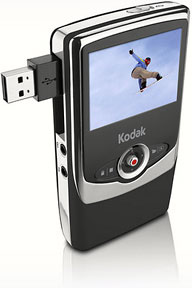 The Zi6 is compact like other
devices in its class. It feels light for its size and has a nice
non-slip "rubbery" coating. The grip feels secure. The light weight
makes it a bit more challenging to hold steady for extended recording,
and there is no image stabilization. But this is not meant to replace a
full size video cam; it is meant to be an extremely portable device you
can take anywhere.
The Zi6 is compact like other
devices in its class. It feels light for its size and has a nice
non-slip "rubbery" coating. The grip feels secure. The light weight
makes it a bit more challenging to hold steady for extended recording,
and there is no image stabilization. But this is not meant to replace a
full size video cam; it is meant to be an extremely portable device you
can take anywhere.
Storage
The Zi6 has a pitiful 128 MBof internal memory, a portion of that being used for the operating system. The good news is that has removable storage in the form of SDHC (Secure Digital High Capacity) cards and can support up to a 32 GB card.
When I purchased my Zi6, I went ahead and got a 4 GB card; I have not been able to fill it up in a day's recording time. So for most users, I think a 4 GB or 8 GB card will be sufficient. Just be sure to get a SDHC card, as older SD cards may not work properly.
Still Images
Most digital cameras today (except the majority of DSLRs) can record video. Most video devices can take still images. The problem is that they are going to almost always do their primary function better. Bottom line: Don't count on the Zi6 to be your primary still camera. Although it will take still images, I have yet to get a picture that isn't blurry.
Video Recording
Thankfully, the Zi6 performs its video duties wonderfully. Even in low-light conditions, the Zi6 produces vibrant colors (although a bit oversaturated) and sharp, smooth video. Grain levels can be high, especially the less light that is available, but overall I think the quality is great for the price.
Outside in bright sunlight, the Zi6 really shines (no pun intended), giving some of the best image quality possible from this size camera. This is your best opportunity for still images also.
The light weight can cause some problems, giving you blurry video with some fast moving subjects. If you pan the camera, you have to be very steady and very slow - unless you're trying to film Blair Witch 3.
Mac Compatibility
The Zi6 is compatible with most newer Macs. It uses a built-in USB 2.0 plug to connect to the computer, and should automatically show up as a removable drive. HD files can be quite large coming from the camera, so transfers may take 5-10 minutes.
iMovie versions '05 through '09 do not recognize the Zi6 as a camcorder for import. When the device is plugged in, iPhoto will automatically start up, and the clips will be imported into the iPhoto library as a digital camera's photos would. Alternatively, you can pull your video directly from the Zi6 into a different folder of your choosing after the camera is mounted.
The clips can be imported into iMovie using either the import function or by dragging the desired clip into the "clips" pane of iMovie. The video will be converted to the format you have set your movie up for (IE: MPEG-4 or DV).
Disadvantages
The Zi6 is powered by two AA batteries, which will give you a decent amount of recording time on a full charge. In my use, I've been getting about two hours of use out of one charge of the included rechargeable NIMH batteries.
While two hours may leave you wanting for more power, the camera's biggest flaw is the lack of any other power source. The Zi6 has no AC adapter, so you are limited to battery power only.
This is just unacceptable for a device that is so power-hungry. When you go to import clips to your Mac, you may lose power midway through the transfer, which is very irritating. Why Kodak left this out is baffling, but I hope it is added in future models.
Final Thoughts
If you need a small pocket video device, the Zi6 is a winner. The size, storage options, and video quality are all great. The only disadvantages I see are the lack of a power adapter option and no low resolution widescreen mode (VGA is a 4:3 format vs. 16:9 for HD video).
At a price of $150 at most retail stores (currently under $120
from
Amazon.com), the Zi6 is an affordable way to get into HD video.

Join us on Facebook, follow us on Twitter or Google+, or subscribe to our RSS news feed
Brian Gray is a journalist from North Carolina who enjoys writing, the beach, and tinkering with Macs.
Today's Links
- Mac of the Day: PowerBook 2300, introduced 1995.08.28. The only Duo equipped with a PowerPC processsor run at 100 MHz.
- Support Low End Mac
Recent Content
About LEM Support Usage Privacy Contact
Follow Low End Mac on Twitter
Join Low End Mac on Facebook
Favorite Sites
MacSurfer
Cult of Mac
Shrine of Apple
MacInTouch
MyAppleMenu
InfoMac
The Mac Observer
Accelerate Your Mac
RetroMacCast
The Vintage Mac Museum
Deal Brothers
DealMac
Mac2Sell
Mac Driver Museum
JAG's House
System 6 Heaven
System 7 Today
the pickle's Low-End Mac FAQ
Affiliates
Amazon.com
The iTunes Store
PC Connection Express
Macgo Blu-ray Player
Parallels Desktop for Mac
eBay

