
Fruitful Editing
External $100 Sony DVD Burner Likes Macs
- 2007.10.10
The 18x Sony DRX830U drive reviewed here was replaced by the 20x DRX840U, which was available from Amazon.com for about $80. It has since been disscontinued and replaced by the slower, slimmer SonyDRX-S77U, which is currently (mid 2010) avaliable from Amazon.com for about $60 in either black or white. It should work with USB Macs every bit as well as the older drives, albeit more slowly.
My previous article was about how to rip your DVDs to your computer. This time around, we'll be looking at the Sony DRX830U DVD burner. Whether you need a burner for data backup of all those MPEG-4 files you just made or to burn custom DVDs, this Sony burner may just be what you're looking for.
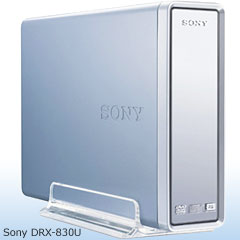
These days, just about every computer comes with a DVD writer or a DVD/CD-RW combo drive. My iMac G5 came with a 4x Apple branded SuperDrive, which has worked for the past two years but is really quite picky about media. When I was lucky, it would burn at the full 4x speed, but most of the time, it burned at 2x - or even 1x.
I'd thought about getting a fast external DVD burner, both to get a nice speed boost and also to be able to use it with whatever computer I needed to connect it to.
As Mac users, we're fortunate to have an excellent operating system, great free software, and some pretty long lasting computers. But make a trip down to your local Staples or Office Max, and you're instantly reminded that we live in a Windows world.
Just head over to the internal/external drive aisle and count the Mac compatible items:
- Hard drives? Good
- External hard drives? Good
- Internal DVD writers? Not bad
- External DVD burners? Terrible
Or is it?
I spent months trying to decide on an external burner. Each one in the local stores read "Windows only". I looked online, and the Mac compatible burners were always sold at an average of $60 more than the Windows version!
It's just not fair. We Mac users should be treated equally with our different OS brethren. General software, that I can understand. But can't a company write a simple OS X driver for a burner without inflating the price?
Well, I was fed up. I had chosen the Sony DVD DRX830U 18x burner because it was fast and cheap - and the reviewers on Amazon gave it good marks. As I was scrolling through the comments, I started to notice that a lot were from Mac users - and how this particular burner worked fine with Macs.
I set off to the store, determined to take my chances. I'd plug it in, and if it didn't work, oh well. There's always eBay.
The box was clearly labeled with Windows; no Macintosh compatibility was stated whatsoever, not even in the documentation. I unwrapped it all, plugged the cable into the USB 2.0 port on my PowerBook, and turned it on.
No response at first from OS X, but when I opened the drive and put a blank DVD in, it showed up! No strange patches to install, no third party software needed. It worked just the way we Mac users would expect it to. (Note: This was under Tiger. I have yet to try this using Panther.)
I'm a big fan of Toast, and the latest version works great with this external burner. I've experienced write speeds much lower than the box stated, though. So far the top speed (with any media) is 8x for DVDs, which is still pretty decent.
The burner worked great with both my iMac and my PowerBook. So far the device has only given me one or two coasters, which were likely caused by software and not the drive.
I feel like I've added some incredible functionality to my
three-year-old iMac, and that's what Low End Mac is all about, right?

Join us on Facebook, follow us on Twitter or Google+, or subscribe to our RSS news feed
Brian Gray is a journalist from North Carolina who enjoys writing, the beach, and tinkering with Macs.
Today's Links
- Mac of the Day: PowerBook 5300, introduced 1995.08.25. The first PowerPC PowerBook was known for 'flaming' performance.
- Support Low End Mac
Recent Content
About LEM Support Usage Privacy Contact
Follow Low End Mac on Twitter
Join Low End Mac on Facebook
Favorite Sites
MacSurfer
Cult of Mac
Shrine of Apple
MacInTouch
MyAppleMenu
InfoMac
The Mac Observer
Accelerate Your Mac
RetroMacCast
The Vintage Mac Museum
Deal Brothers
DealMac
Mac2Sell
Mac Driver Museum
JAG's House
System 6 Heaven
System 7 Today
the pickle's Low-End Mac FAQ
Affiliates
Amazon.com
The iTunes Store
PC Connection Express
Macgo Blu-ray Player
Parallels Desktop for Mac
eBay

