
Apple, Tech, and Gaming
My Intel Mac Big Bang
- 2012.01.27 - Tip Jar
Greetings, Low End Mac friends! It's been a while since my last article, but I must say that between the holidays, an extensive job search that has led me to an intense study on becoming an Apple Certified Support Professional (and later seeking Apple Macintosh Certified Technician's licenses), not to mention converting my life over to Intel Macs (gasp), things have been a bit hectic.
I'm also reading Steve Jobs' biography by Walter Isaacson - a great read so far, I may add.
The Big Bang
With all things aside, the most incredible step I have taken in the world of computing - or more like an explosion akin to the Big Bang - has been my recent move from PowerPC Macs to Intel. The reason why this was such a "Big Bang" is that I really went all out rather than low-end in this case - for several important reasons.
Anything but Low-End
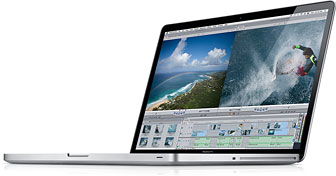 My
first Intel is something much more than a Mac to get the job done. It
was the Mac of my dreams. I acquired it (with the help of a small
loan), and it is now my production flagship - a 17" 2.3 GHz Early 2011
MacBook Pro Core i7, quickly upgraded to 8 GB of RAM courtesy
of
OWC's incredibly low, low price of $49!
My
first Intel is something much more than a Mac to get the job done. It
was the Mac of my dreams. I acquired it (with the help of a small
loan), and it is now my production flagship - a 17" 2.3 GHz Early 2011
MacBook Pro Core i7, quickly upgraded to 8 GB of RAM courtesy
of
OWC's incredibly low, low price of $49!
Okay, admittedly this machine is anything but low-end, but let me say this much: This Mac is screaming fast! I can't imagine using another machine for day-to-day work for the foreseeable future. It cuts through 1080p video like a hot knife through butter, it's faster than many Mac Pros while remaining portable and nearly as expandable, and it provides much flexibility. It will certainly allow me to test out various theories with A/V utilities, gaming applications, and more that I just couldn't do before with my PowerPC equipment.
Well Thought Out Buying Decision
After extensive research, I settled on this model for various reasons. The first is that it was the part of the last family of Macs to ship with Mac OS X 10.6 Snow Leopard preinstalled (however, mine did not come that way - more on that later). The second reason is that since this was a prior model (even though there were modest improvements to the Late 2011 refresh), the Early 2011 models became closeouts in favor of the Late 2011 models and received the benefit of great bargain pricing.
The last reason was to gain support of both Thunderbolt and ExpressCard 34, giving way to nearly unlimited expansion possibilities. With this new Mac, I have a recipe for success that will allow me to have access to the absolute latest and greatest array of software and peripherals while still supporting all my legacy applications and gear courtesy of adapters and Snow Leopard's Rosetta support.
The Lion Debacle
Here's where I ran into some difficulty. This Mac was supposed to ship with Snow Leopard preinstalled, but instead shipped with OS X 10.7 Lion. After speaking with the Customer Service department with the authorized Apple vendor I purchased this unit from, they admitted that there was a bit of a problem in their warehouse and that all the Snow Leopard and Lion units got mixed up and there would be no guarantee that I would get a Snow Leopard unit if I sent it back, so I bit the bullet and began my research on how to do a fresh install of Snow Leopard on this MacBook Pro that was known to be able to boot just fine into Snow Leopard.
Two for One
Apparently, there is a bit of difficulty with this situation surrounding these particular machines, since the last retail version of Snow Leopard was 10.6.3. Early 2011 MacBook Pros require a minimum of 10.6.6 in order to mount the disk image and install, so the only option left was to get a hold of another Mac that could mount or boot into 10.6.3, install 10.6.3 and all updates to 10.6.8 on an external drive, and clone that to the MacBook Pro (which is currently running Lion) after an erase and install/clone from the external drive used with the other Mac.
With Snow Leopard running on a partition, I will easily be able to migrate all of my data from my 12" PowerBook to the new production Mac and have seamless support courtesy of Rosetta. On the other partition, Lion will remain so that I can learn all of the support essentials I need to pass the certification exam for Lion while developing some familiarity with the new technologies employed.
For instance, I am currently typing this document using Text Edit which is compatible with Lion's Versions feature. Using applications such as this will allow me to experience firsthand the pros and cons of Lion's various new features.
Enter the Mini
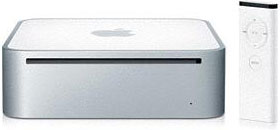 To resolve my problems, I got a 1.83 GHz 2007 Core 2 Duo Mac mini,
which will take the install of retail 10.6.3 and will fit the bill to
facilitate the cloning I need to accomplish to provide the MacBook Pro
with bootable OS X 10.6 and 10.7 partitions. The great thing
(besides the price I paid) and the things that this Mac will do are
evident.
To resolve my problems, I got a 1.83 GHz 2007 Core 2 Duo Mac mini,
which will take the install of retail 10.6.3 and will fit the bill to
facilitate the cloning I need to accomplish to provide the MacBook Pro
with bootable OS X 10.6 and 10.7 partitions. The great thing
(besides the price I paid) and the things that this Mac will do are
evident.
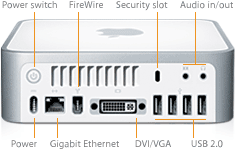 I
will be able to house this very portable unit within my home
entertainment center, and it will serve as a media server hub and as
another Mac that can be easily used while connected to my 32" Insignia
HDTV courtesy of my Dinovo Edge Bluetooth Keyboard. These Minis, which
shipped with integrated Intel GMA 950 graphics, are not great gaming
devices but will unlock a whole new world of possibilities to those
still on PowerPC Macs at a very low cost.*
I
will be able to house this very portable unit within my home
entertainment center, and it will serve as a media server hub and as
another Mac that can be easily used while connected to my 32" Insignia
HDTV courtesy of my Dinovo Edge Bluetooth Keyboard. These Minis, which
shipped with integrated Intel GMA 950 graphics, are not great gaming
devices but will unlock a whole new world of possibilities to those
still on PowerPC Macs at a very low cost.*
What to Do Now?
At this point, I am still running Lion on the MacBook Pro, but I have a plan of action for all things moving forward. I have already made my own bootable Lion backup USB drive and will make a Time Machine backup of what I have so far with Lion on the MacBook Pro (including this article). Then, after erasing, partitioning, and cloning Snow Leopard to one partition and restoring Lion to the other, I will have a Mac that can do it all.
For now though, my studies have taken precedence, and using this Mac so far with Lion isn't as bad as it seems. Much of the iOS features that everyone complained about can be tweaked and you can give yourself more of a traditional OS X feel by turning various options on and off. With a hard drive upgrade to the Mini, I could easily do the same to that machine and have multiple partitions with various versions of OS X running in order to experience it all.
In addition, with my Kindle Fire (a nice Christmas gift) being added to my list of gadgets, I was able to get a copy of the Peachpit Press book, Apple Pro Training Series: OS X Lion Support Essentials: Supporting and Troubleshooting OS X Lion for almost half of the print copy price via Amazon. This will allow me to have all of the information I need to pass my first exam.
To summarize, 2012 has been a very busy year so far and has brought many more electronic goodies than I can shake a stick at, but I have made those devices work for me thus far and continue to use my older Macs as well. My eMac, Pismo, and 12" PowerBook still get daily use and will always provide unique utility in their own ways.
Stay tuned for part 2 - once I have everything up and running
smoothly on this MacBook Pro. 
* Publisher's note: We have the 2.0 GHz version of this model at Low End Mac headquarters, and for typical day-to-day use, we have no complaints about the GMA graphics. It's also a big step forward from our dual-processor G4 Power Macs. dk
About LEM Support Usage Privacy Contact
Follow Low End Mac on Twitter
Join Low End Mac on Facebook
Favorite Sites
MacSurfer
Cult of Mac
Shrine of Apple
MacInTouch
MyAppleMenu
InfoMac
The Mac Observer
Accelerate Your Mac
RetroMacCast
The Vintage Mac Museum
Deal Brothers
DealMac
Mac2Sell
Mac Driver Museum
JAG's House
System 6 Heaven
System 7 Today
the pickle's Low-End Mac FAQ
Affiliates
Amazon.com
The iTunes Store
PC Connection Express
Macgo Blu-ray Player
Parallels Desktop for Mac
eBay

