
Apple, Tech, and Gaming
The iPad as Your In-between Mac
- 2010.03.09 - Tip Jar
After watching the most recent Stevenote on the iPad, I can see Mr. Jobs' vision for the future of iPad as a third category in the Apple family of products. In his speech, Jobs openly dismissed netbooks as cheap notebooks made with cheap components. Releasing a netbook is definitely not on Apple's priority list, so don't expect anything smaller than the 13" MacBook Air anytime soon. Those who own a 12" PowerBook G4 should feel privileged that they still own the ultimate portable Apple notebook with its 10.9" x 8.6" footprint.
While on the subject of portability, there were some impressive facts in Jobs' speech. One of the most impressive is that Apple is now the #1 portable electronic device distributor in the word, surpassing Sony, Samsung, and Nokia. Another interesting fact: Apple has sold over 250 million iPods since 2001. It truly shows how our culture has changed over the years to meet the demands of our busy lifestyles. We want our tech fast, versatile, and mobile!
 With a
glut of notebooks, iPods, and more already out there, do we really need
an in-between device? After watching Jobs' speech and the
demonstration, I will say right away that you are going to want one!
The iPad will do some amazing things to revolutionize your experience
for digital entertainment. Whether you are reading the newspaper or a
book, viewing photos, listening to your music collection, watching
video, or gaming, the iPad does it all.
With a
glut of notebooks, iPods, and more already out there, do we really need
an in-between device? After watching Jobs' speech and the
demonstration, I will say right away that you are going to want one!
The iPad will do some amazing things to revolutionize your experience
for digital entertainment. Whether you are reading the newspaper or a
book, viewing photos, listening to your music collection, watching
video, or gaming, the iPad does it all.
Although similar in many ways to the iPhone/iPod touch, the iPad will offer some abilities that the former do not. With its larger screen, gestures can be used. You can also link up to an active Mac and import Faces, Places, etc. from iPhoto when viewing photos.
Just based on the iPhoto demonstration, it seems that the iPad will be able to do a lot more when used in tandem with an active Mac over a network. With its built-in wireless N and optional 3G connectivity, the iPad can connect to practically any wireless network. The requirements for linking to a Mac are that you must be running Mac OS X 10.5.8 Leopard or later and have an available USB 2.0 port.
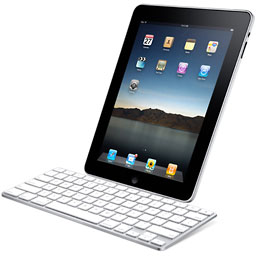 The iPad
will also connect to a dock via the dock connector and can be tethered
to another input device, such as the optional keyboard, with the
included iPad dock connector-to-USB adapter. The possibilities are
definitely there for using the iPad as more than a browsing and video
device, especially when you consider gaming or the possibility of doing
some extensive typing.
The iPad
will also connect to a dock via the dock connector and can be tethered
to another input device, such as the optional keyboard, with the
included iPad dock connector-to-USB adapter. The possibilities are
definitely there for using the iPad as more than a browsing and video
device, especially when you consider gaming or the possibility of doing
some extensive typing.
The iPad may not replace a 12" PowerBook as a fully functional
ultra-compact device, but it will definitely have a place in your home
as the in-between Mac that can do your light duty everyday tasks that
you have typically reserved for your notebook. Being able to do
everything a typical netbook and e-reader can do and much more - and
far better - from the comfort of your couch or bed with the ease of
simple touching and finger gestures will definitely make the iPad
something on everyone's wish list this year.

About LEM Support Usage Privacy Contact
Follow Low End Mac on Twitter
Join Low End Mac on Facebook
Favorite Sites
MacSurfer
Cult of Mac
Shrine of Apple
MacInTouch
MyAppleMenu
InfoMac
The Mac Observer
Accelerate Your Mac
RetroMacCast
The Vintage Mac Museum
Deal Brothers
DealMac
Mac2Sell
Mac Driver Museum
JAG's House
System 6 Heaven
System 7 Today
the pickle's Low-End Mac FAQ
Affiliates
Amazon.com
The iTunes Store
PC Connection Express
Macgo Blu-ray Player
Parallels Desktop for Mac
eBay

