
Apple, Tech, and Gaming
How to Connect Some VGA Macs to Analog HDTVs
- 2009.10.16 - Tip Jar
Rating: 
If you read my earlier article, Teaching an Old iMac Some New Tricks, you may have noted the potentials I mentioned in regards to connecting my iMac G3 to an external display within a home entertainment center. Potentially using a slot-load iMac G3 as a gaming device in conjunction with your HDTV is an option, courtesy of the VGA output on the iMac - but it won't be as easy as you think if you own an older TV.
A Roadblock
Unfortunately, the iMac G3 is going to be relatively limited when it comes to older Standard Definition (SD) CRT TV sets, as well as older HDTV sets that lack digital connections. The VGA port on the back of the iMac G3 can't simply be outfitted with a VGA-to-component video, S-video, or composite video adapter cable to output video to these older televisions.
The reason is that no CRT iMac G3 supports TV-out.
This does not mean that outputting the signal to an analog set is impossible, but it does mean that outputting the signal to an analog set is impractical for iMac G3s. For other machines, see the specs for your video card to see if it supports analog TV-out.
Differences in Technology
To explain this cryptic problem of TV-out and the connections used, you have to consider the fact that you are not comparing apples to apples when it comes to digital vs. analog. Displays and monitors with a digital connection will display the image from an iMac G3 just fine, although you may need an adapter if your digital display lacks a VGA input and uses another digital connection.
On the other hand, with older sets the iMac is speaking a foreign language that can't be translated without some help.
That's where converters and transcoders come into play. A converter can transform a digital or analog signal by fully converting it one way or another and re-imaging it clearly on your TV or display. It will usually scale the video to properly fit, and even alter resolution and refresh frequency while offering various input/output options. Some converters go even further, offering automatic image correction with artifact reduction, or they may allow you to manually fine-tune the image via an OSD (on screen display) interface. The result is typically clear, well-defined text, and lossless picture quality.
A transcoder, on the other hand, simply takes a video signal and outputs the identical image fit to your display or TV without scaling using a different connection (i.e., VGA to component video). This process simply stretches the image out as necessary to fit your TV, usually resulting in a different picture than you may see on your built-in monitor. You usually wind up with grainy video and out of focus text.
As you can see, a converter is much more capable, but much more complex - and a much more costly solution!
The Converter Value Equation
Given the residual value of an iMac G3 (and considering the cost of most converters), it's not practical to purchase a converter - especially to use with an analog set. Video converters with scaling are expensive - most in the $200 to $400 range (some are even more!). It's not a wise investment to spend that much cash on sending a digital signal to an analog set given the pricing on digital flat panels. A 32" LCD 1080p 120 Hz display with VGA input can be had for around $600. I even saw a refurbished 720p 60 Hz 32" flat-panel Vizio for $300!
The easy solution: If you want to output the video from your iMac G3 (or from any other device with a digital connection such as VGA, but without TV-out) to an external display such as a HDTV, make sure the display has a VGA, DVI, or HDMI connector, since these connections are purely digital. That way the path remains digital - eliminating the need for converters (you might just need an adapter - a minimal expense).
Experimenting with TV-out
Before writing this article, I tried to experiment with a device referred as a VGA to Component Video Converter to see if video could be sent through the VGA port on the iMac and transformed to a component video signal that could be displayed on my CRT 1080i HDTV (this was before discovering the difference between a transcoder and a converter).
As previously stated, the iMac G3 can't output an analog signal, but after looking around I thought that the Sabrent TV-PCCT VGA to Component Converter (sold at ayagroup.com for $39.99) would do the job. I contacted ayagroup and decided to review the device. More on that shortly... .
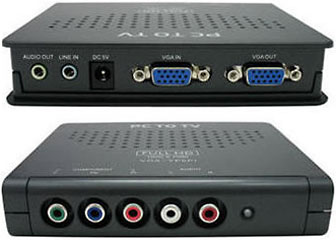
Sabrent TV-PCCT VGA to Component Converter
Through research, I later found that this device indeed was a transcoder, rather than a converter, so it could not fully scale a digital source to an analog display.
Confusing Terminology
Be careful when purchasing such devices, because the word converter gets thrown around a lot. Yes, you are converting something in all transcoders and converters (whether it's the signal, the connection, or both). Unfortunately, to the consumer all of these devices are typically marketed as "converters", giving you the impression that it can fully transform the signal. In no way is this the fault of the reseller. It's simply a case of marketing lingo crossing paths with technical terminology.
To break down the confusion, just look for the key words "scaling" or "scaler" when purchasing any such device if you wish to fully convert a digital signal to analog and retain high quality. If the product description mentions neither and the unit is well under $144 new (the cheapest digital to analog converter with scaling that I could find), it's likely a transcoder and will not convert signal formats. I did happen to find a VGA-to-HDMI converter/scaler on eBay for around $80, but I'm not sure if you can then output the signal to a 1080i TV using an HDMI to component video cable. It's a project for another day and something to consider...
Using an Affordable Transcoder Practically
Since it was a no go for the iMac G3 using the Sabrent VGA to HDTV Converter (transcoder), I decided to experiment using my other machines that had built-in TV-out capabilities to see how the Sabrent unit could handle an analog signal converted from VGA to component video. I tried connecting my 15" 1.67 GHz hi-res PowerBook G4 and my PowerBook G3 "Pismo" 400 MHz to this versatile device.
If your machine has analog TV-out capabilities but your TV lacks digital ports, this device could be right for you. Don't expect the same video quality you see on your computer display.
Initial Impression
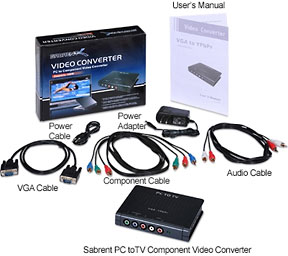 The Sabrent VGA to Component Converter is
versatile. It can take any video source you throw at it (both PAL and
NTSC) and output the signal to a display via component video or VGA.
Just make sure your video card has TV-out capabilities if you want to
display any analog video on your HDTV with component cables.
The Sabrent VGA to Component Converter is
versatile. It can take any video source you throw at it (both PAL and
NTSC) and output the signal to a display via component video or VGA.
Just make sure your video card has TV-out capabilities if you want to
display any analog video on your HDTV with component cables.
The unit has a selector switch that can change between display resolutions from 480p to 720p to 1080i. It also has preset display enhancement settings (colorful, bright, sharp) and a pass through VGA output. You can even input and output the audio with the included stereo mini jack to stereo mini jack, or you can output with standard RCA audio cables. This was a nice feature.
The unit comes with a power supply and all needed cables: VGA, component video, stereo mini jack to stereo mini jack, and RCA audio cables are all included! With pack-ins considered, this unit is a great value. The only shortcomings are build quality and the lack of clear documentation and product description.
The unit feels a little cheap, but for just $39.99 with all the included cables, it's a minor complaint. In fact, I found this to be the most affordable transcoder on the market, so that's definitely a plus for all of us on the low end.
The lack of clear documentation and product description was a bit more annoying. It conflicts itself and first states that the unit will work with any OS. Another bullet point in the manual lists system requirements being only Windows/DOS based computers. Trust me - it works with a Mac.
The other problem is not clarifying that this is a transcoder rather than a converter. It's a transcoder, it doesn't scale, and you need a video card with TV-out capabilities to output an analog signal from a computer. It's too bad this unit can't scale the signal. It would be the cheapest solution on the market by far!
Testing
Below are the results I witnessed using the Sabrent "Converter." My TV is a 26" CRT Samsung 1080i widescreen HDTV manufactured in 2003 with component, S-video, and composite connections (model TXN2670WHF). I opened a Microsoft Word document, launched my Firefox home page, and played a segment from Lord of the Rings: The Two Towers in each test. The hi-res PowerBook G4 is running Leopard (Mac OS X 10.5.8), while the Pismo is running Tiger (OS X 10.4.11).
Results with PowerBook G4 1.67 GHz hi-res 15"
Anything on the 15" hi-res PowerBook G4 looks amazing using its built-in display. So amazing at 1440 x 960, that you forget how spoiled you are when you have one. When you connect the Sabrent video device, you actually need an extra adapter, since the Aluminum PowerBook G4s have a DVI port. Since I have another rare piece of hardware, a Village Tronic VTBook that I bought some time ago for my Pismo (more on that another day), I already had the necessary DVI to VGA adapter that I made use of.
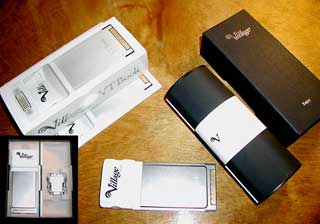 Using
this DVI-to-VGA adapter, I hooked up a VGA cable to the hi-res
PowerBook and sent the video out to the VGA to the Sabrent unit, and
then back to the TV via the included component video cable. The hi-res
G4 'Book immediately recognized my 1080i CRT HDTV (as a VGA display)
and mirrored the video. In 480p at 800 x 600, the "converter" produced
the best results, but without scaling. The images are not mirrored
properly, resulting in the menus at the top, and the Dock at the bottom
being partially off screen. This problem does not persist when using
the S-video output built into the PowerBook with the TV, since the
built-in video card provides scaling with analog TV-out while running
at 856 x 480.
Using
this DVI-to-VGA adapter, I hooked up a VGA cable to the hi-res
PowerBook and sent the video out to the VGA to the Sabrent unit, and
then back to the TV via the included component video cable. The hi-res
G4 'Book immediately recognized my 1080i CRT HDTV (as a VGA display)
and mirrored the video. In 480p at 800 x 600, the "converter" produced
the best results, but without scaling. The images are not mirrored
properly, resulting in the menus at the top, and the Dock at the bottom
being partially off screen. This problem does not persist when using
the S-video output built into the PowerBook with the TV, since the
built-in video card provides scaling with analog TV-out while running
at 856 x 480.
In 1080i, the resolution was a little sharper, but the blur from interlacing was apparent up close. My TV can't display 720p images, but I would imagine that a 1024 x 768 resolution selection would look nice and smooth with 720p selected using the Sabrent unit with a compatible display that may not necessarily have a digital connection, but available component video inputs. In my case, 480p was the best choice, as video is progressive (rather than interlaced), resulting in a smoother picture.
Overall the video from the Sabrent device looks decent, and although scaling is not available (as with any transcoder) and text isn't crystal clear (but certainly readable), 800 x 600 looks a little better in 480p mode from the Sabrent on a HDTV via component video compared to the S-video output from the PowerBook itself. This was slightly more evident with the video test. I would rate the performance here at about 7.5/10 compared to S-video at 7/10.
With a Pismo G3 400 MHz
The Pismo produced similar results, but it has different resolutions to select from than the hi-res while using built-in S-video in comparison tests. At 832 x 624 using the built-in S-video, the Pismo delivered a very good image. Words seem to appear more clearly than from the hi-res G4 (possibly this resolution and my TV), and video was very smooth at this setting. Under the options for the TV as a monitor, you can even enhance the screen image slightly further by selecting "Best for Video."
In this comparison test, with the resolutions from the Sabrent at both HD settings I was able to test (1080i, 480p) through a component video connection, results were identical with those from the hi-res. Selecting 800 x 600 in 480p mode still seemed to be the best choice with the Sabrent unit. When comparing this image to the scaled S-video output with the Pismo, it was a tough call. I'd rate the S-Video at 832 x 624 an 8/10 with the component video at 800 x 600 at 480p (still the best for this configuration) once again a 7.5/10.
Summary and Overall Rating
The Sabrent VGA to Component Video Converter (transcoder) is a great value and provides better video quality at higher resolutions with older HDTV units compared to S-video output. It's definitely worth $39.99 if you lack a digital connection on your TV and you want another option other than S-video. It may work better with your TV if you can display it in 720p, so give it a try, but don't count on crystal clear text or a perfect picture. That's not what the unit is designed for.
Overall, the device does what it advertises and converts a VGA
signal to component HDTV, but once again, make sure your machine has a
video card capable of TV-out if you want to use this to connect to your
TV that lacks a digital connection. Also, your TV needs a minimum of
480p to display the image. An old CRT 4:3 TV that displays images in
480i will not work with this unit.

About LEM Support Usage Privacy Contact
Follow Low End Mac on Twitter
Join Low End Mac on Facebook
Favorite Sites
MacSurfer
Cult of Mac
Shrine of Apple
MacInTouch
MyAppleMenu
InfoMac
The Mac Observer
Accelerate Your Mac
RetroMacCast
The Vintage Mac Museum
Deal Brothers
DealMac
Mac2Sell
Mac Driver Museum
JAG's House
System 6 Heaven
System 7 Today
the pickle's Low-End Mac FAQ
Affiliates
Amazon.com
The iTunes Store
PC Connection Express
Macgo Blu-ray Player
Parallels Desktop for Mac
eBay

