
Apple, Tech, and Gaming
5 Best Sub-$1,000 Mac Notebooks for Gamers
- 2009.09.25 - Tip Jar
As we found when choosing the top 5 sub-$1,000 Mac desktops for gaming, you have to really analyze what is the best overall value for the typical gamer - and which Macs can give you the most bang for your buck in terms of gaming.
The same holds true for notebooks.
If you want gaming on the go for the lowest price possible, you may have to rely on slightly older technology that still has enough processing and video muscle to handle your needs. This isn't necessarily a bad thing, but it could present a problem if you want to play the latest games.
On the other hand, if you really want to play the latest games, take advantage of running Mac OS X 10.6 "Snow Leopard", and use the latest applications, you need an Intel Mac. Choices become limited in the sub-$1,000 price range for good Intel-based gaming portables, but options are available. For the gamer, an Intel Mac opens up a whole new door of possibilities.
In either case, there are some basic things to think about before purchasing a system if you are a gamer - compatibility, processor, GPU (graphics processing unit), and VRAM (video memory). These items are typically not upgradeable, as in the majority of other products traditionally sold by Apple (with the exception of Power Macs, Mac Pros, and a few other outliers). Hard drives, RAM, networking, and peripherals can always be added or upgraded/maxed out later, so that is not a primary concern.
Important Questions
Here is a list of questions/answers to go over before making your purchase:
Do you want OS 9 gaming?
If so, you should get a unit that is capable of booting into Mac OS 9. Research it if you aren't sure.
Do you want to play any Windows based games?
You need an Intel machine.
Were you thinking about buying an early MacBook to play games on, since they're such as great deal and can be found for about $500 these days?
Don't do it! Steer away from MacBooks manufactured before October 2008. You'll be disappointed in your gaming experience on these earlier MacBooks with integrated Intel GMA graphics.
Do you already have some games in mind that you really wanted to play?
Look at the processor requirements and video requirements for these titles first before buying a system. If the title was designed to play in OS 9 and you buy a machine that can't dual-boot (that is, run OS 9 and OS X), you may be disappointed in performance under "Classic Mode" in OS X compared to what you would have had running the game natively. Games designed for Windows won't play well - or won't play at all - in Virtual PC. This is something to consider if you are thinking about a PowerPC Mac.
To each his own, but without further delay, I give you the best gaming Mac portables under $1,000:
#5 PowerBook G3 'Pismo'
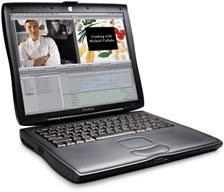 The Pismo is
the most rugged, expandable, and versatile Mac notebook ever built. A
used unit in good shape can be had for $100 to $300 (G4 upgraded units
go for a premium). At first, I found it difficult to justify this
machine as a good gamer's unit, given the dated technology and
8 MB of VRAM, but after doing some research, I wrote Gaming on a Pismo PowerBook.
The Pismo is definitely a great OS 9 gaming machine - it can even
run the commercially sold VGS
(Virtual Game Station) Sony Playstation emulator with ease.
The Pismo is
the most rugged, expandable, and versatile Mac notebook ever built. A
used unit in good shape can be had for $100 to $300 (G4 upgraded units
go for a premium). At first, I found it difficult to justify this
machine as a good gamer's unit, given the dated technology and
8 MB of VRAM, but after doing some research, I wrote Gaming on a Pismo PowerBook.
The Pismo is definitely a great OS 9 gaming machine - it can even
run the commercially sold VGS
(Virtual Game Station) Sony Playstation emulator with ease.
VGS allows you to play original Playstation discs at full speed on your Pismo in OS 9 (VGS will even run well on a Clamshell iBook). It was developed by Connectix and can still be found on eBay, Amazon, and other online resellers from time to time. It is compatible with most games, bringing the Pismo's library to hundreds of great titles - if you can track down a copy.
If you're interested in a Pismo, check out Low End Mac's Best PowerBook G3 Prices.
#4 1 GHz Titanium PowerBook G4
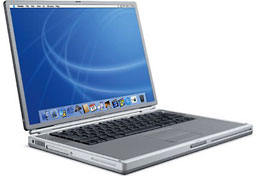 This was the last PowerBook G4 that could
dual-boot, and hence it is the fastest dual-boot Mac notebook (an
867 MHz unit was also available). With its fast 1 GHz processor,
this "TiBook" is capable of running Leopard if needed. These machines
run a wide variety of games and software, allowing you great utility
still today.
This was the last PowerBook G4 that could
dual-boot, and hence it is the fastest dual-boot Mac notebook (an
867 MHz unit was also available). With its fast 1 GHz processor,
this "TiBook" is capable of running Leopard if needed. These machines
run a wide variety of games and software, allowing you great utility
still today.
On gaming, this TiBook will play everything from early classics to some midrange titles, such as Diablo II and Battlefield 1942. Shooters like Quake III Arena and Return to Castle Wolfenstein should play quite nicely at high frame rates!
It's too bad that this was the last dual-boot PowerBook, since the later Aluminum PowerBooks had Core Image capable video cards and fast enough processors to run modern games. The only major drawback for Titanium PowerBooks is the hinges, which are prone to quick failure under average to heavy use. A 1 GHz TiBook can be found for about $400. They still seem to command a bit of a premium for being dual-boot machines.
If you're interested in a TiBook, check out Low End Mac's Best Titanium PowerBook Prices.
#3 1.67 GHz hi-res Aluminum PowerBook G4
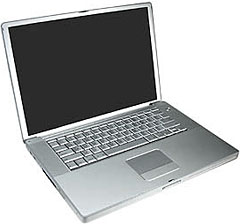 This was the last
PowerBook, period. It marked the end of an era with the PowerPC
chip. The 1.67 GHz hi-res PowerBook G4 is simply an amazing machine
with its 1440 x 960 resolution (15" model) or 1680 x 1050 resolution
(17" model). The 15" model can be found for less than $500 on eBay from
reputable Power Sellers with high feedback ratings. It's truly a great
value, and equipped with a Radeon 9700 (128 MB of VRAM), ambient
lighting sensor, backlit keyboard, fast dual-layer SuperDrive, and
more. It's as good as it gets for a PowerPC based notebook.
This was the last
PowerBook, period. It marked the end of an era with the PowerPC
chip. The 1.67 GHz hi-res PowerBook G4 is simply an amazing machine
with its 1440 x 960 resolution (15" model) or 1680 x 1050 resolution
(17" model). The 15" model can be found for less than $500 on eBay from
reputable Power Sellers with high feedback ratings. It's truly a great
value, and equipped with a Radeon 9700 (128 MB of VRAM), ambient
lighting sensor, backlit keyboard, fast dual-layer SuperDrive, and
more. It's as good as it gets for a PowerPC based notebook.
If you want to know more about this machine and the games it is capable of, just check out Aspyr's list of Mac games or go to Apple's index of HYPERLINK "http://www.apple.com/games/" games. You will be surprised to find that many games are compatible with a high end G4, most notably Doom 3 and Quake 4. Apple even conveniently sorts games by universal or Intel only, making your search easier. It's too bad the PowerBook G5 never existed, which would have opened up some additional possibilities, but this next unit will make you feel like a "Pro."
If you're interested in a 15" or 17" Aluminum PowerBook, check out Low End Mac's Best 15" PowerBook Prices and Best 17" PowerBook Prices.
#2 Pre-unibody MacBook Pro
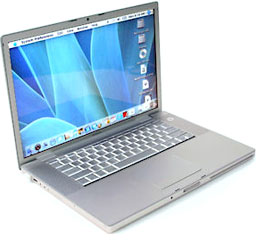 Wow,
look at that? Can you tell the difference between an early MacBook Pro
and the aluminum PowerBook G4 1.67 GHz? Aside from a few changes here
and there with the ports, there is virtually no difference in the case
until the unibody models arrived!
Wow,
look at that? Can you tell the difference between an early MacBook Pro
and the aluminum PowerBook G4 1.67 GHz? Aside from a few changes here
and there with the ports, there is virtually no difference in the case
until the unibody models arrived!
The major differences are under the hood. With dual-core Intel chips and much faster logic boards, these models are capable of playing OS X and Windows games, provided that you have installed a legal copy of Windows on a partition using Boot Camp or through applications such as VMWare Fusion. You have the best of both worlds and can play anything (except the aging library of OS 9 games) with a MacBook Pro.
Let's face it, gaming on one of these units is truly gaming on the higher end of the spectrum and gives you many more gaming possibilities than ever before. How many possibilities, and what unit is the best value under $1,000?
That question is tough to answer, but the practical answer is the earliest MacBook Pros. The first 1.83 GHz to 2.16 GHz Core Duo and 2.16 GHz to 2.33 GHz Core 2 Duo machines are (for the most part) the only ones in this product line so far that can be had used for under $1,000 without an exhaustive search. These are also the only MacBook Pros that are not fully supported by all features of Snow Leopard.
Anything newer than these early MacBook Pros can't be typically found for less than $1,000 - unless you are extremely lucky, or unless a problem or a various blemish persists here and there. Again, you have to bargain hunt. If you're lucky, or tech savvy, you may find a Penryn or Unibody MacBook Pro for under $1,000 that might just need some TLC - but be careful, you get what you pay for! The old saying persists here, "If it sounds too good to be true - it probably is..."
If you're interested in a 15" MacBook Pro, check out Low End Mac's Best 15" MacBook Pro Prices.
That's where I leave you off until I reveal the ultimate value for
portable Mac gaming under $1,000 - and the various runners-up that just
missed the Top 5 list - in Part 2.

About LEM Support Usage Privacy Contact
Follow Low End Mac on Twitter
Join Low End Mac on Facebook
Favorite Sites
MacSurfer
Cult of Mac
Shrine of Apple
MacInTouch
MyAppleMenu
InfoMac
The Mac Observer
Accelerate Your Mac
RetroMacCast
The Vintage Mac Museum
Deal Brothers
DealMac
Mac2Sell
Mac Driver Museum
JAG's House
System 6 Heaven
System 7 Today
the pickle's Low-End Mac FAQ
Affiliates
Amazon.com
The iTunes Store
PC Connection Express
Macgo Blu-ray Player
Parallels Desktop for Mac
eBay

