
Apple, Tech, and Gaming
5 Best Desktop Macs for Gaming for Under $1,000
- 2009.09.10 - Tip Jar
If you are on a budget and want to get a Mac desktop that is great for modern gaming - among other uses - here is a well-defined selection of desktop Macs that are up for the task and can be had well-equipped for under $1,000.
You will typically need a Mac that is capable of utilizing a strong graphics processing unit (GPU), Core Image technology, and AltiVec acceleration at the very least to truly maximize gaming possibilities. This narrows it down to an AGP-based G4 and above, although there is one runner-up that doesn't meet those specifications.
Evaluate your needs. If you want OS 9 gaming, select a G4 that can boot into OS 9 and make sure you have a GPU that will perform 3D acceleration in OS 9 if you do so.
If you want to play any games designed for Windows, make sure to get an Intel-based Mac with enough power to suit your needs.
With that said, here is a great selection of value priced Macs that will provide an excellent experience for today's average gamer.
The Top Five Value-priced Macs for Gamers
These Macs are all great performers and will double as a solid gaming platform. They are ranked by total gaming potential based on initial investment.
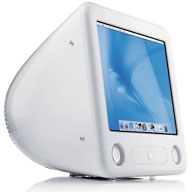
#5 - 1.42 GHz eMac G4 (2005)
 Few realize
what a 1.42 GHz eMac G4 is
capable of. At prices ranging from $169 to $299, you can get your hands
on one of the best values for the entry level OS X gamer. The
built-in 17" CRT is not too shabby at maximum resolution (1280 x 960),
and an external monitor is an option with an adapter. The big surprise
- a Radeon 9600 GPU with 64 MB of VRAM. It's not a powerhouse by
today's standards, but it is quite capable, and it supports Core
Image.
Few realize
what a 1.42 GHz eMac G4 is
capable of. At prices ranging from $169 to $299, you can get your hands
on one of the best values for the entry level OS X gamer. The
built-in 17" CRT is not too shabby at maximum resolution (1280 x 960),
and an external monitor is an option with an adapter. The big surprise
- a Radeon 9600 GPU with 64 MB of VRAM. It's not a powerhouse by
today's standards, but it is quite capable, and it supports Core
Image.
Thanks to the support of Core Image, Doom 3 runs at acceptable frame rates (24-30 FPS consistently on "low" with maxed out RAM). Although the 1.42 GHz eMac (barely) misses the 1.5 GHz minimum system requirements for Doom 3, it installs just fine using Pacifist.
If you are in the market for a 1.42 GHz eMac G4, look for one with a dual-layer SuperDrive, 2 GB of RAM (the max), and a 160 GB hard drive for the best long-term utility. An internal AirPort Extreme/Bluetooth module was also an available option when these were manufactured, so look for that as well for an added bonus. The 1.42 GHz eMac is truly a solid machine and a hard value to beat.
Had it included the same Radeon 9600 GPU as the 1.42 GHz eMac, the 1.5 GHz Mac mini G4 would have been a much better value, but unfortunately it was instead equipped with the Radeon 9200 (64 MB), which capable enough for decent gaming, but not Core Image capable, which is a requirement in some cases (such as Doom 3).
#4 - Power Macintosh G4 (Mirrored Drive Doors) dual 1.25 GHz FW 400 (2002)
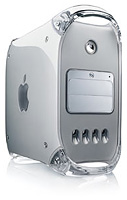 A strong argument can be made for the dual 1.25 GHz Power Mac MDD G4 (dual
boot), since it was the fastest and final Mac that could boot into
OS 9 - and it can also run Mac
OS X 10.5 "Leopard" quite smoothly with no upgrades (outside
of maxing out RAM to 2 GB). This gives a gamer the best of both
worlds and many possibilities.
A strong argument can be made for the dual 1.25 GHz Power Mac MDD G4 (dual
boot), since it was the fastest and final Mac that could boot into
OS 9 - and it can also run Mac
OS X 10.5 "Leopard" quite smoothly with no upgrades (outside
of maxing out RAM to 2 GB). This gives a gamer the best of both
worlds and many possibilities.
The MDD had many advantages over previous Power Mac G4 models, most notably a faster 167 MHz bus (vs. 133 MHz in the Digital Audio and Quicksilver). It also had large drive support (well over the previous 128 GB limit), higher RAM capacity (2 GB vs. 1.5 in DA and Quicksilver), and two internal optical drive bays for easy disc backup potential.
From an aesthetic standpoint, it's arguably the most eye-appealing of any Macintosh tower ever designed with its unique case, which included "Mirrored Drive Doors" and "wind tunnel" ports that helped vent the unit.
A dual 1.25 GHz MDD G4 (not the FireWire 800 version, which cannot boot into OS 9) currently sells for $200 to $400 from reputable resellers, and on eBay, typically configured with a stock SuperDrive, Radeon 9000 (64 MB) video card, and a120 GB HDD. You'll want to perform the following upgrades for a good gaming rig:
- Add a higher capacity hard drive if you need more storage.
- Add a fast dual-layer SuperDrive (16x to 20x) for faster disk access or for making backups.
- Upgrade the graphics card to one of the following:
- Radeon 9800 Pro (128/256 MB)
- GeForce 4 4600 Ti (128 MB)
- GeForce 7800 GT AGP.
- Max out RAM, as mentioned above.
These upgrades can all be had for about $250 to $400 based on your choices and will bring the total price of the system between $450 and $800. Look at your options closely. The GeForce 4 Titanium is a poor performer in OS X and doesn't do Core Image, but is the ultimate OS 9 graphics accelerator. If OS 9 gaming is not a top priority, pick up a Radeon 9200 PCI (128 MB) card to work in tandem with your AGP Radeon 9800 Pro or GeForce 7800 GT, giving you (almost) the best of both worlds.
The ultimate upgrade for the MDD G4 is the Sonnet Duet 1.8 GHz G4, but it's pricey at $599.95, and much better hardware can be had for the price of this upgrade alone. You're better off with the Sonnet Duet 1.6 GHz instead at nearly half that price, although consider that even a dual 1.6 GHz upgrade brings the total investment in a MDD G4 to $750 to $1,100 (assuming you added the other upgrades mentioned above). Check out the processor upgrades available from OWC.
Buyer's tip - be careful if you want a MDD that dual boots! The rule of thumb - if it came equipped with FireWire 800, you can't boot into OS 9. If OS 9 gaming is not important to you, I would suggest this next unit as a much stronger replacement.
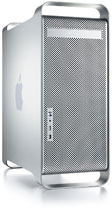
#3 - Power Macintosh G5 Quad 2.5 GHz (2005)
The Power Mac G5 Quad was the last Power Macintosh to be released. The Power Mac G5 uses the same, brushed aluminum case that the Mac Pro currently does. The G5 Quad has incredible processing power with four G5 processing cores, but sadly it falls short of recent Core 2 Duo iMacs with fast 2.66 to 3.06 GHz processors and is basically dead even with the new 2.26 GHz Mac mini, which is almost as capable in the graphics department when compared to the stock GeForce 6600 typically found in the Quad G5.
 Then why even
bother with a G5?
Then why even
bother with a G5?
Simple: It's more expandable.
These G5 monsters can hold up to 16 GB of RAM, along with several powerful video card options such as a GeForce 7800 GT (256 MB, or an Nvidia Quadro FX 4500 (512 MB). The G5 Quad handles HD video and heavy 3D games at full-screen resolution with ease with one of these video cards and is easily compared to early Mac Pros in terms of overall graphics performance.
The Nvidia Quadro 4500 FX with two dual-link DVI ports will even drive two 30" Apple HD monitors at full resolution for the ultimate designer's canvas or ultimate gamer's rig! That's one trick that the less expensive Mac mini can't do.
Overall, to make the most out of a G5 Quad, be sure to drop in a powerful video card, such as those already mentioned, increase your hard drive space (as necessary), and add RAM according to your needs (a 500 GB 7200 RPM SATA drive and 4 GB of RAM should be plenty for the average user). With Leopard and Tiger installed on separate partitions (or separate drives), you can accomplish most tasks designed for a PowerPC Mac at the greatest speeds possible.
In summary, if you want everything that the Mac Pro offers in terms of expandability for much less, and you are willing to forgo Snow Leopard and the ability to run Windows natively, get a G5 Quad! (A hackintosh doesn't count either - it's not a Mac.)
Buyer's tip: Look hard and be patient. You can find a great price on a well-configured G5 Quad for under $1,000. I saw one today on eBay with 4 GB of RAM, a GeForce 7800 GT, and 500 GB hard drive for $979! Protect your investment by purchasing from a reputable reseller and by purchasing an extended warranty if offered (i.e. - Squaretrade), since logic board failures in G5s are not uncommon.
#2 - 24" 2.16/2.33 GHz iMac Core 2 Duo (Late 2006)
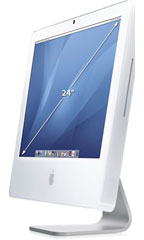 In the age of Snow Leopard, the older Intel machines are
becoming a bargain since they won't support every single feature Snow
Leopard has to offer. The first iMac 24" is no
exception, and although it can't support Open CL, this beast of a Mac
that was once over $2,000 can now be found for under $1,000 used. The
original 24" iMac even included FireWire 800, giving you some nice
high-speed external storage possibilities.
In the age of Snow Leopard, the older Intel machines are
becoming a bargain since they won't support every single feature Snow
Leopard has to offer. The first iMac 24" is no
exception, and although it can't support Open CL, this beast of a Mac
that was once over $2,000 can now be found for under $1,000 used. The
original 24" iMac even included FireWire 800, giving you some nice
high-speed external storage possibilities.
The best thing about this machine that can easily be overlooked and overshadowed by current hardware is its gaming capabilities. If you can find a 2006 24" iMac equipped with a GeForce 7600 GT (256 MB VRAM), you will truly have a gamer's machine. Avoid the GeForce 7300 at all costs - it pales in comparison to the 7600 GT!
Bare Feats performed a barrage of intense gaming tests on this supercharged graphics card. It outperforms some Mac Pros in gaming tests and completely smokes the GeForce 7300! The obvious bonus: The built-in 24" screen is awesome for gaming and DVD/Blu-ray viewing (Blu-ray will only play back in Windows with the needed tools found at fastmac.com). Also, since this is an Intel machine, you can take advantage of any Windows games that meet the hardware specifications the 2006 24" iMac offers (which are plenty).
This article is concluded in The Best Desktop Mac for Gaming and 3 Runners Up.
About LEM Support Usage Privacy Contact
Follow Low End Mac on Twitter
Join Low End Mac on Facebook
Favorite Sites
MacSurfer
Cult of Mac
Shrine of Apple
MacInTouch
MyAppleMenu
InfoMac
The Mac Observer
Accelerate Your Mac
RetroMacCast
The Vintage Mac Museum
Deal Brothers
DealMac
Mac2Sell
Mac Driver Museum
JAG's House
System 6 Heaven
System 7 Today
the pickle's Low-End Mac FAQ
Affiliates
Amazon.com
The iTunes Store
PC Connection Express
Macgo Blu-ray Player
Parallels Desktop for Mac
eBay

