
Those of you who wanted to spend good money on the Late 2009 27″ iMac should note that you can use Mini DisplayPort input to display a video signal on the iMac’s screen – a first for Apple. What you may or may not be aware of is the fact that the video signal must be a pure DisplayPort signal – you can’t simply input an external video signal using an adapter such as an HDMI-to-Mini DisplayPort cable or DVI-to-Mini DisplayPort, etc.
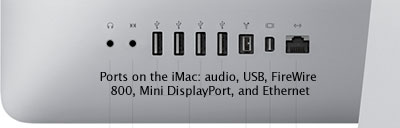
Ports on the rear of the Late 2009 iMac.
This creates a challenge, but since Apple’s 24″ LED display with Mini DisplayPort has been on the market for a little while now, it has given vendors the opportunity to come up with a few solutions to get around this roadblock. As of this writing, there are two solutions that can transform a video signal into a Mini DisplayPort signal.
Atlona’s Solution
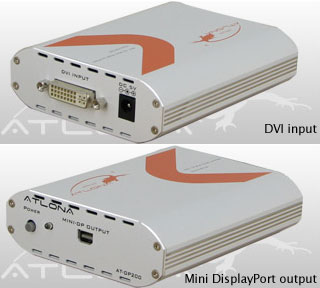
Atlona AT-DP200 DVI-to-Mini DisplayPort Converter
Atlona AT-DP200 DVI-to-Mini DisplayPort Converter
The first solution is the AT-DP200 DVI-to-Mini DisplayPort Converter by Atlona (right), which is fully compatible with the new 27″ iMac (as their site proclaims).
The AT-DP200 doesn’t scale images, which could present an issue to those looking forward to playing their PS3, Xbox 360, or Blu-ray videos on the new iMac. Atlona’s suggestion is to first pass the signal through their HDMI-to-HDMI scaler (AT-HD560) in order to scale, transform, and display these video signals properly. (The AT-DP200 currently sells about $160 from several sources, while the AT-HD560 sells for $369.99 at Amazon.com.)
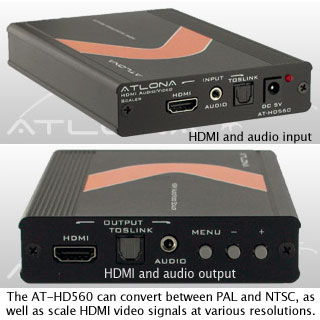
As you can see, Apple has created an expensive problem if you are interested in possibly using the new 27″ iMac as the centerpiece of your home entertainment center or as a gaming monitor with anything but a recent Mac in addition to being your amazing new Mac.
If you are not interested in using the 27″ iMac for anything but its primary purpose (a midrange but very capable computer), and also want to display the video from other devices (such as a Power Mac G4, Power Mac G5, or a PowerBook G4 with DVI video), it’s definitely possible with the second solution for converting a video source to a Mini DisplayPort compliant signal.
Gefen’s Solution
Enter the Gefen DVI-to-Mini DisplayPort Converter.
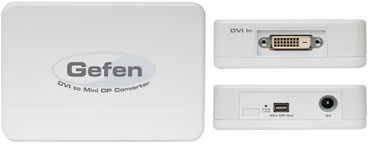
The Gefen DVI-to-Mini DisplayPort Converter doesn’t have as many features as the Atlona AT-DP200, but it retails for $30 less.
This device is less expensive than Atlona’s solutions at just $149 retail (currently a very reasonable $79.24 at Amazon.com) and would be useful if you simply wanted to use the new iMac as the display to anchor a PowerPC Mac with DVI, MacBook Pro (or other supported DVI device) to it, and make the ultimate combination of machines to conveniently switch between.
Wouldn’t it be strange (but fun!) to have a dual MDD G4 that is capable of booting into OS 9 displaying an OS 9 desktop on the new iMac?
The only major drawback to Gefen’s solution is no support for VGA devices or HDCP. A minor gripe would be the fact that the Gefen device only accepts one input resolution and only outputs one resolution (1920 x 1200 at 60 Hz). These limited options aside, the Gefen device looks like it could do the basic trick of transforming a DVI signal to Mini DisplayPort so that you could use your 27″ iMac for a few more purposes, provided that the input signal carries the required 1920 x 1200 resolution.
Only the Beginning
Both devices offer something different and may or may not be the right solution for you with the new 27″ iMac. It’s too bad Apple didn’t implement some sort of built-in solution (software or hardware) that would have simply transformed the video signal sent to the iMac’s Mini DisplayPort input via a simple adapter cable. On the flip side of the coin, you have to congratulate Apple for taking a step in the right direction by finally allowing the iMac to function as a display, something desired since the first iMac in 1998.
As for the signal conversion solutions, you have to consider that this is the first wave of such solutions. Although an all-in-one multi-format converter/scaler would have been nice from the start, I have to applaud Atlona, since the AT-DP200 is fully HDCP compliant, thus allowing Blu-ray to be viewed on the iMac without a Windows software solution (you will need a standalone Blu-ray player instead).
Using the iMac as a display is finally an option with these converters, and while somewhat expensive, they are not out of reach for the average consumer. The question remains, is it worth the extra investment to utilize that new 2560 x 1440 display of the iMac for multiple purposes (such as home entertainment)? And the second question that burns is, “What about Apple? Will Apple release its own solution?”
Whichever the case may be, options exist today for you to utilize your 27″ iMac for much more courtesy of the Mini DisplayPort input.
Keywords: #minidisplayportinput
Short link: http://goo.gl/DhWXxg
searchword: minidisplayportinput
