
Marketing the Mac
MacBook Air: Return of the PowerBook Duo?
- 2008.01.17
Imagine, if you will. You return home from class or work. You pull your MacBook Air from its bag and slide it into the MacDock sitting on your desk. Then you pull your iPhone from your pocket and slide it onto your iPod dock. The iPhone automatically synchs to your now fully featured MacBook Duo. iTunes loads and synchs the TV shows and movies that you downloaded on the Apple TV 2 that's connected to the HDTV in your living room. You backup and sync the files you were working on all day to the Time Capsule you have connected to your broadband modem.
You're now sitting at the center of the digital hub of your life, powered by Apple.
Three of the four missing pieces of this Apple "digital life" arrived with Steve Jobs' keynote at Macworld Expo 2008. The announcements of upgraded Apple TV software, the new MacBook Air, and Time Capsule filled in those three missing pieces. All that is left is information about - and the eventual release of - the MacDock.
Looking Back
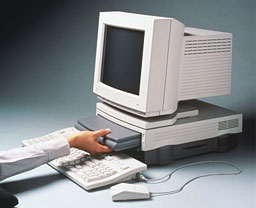
PowerBook Duo in the Apple DuoDock.
The path of product releases and design ideas leading to this all began 16 years ago with the introduction of the PowerBook Duo 210 and the DuoDock in October 1992. The concept of having a portable system that you could transform into a full desktop computer, just by sliding it into a dock, was light-years ahead of any laptop docking system available at the time.
The PowerBook Duos were designed with the idea that the people actually using them were more interested in doing their work than moving the files between computers. These subnotebooks lacked any removable drives and did away with all but the most basic ports: power and fax/modem.
What the Duos themselves lacked, the DuoDocks made up completely. The Docks included a slot that the Duo slid and locked into, slots for extra system and video RAM on top of that already in the Duo, a 68882 FPU, a floppy drive, two NuBus slots, room for a second hard drive, and all the external ports you would expect on any desktop Mac.
The entire Duo system offered a way to have your cake and eat it too. When away from your desk, you had a fully functional Mac laptop. When back home or in your office, you had a desktop Mac comparable to any other at the time.
The line eventually moved to the 68LC040 processor with the 280 and then the PowerPC 603e with the 2300. The line was discontinued in early 1997. The Duos lasted for five years, established a new way of thinking about portable computing, and set the standard for what a docking portable system should be.
Looking Forward
Fast forward 16 years to January 15, 2008. Steve Jobs announces the MacBook Air. In every respect, it is a modern-day Duo. It lacks any removable drives and all but the most basic ports: power, USB, mini-DVI, and a headphone jack.
However, unlike the sneakernet and slow-speed networking days of the original Duos, the framework for a drive-less and port-less laptop is finally available. With the prevalence of WiFi for networking, Bluetooth for device connectivity, and wireless networks virtually everywhere you go, the lack of physical connectivity is almost inconsequential. Optical drive needs can be met either with the external USB SuperDrive or Apple's new Remote Disc software.
The second half of the modern Duo system, the MacDock was patented by Apple on January 3, 2008. The patent application describes exactly what a modern DuoDock should be; an iMac with no guts. The drawings in the application show an iMac-like case with a cutout on the side for sliding in a laptop the size of the MacBook Air. As long as Apple releases this MacDock within the year and includes (at the least) a second hard drive and a built-in optical drive along with the missing ports, the Dock will totally complete the modern Duo system.
A lot has been said of the usefulness or niche marketability of the Air. They say a cheaper MacBook would do better for general use, or that for just a few hundred dollars more, they could have an even more capable MacBook Pro. What most of those voices seem to be forgetting is that, like the original Duo, the Air is perfect for the groups that would be buying it; students, business travelers, and journalists. Basically, anyone who absolutely requires portability but who doesn't need a full package while they are away from their desks.
The Air is a 'subnotebook' or 'ultra-portable'. It has all the parts it needs to fill that role, and none of the parts it doesn't.
I have been waiting years for a return to the Duo paradigm. Before my school newspaper upgraded to PowerBook 1400s, we had Duos. I fell in love with them then and have wanted a system like that for my personal use.
When I'm away from home, I just need something I can write with, watch movies and listen to music on, and surf the Web. The Air is light enough that I can carry it for long periods of time without straining myself, yet powerful enough that I can do everything I need a portable computer for.
Eventually Apple will release the MacDock that I'm waiting for, and
I'll have the complete package. A super-light and thin laptop, and a
nice big monitor with a full keyboard and real mouse . . .
all while never having to worry about the hassles of synching between
two computers. 
Join us on Facebook, follow us on Twitter or Google+, or subscribe to our RSS news feed
Robert Alpizar is a longtime Mac user.
Today's Links
- Mac of the Day: Power Mac 8200, introduced 1996.04.22. The minitower version of 7200 was never sold in America.
- Support Low End Mac
Recent Content
About LEM Support Usage Privacy Contact
Follow Low End Mac on Twitter
Join Low End Mac on Facebook
Favorite Sites
MacSurfer
Cult of Mac
Shrine of Apple
MacInTouch
MyAppleMenu
InfoMac
The Mac Observer
Accelerate Your Mac
RetroMacCast
The Vintage Mac Museum
Deal Brothers
DealMac
Mac2Sell
Mac Driver Museum
JAG's House
System 6 Heaven
System 7 Today
the pickle's Low-End Mac FAQ
Affiliates
Amazon.com
The iTunes Store
PC Connection Express
Macgo Blu-ray Player
Parallels Desktop for Mac
eBay

