Owning a Digicam: A Look at the Costs
Daniel Knight - 1999.12.29
I got the Canon PowerShot A50 I wanted for Christmas - and I like it a lot.
Background
I've been shooting with SLRs almost exclusively since 10th grade, which was about 25 years ago. I've owned several brands, finally switching to a Nikon N6006 a few years ago when I discovered I couldn't focus as well as I used to. I love my Nikon, especially the 28-200 zoom for general use and my fun lens, a 19-35 super-wide zoom.
But the Nikon is fairly bulky. Toting a camera bag with three lenses (even a 50/1.8), a flash, spare batteries, and film is a real job. I get great pictures, but don't use it as much as I used to.
Besides, I'm a webmaster. I want to take pictures for my site without the expense of film, so a digital camera looked like the way to go.
I settled on the PowerShot A50 because it has a good reputation, has the widest lens, and has a very attractive price (I've found it in stock for under US$400 several places). Better yet, it's the most compact zoom lens digicam on the market.
Review
The A50 is compact, although I has surprised it was so thick. It's like a slightly large Canon ELPH, the incredibly compact and cool APS camera.
The viewfinder is easy to use, even with glasses, and there's also a 2" LCD on the back which can be used while taking pictures or to review what you've shot. The controls are very comfortably arrayed and easy to learn. There's a bit more delay in taking a picture than I'm used to, but I'm learning how to work with that.
Probably my favorite feature is the rubber semicircular grip on the front of the camera. Not only does it make for great handling, but if you set the PowerShot down on its face, it's not going to slide anywhere.
But all is not rosy in PowerShot land. Before I filled the 8 MB CompactFlash card halfway, the low battery light came on. I've since learned that battery consumption is one of the banes of digital photography. (Turning off the LCD helps, but there is a lot of electronic circuitry in these things.)
Replacement lithium batteries generally go for $10-15 online, and the DK110 Power Supply Kit for $99 - although I've found a few places selling it for under US$80. (I ordered mine from The Photorium.)
Most sites recommend at least two rechargeable batteries, and more if you're going to be outside for most of the day. For our upcoming trip to Disney World, I'm contemplating buying two $40 batteries to supplement the one that comes with the DK110 kit.
Adding Up the Cost
Buying the camera is only the first expense of owning a digicam. At just over $380 shipped, I've got the heart of the system, but that's only the start.
First, you really do need rechargeable batteries. I recommend no less than two, so you can always have a replacement ready to use. In this case, that's another $120.
I want to shoot a lot of pictures, so a higher capacity CompactFlash card is a must. I managed to locate a 32 MB card for US$80 - and from the same firm that sells the DK110 kit for just under $80.
I could use the slow serial connection on my SuperMac S900, but will 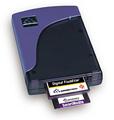 eventually
invest in a USB adapter - a whole lot faster, I won't have to turn off
the computer, and another US$80 or so investment. (I'll probably go
with the Microtech USB
CameraMate, which supports both CompactFlash and SmartMedia.)
eventually
invest in a USB adapter - a whole lot faster, I won't have to turn off
the computer, and another US$80 or so investment. (I'll probably go
with the Microtech USB
CameraMate, which supports both CompactFlash and SmartMedia.)
In the final analysis, I'll end up spending $280-320, depending on whether I buy one or two extra batteries. Add this to the cost of the PowerShot A50 itself, and it suddenly becomes a $700 investment.
Is It Worth It?
My wife keeps asking, is it worth it? If I'd looked at the total cost from the start, I might have said no. On the other hand, I can defer the cost of the USB CameraMate for a while if I'm willing to take my camera to work and download the images there.
But we have to look at the big picture. Maybe I'll shoot the equivalent of 10 24-exposure rolls this year. The film itself will cost maybe $2.50-3.00 per roll (I really like Kodak Max), then another $8-10 for developing. That's $120 per year I don't have to spend now - unless I want to use conventional film. So the first year pays for the DK110 kit and extra battery. And no need to drop off the film for developing, then pick it up later.
Beyond that, I have plans to do a lot of photography that would be inconvenient with a conventional camera. I have several web sites, including one that profiles the growth patterns of well over 100 area churches. I'd like a photo of each, including older buildings for those that have relocated. That's part of the reason I have a 19-35 zoom on my Nikon.
But I can shoot those on my PowerShot A50, which has the equal of a 28mm lens. And when that's not wide enough, I can stitch four shots together in a 2x2 grid to create the rough equivalent of a 14mm lens - something I would never dream of buying. And I can also create panoramas in software, showing the surroundings.
All this will be far easier than using my Nikon, having the negs digitized, and all the time and cost involved with that. In fact, I figure that project alone would cost about $800 in film and scanning, easily covering the entire cost of the PowerShot A50.
I would also like to do some of my own product photography for the Low End Mac site. I've got a nice collection of older Macs, some of which I don't have pictures of on my site. The digicam will make that easy.
In short, because I'll be doing a lot more than family snapshots and vacation pictures, it's easy to justify the cost of the camera and accessories.
And then there's the photo quality printer....
Further Reading
- Buying my digicam online, Dan Knight, Digigraphica, 12/21/1999
- Canon PowerShot A50 "Editor's Choice," Steve's Digicams, 12/27/1999