
Scribus: Free DTP on the Mac
Low End Mac Reader Specials
Memory To Go Special: MacPro 8 Core 8GB kit $232 / 4GB kit $116 / 2GB kit $72. New Macbook 2GB DDR3-$65. HARD DRIVES available -- Free shipping / LIfetime warranty.
Download Typestyler, still the Ultimate Styling Tool for Internet, Print and Video Graphics. Works great in Classic with a Native OS X Version on the way. Free Tryout: www.typestyler.com
LA Computer Company: Specials on AppleCare, iMac's, MacBook Pros and more. Optical Drives for Apple iBooks, Powerbooks, MacBooks, MacBook Pros in Stock. Call 1-800-941-7654 Click Here.
OWC: Premium Memory for Mac without the Premium Price. DDR2 4GB from $47.99, DDR3 4GB for Unibody $79.99, Mac Pro 4GB $97.99. Expert Support, Free Installation Videos & Guides. www.MacSales.com
Don't install Parallels to play poker online! Poker Mac will show you how
to download and install a native Mac poker application such as Full
Tilt Poker Mac.
Laptop Hardware Provided by TechRestore - Overnight Mac & iPod Repairs.
Compare products like desktop computers, apple laptops, apple macs, and LCD Monitors side by side! All the information and reviews to make the best purchasing decision for new mobile phones, sat nav systems, or MP3 players. The Ciao online shopping community makes searching products easy for you.
- 2004.12.21
Jason Walsh examines Scribus, an intriguing alternative to the overpriced behemoths of Quark XPress and Adobe InDesign.

You've installed X11, downloaded Fink and FinkCommander (see Preparing for Scribus: Working with X11 and FinkCommander). Now it's time to install Scribus.
Launch FinkCommander and type "Scribus" into the dialog, click "Install Binary packages," and agree to any dependencies. Now sit back and wait. Eventually FinkCommander will inform you that it has finished installing the application.
Open X11 and type the full path of the address in the terminal:
/sw/bin/scribus
Aqua Launch
As Scribus requires X11, it also requires that you launch X11, open a terminal, and type "/sw/bin/scribus" in the terminal to get it to launch. Not very Mac-friendly.
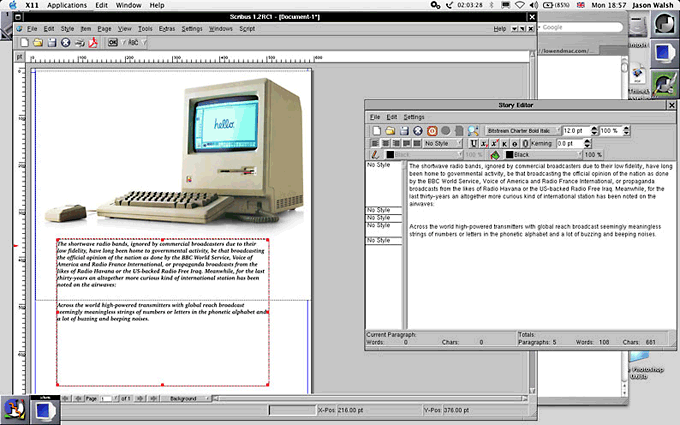
World Tech Communications felt similarly and developed AquaScribus, a handy little app that you can put in the dock and use to launch Scribus directly.
|
Once up and running, Scribus performs pretty much like every other frame-based layout application. Like MLayout (see Killing Quark: Three Layout Alternatives), its interface seems to be modeled on Quark XPress, so most users will be able to hit the ground running. Create a page, draw a frame, import your image or text - so far, so ordinary.
CMYK
The real test of any professional layout application is can it handle CMYK separations, and, if so, how well This has long been a thorn in the side of the free-software and open-source movements.
For example, GIMP (see Bring Out the GIMP), the would-be Photoshop competitor, has poor CMYK support due to patent issues. Many Linux geeks, knowing nothing of the worlds of professional prepress and design ignore these problems and endlessly promote the likes of GIMP for tasks which it is simply not capable of.
So how does Scribus deal with CMYK? By using a trick to separate the colors into four single channels. This is invisible to the user and works flawlessly, as far as LEM's tests went.
The downside of this is that the Linux geeks have now retaliated by saying that the GIMP's RGB images can be used in Scribus and exported to CMYK in Scribus. Well, sure they can - as long as you don't care about decent output, color matching, and working in a properly color-managed workflow.
The Good, the Bad and the Very, Very Ugly
Scribus is a fine application and for anyone wanting to get started on desktop publishing and layout. In interface terms, it's pretty similar to Quark XPress, and as Quark remains the industry standard, this is certainly a good thing. Some items are located in curious places, and leading is referred to using (incorrect) the word-processing term of "line spacing," but otherwise it's pretty easy to find your way around.
There are some ugly aspects to Scribus, but they're not the fault of the application as such. The fact that it requires X11 makes using it somewhat irritating - AquaScribus goes some way to making life easier, but the fact remains that X11 lacks the polish of Mac-native software.
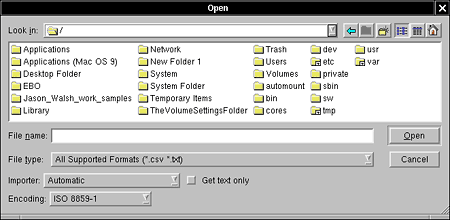
For example, the menu bar is attached to the window instead of the top of the screen - something which has long annoyed Mac-users trying to get to grips with Windows or Unix. Secondly, the file browser displays the entire disk structure including the files and folders hidden and obfuscated (below).
|
Fount of All Knowledge
When you start working with text in Scribus, you may be surprised - or alarmed - to find that none of your fonts are available. What's going on? Well, X11 doesn't have access to the Mac's font libraries, and X11's fonts are horrendous.
Far from being an X11 expert, I couldn't get fonts up an running before writing this piece, so expect a detailed how-to on X11 and fonts soon in the Low End Designer.
In the meantime check out the Scribus Mac OS X fonts page, according to which, "Scribus supports OpenType Fonts, but not in the DFONT format that Mac OS X uses. You can use fondu, a tool to convert fonts with resource forks, into a format which can be understood by X11. You are recommended to convert OpenType fonts into TrueType/OpenType fonts, to preserve all the glyphs."
The Future of Layout
Adobe's InDesign has been making huge inroads in design - particularly in the publishing industry. While Quark remains the de facto standard, Adobe's efforts mean that other programs, such as MLayout and Scribus, have been able to piggyback their way into design.
Having not yet tried Quark 6.5, I'm not in a position to comment on it, but InDesign is a great application, that remains expensive and has huge overhead. Scribus is free and has slightly lower raw power requirements than InDesign, but using X11 negates any speed benefits.
The Bottom Line
If you can afford to buy a commercial application, be that Quark, InDesign, or MLayout, you really should, even if only to ensure that you can open other people's files. The question is, all other things being equal, is Scribus up to the job of professional DTP? The answer is yes, with a few caveats.
The font problem is particularly troubling - but that's more to do with my lack of Unix knowledge, so hopefully we can report back to you with some success soon.
As a layout application, Scribus is fine, plus its PDF output is flawless.
Our final worry is that it doesn't support proprietary color standards such as Hexachrome or Pantone - and likely never will.
In the meantime, write in to the Low End Designer with your Scribus successes and failures.
Jason Walsh is a journalist and designer living in Ireland who has worked in design for several newspaper groups, including Mirror Group Newspapers. Walsh was art director at Gorgeous, a women's lifestyle glossy, and the East Belfast Observer, a weekly local paper.
Recent Low End Designer Columns
- The top Mac design applications of 2004, 01.10. What are the best Mac design programs released or updated in 2004?
- Scribus: Free DTP on the Mac, 12.21. "The question is, all other things being equal, is Scribus up to the job of professional DTP? The answer is yes, with a few caveats."
- Preparing for Scribus: Working with X11 and FinkCommander, 12.10. Two free tools that help get *nix software installed and running under OS X.
- ThinkFree Office: Slow, unpolished, yet useful, 12.01. Despite the name, this isn't free software, and it really calls for a higher end Mac, but it does the job.
- More in the Low End Designer index.
Links for the Day
- Mac of the Day: Clamshell iBook G3/300 MHz, Sep. 1999 - innovative, rugged, heavy, clamshell laptop introduced AirPort and was a huge hit.
- Group of the Day: G-Books is for G3 PowerBooks and iBooks.
- July 4 in LEM history: 00: When Randy met Mac - 08: Wouldn't life be great with an iSlate? - Mac Pro overclocking, Windependence with Darwine, Blu-ray for Macs, and more
Recent Content on Low End Mac
- iPhone 3GS Overheating, Battery Life App, 240 GB Upgrade for 5G iPod, Total Baby App, and More, iNews Review, 07.02. Also low cost international calls, U-verse remote DVR control, Sync Blocker USB-to-Dock cable, Rocket Taxi improved, and more.
- MacBooks Top Amazon Sales, EFI 1.7 Problems, Pros and Cons of Built-in Batteries, and More, The 'Book Review, 07.02. Also make a bootable SD Card, Leopard on a 9" Dell netbook, MacBook Pro and Air reviews, triple WiFi range, bargain 'Books from $179 to $2,300, and more.
- Apple Tops in Satisfaction Again, Slim Profits on Mac mini, Ultimate Photo Setup, and More, Mac News Review, 07.02. Also tips for cloning hard drives and moving files from old Macs, Clickfree Transformer turns USB drive into a backup drive, maximum Mac Pro RAM, and more.
- Refurb MacBook Pro Deal, Fastest Mac Browser, 256 MB Modules for WallStreet, and More, Charles W. Moore, Miscellaneous Ramblings, 07.01. Also more Safari 4 feedback, praise for Camino, MacBook cracks, looking for Craigslist software for Macs, and more.
- Amazon.com v. Interstate Sales Tax: Everyone Loses, Dan Knight, Mac Musings, 07.01. Amazon.com is standing up to states that are trying to have it collect sales tax on interstate commerce, which most see as a violation of federal law.
- Introduction to Autofs in Mac OS X, Keith Winston, Linux to Mac, 07.01. "Autofs is often used in enterprise environments to set up network-based home directories and other network mounts for users at login."
- Optimized Software Builds Bring Out the Best in Your Mac, Dan Knight, Online Tech Journal, 06.30. Applications compiled for your Mac's CPU can load more quickly and run faster than ones compiled for universal use.
- Checking Out Safari 4 on an Old PowerBook, Charles W. Moore, 'Book Value, 06.30. Safari 4 is the fastest it's ever been, but it's not without some frustrating drawbacks.
- Intel's Promise Fulfilled: More Processing Power per Processor Cycle, Dan Knight, Mac Musings, 06.30. Apple promised improved CPU efficiencies when it announced the move to Intel in 2005. Three years of MacBooks show the progress.
- Is Steve Jobs' Health Essential to Apple's Future?, Frank Fox, Stop the Noiz, 06.30. Steve Jobs' health is an important thing, but Apple has demonstrated that it can be profitable without him.
- More links in our archive.
Recent Deals
- Best Mac Pro Deals, 07.02. Used 3 GHz 4-core, $2,000; 3.2 8-core, $2,900; refurb 2.8 8-core, $2,399; new 2.66 4-core, $2,290 a/r; 2.26 8-core, $3,070 a/r; 2.66, $4,499; more.
- Best Mac OS X 10.4 'Tiger' Deals, 07.02. Full version DVD, $140; 5 user family pack, $370; 10-user Server, $299.
- Best 17" PowerBook G4 Deals, 07.02. Used 17" 1 GHz PowerBook, $689; 1.67 GHz, $749; hi-res, $1,029.
- Best Xserve Deals, 07.02. Used 2 GHz single G5, $800; dual, $1,000; refurb 2.8 GHz 4-core Xeon, $2,100; new 2.26 4-core Nehalem, $2,888; 8-core, $3,449; 2.66, $4,799; 2.93, $5,999.
- Best iPod touch Deals, 07.01. Refurb 2G/8 GB, $179; 16 GB, $259; iG/32 GB, $279; new 2G/8 GB, $215; 1G 16 GB, $210; 2G, $275; 2G/32 GB, $369. Prices include shipping.
- Best 13" MacBook & MacBook Pro Deals, 07.01. Used 1.83 GHz, $595; 2.0, $629; new 2.0, $889; 2.13, $925 after rebate; refurb 2.0 Unibody, $949; 2.4, $1,099; new 2.26 MBP, $1,119 a/r; more.
- Best 12" PowerBook G4 Deals, 07.01. Used 867 MHz Combo, $400; 1.33 GHz, $448; 1.5 GHz, $599; 1 GHz SuperDrive, $509; 1.33 GHz, $599; 1.5 GHz SD, $679.
- Best Apple TV Deals, 07.01. Refurb 40 GB Apple TV, $199; new, $220; refurb 160 GB, $279; new, $320. Prices include ground shipping.
- Best G4 iBook Deals, 06.29. Used 12" 800 MHz Combo, $290; 1 GHz CD, $299; Combo, $370; 1.33 GHz, $428; 14" 1 GHz Combo, $399; 1.2, $465; 1.42 GHz, $500.
- Best Mac OS X 10.0-10.3 Deals, 06.29. Mac OS X 10.0, $30; 10.1, $20; 10.2, $60; 10.3, $50; 10.3 Server, unlimited users, $130.
- Best Power Mac G3 and PCI Video Card Deals, 06.29. Used beige 300 MHz, $25; G4/366, $39; blue & white 350, $80; 400, $90; 450, $105; PCI video cards from $15; shipping additional.
- Best Time Capsule and AirPort Deals, 06.29. Close-out 500 GB Time Capsule, $199; 1 TB, $350; AirPort Extreme Base Station, $130; refurb AirPort Express, $85.
- More deals in our archive.
About LEM | Support | Usage | Privacy | Contacts
Navigation
Used Mac Dealers
Apple History
Video Cards
Email Lists
Favorite Sites
MacSurfer
MacMinute
MacInTouch
MyAppleMenu
InfoMac
Macs Only!
The Mac Observer
Accelerate Your Mac
RetroMacCast
PB Central
MacWindows
The Vintage Mac
Museum
DealMac
DealsOnTheWeb
Mac2Sell
ramseeker
Mac Driver Museum
JAG's House
System
6 Heaven
System 7 Today
the pickle's Low-End
Mac FAQ
Abandonware
Petition
Mac vs. PC Info
Affiliates
The Apple
Store
Mac
Connection
MacMall
TechRestore
ExperCom
Crucial
Memory
batteries.com
Have a question?
Ask an expert!
Advertise
MacMinute
MacInTouch
MyAppleMenu
InfoMac
Macs Only!
The Mac Observer
Accelerate Your Mac
RetroMacCast
PB Central
MacWindows
The Vintage Mac
Museum
DealMac
DealsOnTheWeb
Mac2Sell
ramseeker
Mac Driver Museum
JAG's House
System 6 Heaven
System 7 Today
the pickle's Low-End
Mac FAQ
Abandonware
Petition
Mac vs. PC Info
Mac Connection
MacMall
TechRestore
ExperCom
Crucial Memory
batteries.com
Ask an expert!


