
Back in November, we took a quick peek at Scribus running on Linux and promised to give it a go on the Mac. That’s what we’re doing today.
 First off, I would like to offer my apologies to Mac OS 9 users – and, for that matter, OS 8, 7, and 6 users. I am aware that sometimes this column strays from the true low end. Don’t worry, there’s more stuff coming up later, but this week and next week we’re defining low-end in purely financial terms – and you can’t get much cheaper than free, which is exactly what Scribus is.
For those of you at the back who haven’t been paying attention, Scribus is a free page layout application originally developed for Unix and now working on Mac OS X thanks to its BSD Unix underpinnings.
Publishers note: A reminder that this article was published in 2004, long before the Intel transition, back when 1.5 GHz PowerBooks were still considered pretty powerful.
In order to give Scribus a test run, we installed it on a 1.5 GHz PowerBook G4 running Mac OS X 10.3 Panther – not very low-end, I grant you, but next week when we really get our teeth into Scribus we’ll be checking it out on 233 MHz Rev B iMac and a 350 MHz Power Macintosh G3.
The Joy of X
Scribus first came to the attention of Apple-users in November 2003 when Small Biz Mac took a look at the free-software layout application. Its report concluded that “installing it on OS X . . . was too complex.”
Well, a year is a long time in computing, so what’s changed since then?
Quite a lot, as it happens.
First of all, X11 – the traditional Unix graphical user interface system – is now common on Mac systems, even though most users probably don’t know it’s there.
Secondly, installation has got a lot easier thanks to FinkCommander, a nice GUI tool for installing Unix applications on Macs.
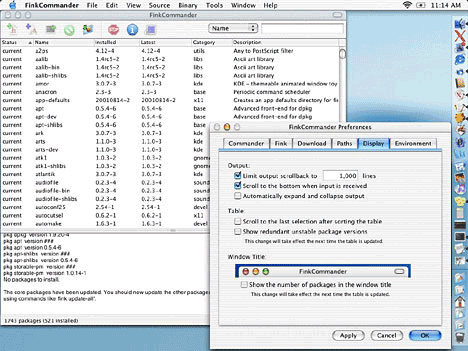
FinkCommander: A handy tool for installing free Unix software on Mac OS X.
FinkCommander is really easy to use. Simply drag the app to your hard disk and launch it. Anyone who has used Silicon Graphics’ Irix operating system will be familiar with the concept – it runs rather like Software Manager from that platform, grabbing files over the Net and installing them perfectly. Obviously FinkCommander can only install packages included in the Fink collection of free and open-source software, but there’s quite a lot of it to choose from.
First of all pop over to http://fink.thetis.ig42.org/ and download the latest Fink Binary Installer. Once this is installed, you’ll find a new directory named “sw” at the top level of your hard drive. Inside this is a microcosm of the Unix file structure, and the Fink-installed apps will live in the “bin” folder, which stands for binary.
Confused? Don’t worry – you don’t need to remember any of this.
Next zip along to http://finkcommander.sourceforge.net/ and download FinkCommander, then launch it.
In FinkCommander, simply type in the name of the app you want, click on Install Binary Package, and away you go. Needless to say, you’ll need to have a fast Internet connection.
Next week the Low End Designer takes a close look at Scribus on OS X and a handy little Aqua app that helps Mac-users feel more at home using it.
PREVIOUS: ThinkFree Office: Slow and Unpolished, Yet Useful
NEXT: Scribus: Free DTP for Macs
Keywords: #scribus #finkcommander #x11
Short link: http://goo.gl/s8Xvob
searchword: prepareforscribus
