
Text and Typography: Leading, Kerning, Tracking, and Justification
Low End Mac Reader Specials
Memory To Go Special: New 2008 iMac 2GB $42 / iMac Intel Core2 DUO & MacBook Pro 2GB $36 - 1GB $20. MacPro 8 Core Memory 8GB kit $286 / 4GB kit $143 / 2GB kit $93 -- Free shipping available. LIfetime warranty.
Download Typestyler, still the Ultimate Styling Tool for Internet, Print and Video Graphics. Works great in Classic with a Native OS X Version on the way. Free Tryout: www.typestyler.com
LA Computer Company: Specials on AppleCare, iMac's, Apple Batteries and Apple A/C Adapters. Also Great prices on Used Apple Computers. Call 1-800-941-7654 Click Here.
OWC: Mercury Elite FW800/FW400/USB2/eSATA up to 2.0TB TOP-RATED Solutions offer High Performance, Reliable storage for all your data storage needs. 500GB $159.99, 750GB $199.99, 1.0TB from $299.99
Mac users can finally play Party Poker for Mac. Not only that, they can also learn how to play PokerStars for Mac.
Laptop Hardware Provided by TechRestore - Overnight Mac & iPod Repairs.
Compare products like desktop computers, laptops, and LCD TVs side by side! All the information and reviews to make the best purchasing decision for a new cell phone GPS products or MP3 players. The Ciao network makes searching products easy for you.
- 2004.10.20
This week the low-end designer tackles more typographic woes, including leading, kerning, tracking, and justification.
Before we launch straight into the new article, I'd like to take an opportunity to apologize to my readers (and editor) for the lack of a column last week. All I can say is, I've been reading your responses to the reader survey and great things are afoot! Now on with business.
Talking the Talk
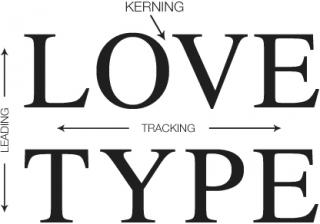
Typography is, from the perspective of newcomers, plagued with confusing terminology. On the other hand, the technical vocabulary does allow for serious and precise discussion and manipulation of text. Let's take a look at some of the key terminology.
Leading and Line Spacing
Leading isn't what you probably think it is. In fact it's pronounced "ledding," as in lead, the metal. In this case, lead is referring to the strips of lead once used to create space between lines of text in the days of mechanical typesetting.
In other words, leading is line spacing. It's purpose is to allow the designer to alter the density of blocks of text. Newspapers are quite dense and as such use a tighter line spacing value than you would find in magazines, brochures, or posters.
Page layout applications like Quark XPress, MLayout, and Adobe InDesign tend to use a default setting for leading of 120%. This means that 10 point text would be set with 12 point leading.
Every document will require different treatment, but here are some useful generalizations:
- Long lines of text may require extra leading.
- Bold face or sans serif type requires more leading.
- Type set at very small sizes, say 8 point or below, may require extra leading.
Leading affects the density of your page, so if your page seems a bit dark, try adding more leading.
Headlines may require negative leading, where type actually (or almost) overlaps.
The leading setting used will always depend on your type size. What size you set your type at will depend on the individual metrics of the font. For example, for body text in a publication, a relatively large font like News 701 could be set at 8 pt., whereas with Times you may want to go as high as 12 pt.
Kerning and Tracking
When a typeface is designed, the designer assigns each character a width allowing for consecutive characters to be placed on a line without touching. However, the type designer's intentions may not be the same as your own. Kerning and tracking are two frequently confused typographical methods for controlling type spacing. Both refer to the adjustment of space between characters of type.
Kerning allows you to manually adjust the space between any two characters. Tracking allows the user to apply a form of universal spacing between all characters. As such, it's a powerful option, and once you've found a setting that you feel is suitable, you'd be well advised to leave it alone and adjust the kerning manually for further changes.
Justifying Text
Text justification is a matter of opinion. My preference is for serious and news style material to be set fully justified (line ends creating a vertical line on both sides of the column). This contributes to a serious feel in the text.
Opinion-pieces, fictional stories and lighter pieces can be set flush-left (ragged-right), which creates a somewhat lighter look.
Centered, flush-right, and forced justification can produce interesting results, but are quite extreme settings - handle with care.
Fitting In
Take a close look at a newspaper, and you will notice that, unlike many magazines or posters, stories fit exactly into the allotted space with no white-space below the last line. This helps give a sober and professional feel to news pages, and obviously we want to replicate that in our design, so, what's the trick behind this?
Well, subtly adjusting the kerning and tracking will get you some of the way there, but the only way to perfect it is to edit (or "sub") the text to make it fit. This is one of the key reasons why pages are laid-out by sub-editors and not designers: An understanding of the rules of language and how to make a story flow well will go a long way.
Jason Walsh is a journalist and designer living in Ireland who has worked in design for several newspaper groups, including Mirror Group Newspapers. Walsh was art director at Gorgeous, a women's lifestyle glossy, and the East Belfast Observer, a weekly local paper.
Recent Low End Designer Columns
- The top Mac design applications of 2004, 01.10. What are the best Mac design programs released or updated in 2004?
- Scribus: Free DTP on the Mac, 12.21. "The question is, all other things being equal, is Scribus up to the job of professional DTP? The answer is yes, with a few caveats."
- Preparing for Scribus: Working with X11 and FinkCommander, 12.10. Two free tools that help get *nix software installed and running under OS X.
- ThinkFree Office: Slow, unpolished, yet useful, 12.01. Despite the name, this isn't free software, and it really calls for a higher end Mac, but it does the job.
- More in the Low End Designer index.
Links for the Day
- Mac of the Day: Macintosh LC, Oct. 1990 - only 3" tall, the LC was the least expensive color Mac in 1990.
- List of the Day: Mac OS 9 List covers Mac OS 9 as both a freestanding OS and as Classic mode in OS X.
- October 15 in LEM history: 90: Mac IIsi, LC, and Classic - 97: Yale threatens to drop Mac support - 99: Decelerate your Mac - Time magazine on Jobs and Apple - 01: Is Microsoft the enemy? - 02: Confessions of a Mac to PC convert - The IT job market - 03: Microsoft's holding pattern - 04: October 1990: The first low-end Macs - Dual core 'Books - 07: When to pick Tux - SteelSeries 4D the best mousepad ever? - Irrational rantings of an Intel hater
Recent Content on Low End Mac
- The October 2008 MacBook Value Equation, Dan Knight, Mac Musings, 10.15. Apple changed the entire MacBook lineup on Tuesday. How do close-out prices compare to the new ones?
- G3 and Low End G4 Mac Performance Comparison, Simon Royal, Mac Spectrum, 10.15. Factors that impact performance are the version of CPU, the size and speed of the Level 2 cache, and how much RAM is installed.
- The Good, the Bad, and the Ugly of Apple Design, Charles W. Moore, Miscellaneous Ramblings, 10.15. Apple has produced some beautiful computers and iPods over the years, but also a few of the ugliest and most ungainly computers ever seen.
- 3 Reasons to Use a Mac, and Pismo Troubleshooting, Charles W. Moore, Miscellaneous Ramblings, 10.15. Why one Windows user is also a Mac user, a Pismo that can't see its AirPort card, and sources of kernel panics.
- Best MacBook Deals, Low End Mac Deals, 10.15. Used 1.83 GHz, $649; 2.0 SD, $750; refurb 2.1 GHz, $849; 2.4, $1,049; black, $1,099; new 2.1, $869 after rebate; 2.4, $1,175 a/r; black, $1,194 a/r.
- Best 15" MacBook Pro Deals, Low End Mac Deals, 10.15. Used 2.0 GHz Core Duo, $1,000; 2.16, $1,100; refurb, 2.4, $1,349; new, $1,444 after rebate; refurb 2.5, $1,499; new, $1,644 a/r; refurb 2.6, $1,799; new, $2,594 a/r.
- Best MacBook Air Deals, Low End Mac Deals, 10.15. Used 1.6 80 HD, $1,200; refurb, $1,349; new, $1,549; 1.8 120, $1,999; 1.6 128 SSD, $2,299; used 1.8 64 SSD, $1,800; new, $2,100.
- MacBook (Unibody), 10.14. The MacBook gets the same aluminum treatment as the MacBook Pro - and dedicated GeForce 9400M graphics.
- 15" MacBook Pro (Unibody), 10.14. The new MacBook Pro's case is carved from a block of aluminum for increased strength.
- MacBook Air (GeForce), 10.14. More storage, a video port, and GeForce 9400M graphics improve the MacBook Air.
- MacBook White, 10.14. Entry-level white MacBook gets a SuperDrive, retail price reduced to US$999.
- Death of the iPod 'Way Off in the Future', Tim Nash, Taking Back the Market, 10.14. Someday Apple will decide that the iPod is no longer profitable and discontinue it, "but that day looks to be way off in the future."
- Best Intel iMac Deals, Low End Mac Deals, 10.14. Used 20" 1.83 GHz, $599; 2.0, $730; 2.16, $800; 24", $950; refurb 17" 1.83, $699; 20" 2.0, $949; 2.4, $999; 2.66, $1,299; 24" 2.4, $1,299; 2.8, $1,549; 3.06, $1,899; rebates on new.
- Best iBook G3 Deals, Low End Mac Deals, 10.14. Used 300 MHz clamshell, $150; 366, $199; 500 CD, $149; 800, $190; 600 DVD, $200; CD-RW, $240; 700 Combo, $250; 900, $369; 14" 600, $230; 900, $449.
- Best Classic iPod Deals, Low End Mac Deals, 10.14. Used 60 GB color, $150; used 30 video, $140; 80, $170; refurb 80 classic, $169; new 120 GB, $240; refurb 160 GB, $249; new, $280. New & refurb include shipping.
- Will Apple's Rumored $800 Notebook Be a Netbook?, Charles W. Moore, 'Book Value, 10.13. Netbooks are hot, and with the economy in turmoil, Apple needs to offer a netbook for the OS X crowd.
- Best Titanium PowerBook G4 Deals, Low End Mac Deals, 10.13. Used 667 MHz Combo, $480; 867 MHz, $530; 1 GHz, $590; SuperDrive, $900.
- Best Classic Mac OS Deals, Low End Mac Deals, 10.13. System 6, $10; 7.1, $12; 7.5.1, $4; Mac OS 7.6, $13; 8.0, $13; 8.1, $48; 8.5, $25; 8.6, $20; 9.0, $20; 9.2.2, $20; more.
- Best Xserve Deals, Low End Mac Deals, 10.13. Used G4/1 GHz, $999; G5/2 GHz, $1,499; new 2.0 4-core Xeon, $1,900; refurb 3.0 4-core, $2,299; 2.8 GHz, $2,599; 3.0 8-core, $3,499; 3.2, $3,699.
- More links in our archive.
About LEM | Support | Usage | Privacy | Contacts

