
2004 – One of the advantages of using a Mac is the wealth of software available for the platform. Of course, this runs contrary to common wisdom – the Mac is thought to be a poor cousin to Windows in terms of the number of applications available. This is literally true – there are many more programs available on the PC – but it ignores three key facts.
Firstly, all of the applications that are important for day-to-day usage, from Word to Photoshop, are available on the Mac. Not only this, but they are often superior to their PC namesakes.
Secondly, the vast majority of PC-only applications are dreadful. This is not just Windows-bashing. It’s a fact. Many inexpensive applications for Windows, such as you might find on a carousel at the local convenience store, are of amazingly low quality.
Thirdly, the Mac’s small market presence means that applications developed by small companies and shareware developers can make a splash in the marketplace proportionally greater than they could achieve on the PC. It is four such applications that we’re taking a look at today.
Publisher’s note: This article was written in 2004. Prices and capabilities of these shareware apps may well have changed since then.
GraphicConverter
GraphicConverter is only just a shareware app – that is, it is shareware, but it’s so popular that it could be boxed, shrink-wrapped, and sold for $200 and still remain popular.
Thankfully, Thorsten Lemke, the developer, doesn’t seem to want to go down that route. GraphicConverter is sold as an application that converts graphics files from one format to another, a task that it performs admirably. GraphicConverter imports about 175 graphic file formats and can export about 75 graphic file formats. This includes all of the usual formats (JPEG, TIFF, GIF, etc.) as well as more exotic formats used by Atari computers, Amigas, Silicon Graphics workstations, and the venerable Apple IIGS.
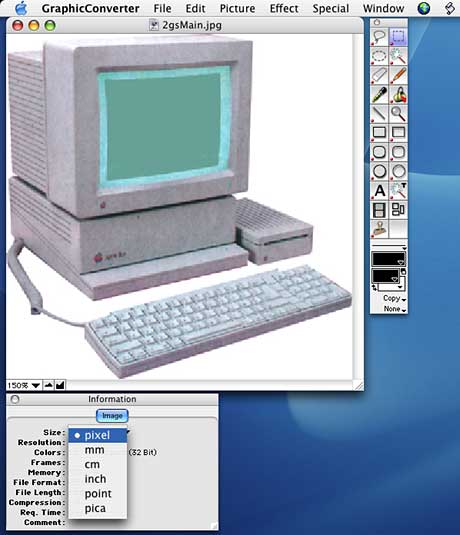
At a price of $30 (or $35 if you want a CD), this alone would make the application worth owning, but GraphicConverter is actually a full-featured bitmap editor in its own right. The program is limited to RGB files only, which means it’s not really a competitor to Photoshop, but it certainly gives apps like ColorIt! and Photoshop Elements a run for their money.
One of the best uses to which you can put GraphicConverter is shaving the file size of JPEGs and GIFs intended for the Web. The results are frankly excellent – better, in my experience, than even those created with Adobe ImageReady.
GraphicConverter is available for both OS X and the classic Mac OS, and if you have a PowerMac G4 or G5 or PowerBook G4, it’s worth checking your applications folder – Apple bundles GraphicConverter with pro Macs.
PDFCompress
Wow! This program’s name is almost enough of a review for this little app. Like many great low cost applications it only does one thing, but it does it so well.
PDFCompress, from MetaObject, reduces the size of Adobe PDF files, as the name implies.
I regularly produce PDFs in Quark XPress by using the built-in JAWS export. Many print professionals advise against this, preferring to use Adobe Acrobat, but for a quick and dirty PDF, that’s a bit too much hassle. The biggest problem with Quark’s PDFs is that they are huge.
Quark uses a rather literal interpretation of the PDF standard, and therefore Quark PDFs contain a lot of coding information that may not be necessary. If you are outputting to a press, this is good, but if you want to put light PDFs up on a website or email them to someone, it’s overkill.
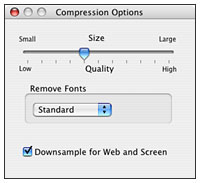 PDFCompress offers a few options, such as stripping out fonts, downsampling resolution, and so on (right), but really, in terms of user interface, Jef Raskin would be proud: Click and drag the PDF file and drop it on the application’s window. It really is as simple as that.
If you deal with PDFs, and who doesn’t these days, buying this program would be $27 well spent.
Art Directors Toolkit 4
Art Directors Toolkit is a handy suite of eight little applets that Apple has been bundling with Power Macs and PowerBooks for some time now. Perhaps you’ve never looked at it – or perhaps you don’t have it, as it isn’t supplied with iMacs, eMacs, or iBooks.
Art Directors Toolkit is a timesaving tool that helps designers get the information they’re looking for quickly. It includes tools for working out page sizes; conversions between metric and imperial measurements; color utilities for RGB, CMYK. and spot colors (below); font previewing; keyboard information; image scaling help; and layout previewing.
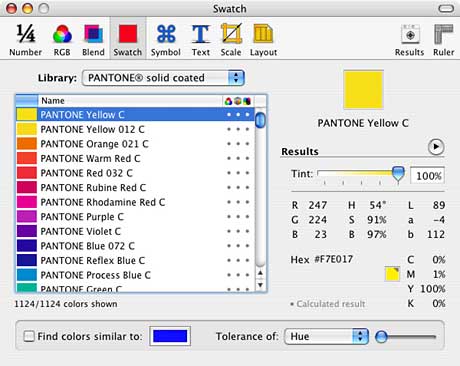
The developers, Code Line, describe it as a sort of calculator for designers, and that’s a pretty good analogy. Art Directors Toolkit is not in any way an essential app, but it really does make the chores of design work so much easier. ADT costs $29.95 for the full app or $14.95 for an upgrade from a prior version. If you’re using Mac OS 9, Code Line will happily supply ADT version 3, though unfortunately at no discount.
TypeStyler 3.7
Last, but certainly not least we come to TypeStyler. Anyone designing flyers, advertisements, or other such “jazzy” material will soon require styled text. Purists will balk – myself included on occasion – but sometimes it just has to be done, so why not make it easy on yourself?
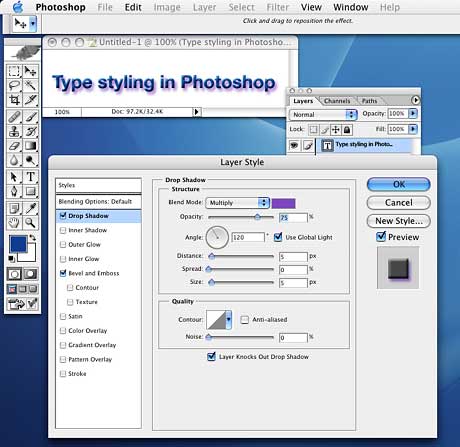
The traditional way to quickly knock up styled text is to use Photoshop (above) or Illustrator. Both are fine apps with complex blends and effects, but TypeStyler offers all of these functions – and more – with a more intuitive text-centric interface.
At present [2004] TypeStyer is not Mac OS X native. However, it functions just fine in the classic environment, and an OS X version is on the way.
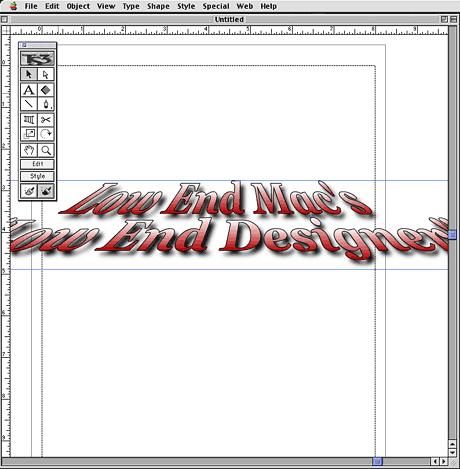
The user-interface is instantly comfortable for Mac-based designers. TypeStyler (above) is very Adobe-like in its UI, being most reminiscent of Adobe Streamline or Illustrator.
TypeStyler is a powerful tool, and like all powerful tools it’s easy to make a mess of things with it. That is not to say that it’s hard to use – far from it, TypeStyler is a joy to use, but with any software dedicate to “effects,” it’s easy to go overboard – think of all of those awful transitions in wedding videos!
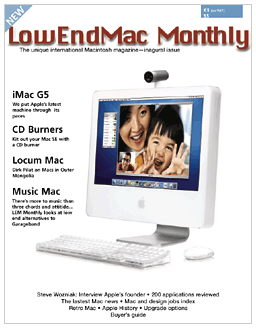 TypeStyler supports every function a designer could want, including clipping paths, export as CMYK, and sophisticated type-handling features. Of course, the main attraction is its ability to shape, curve, and bend text, never mind emboss and add drop shadows and glows.
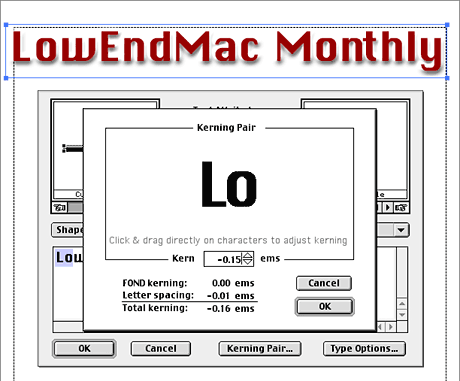
To the right is a nonexistent magazine’s cover (well, we can dream). The typeface used for the nameplate is Chicago, Apple’s original Mac system font. The type foundry Bigelow & Holmes designed Chicago to be readable on tiny 9″ Mac screens; it was never intended to be printed. Thus, for readability purposes at small sizes it has peculiar spacing, it’s almost monospaced, but not quite. Obviously, this is not suitable for a magazine nameplate, but we still want to use it as it screams Mac-ness, so what to do?
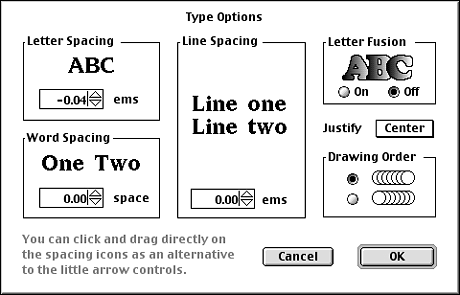
The figures below show the spacing options available in TypeStyler. The first in particular shows how to adjust kerning-pairs, just what we need in order to use Chicago. Perfect.
TypeStyler comes highly recommended. It cost $149.95 for the complete package including the application plus fonts, templates, and user guide. Discounts are available for upgrade editions and a no-CD download edition.
Low End Designer Mailbag
From Boris Mirsaliyev:
I’d just like to point out http://www.w3c.org/
You can check your HTML, CSS, and XML using its validators. If your website validates, it will usually show up properly in any browser on any platform. There are, of course, various formats of HTML, and sites written using HTML 4 standard won’t show up properly on Generation 3 or older browsers. But still, this is a very useful utility for eliminating that low end Windows box and making sure that almost every user sees your website properly.
My two cents,
Boris
Thanks Boris, the W3C is indeed an attempt to define de jure standards on the Web, but it has become bogged down in politicking and is sadly less relevant than it could be. That said, you are correct – a site designed using their standards should look similar on most platforms, font issues notwithstanding.
J
PREVIOUS: Peering Through Windows: Why the Mac OS Alone Isn’t Enough
NEXT: Killing Quark: Three Layout Alternatives
Keywords: #lowenddesigner #shareware #graphicconverter #pdfcompress #typestyler
Short link: http://goo.gl/ok9JXk
searchword: sharewarefordesigners
