
Everyone already knows that Mac OS X is a Unix variant and that it can run Unix software. Many just leave it at that, assuming that Unix software means things that run in the Terminal – but there’s also a whole wide world of graphical apps in the Unix world that run in what’s known as the X11 environment.
The problem is that not many in the Mac community – beyond the übergeeks – seem to know or understand what X11 is.
Fortunately, Apple has made it easy to install and use X11 in a near seamless fashion on your Mac. With a little guidance, it’s pretty easy to be up and running with a bunch of free apps that are well-known to those in the Linux and Unix world.
X11 is the flagship product of X.Org Foundation and simply provides a method for Unix systems to draw windows, mouse pointers, and other standard elements of a graphical user interface (GUI).
Without X11, using a Unix or Linux system is totally a command-line affair.
What Is X11?
X, as it was originally known, was first developed at MIT in 1984. (Probably not coincidentally, this is the same year the first Mac debuted, starting the GUI revolution.) By 1987, it had developed into X11, and it hasn’t changed a whole lot since, beyond being updated for newer video cards and the like.
X11 operates on a client-server methodology. Basically, the X server serves up graphical content and an X client draws the windows and accepts mouse and keyboard input. For nearly all its uses these days, the server and the client are running on the machine, providing Linux distributions everywhere with a fully graphical environment.
After the Mac OS transitioned to a Unix base when OS X debuted in 2001, it was only a matter of time before X11 was up and running on the Mac. But X11 had actually been there long before. X11 clients for the Mac have existed since the late 1980s. Tenon’s MachTen provided a full Unix environment for 680×0 and early PowerPC Macs, including a bundled X client and server. (Tenon later morphed this product into iTools, which provides a nice graphical front end for the Unix/server parts of OS X.)
Apple’s mid-1990s Unix, A/UX, also shipped with an X11 client and server.
X11 on OS X
Getting X11 up and running with Mac OS X 10.0 meant compiling it from source code. Although this was a snap for veteran Unix admins, it would take a while before the idea took off on the Mac. Flash-forward 18 months, and the process got a lot easier in the era of Mac OS X 10.2. A package installer for X11 surfaced from X.Org, and a new third-party app named XDarwin made it easy to run X11 apps alongside OS X’s Aqua ones (or run X11 in its full-screen “rootless” mode).
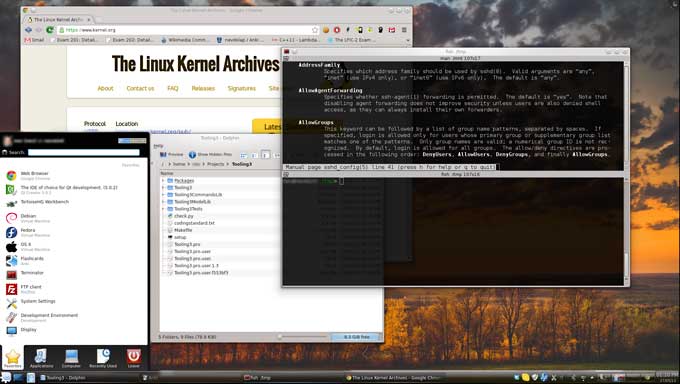
Example of X11 using KDE.
Not long after, Apple started shipping a beta of its own package simply named X11, combining both the X11 framework and a client very similar to XDarwin.
Since OS X 10.3, X11 has been quick and easy to get up and running, and thus there’s been a lot more interest in the Mac community.
Is it worth downloading X11 for 10.3 (or installing from your Tiger install disc for 10.4 users)?
There a few good reasons, and since we’re in the realm of free software, it won’t cost you anything but some time.
Reason #1: Free software
There’s a ton of free, open source software that runs under X11 on Unix/Linux systems, and with a little bit of recompiling they can easily run on OS X, too. If compiling software is a deal-killer for you, don’t worry, because somebody else has already done the work for you.
Fink and DarwinPorts are two incredible projects with the common goal of porting Unix software to Mac OS X. Installing either one of these makes it a breeze to get a ton of free software on your system.
For newcomers, I’d recommend Fink, if only because of it’s wonderful bundled GUI companion, FinkCommander. With FinkCommander in hand, it’s a point-and-click affair to find the type of software you’re looking for and get it installed on your Mac.
Although Fink has a package installer and is really easy to get up and running, follow the instructions closely. In particular, make sure you download the Fink that’s right for your OS and install the X11 SDK from your X11 installer (either downloaded or on the Tiger DVD).
Once you have your software installed, type the program’s full path in X11’s terminal window. For example, to open the Bluefish editor I installed with Fink, I type:
/sw/bin/bluefish &
(The “&” backgrounds the bluefish process, so that I don’t have to leave the terminal window open to keep Bluefish up and running.)
The downside to this is having to know the full path of an application’s command. Fortunately, fink installs almost everything in /sw/bin/. You can use X11’s built-in menu editor to add shortcuts to the the Application menu and not have to type the commands every time.
It’s also possible to download packages that utilize X11 but require no typing of commands to launch. One such fantastic package is Gimp.app, which makes installing and running the popular open-source image editor a snap. Just double-click its icon, X11 opens, and then Gimp opens up.
Reason #2: Run Apps on Other Systems
Going back to its client-server methodology, X11 can serve apps over the network using a standard SSH connection.
In a typical SSH connection, you would type something like the following to get a remote terminal connection:
ssh <username>@<host or ip address>
To forward X11 from that SSH connection, use the following for OS X 10.3:
ssh -x <username>@<host or ip address>
Or, for OS X 10.4:
ssh -Y <username>@<host or ip address>
Now you will have a session opened on the remote machine. Just type in an X11 application’s command, and it will open in your Mac’s X11 environment.
In my day job, I work with an assortment of Linux systems, and running these apps quickly and securely over the network on my PowerBook is a real joy. It beats using a VNC (virtual network computing) client or standing at the console in the server room any day.
This also opens up possibilities for the home user who’d like to try Linux. Linux can run on an old box in your closet while you try out the apps on the laptop from your couch.
Reason #3: Run a Different Desktop Environment
A little bored with OS X and Aqua? With X11, it’s possible to run an entirely different desktop environment on your Mac. This includes the ever-popular K Desktop Environment (KDE), which along with Gnome is one of the leaders in Linux graphical environments.
Fink can get you a working KDE installation, and there are quite a few other methods to get to the same place. Googling for “KDE Mac OS X install” will bring up quite a few pages for research, but those actually inclined to run KDE on their Mac will probably enjoy the challenge (and master it quite easily).
Further Reading
- Preparing for Scribus: Working with X11 and FinkCommander, Jason Walsh, Low End Designer
Keyword: #x11
Short link: http://goo.gl/q7XMSO
searchword: x11
