
Most of us remember the days when Mac databases pretty much meant one thing: FileMaker Pro. Based on technology that Apple acquired from Nashoba Systems in the late 1980s when they purchased FileMaker, Apple’s Claris software division released FileMaker Pro 1.0 in 1990.
FileMaker Pro’s very Mac-like interface, striking a near perfect balance between ease-of-use and power, made it an instant standard.
Big SQL database servers were pretty much the realm of other platforms in that era. There were very few options for running a relational database on your Mac.
FileMaker gained relational capabilities with version 3.0 in 1995, but as many database purists have noted over the years, the ability to reference another database is not the same as having a truly relational, multi-table database.
As of version 8, FileMaker ships a truly relational database with the ability to create multiple tables in one database, but not everyone can shell out close to $300 for a copy – or will want to when there are free alternatives.
Free SQL Alternatives to FileMaker Pro
The move to the Unix-based OS X brought a lot of new database options to the Mac. Popular open source relational databases like MySQL and PostgreSQL can run happily in the background on your Mac. While FileMaker has a nice GUI and the open source databases are inherently command-line applications, there are some nice GUI clients that ease you into the world of SQL if you are new to it.
Would the average Mac user decide to eschew the comfortable GUI ease of FileMaker for a more challenging Unix-based program? This being Low End Mac, I think most of our readers appreciate free software like MySQL or PostgreSQL. FileMaker is far from cheap, much less free.
Learning MySQL or PostgreSQL might take a little more effort, but part of the fun of maximizing the usefulness of your low-end hardware is pushing yourself a little farther and learning something new.
MySQL or PostgeSQL?
I think the real question boils down to this: Should the average Mac user go for MySQL or PostgreSQL?
In the realm of computer holy wars, this can be a particular nasty one.
PostgreSQL fans seem to thrive on pointing out the features that MySQL lacks. While true transactional support, true foreign key constraints, and schemas are nice, we’re generally talking about setting up a small, personal database server. The average home user will never need to know what these terms mean, much less use these features.
This is not meant to imply that MySQL isn’t capable of carrying a heavy load, especially on the Web. Along with PHP, it’s one half of the “dynamic duo” that powers many database-driven websites, including Yahoo!, Amazon, Wikipedia, and Slashdot. [And, to an increasing extent, Low End Mac. ed]
If it’s good enough for those guys, it’s good enough for the vast majority of database needs.
In PostgreSQL’s favor, it does an amazing job of replicating the features of extremely high-end databases. If you’ve ever worked with Oracle or a similar high-end database, you’ll feel right at home. You’ll notice that there’s hardly an enterprise-class feature that’s missing.
That said, I’m a fan of both. Both MySQL 5 and PostgreSQL 8 run on my PowerBook. They both use few resources while running in the background, and they’re both configured out of the box to only accept connections from the local machine, so there’s minimal security risk in running them on my laptop.
There are normal OS X package installers available for both, so there are no worries about getting them up and running.
But Which One?
If I had to recommend one or the other for the Mac user who wants to dip his feet in to the world of relational databases, I’d go with MySQL for a couple of reasons.
MySQL Pros
First, MySQL is very popular – the world’s most popular open source database, according to its makers. Googling for “mysql” or “php mysql” will bring you a ton of resources, whether you’re just getting started or want to do advanced tasks.
You might even run across a fine series of articles that Dan Knight wrote about PHP and MySQL here on Low End Mac a few years ago as he was transitioning the site from static HTML pages to dynamically generated pages.
In short, that popularity means that it’s very easy to find help for MySQL or just learn new tricks when you’re so inclined.
Second, there are some really nice graphical front-ends out there for MySQL. Perhaps the most popular is the web-based PHPMyAdmin, and MySQL offers two nice tools (Administrator and Query Browser) that run equally well on Mac, Linux, and Windows.
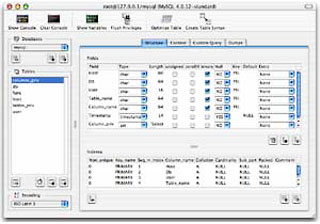 But the slickest MySQL front end you will find is Mac-only, the wonderful CocoaMySQL. Developed in XCode as a fully native OS X app, CocoaMySQL provides an easy, intuitive GUI for creating databases, tables, managing data, and running your own custom queries.
It’s also a great learning tool, thanks to its Console feature. Just click the Console button to open a drawer that shows the exact SQL commands sent to the server. By using this GUI tool, you can actually prep yourself for performing the same tasks at the command line.
PostreSQL Pros
PostgreSQL’s greatest asset is its enterprise-class strength. It’s basically an open-source replication of extremely high-end databases and will appeal to the geekiest of database administrators.
Postgre also integrates with PHP, and there a few nice GUI tools out there, although none match the polish of any of the MySQL tools. There’s a Mac-only tool called PGnJ that is promising, but it doesn’t live up to the standard that CocoaMySQL sets.
Some things in Postgre are just done easier from the command line, and that doesn’t bode well for someone just getting started with SQL.
Conclusion
So while Postgre is a wonderful option for anyone who’s so inclined, I have to give the edge to MySQL because of its widespread popularity and the nice graphical tools that help you learn as you go.
We live in good times for free, powerful database software on the Mac. While FileMaker will probably always be easier for the database newbie, those who appreciate a good bargain and don’t mind learning a few new tricks will certainly enjoy learning SQL on their Mac.
Links
- FileMaker Pro
- FileMaker, Wikipedia
- MySQL
- PostgreSQL
- Using PHP and MySQL, Dan Knight, Online Tech Journal
- PHPMyAdmin
- CocoaMySQL
- PGnJ
Keywords: #mysql #postresql
Short link: http://goo.gl/q2GSDu
searchword: mysqlandpostresql
