
Will we ever be able to live with just one web browser on our Macs? It seems unlikely for a number of reasons.
First and foremost, no one browser works with all sites. What chokes in Safari might render properly in Firefox. And Opera or iCab might handle what fails in the other browsers. Although web standards are more closely adhered to than in the past, we all know the “try it in another browser” routine.
With the arrival of Mac OS X 10.4 Tiger and Safari 2, I thought I could finally settle in with one browser. With version 2, Safari reclaimed the speed advantage that it had lost to Firefox in OS X 10.3.x, and I was hooked on Safari’s new RSS integration.
Firefox
 But the occasional site incompatibility and web development work would bring up the need to use an alternate browser. Most of the time, Firefox would fill that need.
Firefox’s Gecko rendering engine is widely compatible, and this open source, standards-based browser is remarkably consistent across all major platforms (Mac, Windows, and Linux). It’s the second most popular browser on the Web and gaining in market share all the time.
The only problem is that Firefox is not very Mac-like, even with the “enhanced Mac OS X support” in version 1.5. In the interest of platform portability, Firefox includes a lot of its own libraries designed compile easily on multiple operating systems.
This means that Firefox doesn’t have the OS X look and feel that Mac-only apps have. Aesthetically, it feels more like a Windows or Linux app ported over to the Mac.
Since it doesn’t tap into OS X’s native interface element widgets, it has to load its own. This makes Firefox more resource intensive than other Mac browsers.
Camino
 But the Gecko environment is available in a native Mac OS X app, in the form of the wonderful and often-neglected Camino browser. [Camino was updated to version 2.1.2 in March 2012 and is now dormant – yet it is compatible through OS X 10.9 Mavericks.]
I was a big fan of this project (originally known as Chimera) in the pre-Safari days. The original goal was one that the Firefox team took and ran with – to take the browser component out of the large Netscape/Mozilla suites and create a lean, fast, next generation Gecko-based browser.
Before January 2003, Camino was far and away the fastest browser on the Mac. Even after Safari shipped, Camino had more features. Tabbed browsing, for instance, didn’t appear in Safari for a couple of months after its 1.0 release.
With Safari and Firefox providing stiff competition, Camino lay dormant for a long while. But as time went by and a small faction of users began to complain about Firefox’s lack of optimization for the Mac platform, the project came back to life. Not too long ago, I decided to download the latest nightly build of Camino to see how it’s doing these days.
Better Than Firefox
Suffice to say, I was very impressed. This is the Mac browser that Firefox could easily be. In my experience on a 1 GHz PowerBook G4, Camino blows the doors off Firefox 1.5 in rendering speed and overall interface snappiness.
Being built as a native Cocoa app, Camino takes full advantage of being a full-fledged Mac app. Interface elements and widgets look beautiful and familiar. It also demands less of your CPU and RAM than its more popular cousin.
Better Than Safari
Beyond that, the sheer performance of the Gecko engine really shines. Although a few months ago I didn’t think anything could top Safari 2’s speed on my Mac, to my eyes Camino now has a nice edge in the speed department. Your mileage may vary, but it can’t be argued that Camino does what it does very well and very fast.
The development team isn’t content to simply make a Mac-ified Firefox. Some of the best features of Safari have been incorporated, including the ability to reset the app and empty the cache from the Camino menu. There’s also a nice implementation of Safari’s bookmark manager/history browser.
Unique Features
Camino keeps a “Top 10 most visited sites” list in “Show History” that I have found to be really neat. We all have a pretty good idea of what sites we visit most often, but nothing beats actual statistics.
Some features that Camino shares with Firefox that Safari doesn’t have include a more flexible popup blocker. You can specify which sites can allow popups while blocking them at all other sites. Safari simply lets you turn popup blocking on or off.
Missing Features
One Firefox feature sorely missed in Camino is extensions. The multitude of extensions for Firefox and other Mozilla-based browsers provides an amazing amount of browser customization.
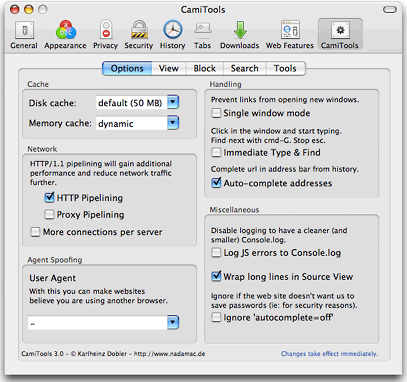
However, some of the best of these extensions have been wrapped into CamiTools,* which adds a new pane to Camino’s preferences window. Among its many features, CamiTools takes care of two things I miss most from Firefox’s extensions – ad blocking and adding additional sites to the website search box (in addition to the standard Google search).
Now if someone could port the Web Developer Toolbar to Camino, I’d be in heaven.
If you’d like a change of pace – and perhaps a faster web browsing experience – go and get yourself a recent build of Camino. I’m enjoying it so much I’ve made it my default browser for now and gone back to Net News Wire Lite for my RSS needs.
* Camitools is incompatible with versions of Camino going back to at least 2008, so we have removed the link to it.
Keywords: #camino #caminobrowser
Short link: http://goo.gl/fcKade
searchword: caminobrowser
