
Cortland
Lineform: A Familiar, Friendly, Affordable Illustration Program for OS X
- 2007.01.29
Rating: 
There are many different illustration programs for Mac OS X, including both high- and low-end choices. Freeverse launched Lineform last year, a powerful illustration tool with a simple user interface that bears a familiar resemblance to both Apple's and Omni Group's applications, meaning there is little to learn.
Lineform's main features include Boolean operations, outlines, free transformations, CMYK preview, artistic strokes, gradients, Bezier editing, arrows, freeflow text, and more.
After installing Lineform, I was amazed to see the application size is a mere 9.3 MB (this includes the French and Japanese localizations).
Lineform is easy-to-use, incredibly fast, and has Universal Binary support.
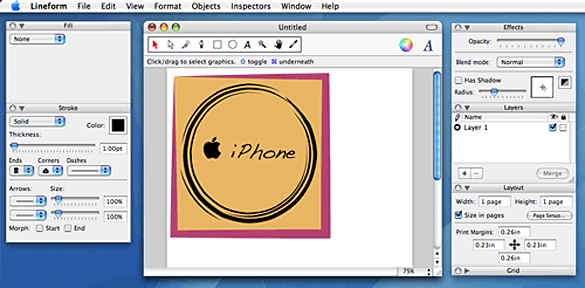
The first feature I came across that struck me as übercool were the Stroke effects. Unfortunately, there are minor user interface annoyances throughout the program. The custom floating palettes look nice, but are missing resize-widgets in the corners, meaning I cannot view all of the different Stroke effects at the same time. However, this is only a very minor problem.
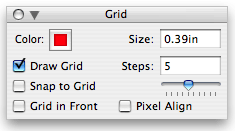
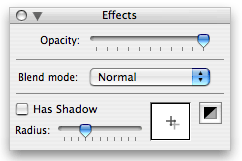
Left: Grid floating palette. Right: Effects floating palette for
opacity/blends/shadows.
Although Freeverse do not position Lineform as a competitor to Illustrator on their website, many of Adobe's customers have been switching over. Lineform includes many capabilities you'd expect from any illustration program, such as shadows and layout grids. There is also an outline view.


Left: Custom shape created using the Paint tool, with a Radial
fill, effect stroke on top of a red layout grid. Right: The same
custom shape in Outline View with layout grid turned off.
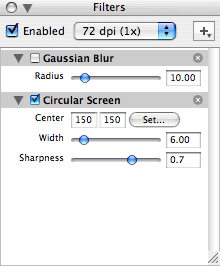
My second
favorite feature is the filters, of which there are over 50,
including crop, distortion, blur, halftone, color adjustment, tilt,
gradients, and transformations. Using Lineform's built-in filters,
your dull illustrations can come to life.
These filters also make Lineform very appealing for those involved in designing logos, posters, and other marketing and branding materials for a client or business.
iPhoto users will be glad to know that Lineform includes it's own Media Browser feature for adding photos into Lineform directly from iPhoto - and also from your Pictures folder.
Using the Media Browser in Lineform, I created a circle, applied a custom artistic stroke, and then dragged and drop a photo of San Francisco's Transamerica Pyramid into the Fill palette Image canvas box. And ta-da! I also created another shape, and applied an arrow and the halftone filter. Very easy, and very cool.

There is
currently a lack of a wide range of different pre-made shapes to
choose from but Freeverse has stated that they are receptive to
customer feedback regarding feature suggestions.
In conclusion, Lineform is a very strong competitor to other illustration programs on Mac OS X, including many appealing features and a good price tag. I was very happy with the performance of Lineform and would suggest it to others.
Version changes for 1.2.5:
- Improved palette positioning
- Improved PDF export
- Improved text editing
- Improved palette positioning
- Various bug fixes
Lineform is shareware, costs $79.95 (boxed version available),
includes printed manual, compatible with Mac OS X 10.3.9 or later
(Universal Binary). Available in English, Japanese, French.
Join us on Facebook. Follow us on Twitter.
Joshua Coventry's writing can also be found on Silicon User.
Recent Cortland articles
- eWorld: Apple's Overpriced, Poorly Marketed Online Service, 2009.03.31. Apple's eWorld was innovative, built communities, and allowed Internet access in 1994, but hardly anyone even knew it existed. And those who did thought it overpriced.
- Apple's Climb Back to Success, 1999 to 2001, 2009.02.02. From a company with a questionable future in 1997, Apple became a model of success with new computers, a new operating system, and the iPod.
- Beleaguered: Apple Bottoms Out, 1996 to 1998, 2009.01.28. Apple was in a strong position in 1995, but by 1997 the company's future was in question.
- More in the Cortland index.
Links for the Day
- Mac of the Day: Mac IIfx, introduced 1990.03.19. This 'wicked fast' 40 MHz Mac trumped the 33 MHz DOS world.
- February 14 in LEM history: 98: A perfect compact Mac - 00: Extended computer warranties worth the cost? - Making your PC work with your Mac - 01: Customize Microsoft Word - 02: Quadra revives a passion for computing - 03: Real world performance - DIY Pismo screen replacement - Best Mac for writing - 03: Fastest browser on the Mac - 06: 15" MacBook Pro - Impressions of a newly acquired Lisa - Finding and using free WiFi - Apple should liberate OS 9 - 07: New Mac mini cheaper than upgrading a Power Mac - 08: Falling in love with OS X
- Support Low End Mac
Recent Content on Low End Mac
- Fix Home Button Delay, Tablet the Ultimate Mobile PC, iPad Notebook a Possibility, and More, iOS News Review, 2012.02.10. Also using your iPad at work, two photo editors, a new iPad text editor, Macally's magnetic iPad 2 stand, and more.
- White MacBook Goes End-of-Life, Logitech Touch Mouse Supports Gestures, Firmware Updates, and More, The 'Book Review, 2012.02.10. Also MacBook Air better than any Ultrabook, docks for MacBook Pro models, Intel offers improved SSDs, and more.
- Mac and iOS Browsers: Options Galore, Freeware Forum, 2012.02.10. Safari is adequate on Mac and great on iOS, but the range of good alternatives is stunning. LEM writers share their favorites.
- Apple's Support Lead Shipping, Smartphones Outsell PCs, OS X Ported to ARM by Intern, and More, Mac News Review, 2012.02.10. Also the power of Tex-Edit Plus, Google and Twitter are already censoring the Web, Snow Leopard Security Update, and more.
- LogMeIn: Remote Screen Sharing for the Rest of Us, Alan Zisman, Zis Mac, 2012.02.09. Configuring the Mac's built-in screen sharing to work over the Internet can be difficult or impossible. LogMeIn makes it easy.
- 15 Years Ago Motorola Unveiled the PowerPC G3, Low End Mac Round Table, 2012.02.06. The G3 processor was optimized for real world Mac software and made a big leap forward in efficiency.
- Don't Kill Caps Lock, Learning to Love the iOS Keyboard, and an Adaptive iPad Keyboard, Charles W. Moore, Miscellaneous Ramblings, 2012.02.06. The Caps Lock key has a useful function, the iPad's keyboard really is useful, and checking out an adaptive keyboard for the iPad.
- More links in our archive.
Recent Deals
- Best 17" MacBook Pro Deals
- Best iPod classic Deals
- Best eMac Deals
- Best MacBook Air Deals
- Best iBook G4 Deals
- Best iPad Deals
- Best Classic Mac OS Deals
- Best Apple TV Deals
- More deals in our archive.
About LEM Support Usage Privacy Contact
Follow
Low End Mac on Twitter
Join Low End Mac
on Facebook
Low End Mac Reader Specials
TypeStyler 11 is now in the Mac App Store!! -- Special Introductory Price of $59.95!! -- To Buy From The Mac App Store Click Here Now!! Or buy direct
from Strider Software.
Don't install Parallels to play poker online! Poker Mac will show you how to download and install a native Mac poker and Mac Casino applications in minutes.
Favorite Sites
MacSurfer
Cult of Mac
Shrine of Apple
MacInTouch
MyAppleMenu
InfoMac
The Mac Observer
Accelerate Your Mac
RetroMacCast
PB Central
MacWindows
The Vintage Mac Museum
DealMac
Deal Brothers
Mac2Sell
Mac Driver Museum
JAG's House
System 6 Heaven
System 7 Today
the pickle's Low-End Mac FAQ
Affiliates
Amazon.com
The Apple Store
The iTunes Store
PC Connection Express
GainSaver
Parallels Desktop for Mac
eBay

