
Pippin was a multimedia player developed by Apple Computer in the mid 90s. Apple decided to create and license the technology (named Pippin after a type of apple smaller than a McIntosh) due to their belief that home computers were becoming more and more important and popular with customers.
 Apple realized that for multimedia technology to reach the home, the entry price had to be reduced substantially. But a low entry price wouldn’t be enough; the platform had to be distributed by many companies which collectively could reach a much larger audience than one company alone – exactly what Microsoft had done to make Windows number one on PCs.
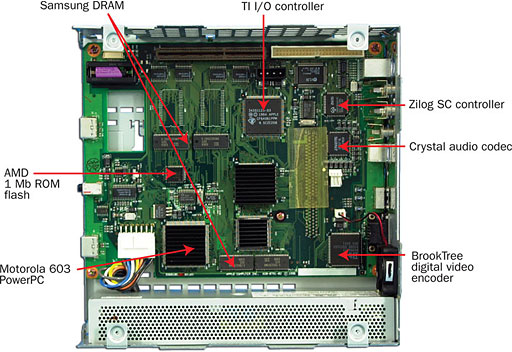
The Pippin technology was heavily based on the PowerPC Macs of the time and used a reduced version of the Mac OS optimized for media playback and a minimal memory footprint. The operating system was included on every Pippin CD-ROM title.
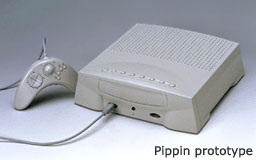 Apple chose to license the Pippin platform to manufacturers interested in building and selling their own version of the Pippin; it was never sold as an Apple branded product.
Development units were available from Apple. Until September 1, 1996, Apple operated a special program called the “Developer Test Drive” as a service to developers who needed hardware quickly. The Test Drive was discontinued after Bandai started shipping the @World, the first and only Pippin.
Pippin Technology
Unlike a Macintosh, Pippin didn’t have a hard drive – the only guaranteed storage media available is 128 KB of internal NVRAM (nonvolatile RAM). An optional floppy drive could be installed as well. Of the 128 KB of built-in NVRAM, 8 KB is used by the system software, leaving 120 KB for general purpose storage.
The internal NVRAM is represented as a small HFS (Hierarchical File System) volume. By small HFS, this means that only two levels of hierarchy are allowed: the first level being the root level, the second being folders appearing at the root level. In fact, within Pippin’s NVRAM, folders can only appear at the root level; no subfolders are allowed within them. Despite this limited hierarchy, all normal file manager calls would treat NVRAM as a normal HFS disk.
In order to reduce confusion, it was strongly recommended that developers save all files, preferences, and any other data in a single folder at the root level of either the NVRAM or to the optional floppy disk. This folder would have a name closely related to the program’s title and a name that would be included as a string resource. The title-named folder would provide organization for the user and further simplify tasks such as copying, moving, and deleting files that are associated with particular a program.
All CD-ROM titles to be played on Pippin had to be “Pippinized” in order to run successfully. Apple had a technical note describing the hardware, software, and procedures required to make Pippin-ready CD-ROMs either though modification of already released CD-ROM titles or as brand new CD-ROM titles.
In order for Pippin CDs to run on a Pippin Power Player, they had to first go through an authentication process. The authentication process applied an Apple-approved RSA signature, in the form of an electronic encrypted key, onto a Pippin CD.
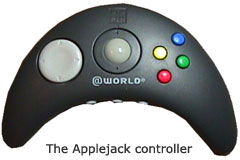
The Applejack input device driver combines the features of a game pad and a trackball in a small handheld device.
The Bandai @World Player
On December 13, 1994, Apple licensed the Pippin technology to Bandai, Japan’s largest toy maker. Less than 42,000 Bandai Pippin @World multimedia players were sold in the US and Japan between 1996 and 1998. Less than 12,000 of those were sold in the US, and it’s believed that as few as 5,000 actually reached customers.
The Bandai @World was released in Japan in 1995. At this time, the market was dominated by the Nintendo 64, Sony Playstation, and Sega Saturn, dedicated gaming consoles that were much more powerful than the more general-purpose Pippin.
However, the @World was also marketed as a network computer and general home computer for Internet browsing and playing Macintosh, Windows, and DOS games (it was the first gaming console with integrated online capabilities). These additional features weren’t enough to build the Pippin’s success.
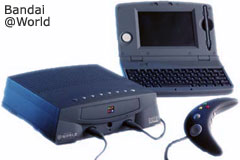 The @World player was released in the United States in 1996 and cost $599. Several peripherals were also available, as well as a 4 MB RAM expansion card, which cost $120. A keyboard adapter cable cost $12, and an Applejack controller, $45. Another peripheral was an ADB (Apple Desktop Bus) input device with a keyboard, stylus, and drawing pad.
@Worlds were produced in white and black. The white models were called Atmark (for the “@” mark) and were only marketed and sold in Japan. The black units were called @World and were sold in the US. There are black Atmark units in Japan, but they are extremely rare.
@World allowed the consumer to add system memory easily using DRAM memory cards. In addition, manufacturers were able to add other devices using PCI-like expansion, including mass storage devices, graphics accelerators, compression decoders, and more.
There were several buttons on the top of the Pippin acting as easy access controls: L-R power, play/pause, stop, volume up/down (headphones), rewind, fast forward, and eject/exit program. The rear of the Bandai Pippin includes L-R VGA/PAL/NTSC selection, S-video out, composite video out, stereo audio out/in, printer port, and modem port (these two ports require special cables).
Katz Media, a Norwegian company, had intentions to market Pippin technology in France, Germany, and the UK. The unit would have retailed from £400 to £550. Bandai dropped support and killed off Pippin’s chances in the UK.
The Pippin was voted one of the 25 Worst Tech Products of all Time by PC World magazine in May 2006.
Technical Specifications
Hardware
- 66 MHz PowerPC 603 RISC microprocessor
- Superscaler, three instructions per clock cycle
- 8 KB data and 8 KB instruction caches
- IEEE standard single and double precision Floating Point Unit (FPU)
- 6 MB combined system and video memory, advanced architecture
- Easy memory expansion cards in 2, 4 and 8 MB increments
- 128K SRAM store/restore backup
- 4x CD-ROM drive
- Two high-speed serial ports, one of which is GeoPort ready
- PCI-compatible expansion slot
- Two ruggedized ADB inputs
- Supports up to four simultaneous players over Apple Desktop Bus (ADB)
- Will support standard ADB keyboards and mice with connector adapters
Video
- 8-bit and 16-bit video support
- Dual frame buffers for superior frame-to-frame animation
- Support for NTSC and PAL composite, S-video and VGA (640×480) monitors
- Horizontal and vertical video convolution
Audio
- Stereo 16-bit 44 KHz sampled output
- Stereo 16-bit 44 KHz sampled input
- Headphone output jack with individual volume control
- Audio CD player compatibility
Software
- Runtime environment derived from Mac OS
- PPC native version of QuickDraw
- Reduced system memory footprint (computer specific features removed)
- Disk-resident system software stamped on CD-ROM with title
- System boots off of CD-ROM
- System software upgrades released through CD-ROM stamping operations
- 68k emulator
- Macintosh Toolbox intact
Resources
- Apple Pippin, Wikipedia
- Pippin FAQ, The Mac Geek
- Apple Confidential 2.0, Owen W. Linzmayer
- Bandai Pippin Museum & Archive
- Apple Bandai Pippin in Retrospective, Allan Yogasingam, EE Times, 2008.11.10
Short link: http://goo.gl/2FMaEO
searchwords: pippinhistory, applepippin


