
Introduced along with the Mac II in March 1987, the SE came with 1 MB of RAM, one or two double-sided 800K floppies, and space to mount an internal SCSI hard drive (the second drive bay held either a hard drive or second floppy – no room for both, although that didn’t stop some people from creating a bracket to mount a hard drive in a two-floppy SE). The SE was the first compact Mac with a built-in fan.
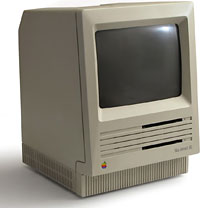
The SE is sometimes referred to as the SE/20, SE 1/40, 4/80, etc. “SE/20” is not an official designation, often leads to confusion, and should not be used. These are not different models, nor should an “SE/20” be confused with the more powerful SE/30. These numbers refer to the amount of memory and size of the internal hard drive, so an “SE/20” would have a 20 MB hard drive and an SE 4/40 would have 4 MB of RAM and a 40 MB hard drive.
Although Apple officially rates SCSI on the SE at 1.25 MBps, real world testing finds it to be considerably lower at about half the rated speed. This is also roughly 2.5x faster than the SCSI on the Mac Plus.
In August 1989 Apple began to ship the SE with their high density floppy drive, known as the FDHD (floppy drive, high density) or SuperDrive (for its ability to read and write IBM-format floppies with additional software). Not only did this provide 1.4 MB capacity, but also the ability to read and write 3.5″ DOS disks using special software.
Older SEs with their original ROMs do not support high density floppies. However, they can be used with FDHD drives as long as the disks used are 800K floppies.
The SE was introduced as the low-end cousin of the hot new 16 MHz Mac II. The SE was the first compact Mac with an expansion slot. One of the first add-in cards was an MS-DOS card. Over time, video, ethernet, and accelerator cards became popular accessories.
It’s not generally known, but the SE supports color, although not on the internal display. It’s only 3-bit color, but it supports output to the ImageWriter II printer’s color ribbon, and as least one company made a SCSI video output device that let the SE display 3-bit color on an external color monitor.
Color display? Aura Systems made ScuzzyGraph II, a SCSI peripheral that provided 8-color video for people who didn’t want to buy (or couldn’t afford) a Mac II. 1989 cost was $995 to $2,495, depending on resolution.
You can convert a non-working compact Mac into a Macquarium. (Please, don’t even think of converting a working one – you can always find someone interested on the Classic Macs or Vintage Macs lists.)
Tips
- If you have less than 4 MB installed, upgrade to 4 MB. You can often find pulled 1 MB SIMMs (removed from other Macs during upgrade) inexpensively.
- The SE cannot use two-chip 1 MB SIMMs.
- Memory permitting, set the disk cache to 128k.
- To use HD floppies on a pre-SuperDrive SE, look into the Applied Engineering AE HD+ external floppy drive. They may be available from Que Computers for $99 (612-623-0903). Note that the “plus” is important – the AE HD will not do the job.
- Because of limited SCSI throughput, older hard drives with no data buffer should usually be formatted with a 2:1 interleave for use in the SE. (Unfortunately, other Macs may find it difficult or impossible to work with this interleave.) This is not an issue with newer drives that have a data buffer.
- If you need to create the smallest possible System file, you can delete Chicago 12, Geneva 9 and 12, and Monaco 9, since these fonts are in the SE ROMs.
- To remove the hard drive: find the two screws holding the drive bracket in place. They will be facing the rear of the computer and underneath the drive itself. You’ll need a fairly long Phillips screwdriver to reach them – and you’ll need to disconnect the power and data cables before you can get to them. Once the screws are loose, lift the back and it should come out easily.
Details
- SE introduced 1987.03.02 at $2,900 (dual floppy) or $3,700 (with 20 MB hard drive); discontinued 1989.08.01
- SE FDHD (1.4 MB floppy) introduced 1989.08.01; discontinued 1990.10.15
- code names: Plus Plus, Maui, Aladdin, Chablis, Freeport
- configurations included dual-floppy or one floppy plus 20 or, 40 MB hard drive
- Gestalt ID: 5
- Order no.: M5010 (SE), M5011 (SE FDHD)
- upgrade path: SE/30 motherboard
Mac OS
- requires System 4.1 (System 4.0 and Finder 5.4) to 7.5.5, although we have a report of one user running System 1.1 on the SE)
- addressing: 24-bit only
Core System
- CPU: 8 MHz 68000
- ROM: 256 KB
- RAM: 1 MB, expandable 4 MB using pairs of 256 KB or 1 MB 150ns 30-pin SIMMs (will not work with two-chip 1 MB SIMMs)
Performance
- 1.0, relative to SE
- 0.37, MacBench 2.0
- 0.98, Speedometer 3
- 0.7 MIPS
- see Benchmarks: SE for more details
Graphics
- 9″ b&w screen, 512 x 342 pixels
Expansion
- ADB ports: 2
- serial ports: 2 DIN-8 RS-422 ports on back of computer
- SCSI ports: 1 DB-25 connector on back of computer, maximum throughput of 5,248 kbps
- floppy drive: 800 KB, 1.4 MB double-sided on FDHD version
- floppy connector on back of computer
- Hard drive: none or 20 MB
- expansion slots: 1 SE PDS
Physical
- size (HxWxD): 13.6″ x 9.6″ x 10.9″
- Weight: 17 lb.
- PRAM battery: 3.6V half-AA
- power supply: 100W
Accelerators & Upgrades
Some accelerators have onboard SIMM slots, allowing them to use more than 4 MB of RAM.
- Brainstorm accelerator (16 MHz 68000), long discontinued. See review in Macworld, 1995.03.
- Macintosh SE/30 motherboard (16 MHz 68030), but it probably costs less to buy a whole SE/30 than just a motherboard.
- MicroMac Multispeed (16, 25, or 32 MHz 68030), optional 32 MHz 68882 FPU
- MicroMac Performer (16 MHz 68030), optional 25 MHz 68882 FPU
- MicroMac Performer Pro (32 MHz 68030), 64 KB cache, optional 68882 FPU
- Radius Accelerator SE (16 MHz 68020 with 68881), 25 MHz version also produced
- Sonnet Technologies Allegro SE (33 MHz 68030), 33 MHz 68882 FPU, discontinued
Discontinued accelerators (68030 unless otherwise noted) include the Applied Engineering TransWarp (16, 40 MHz), Dove Marathon Racer (16 MHz), Extreme Systems Vandal (50 MHz), Harris Performer2 (16 MHz 68000), MacProducts Railgun (33 MHz), Mobius (25 MHz), NewLife Accelerator! (16, 25, 33 MHz), Novy ImagePro (16, 25, 33 MHz), and Total Systems Mercury (16 MHz), Gemini Integra (50 MHz), and Gemini Ultra (33, 50 MHz).
Color? Aura Systems made ScuzzyGraph II, a SCSI peripheral that provided 8-color video for people who didn’t want to buy (or couldn’t afford) a Mac II. 1989 cost was $995-2,495, depending on resolution.
Cautions
- Never connect an Apple II 5.25″ floppy drive to the Mac’s floppy port. Doing so can ruin the floppy controller, meaning you can’t even use the internal drive any longer.
- That monitor packs a lot of voltage. Read Compact Mac CRT Energy before working inside.
- Macs with black-and-white only displays (1-bit, no grays) may find Netscape Navigator 3 makes it impossible to view some pages and sites. The workaround is to use Navigator 2.
- Some early SEs had noisy fans; MacUser (1992.11) recommends replacing them.
- Reliably supports serial speeds to 19.2 kbps, although default is 9600 bps. May have better throughput at 28.8 kbps despite some dropped and retransmitted packets. Throughput with a 56k modem may be limited. See 56k modem page. For more information on Mac serial ports, read Macintosh Serial Throughput.
- Apple discontinued support and parts orders for the Plus on 1998.08.31. You may be able to find dealers with parts inventory either locally or on our parts and service list.
Keywords: #macse #macintoshse
Short link: http://goo.gl/cR4aMw
searchwords: macse, macintoshse
Online Resources




