
This is a list of some apps and extensions that work on 68000-based Macs including the Mac Plus, Mac SE, Mac Portable, Mac Classic, and PowerBook 100. Notes and RAM requirements are in parentheses. (Compatibility tested mainly on a 4 MB PowerBook 100 or Mac Plus running System 7.0.1.) Note also that newer versions might work.
Matti Haveri, mhaveri@walli.walli.uwasa.fi
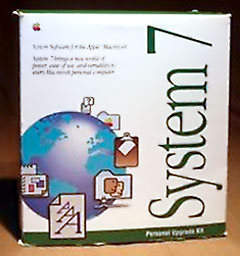 System 7.0.1 leaves 3131K free memory on a 4 MB PowerBook 100; additional MacTCP 2.0.6 and MacPPP 2.0.1 leave 3015K free memory. (With extensions off, System 7.5.5 takes about 1,200 KB, leaving roughly 2,800 KB free.)
Links to System 6.0.8, 7.0.1, and 7.5.3
We have updated as many links as we have been able to find, but Low End Mac makes no claims regarding the accuracy of this information or these links. Most commercial software is not available for free download.
- Anarchie 1.6.0 (ftp-client; v2.0 and later crash)
- AOL 2.6
- AppDisk 1.5 (RAM-disk) [v1.7.4 requires System 7, may be 68000 compatible]
- ApplWindows 2.0.2 (hierarchical app-menu)
- AutoDoubler 1.0
- Basic Black 1.4.1 (minimal screensaver)
- BBEdit Lite 3.5.1 (a great text editor)
- BeHierarchic 1.0.5 (hierarchical apple-menu)
- Black Night 1.0.5 (terminal emulator)
- Canvas 3.5
- ClarisDraw 1.0v3
- ClarisWorks 3.0
- Compact Pro 1.51 (*.cpt and *.hqx coder)
- Disinfectant 3.6 (anti-virus utility)
- Disk Copy 4.2 (handles *.image files)
- DropStuff w/EE 4.0 (a must-have addition to StuffIt Expander)
- Dynodex 3.5
- Easy View 2.62 (setext- and digest-browser)
- EndNote Plus 1.2.1 (bibliography manager)
- Eudora Lite 1.5.5 (email-client)
- Excel 4.0 (RAM 2048)
- Extensions Manager 2.0
- FaxSTF 2.6.1 (fax-utility)
- Fetch 3.0.1 (ftp-client)
- File Buddy 3.4.8 (handles file-types etc)
- FileMaker Pro 3
- FirstClass Client 2.5
- Flash-It 3.0.2 (screen captures)
- FreeHand 2.02
- GIFConverter 2.4.3 (opens GIFs, JPGs, TIFs, PICs; RAM 1500), Mac Plus or later
- GIFwatcher DA 2.1.2 (opens GIFs)
- GrafEq 2.04 (1.15 is less resource demanding), Pedagoguery Software, even works under System 6
- HyperCard 2.0v2
- Illustrator 1.9.5
- InterSLIP 1.0.1
- Ircle 1.5.6 (irc-client)
- Kermit 0.99(188) (terminal emulator)
- MacDraw II 1.1v2
- MacinTalk 1.31 (this is obsolete; v2 also works)
- MacinTalk 2 (from the PlainTalk/Text-to-Speech 1.4.1 package)
- MacKnowledge (BBS; RAM 1060)
- MacLink Plus 7.5
- MacMinix 1.5.10.7 (Unix-like system that runs as an app under MacOS)
- MacPPP 2.0.1
- MacSOUP (68000) 2.2b7 (off-line news-client)
- MacTCP 2.0.6
- MacTCP Watcher 1.1.0 (ping crashes 2.0)
- MacWeb 1.00A3.2 (www-client; v1.1.1 E crashes when saving prefs)
- MacWeb 2.0 (more features than in v1.00A3.2 but also slower and buggier)
- MacWrite II 1.1v1
- MacWrite Pro 1.0v4
- MaxFax 3.3.2
- MenuChoice 2.0 (hierarchical apple-menu)
- NCSA Mosaic 1.0.3 (www-client)
- NCSA Telnet 2.6 (telnet-client)
- NewsWatcher 2.1.1 (news-client)
- Norton Utilities 3.2
- PageMaker 4.0
- Persuasion 2.0
- Photoshop 1.0 (RAM 2048)
- PowerPoint 2.01
- Quark Xpress 3.32 (min RAM 2000, runs on as low as 900)
- ResEdit 2.1.3
- SCSIProbe 4.3
- ShrinkWrap 2.1 (mounts .image files etc; doesn’t create them on a Plus)
- StickyClick 1.2 (sticky mousedown Ý la Windows)
- Strip Fat 1.0a1 (unfattens apps by removing PPC or 68K code)
- StuffIt Deluxe 4.0
- StuffIt Expander 4.0.1 (a must-have decoder)
- StuffIt Lite 3.0.7 (crashes occasionally)
- Tex-Edit Plus 1.8.5 (text editor)
- TrueType 1.0 (TrueType INIT for Systems (6.0.5-6.0.8)
- UULite 2.0 UR (uucoder)
- Virex 5.0b (virus utility)
- Word 5.1 (RAM 2048)
- WriteNow 3.0
- YA-Base64 1.2.0 (base64 decoder; v1.2.9 crashes)
- YA-NewsWatcher 2.0.3b0 (news-client; v2.3.4 crashes)
- ZTerm 1.0.1 (terminal emulator)
- ZipIt 1.1.1 (v1.3.5 crashes PB100 with type 2 error, v1.3.8 current)
- uuUndo 1.0b5 (uudecoder)
- Xlator 1.1 (converts eols and charsets)
68000 Macs are supported up to System 7.5.5.
The last freely distributed versions were System 7.0 (DD floppies) and 7.0.1. Remember to also get the 7.0.x tune-up.
System 7.x requires a minimum of 2 MB of RAM and can be quite slow on 8 MHz Macs.
Systems 6.0.3-6.0.8 are the best choice for 8 MHz Macs and models with less than 2 GB of RAM.
TrueType INIT and Font/DA Mover for Systems 6.0.5-6.0.8
Systems 5.0-7.0.1 (7.0 on DD floppies) and some localized 7.0.1 systems
System files are often stored as *.image files which can be opened and transferred to floppies with DiskCopy or ShrinkWrap.
Minimum Requirements for the Net
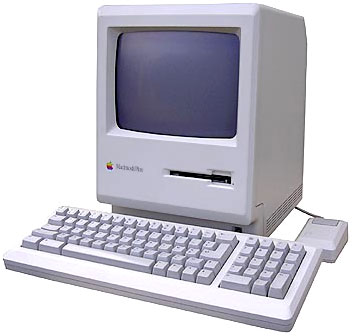 Mac Plus, 2.5-4 MB RAM, 20 MB hard disk, 2400-14400 modem, System 7.0, and MacTCP 2.0.6 are the practical minimum requirements for PPP connections. Only MacPPP 2.0.1 and InterSLIP 1.0.1 currently work on 68000 Macs (SimplePPP, Sonic PPP, InterPPP, MacSLIP or FCRppp might work, but I haven’t tried them).
MacTCP is included in System 7.5. Apple dealers once sold it, but a cheaper and better way was to buy “The Internet Starter Kit for Macintosh” (Adam Engst, Hayden Books) book where MacTCP, among other utilities, is included.
- MacTCP 2.0.x to 2.0.6 updaters
- MacPPP 2.0.1
- InterSLIP 1.0.1
On 68000 Macs, telnet-, ftp-, mail-, and news-apps like NCSA Telnet, Fetch, Anarchie 1.6.0, Eudora, and NewsWatcher work fine. With Mac Plus you can’t use control-keys in NCSA Telnet (in ZTerm you can use command instead of control).
On 68000 Macs, NCSA Mosaic 1.0.3, MacWeb 1.00A3.2 and v2.0 work. MacWeb 1.00A3.2 works better than v1.1.1 E, which crashes when saving prefs. MacWeb 2.0 has more features than v1.00A3.2, but it is also slower and buggier. NCSA Mosaic 1.0.3 can display in-line graphics, but with MacWeb you must use an external helper (click and hold on an image icon, choose “Retrieve to Disk” from the popup menu and view with GIFConverter or GIFwatcher DA).
Q: How can I get MacWeb 1.00A3.2 to automatically show GIFs on a 4 MB 68000 Mac?
A: Usually MacWeb tries to open GIFs internally; on 68000 macs this is not possible and an external viewer like GIFConverter is needed. However, GIFConverter doesn’t really fit into the max 900K RAM that MacWeb leaves. There is an old DA “GIFwatcher DA” that can be transformed into an automatically launched app via “DA Piggyback 1.2” which takes less memory than GIFConverter. Then change in MacWeb’s prefs’ Edit/Suffixes “gif” to MIME type “image/pict” and Edit/Helpers MIME type’s “image/pict” helper to GIFWatcher. Turn File/Preferences/Format/Autoload images off; you must view each GIF separately with no clickable links.
<ftp://ftp.ncsa.uiuc.edu//Mac/Mosaic/NCSAMosaic103.hqx>
ResEdit instructions for proxy support in MacWeb 1.00A3.2
With only 1 MB RAM, floppy drive(s), and System 6 you can connect via a terminal emulator like ZTerm and use Unix apps like pine, tin, ftp, ncftp, sz, rz, and lynx for mail, news, file transfer, and www. With ZTerm you can use command-key instead of control when using Mac Plus. To save disk space on those 800K floppies, install the minimum System 6.0.x that ZTerm requires. You can trash all files except System and Finder, delete unnecessary fonts and DAs from the System file with Font/DA Mover, and delete PPC code from ZTerm with Strip Fat to save even more disk space.
If you really want to use System 6 and connect via PPP, I’ve heard that the following software versions might work: System 6.0.5-6.0.8, MacTCP 2.0.6, MacPPP 2.0.1, NCSA Telnet 2.6, Fetch 3.0.1, Eudora 1.3.1, NewsWatcher 2.0d13m01, Internews 1.1, MacTCP Watcher 1.1.0, Valuefax 2.0.9 (older versions of these apps may use less memory).
< ftp://ftp.brown.edu/pub/mac/NewsWatcher/NewsWatcher_2.0d13m01.sea.hqx>
If you need to save disk space, unfatten the apps with Strip Fat.
Old mac games and info about Compact Macs at:
<http://www.jagshouse.com/GetYourCompactMacOnTheWeb.html>
To subscribe to Classic Macs mailing list, send a subscription request to <classicmacs@hitznet.com>. To post comments or questions send your e-mail post to <classic-post@hitznet.com>.
Keywords: #68000software
Short link: http://goo.gl/4BdeC7
searchword: 68000software
