
Low End Mac Reader Specials
TypeStyler For Mac OS X is Now Shipping! Download The Free Fully Functional 60 Day Tryout at www.typestyler.com
Don't install Parallels to play poker online! Poker Mac will show you how
to download and install a native Mac poker application such as Full
Tilt Poker Mac.
Compare products like desktop computers, apple laptops, apple macs, and LCD Monitors side by side! All the information and reviews to make the best purchasing decision for new mobile phones, sat nav systems, or MP3 players. The Ciao online shopping community makes searching products easy for you.
The 'Book Beat
Bringing a PowerBook 520 Back from the Dead
- 2005.11.28
Over the last year, I've developed something of a reputation as a "rehousing project" for old Macs. Just last week I was given an old PowerBook 520 by someone who hadn't used it for years. The machine had been in storage for quite some time.
With its built in ethernet support, it offered an ideal machine to keep stashed under the sofa and pulled out when I wanted to check my email.
Dead Out of the Box
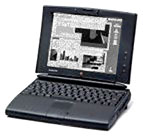
This was the
first 68k Mac laptop I've ever laid hands on. I tapped the power button
as soon as I had it on my desk, but nothing happened. So I pulled out
the mains charger and tried to run it from the mains.
Still no signs of life.
At first I was a little distraught at the idea that this machine was just a big old paperweight, but then I thought back to the PowerBook 5300 and its flaky socket for the mains charger. A bit of cable wiggling later, and the 520 sprung into life.
A Pleasant Surprise
The 520 then revealed some very pleasant surprises. I'd already noticed that the case had a PowerPC logo on it, which seemed odd given that this was a 68040 machine.
A quick check under "About This Macintosh" revealed that what was sat in front of me was actually an upgraded 520 &endash; one with a 99 MHz PowerPC 603e processor (quite a leap from the 25 MHz I was expecting).
Even better, since the scarcity of PowerBook RAM upgrades nowadays meant that a memory upgrade was pretty much out of the question, I was really pleased to see that the memory was raised to a very respectable 40 MB (some of it coming from the CPU upgrade card).
The Bad News
There was bad news, too. For some reason, the machine wasn't recognising the two "intelligent" NiMH batteries that were installed. Removing and reseating them made no difference.
As far as the PowerBook was concerned, the batteries either didn't exist or weren't worth charging.
Much time was then spent surfing the 'Net looking for a solution to my woes. Some people had gone as far as to take the batteries to pieces and replace the cells inside them, but this seemed a bit of overkill.
What kept being mentioned in all these articles was the "Intelligent Battery Reconditioning Software" &endash; why wasn't this software on my PowerBook?
A little bit of hunting online, and I found a copy of the software from download.com - but was this going to be the answer?
Try and Try Again
The reconditioning software only works on the battery in the right-hand bay. I tried it on the first one, only to get the error. "Your battery could not be updated, please return to an authorized Apple dealer".
Switching the batteries produced the same result.
Frustrated, I took a tea break. Upon returning to the machine, I decided to give it one more try. Lo and behold, the reconditioning software got about 10 seconds into the process before it failed with the same message.
Failure again, but we'd gotten further this time. One more try and - wonder of wonders - the reconditioning cycle ran through. It failed again, right at the end this time, but the PowerBook was now recognising one of the batteries.
The laptop now spent about 10 minutes charging before reporting the battery was 100% full. The machine was able to run on battery power alone for the first time in years. She managed about two minutes before shutting down due to "low batteries". Still, it was progress.
Restarting from the mains, I decided to try reconditioning battery number two. Again, we got an error at the end of the process, but now both batteries were being recognised. They both hold their charge for mere minutes before shutting down, but now the process of reconditioning and recharging them can begin.
The Moral
The moral of this story has to be that even a seemingly broken machine may still have life in it. With a bit of effort and research, this dark grey paperweight has been turned into a functioning laptop once again.
There's probably also something to be said for Apple, whose
reconditioning software made this dramatic recovery possible.
Recent 'Book Beat articles
- Bringing a Zebra Stripe SE/30 Back to Life, 02.19. The Japanese call it Simasimac, the horizontal striped pattern that indicates your Mac is terminal.
- Creating Classic Mac Boot Floppies in OS X, 08.07. Yes, it is possible to create a boot floppy for the Classic Mac OS using an OS X Mac that doesn't have Classic. Here's how.
- Who cares about Apple's market share?, 08.24. Market share and installed base are not only nebulous, but ultimately unimportant as long as Apple continues to turn a profit.
- Moving files from your new Mac to your vintage Mac, 06.13. Old Macs use floppies; new ones don't. Old Macs use AppleTalk; Tiger doesn't support it. New Macs can burn CDs, but old CD drives can't always read CD-R. So how do you move the files?
- More in the 'Book Beat index.
Links for the Day
- Mac of the Day: Lisa, Jan. 1983 - The ancestor of the Macintosh had a mouse, a graphical interface, and a $10,000 price tag.
- Group of the Day: Unsupported OS X is for those using OS X on unsupported hardware.
- March 22 in LEM history: 00: Macs and digital video - 01: My Performa - Fun at CompUSA75 Mac Advantages - 02: Don't try this at home - History of portable computing - 04: Prolong battery life - 05: Symantec's ravings spread FUD about OS X security - 06: Picking a Power Mac G4 - France and the end of DRM
- Support Low End Mac
Recent Content on Low End Mac
- Does iPhone OS Need Multitasking?, iCab Comes to iPhone, Canada's Proposed iPod Levy, and More, iNews Review, 03.19. Also the iPad paradox, Freescale demos $200 tablet, gardening apps, aluminum iPhone stand, steel iPhone case, and more.
- Could iPad Replace the Mac?, Mac Sales Up in 2010, Avoiding Windows 7 'Whenever Possible', and More, Mac News Review, 03.19. Also why your next Mac may be an iPad, science blogger abandons Apple, the benefits of standing while working, and more.
- The Mobile System Stampede, Lithium Battery That Can't Explode, Affordable SSD Options, and More, The 'Book Review, 03.19. Also June 2007 MacBook Pro external display issue, laptop stands, 1 TB ultraportable hard drive, Mini DisplayPort/HDMI adapter, and more.
- How to Zoom Your Browser for a More Readable Web, Steve Watkins, The Practical Mac, 03.18. Instructions for zooming text and pages in Safari, Firefox, Camino, and Opera.
- CardBus WiFi, the Shiira Browser, Ridding the Web of Flash, and Macs vs. PCs, Charles W. Moore, Miscellaneous Ramblings, 03.18. Mac longevity, Shiira speed, ambidextrous Mac and Windows use, and how Flash benefits Apple.
- How Ad Blocking Hurts Your Favorite Websites, Charles W. Moore, Miscellaneous Ramblings, 03.18. Ad income keeps the Web free. Blocking online ads hurts your favorite websites.
- Taking Apart the 12" PowerBook, John Hatchett, Recycled Computing, 03.17. There are a lot of steps involved in disassembling a 12" PowerBook. Proceed with caution.
- More links in our archive.
Recent Deals
- Best 13" MacBook & MacBook Pro Deals, 03.22. Used 1.83 GHz, $570; 2.0, $599; 2.4 GHz, $889; refurb 2.26, $849; new, $900 after rebate; Pro, $1,119 a/r, 2.53, $1,399 a/r.
- Best Power Mac G5 Deals, 03.22. 1.8 GHz single, $399; dual, $445; 2.0, $609; 2.5, $724; 2.7, $799; 2.3 GHz dual-core, $669; 2.5 GHz Quad, $799.
- Best AirPort Deals, 03.22. Refurb AirPort Express, $79; new, $95; refurb dual-band AirPort Extreme Hub, $129; new simultaneous dual-band, $168.
- Best Intel iMac Deals, 03.17. Used 17" from $600; 20" from $750; 24" from $825; refurb 21.5" nVidia, $999; new, $1,099; refurb Radeon, $1,299; new, $1,399; refurb 27" 3.06, $1,499; more.
- Best G5 iMac Deals, 03.17. 17" 2.0 GHz, $380; 1.9 GHz iSight, $479 shipped; 20" 1.8 GHz, $509 shipped; 2.1 GHz iSight, $549 shipped.
- Best Time Capsule Deals, 03.17. Close-out 500 GB, $140; new 1 TB, $279; used 2 TB simultaneous dual-band, $400; new, $455. Shipping included.
- Best iPad Deals, 03.16. 16 GB iPad, $499; 32 GB, $599; 64 GB, $699; 16 GB with 3G, $629; 32 GB 3G, $729; 64 GB 3G, $829. Free ground shipping.
- More deals in our archive.
About LEM | Support | Usage | Privacy | Contacts
Navigation
Used Mac Dealers
Apple History
Video Cards
Email Lists
Favorite Sites
MacSurfer
MacMinute
MacInTouch
MyAppleMenu
InfoMac
Macs Only!
The Mac Observer
Accelerate Your Mac
RetroMacCast
PB Central
MacWindows
The Vintage Mac
Museum
DealMac
DealsOnTheWeb
Mac2Sell
ramseeker
Mac Driver Museum
JAG's House
System
6 Heaven
System 7 Today
the pickle's Low-End
Mac FAQ
Abandonware
Petition
Mac vs. PC Info
Affiliates
The Apple
Store
Mac
Connection
B&H
MacMall
TechRestore
ExperCom
Crucial
Memory
batteries.com
MacMinute
MacInTouch
MyAppleMenu
InfoMac
Macs Only!
The Mac Observer
Accelerate Your Mac
RetroMacCast
PB Central
MacWindows
The Vintage Mac
Museum
DealMac
DealsOnTheWeb
Mac2Sell
ramseeker
Mac Driver Museum
JAG's House
System 6 Heaven
System 7 Today
the pickle's Low-End
Mac FAQ
Abandonware
Petition
Mac vs. PC Info
Mac Connection
B&H
MacMall
TechRestore
ExperCom
Crucial Memory
batteries.com

