
The 'Book Review
2 Apps Every MacBook Should Have, Right-click with Apple's 1-button Trackpad, Micro Flash Drives, and More
This Week's Mac Notebook News
Compiled by Charles Moore and edited by Dan Knight - 2007.09.07
This Week's MacBook, PowerBook, and iBook News
All prices are in US dollars unless otherwise noted.
General Apple and Mac desktop news is covered in The Mac News Review. iPod, iPhone, and Apple TV news is covered in The iNews Review.
News & Opinion
Reviews
Tech Trends
Products and Services
Software
iPod Deals
Bargain 'Books
News & Opinion
2 Apps Every MacBook Owner Should Have
Deep Thought's Jay says:
"Yesterday I finally received my MacBook. There was much joy and celebration as I told the other guys here at DT about it. I also was pretty excited about it; I mean, I have written for DT almost a year now, and not until now have I had any say on Apple subjects. All of that is beside my main point, which has nothing to do with me being happy about my MacBook. The point I am aiming for is how I ended up in a video chat with my friend Aaron, who has owned his MacBook for as long as I can remember. He started sending me programs that he had dug up from the immense amount of open source/freeware floating around for OS X. There are a couple that I feel obligated to give the spotlight to.
- smcFanControl
- Desktop Manager"
Link: Apps Every MacBook Owner Should Have
Next Year's Notebooks Will Be Worth Waiting For
InformationWeek's David DeJean reports:
"Good things come to those who wait, says the proverb. Right now, this is very appropriate if you're in the market for a new notebook. Unless you're in a hurry, you may want to keep your wallet in your pocket - there are new technologies around the corner you won't want to miss.
"While for a few years, the pace of innovation seemed to be slowing down, the year 2008 may be different. Conversations with several experts on industry trends, and a deep dive into the conventional wisdom of published reports, have yielded some interesting prognostications:
- Big notebooks are getting bigger
- Notebook displays are going Hollywood
- Small notebooks will continue to shrink
- Wireless use will continue to expand
- It's getting easier to be green
- Storage is going solid-state
- More notebooks may mean less Windows"
Link: The Future of Mobile Tech: Next Year's Notebooks Will Be Worth Waiting For
Reviews
May 2007 MacBook 'the Best Place to Start'
PC Magazine's Cisco Cheng reports:
"Ever since Apple switched to Intel CPUs, the Mac versus PC debate has transformed the Apple MacBook into a crowd favorite, a status that its predecessor, the iBook, never really achieved. This is especially true among teens and novice users. To them, the MacBook is the epitome of what's cool in the computing world, and few have any quibbles about its gorgeous design. Every six months or so-at least that's been the trend with the past two releases-the MacBook also gets a component refresh, though the price remains the same. The new Apple MacBook 13-inch (Core 2 Duo T7200) ($1,099 direct) moves from a 1.83-GHz to a 2.0-GHz processor and offers several other enhancements. It's not the new and faster Intel chipset (aka Santa Rosa) that many had anticipated, but that won't take anything away from your overall experience. (So far, an upgrade to the new Centrino Duo has been limited to MacBook Pros.) And as I have said in my most recent MacBook review, the best place to start is at the base."
Link: Apple MacBook 13-inch (Core 2 Duo T7200) Review
15" MacBook Pro (LCD) a PC Magazine Editors' Choice
PC Magazine's Cisco Cheng reports:
"Apple MacBook Pro fanatics know the drill. Every six months or so, their eyes gleam in anticipation of earth-shattering upgrades. With Intel's launch of its Santa Rosa platform, the foregone conclusion was that the MacBook Pros would get the added speed from a component transplant. But what about other desired features? Would the MacBook Pro have built-in Wireless WAN? A Blu-ray drive? An LED display? Well, one out of three isn't bad. The Apple MacBook Pro 15-inch (LED) embeds a new display technology called LED backlighting, not to mention an array of processing parts that range from a new Intel Core 2 Duo processor to a new graphics core from Nvidia. You won't notice much of a visual difference with the LED screen, but the performance enhancements may be enough to make MacBook Pro owners out of some who had been undecided. Upgrading from a current MacBook Pro is probably not worth the expense, but Apple put enough into the MacBook Pro 15-inch (LED) for the line to retain the Editors' Choice for mainstream laptops."
Link: PC Mag: Apple MacBook Pro 15-inch Review
Tech Trends
SanDisk's Micro Solid State Drive for Low-Cost PCs
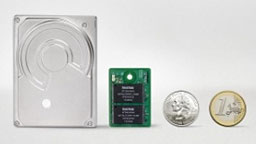
PR: Joining global efforts to bring affordable personal computers to millions of people in developing nations, SanDisk Corporation has announced the uSSD 5000 solid state drive (SSD), which can be used as an economical substitute for hard disk drives in sub-$250 PCs. Among the first computers using uSSD solid state drives will be the Intel-powered classmate PC, intended for educational markets in emerging nations.
 The announcement was made at IFA, the world's largest consumer
electronics show, where SanDisk is exhibiting at Booth 130, in Hall
15.1 of Messe Berlin, through Sept. 5.
The announcement was made at IFA, the world's largest consumer
electronics show, where SanDisk is exhibiting at Booth 130, in Hall
15.1 of Messe Berlin, through Sept. 5.
SanDisk's uSSD 5000 solid state drive is a USB module designed to be embedded directly onto the motherboard of low-cost PCs as a hard disk replacement. The uSSD 5000 solid state drive supports a variety of operating systems, including Microsoft's Windows XP Professional, Windows XP Embedded, Windows Embedded for Point of Service and Windows CE, as well as Linux. The uSSD 5000 solid state drive is expected to be available in capacities from 2 GB1 to 8 GB.
This is the first SSD product from SanDisk to be offered with SanDisk's patented multi-level cell (MLC) technology. MLC technology doubles data-storage capacities in the same physical space as single-level cell (SLC) technology, resulting in significant cost savings.
"The low-cost educational PC category is an emerging market for flash storage where low cost, ruggedness and low power consumption will be the primary factors for broad-based adoption," said Greg Rhine, senior vice president and general manager of the Consumer Products Division at SanDisk. "At 2 GB, the uSSD 5000 solid state drive delivers the necessary storage capacity for low-cost PCs at significantly less cost than conventional hard drives, while meeting performance and reliability requirements for this market. We are proud to have been chosen for the Intel-powered classmate PC, a product that demonstrates how inexpensive SSDs can contribute to the worthy cause of improving education in the developing world."
Compared to conventional hard disk drives, SanDisk's uSSD 5000 solid state drives are advantageous in low-cost PCs for a variety of reasons:
- Cost Effectiveness - uSSD 5000 solid state drives at 2GB are significantly less expensive than even the lowest-capacity conventional hard disk drives. Future generations of flash memory will usher in higher storage capacities at the requisite price points.
- Ruggedness - With no moving parts, SanDisk's uSSD 5000 solid state drives are a perfect fit for kid's classroom wear-and-tear. The durability of uSSD 5000 solid state drives surpasses mechanical hard disk drives.
- Reliability - SanDisk's uSSD 5000 solid state drives deliver high reliability based on advanced flash management technology including powerful error detection and correction algorithms.
- Small - At 27mm x 38mm, uSSD 5000 solid state drives are about one-fourth the size of 1.8-inch hard disk drives.
- Strong Performance - uSSD 5000 solid state drives with MLC technology offer performance more than sufficient for the low cost PC market.
SanDisk uSSD 5000 solid state drives are expected to be available for customer sampling in 30 days, with volume availability expected in the fourth quarter, in capacities ranging from 1 to 8 gigabytes. In addition to the uSSD 5000 brand, SanDisk offers other SSD products in 4-, 8-, 16-, 32- and 64-GB capacities.
SanDisk is the original inventor of flash storage cards and is the world's largest supplier of flash data storage card products, using its patented, high-density flash memory and controller technology. SanDisk is headquartered in Milpitas, California, and has operations worldwide, with more than half its sales outside the US.
- 1 gigabyte (GB) = 1 billion bytes; 1 megabyte (MB) = 1 million bytes
Link: SanDisk SSD
Products and Services
SanDisk Multi Card ExpressCard Adapter
PR: SanDisk Corporation has launched the SanDisk Multi Card ExpressCard Adapter, offering fast transfer speeds from memory cards to notebook computers without the need to carry cables or external card readers. The announcement was made at IFA, the world's largest consumer electronics show, where SanDisk is exhibiting at Booth 130, in Hall 15.1 of Messe Berlin, through Sept. 5.
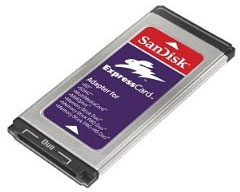 The new adapter fits into the ExpressCard slot now found
in most new notebook computers, and accepts six card formats: SD, SDHC,
MultiMediaCard, MMCplus, Memory Stick Duo, Memory Stick PRO Duo and
Memory Stick PRO-HG Duo. Many competing ExpressCard adapters only
accept the full size Memory Stick format, running counter to the swing
in market momentum toward the smaller Duo form factor.
The new adapter fits into the ExpressCard slot now found
in most new notebook computers, and accepts six card formats: SD, SDHC,
MultiMediaCard, MMCplus, Memory Stick Duo, Memory Stick PRO Duo and
Memory Stick PRO-HG Duo. Many competing ExpressCard adapters only
accept the full size Memory Stick format, running counter to the swing
in market momentum toward the smaller Duo form factor.
"With the SanDisk Multi Card ExpressCard Adapter, we're supporting the rise of the ExpressCard slot in notebook computers," said Matthijs Hutten, Senior Product Marketing Manager at SanDisk. "We expect ExpressCard to completely replace the PC Card standard in the near future, so offering an ExpressCard adapter which integrates many popular card formats is a natural move for SanDisk."
For notebook computers without embedded memory card slots, the SanDisk Multi Card ExpressCard Adapter is an easy system upgrade. Users only need to pop the card into the ExpressCard slot - there is no software to install, with no external cables or hardware required. To transfer data, users simply take a memory card out of a device such as a digital still or video camera, an MP3 player, a portable game player or a mobile phone and insert the card into the adapter.
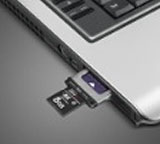 Even for notebook computers with embedded memory card
slots, the SanDisk Multi Card ExpressCard Adapter can be useful.
Embedded slots today don't always support the new SD High Capacity
(SDHC) format or the Memory Stick PRO Duo form factor, requiring users
to carry an external reader. SanDisk's new adapter offers native SDHC
and Memory Stick PRO Duo support.
Even for notebook computers with embedded memory card
slots, the SanDisk Multi Card ExpressCard Adapter can be useful.
Embedded slots today don't always support the new SD High Capacity
(SDHC) format or the Memory Stick PRO Duo form factor, requiring users
to carry an external reader. SanDisk's new adapter offers native SDHC
and Memory Stick PRO Duo support.
The SanDisk Multi Card ExpressCard Adapter is expected to be available in North America and Europe in September, with a manufacturer's suggested retail price of $29.99 in the United States. Suggested retail pricing in Europe is yet to be announced.
SanDisk is the original inventor of flash storage cards and is the world's largest supplier of flash data storage card products, using its patented, high-density flash memory and controller technology. SanDisk is headquartered in Milpitas, California and has operations worldwide, with more than half its sales outside the US.
Link: SanDisk
Software
One Finger Snap: Right-click for Apple's 1-button Trackpad
PR: Don't throw away that 1-button mouse:
Many new Mac buyers find that the first purchase they make is for a 2-button mouse so they can have quick access to the contextual menu. Sure, you can hold down the control key when you click, but let's face it, a two button mouse makes the contextual menu so much easier to get to. Now with One Finger Snap, you can just click and hold down that one button to get to the contextual menu. And that way you can hold onto that beautiful Apple mouse, too.
Great for PowerBook users:
At the office, you have a nice two-button mouse, and you use it every day. Now you take your PowerBook on the road, and your right mouse button finger is just twitching. You get things done so much faster with the contextual menu. Don't you wish there was an easy way to get to it from the track pad? One Finger Snap works as well with a one-button track pad as it does with a one-button mouse. So you can click and hold the trackpad button rather than carry along another piece of equipment.
For ex-Windows users:
So you took the plunge and switched to the Mac. Good for you. While you like Mac OS X on your new Mac mini, you can't help but miss that old 2-button mouse. Don't go back to Windows, just try One Finger Snap. It's much cheaper, and it has fewer viruses.
But I already have a 7-button, wireless mouse with a scroll wheel:
Oh, you ubergeek you. One Finger Snap can still help you. Wouldn't it be nice to have just one more button? Turn on One Finger Snap, and you no longer need that right mouse button for the contextual menu. Now you can reassign it to something more useful.
System Requirements: One Finger Snap will work on Mac OS X 10.3 Panther or 10.4 Tiger.
New with One Finger Snap 1.4: One Finger Snap is now an open source project. Appropriate changes were made to make it more accessible to other developers.
While it was once a shareware product, One Finger Snap is now open source as of version 1.4. It is offered under the MIT license:
Link: One Finger Snap
Bargain 'Books
Bargain 'Books are used unless otherwise indicated. New and refurbished units have a one-year Apple warranty and are eligible for AppleCare.
There are two different versions of WallStreet running at 233 MHz, the cacheless MainStreet version and the later Series II with a level 2 cache. It's not always possible to determine from the vendor's listing which is being offered, so we've included links within this paragraph to the two models. The same goes for the PowerBook G4/667 (VGA) and G4/667 (DVI), the titanium vs. aluminum 15" PowerBook G4 at 1 GHz, and 1.25 GHz to 1.5 GHz 15" PowerBooks.
PowerBook, iBook, and MacBook profiles linked in our Portable Mac Index.
Apple Store
The 2.2 GHz MacBook Pro Core 2 Duo is the cheapest MacBook Pro offered this week at $1,699. All MacBooks cheaper than $949.00 are sold out. A high-resolution screen 17" MacBook Pro is available, although at just $200 off the new price, it's not a rip-roaring bargain. cm
- refurb 2.0 GHz Core Duo MacBook, white, 1 GB/80/SD, $949
- refurb 2.0 GHz Core 2 MacBook, white, 1 GB/80/Combo, $949
- refurb 2.0 GHz Core 2 MacBook, white, 1 GB/80/SD, $999
- refurb 2.16 GHz Core 2 MacBook, white, 1 GB/120/SD, $1,099
- refurb 15" 2.2 GHz Core 2 MacBook Pro, 2 GB/120/SD, $1,699
- refurb 17" 2.33 GHz Core 2 MacBook Pro, 2 GB/160/SD, $2,199
- refurb 17" 2.4 GHz Core 2 MacBook Pro, 2 GB/160/SD, $2,399
- refurb 17" 2.4 GHz Core 2 hi-res MacBook Pro, 2 GB/160 7200 rpm/SD, $2,599
- refurb 15" 2.4 GHz Core 2 MacBook Pro, 2 GB/160/SD, $2,199
TechRestore
TechRestore is offering a $25 discount to 'Book Review readers off any PowerBook or iBook in stock. Just enter the code CWM during checkout when ordering online. The coupon code is valid from now through 2007.12.31.
- 12" iBook G3/600, 256/20/CD, $349.99 less $25 = $324.99
- 12" iBook G3/700, 256/20/Combo, $419.99 less $25 = $394.99
- 12" PowerBook G4/867, 256/40/SD, $679.99 less $25 = $654.99
- 12" PowerBook G4/1.5 GHz, 256/80/SD, $849.99 less $25 = $824.99
- 14" iBook G4/1.42 GHz, 512/60/SD, APX, $829.99 less $25 = $804.99
- 15" PowerBook G4/1.5 GHz, 256/80/SD, $979.99 less $25 = $954.99
- 15" PowerBook G4/1.67 GHz, 512/80/SD, APX, BT, $1,199.99 less $25 = $1,174.99
- 15" 1.83 GHz Core Duo MacBook Pro, 512/80/SD, $1,249.99 less $25 = $1,224.99
Baucom Computers
- 12" iBook G3/700, 256/20/Combo, $299
- 12" iBook G3/600, 256/15/CD, $219
- 12" iBook G3/700, 384/20/Combo, $309
- 12" iBook G4/1.2 GHz, 512/30/Combo, AP, $515
- 15" PowerBook G4/867, 512/40/SD, scratches/wear, $520
- 15" PowerBook G4/867, 512/40/SD, $555
- Add AirPort for $70
Wegener Media
- 12" PowerBook G4/867 MHz, 256/40/Combo, $589.99
Power Max
Free shipping and $50 rebate on Power Max MP3 Sunglasses with the purchase of any new, used, or refurbished Mac.
- open box 1.83 GHz Core 2 MacBook, white, 512/60/Combo, warranty started, $949
- open box 1.83 GHz Core 2 MacBook, white, 512/60/Combo, $999
- open box 2.0 GHz Core 2 MacBook, white, 1 GB/80/SD, $1,029
- 2.0 GHz Core 2 MacBook, white, 1 GB/80/SD, $1,149
- open box 2.0 GHz Core 2 MacBook, black, 1 GB/120/SD, $1,349
- open box 2.0 GHz Core 2 MacBook, white, 1 GB/120/SD, $1,249
- open box 2.0 GHz Core 2 MacBook, black, 1 GB/120/SD, $1,349
- open box 15" 2.16 GHz Core 2 MacBook Pro, 1 GB/120/SD, $1,699
- 15" 2.16 GHz Core 2 MacBook Pro, 1 GB/120/SD, $1,749
- 15" 2.33 GHz Core 2 MacBook Pro, 2 GB/120/SD, $2,199
- 17" 2.33 GHz Core 2 MacBook Pro, 2 GB/160/SD, warranty started, $2,599
- 17" 2.33 GHz Core 2 MacBook Pro, 2 GB/160/SD, $2,688
ExperCom
- open box 15" 2.33GHz MacBook Pro, 2 GB/120/SD, $1,999
- open box 17" 2.4GHz MacBook Pro, 2 GB/160/SD, $2,599
PowerBook Guy
- 12" clamshell iBook G3/300, blueberry, 64/3/CD, $129.95
- 12" clamshell iBook G3/300, tangerine, 64/3/CD, $149.95
- 12" iBook G3/500, 128/10/CD, $199.95
- 12" iBook G3/500, 256/20/CD-RW, $259.95
- 12" clamshell iBook G3/366, Key lime, 128/10/CD, $279.95
- 12" iBook G3/600, 128/20/CD, $239.95
- 12" iBook G3/600, 256/15/DVD, $279.95
- 12" iBook G3/800, 256/30/Combo, $369.95
- 12" iBook G4/1 GHz, 512/30/Combo, APX, $549.95
- 15" PowerBook G4/1.5 GHz, 512/80/SD, APX, BT, $999.95
We Love Macs
- 12" iBook G3/500, 192/10/CD, $284.95
- 12" iBook G3/700, 256/20/CD, $379.95
Custom Macs
- 12" clamshell iBook G3/300, 64/3/CD, OS 9, $129.99
- 12" clamshell iBook G3/300, 256/3/CD, OS X 10.3, $189.99

- 12" iBook G3/500, 128/10/CD, OS X, $209
- 12" iBook G3/500, 128/30/CD, OS X, $279
- 12" iBook G3/600, 128/30/CD, OS X, $329
For more deals on current or recently discontinued models, see our MacBook deals, 15" MacBook Pro deals, 17" MacBook Pro deals, 12" PowerBook G4 deals, 15" and 17" PowerBook G4 deals, titanium PowerBook G4 deals, iBook G4deals, PowerBook G3 deals, and iBook G3deals.
Join us on Facebook, follow us on Twitter or Google+, or subscribe to our RSS news feed
Links for the Day
- Mac of the Day: PowerBook 500 Series, introduced 1994.05.16. 'Blackbird' includes a 25 to 33 MHz 68040 along with smart batteries and grayscale or color displays.
- Support Low End Mac
Recent Content
About LEM Support Usage Privacy Contact
Follow Low End Mac on Twitter
Join Low End Mac on Facebook
Favorite Sites
MacSurfer
Cult of Mac
Shrine of Apple
MacInTouch
MyAppleMenu
InfoMac
The Mac Observer
Accelerate Your Mac
RetroMacCast
The Vintage Mac Museum
Deal Brothers
DealMac
Mac2Sell
Mac Driver Museum
JAG's House
System 6 Heaven
System 7 Today
the pickle's Low-End Mac FAQ
Affiliates
Amazon.com
The iTunes Store
PC Connection Express
Macgo Blu-ray Player
Parallels Desktop for Mac
eBay

