
The 'Book Review
Apple's Notebook Shift, Loose Hinge on Unibody MacBook Pro, MBP Video Issues, and More
This Week's MacBook, PowerBook, and iBook News
Compiled by Charles Moore and edited by Dan Knight - 2009.01.30
All prices are in US dollars unless otherwise noted.
General Apple and Mac desktops is covered in The Mac News Review. iPod, iPhone, and Apple TV news is covered in The iNews Review.
News & Opinion
- Apple's Dramatic Notebook Sales Shift
- The Myth of Width: When Wide Screens Don't Work
- MacBook Pro Glossy Display Good, but Reflections Unacceptable
- SSD Tailored for the MacBook Air V2
- Users Complaining of Loose Hinge on Unibody MacBook Pros
- Tim Cook's Big Problem - 'Netbooks'
- 35 Million Netbook Shipments Expected in 2009
Reviews
- Unibody MacBook 'a Beautiful Laptop'
- The Most In-depth Unibody MacBook Review Yet - By a Recent Mac Switcher No Less
Apple Updates
- MacBook Pro: Distorted Video or No Video Issues
- About the Apple Mini DisplayPort to Dual-Link DVI Adapter
Bargain 'Books
News & Opinion
Apple's Dramatic Notebook Sales Shift
The Industry Standard says:
"Buried in Apple's sales figures for the recently concluded holiday quarter is an interesting statistic: The notebook line (MacBook, Air and MacBook Pro lines) exceeded 70 percent of Macintosh sales for the first time ever....
"MacBook sales records were smashed with a surprising 1.8 million units sold in that quarter. That's more than twice the quarterly figures from 2006."
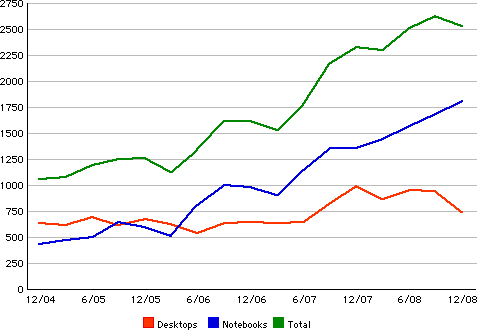
Macintosh Unit Sales, holiday quarter 2004 through holiday quarter
2008.
Link: Apple's Dramatic Notebook Sales Shift
The Myth of Width: When Wide Screens Don't Work
Cnet's Rafe Needleman says:
"The displays of the world are getting wider. For those of us who work, this is not progress. Sure, wide-screen computer screens look cool, but in the real world of working on laptops, a wide-screen display is an ergonomic step backwards.
"Before I slam the move to wide-screen computers, I will gladly admit that for entertainment content, wide-screen works. Our eyes are side-by-side, after all, and having a story unfold in a way that more closely respects how we see gives a more engrossing, absorbing experience. Wide-screen plasma and LCD television sets make sense, as do CinemaScope movie theaters .
"But when we have work to do, the fact that our eyes are set up to spot a herd of jackals approaching us over the plain becomes irrelevant. For most people, the world of work is in portrait mode, and wide-screen displays offer scant benefits...."
Editor's note: I agree enthusiastically. cm
Other editor's note: Likewise. Without sufficient vertical pixels, you just can't work efficiently. dk
Link: The Myth of Width: When Wide Screens Don't Work
MacBook Pro Glossy Display Good, but Reflections Unacceptable
Rob Galbraith says:
"In July 2007, we wrote an assessment of the matte display in the MacBook Pro 15 inch. At the time, Apple was beginning the transition to LED backlights in its laptop line, and what we found was the display was incrementally better than the company's previous offerings in this size and offered a decent platform for assessing and doing basic adjusting of pictures in the field. In short, the screen was good and it responded well to hardware profiling but overall accuracy was a couple of notches below a good desktop display. Still, we concluded that Apple was making one of the finest laptop screens we'd seen for use in a pro digital photography workflow.
"Eighteen months have elapsed since then, and the laptop display landscape has changed plenty. Apple has switched to a glossy-only display design for most of its portable lineup, Lenovo has released a laptop with a screen calibrator built into the palmrest while netbooks have evolved into surprisingly useful tools for some types of photography. To that end, we've gathered and tested the displays in three current laptops: the late-2008 MacBook Pro 15 inch, Lenovo ThinkPad W700 and Dell Inspiron Mini 9.
"Well, make that four laptops. Rounding out the testing is the IBM/Lenovo ThinkPad T60, whose 1400 x 1050 pixel FlexView display has nearly a cult following among laptop aficionados...."
Link: A Look at the Evolving Laptop Display
SSD Tailored for the MacBook Air V2
Hardmac's Lionel says:
"Even if the market of the 2,5" SSD has largely taken off, that of the 1,8" has developed more slowly, especially for the models with a thickness of 5 mm.
"As all those who have looked for disks for the MacBook Air V1 know, there are practically none, and alas, things are likely to remain in this state, as the format Flex ATA used by Apple is in the process of disappearing.
"Things are better for those which have a model of the second revision which has adopted the SATA.
"Especially as PQI announces the SSD S518."
Link: A SSD Tailored for the MacBook Air V2
Users Complaining of Loose Hinge on Unibody MacBook Pros
9 To 5 Mac's Seth Weintraub reports:
"A group of people who have purchased Unibody MacBook Pros likes the rigidity of the old MacBook Pro hinges vs. the new one. So of course they started a petition and got it dugg to get attention put on the matter. It isn't clear what exactly Apple could do at this point except tighten some screws or use less lubricant. But we do know everyone will have an opinion on both sides of this matter...."
Link: Fix the Hinge! Users Complaining of a Loose Hinge on Unibody MacBook Pros
Tim Cook's Big Problem - 'Netbooks'
Motley Fool's Tim Beyers says:
"I don't envy Tim Cook.
"That's not a slight. Cook strikes me as a smart, engaging guy who handled himself very well during Apple's recent earnings call. Who cares if he lacks Steve Jobs' legendary gregariousness? He's obviously in control, and that's what the iEmpire needs right now: a steady hand. Mostly, anyway.
"But Apple also needs innovation. A big idea. Soon.
"Netbooks are the problem. Apple shouldn't rush to create one, but eventually, it will need an alternative to what Dell, Hewlett-Packard, Intel, and others are creating; netbooks are the next great format for innovation. As Computerworld's Mike Elgan wrote recently, 'Desktop PCs are the least innovative areas of consumer technology.'"
Link: Tim Cook's Big Problem - 'Netbooks'
35 Million Netbook Shipments Expected in 2009
PR: The time is right for the netbook. According to analysts at ABI Research, a confluence of social and technological factors has created a kind of "perfect storm" that will lead to a market explosion for netbooks over the next few years. The firm forecasts worldwide shipments of nearly 35 million this year, rising to an estimated 139 million in 2013.
Practice director Kevin Burden describes this evolution: "PDA's began our reliance on instant accessible data while traveling. When PDA functionality converged with cellular voice, smartphones became the new darling of mobile professional technology that many expected to evolve into the hub for all data and communication needs for traveling professionals. Today, with a better understanding for what a smartphone is, is not, and may never be, along with a reality check on the usefulness of UMPCs, the market remains open for new device types."
Smartphones did a lot to raise our comfort level with mobile technology as well our expectations for how connected we could be and how accessible information and data should be while on the road.
Enter the netbook with its lightweight, medium-sized form factor and low-cost processors leading to moderate overall price points may finally have "right-sized" mobile technology for productive travels.
While the advent of low-cost, power stingy x86 and ARM processors were the technical keys to netbooks, Burden argues that industry and consumer expectations also needed to evolve before netbooks would meet market acceptance. "In recent years, the industry still expected the smartphones to be more than they turned out to be, and most recently, MIDs were thought to be the next big mobile devices segment, but an unclear usage model continues to confuse the market. So today, netbooks' time has come, and ABI research expects them to enjoy very strong market growth."
ABI Research's "Mobile Devices Annual Market Overview" delivers an integrated view of the mobile devices market and examines the unique market aspects of individual device form factors, including mobile handsets, ultra mobile devices, broadband-enabled consumer electronics and cellular modems. It includes detailed shipment and revenue forecasts, and is a component of the firm's Mobile Devices Research Service.
Reviews
Unibody MacBook 'a Beautiful Laptop'
The Times' Mark Frary reports:
"Apple has pimped its 13.3 inch entry level laptop with a new aluminium case and a glass trackpad that will make iPhone users swoon
"It's a rare laptop that makes you want to stroke it but the new version of Apple's 13 inch MacBook is one of them. The old version of Apple's 13 inch take on the laptop market was starting to look a bit long in the tooth so the new updates had to be something special and oh, were they special....
"For the business traveller, what an aluminium case brings is sturdiness....
"As with everything Apple, design is a key differentiator. This is a beautiful laptop to behold...."
Link: Review: Apple MacBook
The Most In-depth Unibody MacBook Review Yet - By a Recent Mac Switcher No Less
Tom's Hardware's Alan Dang has posted the most comprehensive and detailed review of those machines I've run across. Dang is actually a switcher from the PC side, saying he had never had a good reason to switch to a Mac, and that Windows NT, 2000, XP, and Vista x64 had all served him well on systems always hand-built with the best-of-class components, but everything changed on October 8, 2008 when, to summarize radically, the Windows malware siege finally got yo him in the form of a zero-day exploit.
Three options presented: a) reformat the hard drive and start with a fresh install of Windows Vista, b) switch entirely to Linux, or c) try switching to a Mac.
"The timing couldn't have been better;" says Dang. "Apple was planning to update their notebook line the following week. I'd pick one of the notebooks up, give it an earnest go to see if a die-hard Windows and Linux user could switch to the Mac and document the whole thing. I'd play with the Mac for a month and then give the notebook away to my parents. When Core i7 desktop processors were available in greater quantities, I'd rebuild my Windows PC then.... I had no plans to switch from Windows to Macintosh permanently. All of my data had been stored on NTFS-formatted external drives and all my applications were for Windows. I was too careful, too savvy, and too poor to switch to a Mac.
"It was only supposed to be an experiment.
"It was only supposed to be one month.
"But it happened anyway. I've switched to a Mac."
This one is well worth investing some time reading. cm
Link: Apple MacBook Review: Part 1 : Introduction
Apple Updates
MacBook Pro: Distorted Video or No Video Issues
Apple Support has updated its information page on MacBook Pro (2007 - Early 2008) video issues::
Symptoms
In July 2008, Nvidia publicly acknowledged a higher than normal failure rate for some of their graphics processors due to a packaging defect. At that same time, Nvidia assured Apple that Mac computers with these graphics processors were not affected. However, after an Apple-led investigation, Apple has determined that some MacBook Pro computers with the Nvidia GeForce 8600M GT graphics processor may be affected. If the Nvidia graphics processor in your MacBook Pro has failed, or fails within two years of the original date of purchase, a repair will be done free of charge, even if your MacBook Pro is out of warranty.
What to look for:
- Distorted or scrambled video on the computer screen
- No video on the computer screen (or external display) even though the computer is on
Specific products affected:
- MacBook Pro 15-inch and 17-inch models with Nvidia GeForce 8600M GT graphics processors
- MacBook Pro (17-Inch, 2.4 GHz)
- MacBook Pro (15-Inch, 2.4/2.2 GHz)
- MacBook Pro (Early 2008)
These computers were manufactured between approximately May 2007 and September 2008
Products Affected
- MacBook Pro, models with Nvidia GeForce 8600M GT graphics processors
Resolution
If your MacBook Pro is exhibiting any of the symptoms listed above, please take it to an Apple Retail Store or an Apple Authorized Service Provider (AASP) for evaluation, or call your local Apple Contact Center. Before visiting the Genius Bar at the Apple Retail Store, please make a reservation.
Apple is issuing refunds to customers who may have paid for repairs related to this issue. Please contact Apple for details on the refund process.
Note: If your MacBook Pro is not experiencing any of these symptoms, you do not need to contact Apple.
Link: MacBook Pro: Distorted Video or No Video Issues
About the Apple Mini DisplayPort to Dual-Link DVI Adapter
Apple Support says:
Find answers here to frequently asked questions about using the Mini DisplayPort to Dual-Link DVI adapter to connect your Mini DisplayPort Macintosh computer to an external monitor.
Products Affected
Apple Cinema Display, MacBook (13-inch, Aluminum, Late 2008), MacBook Air (Late 2008), MacBook Pro (15-inch, Late 2008)
What is the Mini DisplayPort to Dual-Link DVI adapter? How is it different from Mini DisplayPort to DVI adapter?
Macintosh computers equipped with a Mini DisplayPort need to use an adapter with supported external displays that utilize a DVI interface. Use the Mini DisplayPort to Dual-Link DVI adapter with a supported dual-link display when the external display resolution is set at higher than 1920 x 1200. Computers equipped with a Mini DisplayPort include the MacBook (13-inch, Aluminum, Late 2008), the MacBook Pro (15-inch, Late 2008), MacBook Pro (17-inch, Early 2009), and MacBook Air (Late 2008).
What are the operating system requirements for the Mini DisplayPort to Dual-Link DVI adapter?
You will need Mac OS X v10.5.6 or later to use this adapter.
What are the hardware requirements for the Mini DisplayPort to Dual-Link DVI adapter?
A Macintosh with a Mini DisplayPort and dual-link DVI display. If you are using only displays that are not dual link at resolutions of 1920 x 1200 or lower, a dual link adapter is not necessary. The Mini Display Port to DVI adapter should address your needs.
Which monitors does this adapter support?
Use the Mini DisplayPort to Dual-Link DVI Adapter to connect your MacBook, MacBook Pro, or MacBook Air to a 30-inch display that includes a DVI connector, such as the 30-inch Apple Cinema Display HD.
Can other adapters be interconnected or "daisy-chained" to the Mini DisplayPort to Dual-Link DVI adapter?
The Mini DisplayPort to Dual-Link DVI adapter cannot be interconnected with any other adapter.
My Apple Cinema Display (30-inch DVI) is not working properly when used with the Mini DisplayPort to Dual-Link DVI adapter. What can I do?
If you experience trouble viewing video output on your display when using the Mini DisplayPort to Dual-Link DVI adapter, you should try these steps:
Reset the Mini DisplayPort to Dual-Link DVI adapter by disconnecting its Mini DisplayPort and USB connections from the computer for few seconds.
Reconnect the cables back to the computer to see if the issues persist.
If your issue is still unresolved, disconnect both the Mini DisplayPort to Dual-Link DVI adapter as described in step 1, then power off the monitor.
Reconnect all cables and power on the monitor to attempt to resolve your issue.
Link: About the Apple Mini DisplayPort to Dual-Link DVI Adapter
Bargain 'Books
Bargain 'Books are used unless otherwise indicated. New and refurbished units have a one-year Apple warranty and are eligible for AppleCare.
PowerBook, iBook, and MacBook profiles linked in our Portable Mac Index.
Apple Store
Somewhat fewer MacBooks to choose from this week starting at $849, several Unibodies, and some price cuts on old school MacBook Pro 15".
- refurb 1.6 GHz MacBook Air, 2 GB/80, $999
- refurb 1.8 GHz MacBook Air, 2 GB/64 SSD, $1,299
- refurb 2.1 GHz Core 2 MacBook, white, 1 GB/120/SD, $849
- refurb 2.2 GHz Core 2 MacBook, black, 1 GB/160/SD, $999
- refurb 2.0 GHz Unibody MacBook, 2 GB/160/SD, $1,099
- refurb 2.4 GHz Unibody MacBook, 2 GB/250/SD, $1,399
- refurb 15" 2.4 GHz Unibody MacBook Pro, 2 GB/250/SD, $1,699
- refurb 15" 2.6 GHz Penryn MacBook Pro, 2 GB/200 @ 7200 rpm/SD, $1,799
- refurb 15" 2.53 GHz Unibody MacBook Pro, 4 GB/320/SD, $2,149
- refurb 17" 2.33 GHz Core 2 MacBook Pro, 2 GB/160/SD, $1,799
- refurb 17" 2.4 GHz Penryn MacBook Pro, 2 GB/160/SD, $1,849
- refurb hi-res 17" 2.4 GHz Penryn MacBook Pro, 2 GB/160/SD, $1,999
- refurb 17" 2.5 GHz Santa Rosa MacBook Pro, 2 GB/200/SD, $1,899
- refurb hi-res 17" 2.5 GHz Santa Rosa MacBook Pro, 2 GB/250/SD, $1,899
- refurb 17" 2.5 GHz Penryn MacBook Pro, 2 GB/250/SD, $1,999
- refurb 17" 2.6 GHz hi-res Penryn MacBook Pro, 2 GB/200 @ 7200 rpm/SD, $2,299
TechRestore
- 15" 1.83 GHz Core Duo MacBook Pro, 512/80/SD, $849.99
- 15" 2.0 GHz Core Duo MacBook Pro, 1 GB/80/SD, $899.99
- 15" 2.16 GHz Core Duo MacBook Pro, 1 GB/100/SD, $949
- 17" 2.16 GHz Core Duo MacBook Pro, 1 GB/120/SD, $1,199
- 17" 2.33 GHz Core 2 Duo MacBook Pro, 1 GB/120/SD, $1,399
MacMall
- 2.0 GHz Unibody MacBook, 2 GB/160/SD, $1,219.99
- 2.4 GHz Unibody MacBook, 2 GB/250/SD, $1,509.99
- 15" 2.4 GHz Core 2 MacBook Pro, 2 GB/200/SD, $1,449.99
- 15" 2.6 GHz Penryn MacBook Pro, 2 GB/200 @ 7200 RPM/SD, $1,649.99
- 15" 2.4 GHz Unibody MacBook Pro, 2 GB/250/SD, $1,748.99
- 15" 2.53 GHz Unibody MacBook Pro, 4 GB/320/SD, $2,329.99
Mac Connection
- 2.1 GHz MacBook White, 1 GB/120/SD, $999.99 less $50 mail-in rebate = $949.99 shipped
Wegener Media - G3 iBooks - 15" Titanium PowerBook - 15" Aluminum PowerBook - MacBook - 15" MacBook Pro
- 12" iBook G3/500 MHz, 128/10/CD, $169.99
- 12" iBook G3/600 MHz, 128/15/CD, $249.99
- 12" iBook G3/700 MHz, 128/20/Combo, $329.99
- 12" iBook G3/800 MHz, 256/30/Combo, $399.99
- 12" iBook G3/900 MHz, 256/40/Combo, $489.99
- 1.83 GHz Core Duo MacBook, white, 512/60/Combo, 60 day warranty, $594.99
- 2.0 GHz Core Duo MacBook, white, 512/60/Combo, 60 day warranty, $659.99
- 2.0 GHz Core Duo MacBook, black, 512/80/SD, 60 day warranty, $719.99
- 2.0 GHz Core 2 MacBook, white, 1 GB/80/SD, 60 day warranty, $769.99
- 2.0 GHz Core 2 MacBook, black, 1 GB/120/SD, 60 day warranty, $799.99
- 15" titanium PowerBook G4/867 MHz, 256/30/Combo, $549.99
- 15" titanium PowerBook G4/1 GHz, 256/60/Combo, $699.99
- 15" aluminum PowerBook G4/1.25 GHz, 256/60/Combo, $599.99
- 15" aluminum PowerBook G4/1.33 GHz, 256/60/Combo, $639.99
- 15" aluminum PowerBook G4/1.5 GHz, 1 GB/80/Combo, $679.99
- 15" aluminum PowerBook G4/1.67 GHz, 1 GB/80/SD, APX, $729.99
- 15" hi-res aluminum PowerBook G4/1.67 GHz, 512/80/SD, APX, $799.99
- 15" 1.83 GHz MacBook Pro, 512/80/SD, 90 day warranty, $899.99
- 15" 2.0 GHz MacBook Pro, 512/80/SD 90 day warranty, $979.99
- 15" 2.0 GHz MacBook Pro, 512/100/SD 90 day warranty, $1,099.99
- 15" 2.16 GHz MacBook Pro, 1 GB/100/SD, 90 day warranty, $1,179.99
ExperCom
- used 2.0 GHz MacBook, white, 2 GB/80/SD, $699
Baucom Computers
- 1.83 GHz MacBook, 1 GB/80/Combo, APX, $600
- 15" hi-res PowerBook G4/1.67 GHz, 1 GB/80/SD, $715
- 15" hi-res PowerBook G4/1.67 GHz, 1.5 GB/100/SD, $805
- 2.0 GHz MacBook Pro, 1 GB/100/SD, APX, $969

- 12" iBook G4/1 GHz, 512/30/Combo, $499.95
- 15" PowerBook G4/500 MHz, 256/20/DVD, $479.95
For deals on current and discontinued 'Books, see our 13" MacBook and MacBook Pro, MacBook Air, 13" MacBook Pro, 15" MacBook Pro, 17" MacBook Pro, 12" PowerBook G4, 15" PowerBook G4, 17" PowerBook G4, titanium PowerBook G4, iBook G4, PowerBook G3, and iBook G3 deals.
We also track iPad, iPhone, iPod touch, iPod classic, iPod nano, and iPod shuffle deals.
Join us on Facebook, follow us on Twitter or Google+, or subscribe to our RSS news feed
Links for the Day
- Mac of the Day: PowerBook 500 Series, introduced 1994.05.16. 'Blackbird' includes a 25 to 33 MHz 68040 along with smart batteries and grayscale or color displays.
- Support Low End Mac
Recent Content
About LEM Support Usage Privacy Contact
Follow Low End Mac on Twitter
Join Low End Mac on Facebook
Favorite Sites
MacSurfer
Cult of Mac
Shrine of Apple
MacInTouch
MyAppleMenu
InfoMac
The Mac Observer
Accelerate Your Mac
RetroMacCast
The Vintage Mac Museum
Deal Brothers
DealMac
Mac2Sell
Mac Driver Museum
JAG's House
System 6 Heaven
System 7 Today
the pickle's Low-End Mac FAQ
Affiliates
Amazon.com
The iTunes Store
PC Connection Express
Macgo Blu-ray Player
Parallels Desktop for Mac
eBay

