
The 'Book Review
MacBook Air Reviews, Modbook Interview, Cracking Open the Clamshell iBook, and More
This Week's MacBook, PowerBook, and iBook News
Compiled by Charles Moore and edited by Dan Knight - 2008.02.01
All prices are in US dollars unless otherwise noted.
General Apple and Mac desktops is covered in The Mac News Review. iPod, iPhone, and Apple TV news is covered in The iNews Review.
News & Opinion
- One-on-One with the Makers of the Modbook
- MacBook Air Now Shipping
- Macworld's Comprehensive MacBook Air Review
- The MacBook Air Austerity Program: Lose 80 GB in One Day
- MacBook Air: A Little Too Pretty?
- The CPU that Intel Built Just for Apple
- Older AirPort May Cause Networking Issues with MacBook Air
- Forget about Watching DVDs Wirelessly on Your MBA
- Inside the MacBook Air: The Solid-state Drive Option
- Compatible SSDs for MacBook Air
- MacBook Air: Making the Migration
- USB EV-DO Modems Won't Fit the MacBook Air
- Apple MacBook Review
Retro 'Books
Apple Updates
- MacBook Air Developer Note
- MacBook Air: About the Mac OS X 10.5 Leopard Installation Media
- MacBook (13" Mid 2007) User Guide
Products
Bargain 'Books
News & Opinion
One-on-One with the Makers of the Modbook
InformationWeek's Mitch Wagner reports:
"Axiotron's Modbook is a modified MacBook running Mac OS X that has had its screen and keyboard severed and replaced with the tablet screen.
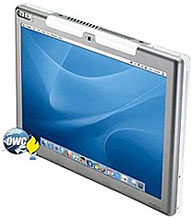 "If you live all day in Adobe
Illustrator, Photoshop, or some other visual Mac app, Axiotron has its
eye on you. The company makes the long-awaited Modbook Mac tablet,
designed for designers, illustrators, and other visually creative
professionals.
"If you live all day in Adobe
Illustrator, Photoshop, or some other visual Mac app, Axiotron has its
eye on you. The company makes the long-awaited Modbook Mac tablet,
designed for designers, illustrators, and other visually creative
professionals.
"'It's for people who draw, scribble, and paint,' said Axiotron CEO Andreas Haas. We sat down with Haas for a one-on-one interview recently."
Link: One-on-One with the Makers of the Only Authorized MacBook Tablet
MacBook Air Now Shipping
PR: Apple announced on Wednesday that MacBook Air, the world's thinnest notebook, is now shipping. MacBook Air measures an unprecedented 0.16" at its thinnest point, while its maximum height of 0.76" is less than the thinnest point on competing notebooks. Apple also announced that the new Apple TV software update, which allows users to rent high definition movies directly from their widescreen TVs, is not quite finished. Apple now plans to make the free software download available to existing Apple TV customers in another week or two.

MacBook Air has a stunning 13.3" LED-backlit widescreen display, a full-size and backlit keyboard, a built-in iSight video camera for video conferencing, and a spacious trackpad with multitouch gesture support so users can pinch, rotate and swipe. MacBook Air is powered by a 1.6 GHz or 1.8 GHz Intel Core 2 Duo processor with 4 MB L2 cache, and includes as standard features 2 GB of memory, an 80 GB 1.8" hard drive, and the latest 802.11n WiFi technology and Bluetooth 2.1.
 The new
MacBook Air is now shipping and will be available through the Apple Store, Apple's
retail stores and Apple Authorized Resellers for a suggested retail
price of $1,799 (US), and includes: 13.3" LED-backlit glossy widescreen
display with 1280 x 800 resolution; 1.6 GHz Intel Core 2 Duo processor
with 4 MB L2 cache; 800 MHz frontside bus; 2 GB of 667 MHz
DDR2 SDRAM; 80 GB hard disk drive with Sudden Motion Sensor; Intel
Graphics Media Accelerator X3100; Micro-DVI port (includes Micro-DVI to
VGA and Micro-DVI to DVI Adapters); built-in iSight video camera;
built-in AirPort Extreme 802.11n wireless networking and Bluetooth
2.1+EDR; one USB 2.0 port; one headphone port; multitouch TrackPad with
support for advanced multitouch gestures including tap, scroll, pinch,
rotate and swipe; and 45 Watt MagSafe Power Adapter.
The new
MacBook Air is now shipping and will be available through the Apple Store, Apple's
retail stores and Apple Authorized Resellers for a suggested retail
price of $1,799 (US), and includes: 13.3" LED-backlit glossy widescreen
display with 1280 x 800 resolution; 1.6 GHz Intel Core 2 Duo processor
with 4 MB L2 cache; 800 MHz frontside bus; 2 GB of 667 MHz
DDR2 SDRAM; 80 GB hard disk drive with Sudden Motion Sensor; Intel
Graphics Media Accelerator X3100; Micro-DVI port (includes Micro-DVI to
VGA and Micro-DVI to DVI Adapters); built-in iSight video camera;
built-in AirPort Extreme 802.11n wireless networking and Bluetooth
2.1+EDR; one USB 2.0 port; one headphone port; multitouch TrackPad with
support for advanced multitouch gestures including tap, scroll, pinch,
rotate and swipe; and 45 Watt MagSafe Power Adapter.
Build-to-order options and accessories for MacBook Air include the ability to upgrade to a 1.8 GHz Intel Core 2 Duo processor; 64 GB solid state drive, MacBook Air SuperDrive, Apple USB Ethernet Adapter, Apple USB Modem, Apple MagSafe Airline Adapter, Apple Remote and the AppleCare Protection Plan. Additional build-to-order options also include preinstalled copies of iWork '08, Logic Express 8, Final Cut Express 4 and Aperture 1.5.
Macworld's Comprehensive MacBook Air Review
"Compromises limit appeal of Apple's lightest-ever laptop," says Macworld's Jason Snell in a major review of Apple's new baby 'Book.
"The MacBook Air, Apple's latest Intel-based laptop, is the lightest, thinnest laptop Apple has ever constructed, and according to Apple, it's the thinnest laptop ever made. And in many ways, the story of this laptop is the story of a series of compromises, all made in order to fit an entire Mac in a three-pound package that's three-quarters of an inch thick at its thickest point....
"There is no denying that the MacBook Air's thinness makes it visually striking. But I'm not convinced of the utility of that thinness. Other than allowing Apple to declare the Air the current winner of the race to design the thinnest laptop, it seems that the Air has slimmed down in the least important dimension....
"Yes, I'll grant you, I can almost slide the MacBook Air under my office door. But I don't believe the extra thinness is going to gain me much working room when I'm wedged in a coach airline seat behind someone whose seat is fully reclined. Or on my daily bus commute, when I'm sitting in a seat so small it makes coach look like business class. In these situations, reduced depth would be more likely to improve the angle of my screen and keep the front of my laptop from pressing against my chest. But in that dimension, the MacBook Air is no different from the MacBook....
"If the story of the MacBook Air is a story about compromise, the decision about whether the MacBook Air is a product worth having can be answered by one question: How much are you willing to compromise?"
Link: Review: MacBook Air
The MacBook Air Austerity Program: Lose 80 GB in One Day
Macworld's Jason Snell reports:
"The first thing I did upon realizing that I'd be reviewing the MacBook Air for Macworld was sigh heavily and curse my luck. Not that I'm not lucky to get to play with the MacBook Air - I'm excited about that. No, my sigh was one of realization. Realization that my current MacBook was stocked with a 160 GB hard drive, a drive that was nearly full.
"In order to fit my life into the MacBook Air, I was going to have to remove half the data from my hard drive in less than a week.
"This is the story of my crash MacBook diet...."
Link: The MacBook Air Austerity Program, or How to Lose 80 GB in One Day
MacBook Air: A Little Too Pretty?
BusinessWeek's Stephen H. Wildstrom says:
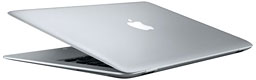 "It didn't
take long for Apple's new laptop, the MacBook Air, to set off an
intense struggle between my heart and my head. Without doubt, the Air
is the best looking and the sexiest computer ever designed. But a
computer is a tool, not an objet d'art, and there are a lot of
practical shortcomings forced by Air's minimalist design."
"It didn't
take long for Apple's new laptop, the MacBook Air, to set off an
intense struggle between my heart and my head. Without doubt, the Air
is the best looking and the sexiest computer ever designed. But a
computer is a tool, not an objet d'art, and there are a lot of
practical shortcomings forced by Air's minimalist design."
Link: MacBook Air: A Little Too Pretty?
The CPU that Intel Built Just for Apple
Dr. Jon Peddie of Jon Peddie Research reports:
"You may have wondered how it is possible that the MacBook Air is getting a new Intel microprocessor - a processor that is so new that it has not been available for any other product. We actually have seen other examples of Apple being treated as a very special customer by Intel, such as the exclusive availability of the 3.0 GHz quad-core Xeon last year. A little investigation reveals that Intel actually did develop a processor for Apple and its MacBook Air. And, if you are aware of the background story, this special Apple chip makes a whole lot of sense for both Apple and Intel....
"When Steve Jobs asked his new best friend Paul Otellini if Intel could produce a super small yet powerful CPU for this notebook, Otellini apparently did not hesitate. If you look into the development Intel went through in the past two years, it becomes somewhat clear that Otellini has changed Intel into a much more customer-centric company again. Although he isn't part of Intel's founding team, he knew listening to customers and telling them a simple 'we can do it' was what had made the company great in the first place....
"What Apple ended up receiving for the MacBook Air is a custom-built Core 2 Duo 9000 series, multi-core, multi-gigahertz, sub-25 watt chip in very compact package. And Apple got it exclusively until this fall...."
Link: The CPU that Intel Built Just for Apple
Older AirPort May Cause Networking Issues with MacBook Air
Macworld's Jim Dalrymple reports:
"If you're waiting for your new MacBook Air to show up, there are a few notes from Apple that may interest you before it arrives. All of the notes, including one about older base stations, outline potential issues and fixes with the MacBook Air....
"Another potential problem is jumpy or jerky video when using the MacBook Air's built-in camera...."
Link: Older AirPort May Cause Networking Issues with MacBook Air
Forget about Watching DVDs Wirelessly on Your MBA
MacUser's Derik DeLong says:
"One of the first questions that popped into my head was whether there would be limitations on what Remote Disc could do when acting as a drive for the MacBook Air. Booting isn't an issue (a feat which I wouldn't have imagined back when AirPort debuted). However, it's compatibility isn't perfect.
"We know it won't write discs already (hardly surprising considering the lack of data reliability over a network link). Did you know though that you won't be able to watch DVDs either?"
Link: Forget about Watching DVDs Wirelessly on Your MBA
Inside the MacBook Air: The Solid-state Drive Option
Macworld's Jon L. Jacobi reports:
"When it comes to storage, the newly unveiled MacBook Air offers an 80 GB, 4,200-rpm Parallel ATA hard drive as part of its standard configuration. However, that's not the only option - would-be MacBook Air buyers can also order the laptop with a 64 GB solid-state drive (SSD).
"The price for that downgrade in storage capacity: $999 on top of the $1,799 asking price for the standard MacBook Air. So why would you pay so much more for less? Because, for some mobile users, solid-state storage is a compelling alternative to traditional hard drives...."
Link: Inside the MacBook Air: The Solid-state Drive Option
Compatible SSDs for MacBook Air
Hardmac's Lionel reports:
"Several readers asked us about compatible SSDs to be installed in MacBook Air.
"You will need 1.8" PATA SSDs, with a 5mm thickness and featuring a ZIF socket. As there are different sizes of ZIF, you will need the smallest version."
Link: Compatible SSDs for MacBook Air
MacBook Air: Making the Migration
Macworld's Jason Snell says:
"One of the oddities of the MacBook Air is, as a system without a FireWire port, an optical drive, or an accessible hard drive, the act of reinstalling Mac OS X and migrating your files from your old system to this new one is more complicated than it has been in the past.
"Without FireWire there's no 'target mode,' a feature that lets you mount a laptop's drive on another Mac as if it were an external hard drive. It's a feature that's been around for a long time (dating back to a SCSI version on old PowerBooks), and it's a convenient way to migrate files on and off of laptops, but the MacBook Air just won't do it. (And no, sadly, there's no USB equivalent.)
"But Apple has taken the MacBook Air's release as an opportunity to upgrade its Migration Assistant - which previously focused on transferring files via FireWire - and other software in order to make life easier for MacBook Air users and, presumably, other Mac users via some future software update."
Link: MacBook Air: Making the Migration
USB EV-DO Modems Won't Fit the MacBook Air
Engadget's Ryan Block reports:
"Ouch, we just tested and confirmed that one of the smallest (and thus likeliest to fit) USB EV-DO modems around, the Sprint / Novatel U727, won't even come close to fitting in the cramped, foldaway USB port on the MacBook Air...."
Link: Adding Insult to Injury: USB 3G Modems Won't Fit in the MacBook Air
Apple MacBook Review
Stuff TV says:
"The spec tweaks might be minor, but the MacBook remains a highly desirable and excellent value laptop for everything except hardcore gaming
"Apple's smug 'Mac versus PC' adverts give the impression that using a MacBook means dealing with the computing equivalent of an obnoxious, self-satisfied slacker. Happily the reality is very different: it comes pre-loaded with Leopard, which is indisputably easier to use than Vista, and the ability to dual boot with Gates' OS gives it a real leg-up compared to Windows-only laptops."
Link: Apple MacBook Review
Retro 'Books
Cracking Open the Clamshell iBook
Cnet Networks' TechRepublic runs a regular series called "Cracking Open" in which it takes a look inside a variety of gadgets. CNET News.com is publishing this excerpt.
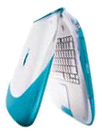 "With an
innovative design that was meant to grab your attention, the original clamshell iBook from
Apple generated almost as much buzz in the IT world as the more recent
iPhone. In 1999, personal computer users were generally stuck with the
familiar black rectangle laptop, but the iBook came in blueberry and
orange and was shaped like a clamshell (toilet seat?). But what was the
iBook like on the inside? We find out in this TechRepublic 'Cracking
Open' gallery."
"With an
innovative design that was meant to grab your attention, the original clamshell iBook from
Apple generated almost as much buzz in the IT world as the more recent
iPhone. In 1999, personal computer users were generally stuck with the
familiar black rectangle laptop, but the iBook came in blueberry and
orange and was shaped like a clamshell (toilet seat?). But what was the
iBook like on the inside? We find out in this TechRepublic 'Cracking
Open' gallery."
Link: Cracking Open the iBook G3
Repairing an iBook G4's Retro Internal Circuits
Hardmac's Lionel reports:
"In the era of MacBooks, MacBook Pro's and MacBook Air's, an iBook looks like a dinosaur. However, if it still works, that machine will still be useful for some purposes.
"Reboutte, a member of our fora, decided to repair a broken iBook - apparently a wire had come loose, and made a short circuit."
Link: Repairing an iBook's Retro Internal Circuits
Apple Updates
MacBook Air Developer Note
Apple's introduction to the MacBook Air Developer Note says:
"This developer note gives a technical description of the Intel Core 2 Duo MacBook Air computer introduced in January 2008. The purpose of this note is to provide information about the computer's internal design, input-output features, and expansion capabilities to help developers design products compatible with the MacBook Air.
"The MacBook Air is designed for portability and a completely wireless experience. One of the reasons why the design is so thin, is that it does not include an optical drive. To load software, the MacBook Air can access the optical drive of another Mac or PC using the Remote Disc feature. For complete instructions on using Remote Disc, refer to the MacBook Air User Guide that shipped with the computer.
"The system requirements for using Remote Disc with the MacBook Air are Mac OS 10.4.10 or later or the latest version of Windows XP or Vista."
Link: MacBook Air Developer Note
MacBook Air: About the Mac OS X 10.5 Leopard Installation Media
A new Apple Knowledge Base article says:
"The Mac OS X 10.5 installation media that shipped with your MacBook Air is designed for use on this computer only and not intended for any other computer.
"The installer prevents this software from being installed on other Macintosh computers. Furthermore, other Mac OS X 10.5 installation media should not be used when restoring the system software on your MacBook Air."
Link: MacBook Air: About the Mac OS X 10.5 Leopard Installation Media
MacBook (13" Mid 2007) User Guide
Get to know the ins and outs of your MacBook.
- Discussions forums - Seek help from other MacBook users.
- Software Update - Having issues? First update your software.
- Downloads
- Manuals
- Specifications
- Get Started
- Portables Fast Start: New User's Guide
- How to
- Install memory in your MacBook
- Identify a MacBook (13" Late 2007)
- Remove or install the battery
- Maximize your Notebook battery charge
- Tips for inserting discs into the disc drive
- Startup key combinations for Intel Macs
- Clean the plastics on your Mac
- Disconnect the MagSafe power adapter
- Use your MacBook with the display closed and a Bluetooth keyboard or mouse
- About
- Mac OS X 10.5 Leopard installation disk for MacBook (Late 2007)
- Firmware updates for Intel-based Macs
- External ports and connectors
- MagSafe Airline Power Adapter is not compatible with automobile power ports
- Care, Use and Safety information
- Reducing cable strain on your MagSafe power adapter
- User Discussions - Troubleshooting
- If you need information about fixing an issue, try these Apple articles.
- Resetting the Power Management Unit (SMC)
- My MacBook shuts down intermittently
- Battery not recognized after being fully drained
- Battery not recognized or "X" icon appears on menu bar
- My MacBook that won't turn on
- Runaway applications can shorten battery runtime
- Troubleshooting the CD or DVD disc drive
- My trackpad is behaving unexpectedly
- About white MacBooks' palmrest area
- MacBook may run warm because rear vent is blocked
- Operating temperatures for Apple Notebooks
- Processor speed reduced when battery is removed while operating from an A/C adaptor
Link: MacBook (13" Mid 2007) User Guide
Products
FastMac's High Capacity Replacement Battery for 17" MacBook Pro
PR: FastMac has announced the first and only high capacity, extended life battery upgrade for Apple's 17" MacBook Pro computer. The new 71 Watt hr. battery, which is compatible with all models of the 17" MacBook Pro, uses Lithium-Polymer cells (with integrated charge indicator LEDs) that are manufactured to the highest quality standards and utilize TruePower technology to provide a safe computing experience. With this offering, FastMac rounds out its line of battery upgrades to include ALL models of MacBook and MacBook Pro computers, thereby becoming the only company, besides Apple, to offer a full line of batteries for Apple's newest portables. FastMac's TruePower battery for the MacBook Pro 17" is scheduled to ship within 10 days and is available for pre-order from www.fastmac.com for a special introductory price of $99.95. Each battery carries a 1-year warranty and a 30-day money back guarantee.
 FastMac's
TruePower line of battery upgrades replaces the computer's original
battery with a larger capacity and longer lasting advanced power cell
battery that utilizes TruePower technology. This technology
incorporates sensors in the integrated circuit inside the battery that
detect undesirable levels of swelling or a short circuit that will
power off the battery in certain extreme conditions.
FastMac's
TruePower line of battery upgrades replaces the computer's original
battery with a larger capacity and longer lasting advanced power cell
battery that utilizes TruePower technology. This technology
incorporates sensors in the integrated circuit inside the battery that
detect undesirable levels of swelling or a short circuit that will
power off the battery in certain extreme conditions.
"As a replacement, or a spare, our batteries not only last longer than Apple's original, they are also $30 cheaper," said Michael Lowdermilk, Business Development Manager for FastMac Performance Upgrades, Inc.
FastMac's line of TruePower batteries for laptops are engineered using the highest quality, high-capacity Lithium Ion or Polymer cells, keeping safety in mind at all times. FastMac utilizes custom form factors and materials to achieve a superior fit and finish, matching the original battery whilst increasing capacity. Each battery is individually tested and includes safety features to protect against overcharge, overheating, short circuits and power surges. All TruePower batteries carry at least a 1 year warranty and in some cases, a 2 year warranty. FastMac's TruePower line includes battery upgrades for all iPods & all Apple portables released since 1997, including the world's longest lasting PowerBook battery with up to 68% more capacity than the original. FastMac is also first to market a replacement battery for all of Apple's latest MacBook & MacBook Pro portables.
TruePower is the name of an innovative new technology designed to extend the life of ordinary Lithium Ion cells, commonly used in most rechargeable batteries. More than 4 years in development, this patented technology allows tiny ceramic particles (each less than a millionth of a millimeter in size) to be integrated into the molecular structure of the chemical binding agent found inside each Lithium Ion battery. These particles then link-in with each other & a proprietary energy management circuit to create an extremely dense and highly conductive layer on the surface of a capacitor-enhanced battery pack. This combination delivers the power necessary to satisfy the pulse demands placed on most batteries, whilst ensuring the protection of the Lithium cell matrix. These results in battery packs that can be recharged many more times as well as yielding longer run times per charge. Whereas ordinary battery packs start losing their power within a few months, TruePower-enhanced battery packs continue giving consistent power for long periods, allowing OEMs to offer warranties of 2 years or more. More information about TruePower is available via the website:
http://www.fastmac.com/truepower.php
FastMac's battery upgrades utilize TruePower technology- a patented material & energy management circuit that is designed to protect the battery's internal lithium crystal matrix from damage caused by power spikes. These spikes occur when the computer demands a sudden high current peak- for example, to turn on the backlight or to load the next data sectors. Over time, these power spikes decrease capacity, runtime and battery life, eventually rendering the power cells unusable. Through the use of TruePower technology, the energy management circuit is able to smooth out the power spikes and lower the rate of decay. This protects the battery and leads to a longer lifecycle. Not only does this extend the usability of the computer, it also helps the environment by curbing the depletion of chemicals and plastic materials used in battery products and reducing the number of waste batteries sent to landfills. More information about FastMac's battery upgrades is available via the website.
This battery is compatible with any 17" MacBook Pro
Price: $99.95
Link: High Capacity MacBook Pro Replacement Battery
Bargain 'Books
Bargain 'Books are used unless otherwise indicated. New and refurbished units have a one-year Apple warranty and are eligible for AppleCare.
There are two different versions of WallStreet running at 233 MHz, the cacheless MainStreet version and the later Series II with a level 2 cache. It's not always possible to determine from the vendor's listing which is being offered, so we've included links within this paragraph to the two models. The same goes for the PowerBook G4/667 (VGA) and G4/667 (DVI), the titanium vs. aluminum 15" PowerBook G4 at 1 GHz, and 1.25 GHz to 1.5 GHz 15" PowerBooks.
PowerBook, iBook, and MacBook profiles linked in our Portable Mac Index.
Apple Store
Refurb Santa Rosa 15" MacBook Pros are back this week, in my estimation a better value than the older 2.33 MHz Core 2 Duo models that are offered for $200 more. The higher-spec. 15-incher has never seemed to me to be much of a deal. Also, $100 price drops on a couple of the 17" models and MacBooks. cm
- refurb 2.0 GHz Core 2 MacBook, white, 1 GB/80/Combo, $899
- refurb 2.0 GHz Santa Rosa MacBook, white, 1 GB/80/Combo, $949
- refurb 2.0 GHz Core 2 MacBook, white, 1 GB/80/SD, $1,049
- refurb 2.16 GHz Core 2 MacBook, black, 1 GB/160/SD, $1,249
- refurb 2.2 GHz Core 2 MacBook, white, 1 GB/120/SD, $1,099
- refurb 2.2 GHz Core 2 MacBook, black, 1 GB/160/SD, $1,299
- refurb 15" 2.2 GHz Core 2 MacBook Pro, 2 GB/120/SD, $1,699
- refurb 15" 2.33 GHz Core 2 MacBook Pro, 2 GB/120/SD, $1,899
- refurb 15" 2.4 GHz Core 2 MacBook Pro, 2 GB/160/SD, $2,099
- refurb 17" 2.33 GHz Core 2 MacBook Pro, 2 GB/160/SD, $2,099
- refurb 17" 2.4 GHz Core 2 MacBook Pro, 2 GB/160/SD, $2,299
- refurb hi-res 17" 2.4 GHz Core 2 MacBook Pro, 2 GB/160/SD, $2,499
TechRestore
- 15" PowerBook G4/400, 256/20/DVD, $499.99
- 17" PowerBook G4/1 GHz, 512/60/SD, $999.99
Wegener Media - 15" MacBook Pro - 17" MacBook Pro
- 15" 1.83 GHz MacBook Pro , 512/80/SD, $1,179.99
- 15" 2.0 GHz MacBook Pro, 512/80/SD, $1,239.99
- 15" 2.16 GHz MacBook Pro, 1 GB/100/SD, $1,399.99
- 17" 2.16 GHz Core Duo MacBook Pro, 1 GB/120/SD, $1,499.99
- 17" 2.16 GHz Core Duo MacBook Pro, 1 GB/160/SD, $1,529.99
- 17" 2.16 GHz Core Duo MacBook Pro, 1 GB/200/SD, $1,619.99
Baucom Computers
- 12" iBook G4/800, 640/30/Combo, $399
- 12" iBook G4/800, 640/30/Combo, APX, $439
- Add AirPort Extreme for $39
- 1.83 GHz MacBook, white, 1 GB/80/Combo, $879
- 2.16 GHz Core 2 MacBook, black, 1 GB/160/SD, $1,259
ExperCom
- open box 15" 2.33 GHz MacBook Pro, 2 GB/120/SD, $1,799
- open box 17" 2.4 GHz MacBook Pro, 2 GB/160//SD, $2,549
Power Max
- MacBook 2.0 GHz Core 2, white, 1 GB/80/Combo, $1,049
- MacBook 2.16 GHz Core 2, black, 1 GB/160/SD, $1,439
- open box 2.16 GHz Core 2 MacBook, white, 1 GB/120/SD, warranty started $1,199
- open box 2.16 GHz Core 2 MacBook, white, 1 GB/120/SD, $1,229
- open box 2.16 GHz Core 2 MacBook, black, 1 GB/160/SD, $1,379
- open box 15" 2.2 GHz Core 2 MacBook Pro, 2 GB/200/SD, $2,229
- open box 17" 2.33 GHz Core 2 MacBook Pro, 2 GB/160/SD, $2,599
- open box 17" 2.4 GHz Core 2 MacBook Pro, 2 GB/160/SD, $2,599
- 17" 2.4 GHz Core 2 MacBook Pro, 2 GB/200/SD, $2,969
- 17" 2.4 GHz Core 2 MacBook Pro, 2 GB/200/SD, $3,079
PowerBook Guy
- 12" iBook G3/500, 128/10/CD, $199.95
- 12" iBook G3/600, 128/20/CD, $179.95
- 12" iBook G3/600, 128/20/CD, $219.95
- 12" iBook G3/700, 256/20/CD, $229.95
- 12" iBook G3/800, 256/30/CD, $269.95
- 12" iBook G4/800, 640/40/Combo, $469.95
- 12" iBook G4/1 GHz, 768/40/Combo, $519.95
- 14" iBook G3/900, 256/40/Combo, $379.95
- 15" PowerBook G4/1.67 GHz, 1 GB/120/SD, APX, $1,299.95
For deals on current and discontinued 'Books, see our 13" MacBook and MacBook Pro, MacBook Air, 13" MacBook Pro, 15" MacBook Pro, 17" MacBook Pro, 12" PowerBook G4, 15" PowerBook G4, 17" PowerBook G4, titanium PowerBook G4, iBook G4, PowerBook G3, and iBook G3 deals.
We also track iPad, iPhone, iPod touch, iPod classic, iPod nano, and iPod shuffle deals.
Join us on Facebook, follow us on Twitter or Google+, or subscribe to our RSS news feed
Links for the Day
- Mac of the Day: PowerBook 500 Series, introduced 1994.05.16. 'Blackbird' includes a 25 to 33 MHz 68040 along with smart batteries and grayscale or color displays.
- Support Low End Mac
Recent Content
About LEM Support Usage Privacy Contact
Follow Low End Mac on Twitter
Join Low End Mac on Facebook
Favorite Sites
MacSurfer
Cult of Mac
Shrine of Apple
MacInTouch
MyAppleMenu
InfoMac
The Mac Observer
Accelerate Your Mac
RetroMacCast
The Vintage Mac Museum
Deal Brothers
DealMac
Mac2Sell
Mac Driver Museum
JAG's House
System 6 Heaven
System 7 Today
the pickle's Low-End Mac FAQ
Affiliates
Amazon.com
The iTunes Store
PC Connection Express
Macgo Blu-ray Player
Parallels Desktop for Mac
eBay

