
The 'Book Review
Bottom-loading Optical Drive, More Core 2 'Book Reviews, Signature Suit Protects MacBooks, and More
This Week's Mac Notebook News
Compiled by Charles Moore and edited by Dan Knight - 2007.02.02
This Week's MacBook, PowerBook, and iBook News
Here's an odd idea from Apple - putting the optical drive on the bottom of a notebook computer, where you'd have to turn your 'Book over to change the disc. Can't imagine this actually flying in a notebook computer.
OWC is looking for dealers to sell the Modbook Mac table, and Boston Power promises faster charging notebook batteries.
One the review front, Bare Feats finds the 17" Core 2 MacBook Pro up to 48% faster than its predecessor, and several PC sites are very impressed with the Core 2 MacBook.
Case-Mate has a new protective "suit" for MacBook and MacBook Pro models, and Smart Scroll X has been improved.
All prices are in US dollars unless otherwise noted.
General Apple and Mac desktop news is covered in The Mac News Review.
News & Opinion
- Apple Seeks Patents for Bottom-loading Drive
- OWC Recruits Dealers for Modbook Mac Tablet
- Boston Power to Unveil Fast-Recharge Notebook Battery
Reviews
- 3D Game Shootout: 17" MacBook Pro Core Duo vs. Core 2 Duo
- 17" 2.33 GHz Core 2 MacBook Pro 'Significantly Outperforms' Core Duo Model
- Core 2 MacBook Worth a Look
- PC World: MacBook 'a Winner'
- PC Mag: MacBook 'a Great Choice'
Apple Updates
Products and Services
Software
Bargain 'Books
News & Opinion
Apple Seeks Patents for Bottom-loading Drive
 InformationWeek's Antone Gonsalves reports:
"Apple has applied for two patents related to a bottom-loading disk drive for a notebook....
"A potential benefit of a bottom-loading disk drive would be a thinner notebook...."
Link: Apple Seeks Patents for Bottom-loading Disk Drive - Thinner Notebooks?
OWC Recruits Dealers for Modbook Mac Tablet
eWeek's Daniel Drew Turner reports:
"Two weeks after its introduction, the Axiotron Modbook, which reseller Other World Computing called '"the One and Only Mac Tablet" computer,' is starting to lure independent Macintosh dealers.
"'We have had significant reseller interest,' said OWC's Lawrence R. O'Connor.
"O'Connor said that the company expects to ship the Modbook, an Apple MacBook modified with a Wacom digitizer to turn it into a tablet computer, in early April. He added that if Apple refreshes the MacBook line before April, any enhancements in the new model will make it into the Modbook.
"Resellers who want to carry the Modbook will have to be certified by OWC, O'Connor said."
Link: Other World Computing Recruits Dealers for Modbook Mac Tablet
Boston Power to Unveil Fast-Recharge Notebook Battery
InformationWeek's Sharon Gaudin reports:
"Boston Power at the Demo 2007 show this week plans to show off a lithium-ion battery that's less likely to catch on fire and offers what the company calls the industry's fastest-recharge rate.
"The Sonata, a next-generation, lithium-ion battery, is designed to get back up to 80% capacity in 30 minutes when recharging, according to figures released from Boston Power. That would represent about half the time required by other batteries on the market, the company said....
"Boston Power's Sonata product line is designed to be used in existing notebooks. It requires no design changes on the part of notebook computer makers, according to the company, which adds that Sonata features enhancements in both performance and safety."
Link: Boston Power to Unveil Fast-Recharge Battery
Reviews
3D Game Shootout: 17" MacBook Pro Core Duo vs. Core 2 Duo
Bare Feats' Rob-ART Morgan reports:
"We originally compared a 15" Core 2 Duo to a 17" Core Duo MacBook Pro since that's all we could get our hands on. However, when it came to our game tests at 1440 x 900, the 17" was at a disadvantage since the 15" was optimized for that resolution.
"So we are replacing those graphs with the ones below showing two 17" MacBook Pros both with the Mobility Radeon X1600 GPU, both with two matching 1 GB memory modules, and both with a 7200 rpm boot drive. The only obvious difference is the processors - one has a 2.16 GHz Core Duo and the other a 2.33 GHz Core 2 Duo....
"The MacBook Pro Core 2 Duo's advantage over the Core Duo version ranged from 5% to 48% depending on what 3D Game and what resolution...."
Link: 3D Game Shootout: 17" MacBook Pro Core Duo versus 17" MacBook Pro Core 2 Duo
17" 2.33 GHz Core 2 MacBook Pro 'Significantly Outperforms' Core Duo Model
CNet UK's Dan Ackerman reports:
"The 13.3-inch Apple MacBook and 15.4-inch MacBook Pro, both featuring Intel Core 2 Duo processors, impressed us by mixing Apple's lauded industrial design and user-friendly operating system with the kind of high-end hardware usually seen only on the PC side - not to mention the ability to run Windows XP through Boot Camp.
"The high-end 17-inch MacBook Pro adds some hard drive space and screen real estate over the 15-inch MacBook Pro, boosting the base price by £200. The £1,899 system (our £2,279 review unit was tricked out with extra RAM) is very light for a 17-inch laptop, and it's a good choice for anyone needing an easily transportable big-screen laptop, although most users will be just as happy with the excellent 15-inch version."
Link: MacBook Pro (17-inch 2.33 GHz) Review
Core 2 MacBook Worth a Look
PC World reports:
"How good is the latest Apple laptop?
"Senior Editor Narasu Rebbapragada responds: Apple's MacBook with an Intel Core 2 Duo processor is a good buy not only for Mac lovers but also for PC users who are in the market for an Apple portable....
"Windows runs smoothly on the Mac, but software and driver kinks will remind you that you're not on a PC. I use Apple's free Boot Camp utility to work in programs such as Office 2007. The $80 Parallels Desktop for Mac is another great alternative for running both OSs simultaneously."
Link: MacBook Worth a Look
PC World: MacBook 'a Winner'
PC World's Harry McCracken reports:
"With its new MacBook, Apple has filled out its Intel-based portable line with an entry-level model. But this mobile Macintosh packs so many clever, practical features into its compact case that using it never feels like a compromise....
"The MacBook does come with integrated graphics rather than the faster discrete adapter that gamers and graphics pros will want. And it has no ExpressCard, PC Card, or memory-card slots, nor a dialup modem."
Link: Apple's Entry-level Laptop Is a Winner
PC Mag: MacBook 'a Great Choice'
PC Magazine reports:
"The Apple MacBook 13-inch is a great choice for anyone wanting a simple computer with a sleek design. The base-model MacBook costs just $1,099 (direct), but still has plenty of speed....
"When it comes to budget laptops, the MacBook 13-inch White (Core 2 Duo) is easily one of my top choices, especially now that it has the latest Intel Core 2 Duo processor."
Link: Apple MacBook Video Review
Apple Updates
$2 AirPort Extreme 802.11n Enabler for Core 2 Macs
If you have a Mac with an Intel Core 2 Duo processor (except the 17-inch, 1.83 GHz iMac) or a Mac Pro with AirPort Extreme, you can enable it to access an 802.11n* wireless network using the AirPort Extreme 802.11n Enabler software.
Price: $1.99
Many Mac computers with an Intel Core 2 Duo and all Mac Pro computers with AirPort Extreme can be enabled to access 802.11n-based wireless networks. If you purchased one of these Macs, you can use the AirPort Extreme 802.11n Enabler software to activate this advanced wireless capability.
Important note: The Enabler is included free with the new AirPort Extreme Base Station with 802.11n. If you purchase a new AirPort Extreme Base Station, you do not need to purchase the Enabler separately.
These Macs have the 802.11n hardware built-in:
- MacBook Pro with Intel Core 2 Duo
- MacBook with Intel Core 2 Duo
- Mac Pro with AirPort Extreme option
- iMac with Intel Core 2 Duo (except the 17-inch, 1.83 GHz iMac)
Do you need the AirPort Extreme 802.11n Enabler
Before purchasing the 802.11n Enabler software, check to make sure that your Mac does not already have the 802.11n enabler already installed.
- Open Network Utility (found in the Applications > Utilities folder)
- Under the Info Tab, choose Network Interface (en1)
- In the section "Model: Wireless Network Adapter," if it says (802.11a/b/g/n), you already have the 802.11n enabler installed. If it says (802.11a/b/g), you do not have the 802.11n enabler installed.
How to install the AirPort Extreme 802.11n Enabler:
- Add the AirPort Extreme 802.11n Enabler to your shopping cart and complete your order.
- On the Order Confirmation page and email, you'll receive instructions and a URL for downloading the Enabler software.
- Click the download link, then locate the disk image (.dmg) file on your computer and double-click it.
- Double-click the AirPort Extreme 802.11n Enabler file and follow the onscreen steps to update your Mac.
Note: The software license for the 802.11n Enabler software allows you to install and use it on all computers under your ownership or control.
*Based on an IEEE 802.11n draft specification.
Link: AirPort Extreme 802.11n Enabler for Mac
AirPort Extreme Update 2007-001
The perfect wireless solution for home, school, and business. As it blankets your space with a blazing-fast, secure wireless network, it opens up a world of possibilities for home entertainment, backups, printing, and more. With the AirPort Extreme Base Station, you and up to 50 of your friends, colleagues, or family members can enjoy a robust wireless network offering up to five times the performance and up to twice the range of networks created with the earlier 802.11g standard.
This update is recommended for all Intel-based Macintosh computers and provides compatibility with AirPort Extreme base stations and networks.
It addresses a security problem:
Impact: Attackers on the wireless network may cause system crashesDescription: An out-of-bounds memory read may occur while handling wireless frames. An attacker in local proximity may be able to trigger a system crash by sending a maliciously-crafted frame to an affected system. This issue affects the Core Duo version of Mac mini, MacBook, and MacBook Pro computers equipped with wireless. Other systems, including the Core 2 Duo versions are not affected. This update addresses the issue by performing additional validation of wireless frames. Credit to LMH for reporting this issue.
System Requirements
- Mac OS X 10.4.8
- Intel-based Macintosh
System Support: Intel
Products and Services
Case-Mate Signature Suits for MacBook and MacBook Pro
 PR: Signature suits by
case-mate are form-fit leather wraps for your MacBook and MacBook
Pro. These premium leather cases hug your laptop offering security
and protection. These unique leather cases are strong, stylish, and
feel great to the touch.
PR: Signature suits by
case-mate are form-fit leather wraps for your MacBook and MacBook
Pro. These premium leather cases hug your laptop offering security
and protection. These unique leather cases are strong, stylish, and
feel great to the touch.
 13" suits are available to you
in seven color choices:
13" suits are available to you
in seven color choices:
- Black with White Accent
- Black with Red Accent
- Phantom Black
- White with Black Accent
- White with Red Accent
- Alpine White
- Sienna Red
15" suits are available to you in three color choices:
- Alpine White
- Phantom Black
- Sienna Red
- More Colors Coming Soon
 Features
- Molded out of an impact resistant shell
- Soft interior lining will not harm your laptop
- Easy slide in/slide out design
- Cooling vent on the underside to promote airflow
- Translucent holds wrap around your MacBook allowing the suit to hug your laptop
Price
- MacBook models - $149.99
- MacBook Pro models - $159.99
Link: Case-Mate Signature Suits for MacBook and MacBook Pro
NewerTech Ships USB Universal Drive Adapter
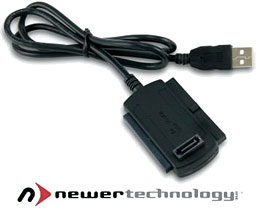 PR: Newer Technology,
Inc. (NewerTech) has announced that it is shipping the NewerTech
USB 2.0 Universal Drive Adapter, the easiest and most
cost-effective way to move data from your old hard drive to your
new hard drive via USB Plug-N-Play.
PR: Newer Technology,
Inc. (NewerTech) has announced that it is shipping the NewerTech
USB 2.0 Universal Drive Adapter, the easiest and most
cost-effective way to move data from your old hard drive to your
new hard drive via USB Plug-N-Play.
Essential Tool for the Techie - Easily Moves Data
Priced at $24.95 (introductory pricing), the NewerTech USB 2.0 Universal Drive Adapter is a USB adapter cable that gives a second life to switched-out hard drives, which can be used without buying expensive enclosures. Recently announced at Macworld Expo with sellout crowds and one of the largest sales volumes ever, the USB 2.0 Universal Drive Adapter allows any hard drive (2.5", 3.5", or 5.25") or optical drive (standard IDE/ATA/ATAPI 40 pin or Serial-ATA) to be connected via USB with any computer using Mac OS 9.2 or higher, Linux 2.4.X, or Windows 2000 or higher for the ultimate in usability. The adapter allows you to reuse old drives on an as needed basis for emergency access should a problem occur with a computer, and also lets you transfer data from drives removed from a failed computer.
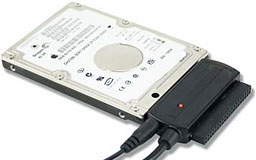 Popular with PC and Mac users
alike, the USB 2.0 Universal Drive Adapter is perfect for file
transfer after the upgrade of an internal hard drive, backing up
and storing file archives, and accessing data and interfacing with
stored backup drives. Truly universal, the USB 2.0 Universal Drive
Adapter has been tested to work with all hard drive brands,
including Maxtor, Seagate, IBM, Hitachi, Samsung, Western Digital,
and Fujitsu; optical drive brands, including LG, Lite-On,
Panasonic, Pioneer, Plextor, Sony, Teac, and Toshiba; and removable
media drives, such as Iomega Zip. The adapter provides a USB 2.0
transfer speed of up to 480 Mbps and is also backwards compatible
with USB 1.1.
Popular with PC and Mac users
alike, the USB 2.0 Universal Drive Adapter is perfect for file
transfer after the upgrade of an internal hard drive, backing up
and storing file archives, and accessing data and interfacing with
stored backup drives. Truly universal, the USB 2.0 Universal Drive
Adapter has been tested to work with all hard drive brands,
including Maxtor, Seagate, IBM, Hitachi, Samsung, Western Digital,
and Fujitsu; optical drive brands, including LG, Lite-On,
Panasonic, Pioneer, Plextor, Sony, Teac, and Toshiba; and removable
media drives, such as Iomega Zip. The adapter provides a USB 2.0
transfer speed of up to 480 Mbps and is also backwards compatible
with USB 1.1.
With the proliferation of large digital video, music and photo files, storage is crucial for every computer user, who requires larger and larger hard drives than those that were originally shipped with their computers. After upgrading these drives, the question is how do you transfer your files from the old drives and what do you do with your old, still functioning storage drives. The NewerTech USB 2.0 Universal Drive Adapter lets you easily transfer data between drives and then allows you to reuse old drives without the extra cost of enclosures, instead of just throwing the old drives out.
The NewerTech USB 2.0 Universal Drive Adapter includes all hardware necessary for the plug-and-play of supported 2.5"/3.5"/5.25" storage devices to any Apple/Mac or PC with an available USB port. No software is required for the use of the adapter with a Apple/Mac computer with OS 8.6 or higher (including any version of OS X); a CD is included with the drivers required to use with Windows based systems. The NewerTech USB 2.0 Universal Drive Adapter is available through exclusive distributor Other World Computing immediately for $24.95.
Software
Smart Scroll X Makes Scrolling More Convenient
PR: Smart Scroll X brings new scrolling options and enhancements to Mac OS X:
- Super Wheel - smoother, more comfortable scroll wheel action.
- Grab Scroll lets you scroll by clicking and dragging anywhere in a window. Currently for Cocoa applications.
- A "High Gear" for your scroll wheel, so you can have super-fast scrolling when you need it.
- Universal Scroll Keys to scroll without having to reach for the mouse. Scroll keys are the same in every application, giving you fast & dependable scrolling right from the keyboard.
- Adds Scroll wheel support to FileMaker Pro 6 and 7 (as well as live scrolling).
- Adds Live Scrolling and proportional thumbs to AppleWorks 6.
- FileMaker Pro and AppleWorks enhancements
Grab Scroll
Grab scroll works with any mouse or pen or trackpad, etc. It is essentially the same feature as the hand tool available in many graphics programs, but now you can use it for scrolling in any Cocoa application (support for Carbon applications is forthcoming).
- With a single-button mouse, a scroll key lets you turn the cursor into an open hand: hold the first key and tap the second one. To scroll, click and drag with the mouse. Grab scroll mode ends when you release the first key (the 2nd key is used to activate grab scroll, and also to scroll faster when you want).
- With a multiple-button mouse, you just press one of the buttons (select one) to grab the page and slide it inside its window.
- With a graphics pen, you'll probably want to setup the extra buttons so that the first one does a middle-click (so you can use it to grab scroll) and the 2nd one does a right-click. Since the pen lets you move the cursor farther with less effort and more precision than a mouse, you can keep the normal speed at 1x for maximum control and set the other speeds to some high value.
Two extra scrolling speeds are available, in addition to the normal speed. One by holding a user-selectable key while dragging, and the second by starting to drag near an edge of the area to scroll.
Faster Scroll Wheel
You can make your scroll wheel faster when you hold down a user-selectable key, up to 12 times faster. In addition, the speed multiplier you choose is applied on top of the acceleration already provided by the Keyboard & Mouse preference pane: this means you keep the same level of control as you have now, but you can scroll farther and without having to spin the wheel nearly as much.
Universal Scroll Keys
A welcome alternative to always having to reach for the mouse, Scroll Keys are a real time saver for anyone who types a lot!
With automatic scroll focusing, all you do is press a Scroll Key and Smart Scroll X automatically selects and scrolls the correct pane. Scroll Keys also feature their own adjustable scrolling speed, with optional progressive acceleration, so that you can easily scroll multiple pages simply by holding down a key.
Scroll Keys are the same across all applications: no need to remember different keys for each app. Because of this, and because Scroll Keys are conveniently located in the corner of the keyboard, you can even scroll without having to look at the keys.
Scroll Keys are made possible by the new kind of keyboard shortcut used in Smart Scroll X, which doesn't involve hitting letter keys (hence avoiding conflicts with existing key combinations). Instead, you hold down one of the four corner keys and you scroll by hitting one of the others (some keyboards have these keys on both sides, letting you scroll with either hand) :
FileMaker Pro & AppleWorks enhancements
Smart Scroll X brings scroll wheel support and live scrolling to FileMaker Pro 6 and 7. You can now use your scroll wheel mouse for scrolling FileMaker Pro documents. Note: With some layouts you may need to click one of the scroll bars once before the scroll wheel works. A fix will be available in the next version of Smart Scroll X.
AppleWorks 6 users get live scrolling and proportional thumbs, as well as scroll wheel support.
Live scrolling updates the document while you drag the scroll bar thumb. Proportional thumbs show how much of the document is being displayed, and they make it easier to see which part you are viewing. They are also easier to grab with the mouse.
Scroll Next
If a window has two or more scrollable panes, it is the one under the mouse pointer that scrolls. Automatic scroll focusing will select one of the panes for you when you press a Scroll Key to start scrolling, but chances are it won't be able to guess the correct pane every time. To let you scroll another pane without reaching for the mouse, Smart Scroll X adds the Scroll Next feature: hold down Control and hit Shift to select the next pane in the window for scrolling. The mouse pointer jumps to the selected pane too, providing visual feedback.
Scroll Next is quite useful in applications such as Mail for example, where one often wants to alternatively scroll the list of messages and the text of an email.
Note: In the current version of Smart Scroll X, scrolling in Carbon applications only works if the mouse pointer is above the pane to scroll. An upcoming version of Smart Scroll X will remove this limitation, and also enable the Scroll Next feature for Carbon applications.
Other features of Smart Scroll X
Finally, Smart Scroll X lets you select a comfortable scrolling speed for Scroll keys (including optional acceleration), and offers a larger selection of scrollbar arrows positions (still useful from time to time, although with Grab Scroll and Scroll Keys you won't need to click on arrows very often anymore). You do not need to restart applications for these changes to take effect.
New in version 2.1:
- Super Wheel improvements for the Finder, Firefox and other Carbon applications.
- Smoother horizontal scrolling for Super Wheel and Grab Scroll, in Carbon applications.
- Various minor fixes and improvements.
New in version 2.0x:
- New Super Wheel feature.
- New Coasting feature for Grab Scroll.
- New Grab Scroll feature for Carbon applications.
- Universal binary.
- Includes Rosetta TuneUp, a utility for preventing Rosetta-related crashes on Intel Macs.
- Streamlined preference pane.
- Various fixes and improvements.
System requirements: Mac OS X 10.3.9 or later.
System support: PPC/Intel
Smart Scroll X is shareware ($19 single user license)
Link: Smart Scroll X
iBatt 2 Battery Monitor
PR: iBatt 2 is the most complete battery analyzer available for Mac laptops
iBatt is a battery monitor for MacBooks, PowerBooks and iBooks. iBatt digs deep into your system to find out as much as it can about your laptop's battery. It presents this information in a sleek, easy to read console view, along with gauges and a line graph showing battery history. It also communicates with the iBatt server to share your battery data with iBatt's database, allowing you to compare your battery's performance with other batteries in your laptop model.
Track your battery in real-time, or view historical logs. See how your battery compares with other laptops of your type from around the world.
iBatt will almost certainly tell you things about your 'Book's battery that you never knew. All batteries degrade over time, and OS X has no built-in way of showing you just how worn out your battery is. But your 'Book knows, and iBatt knows how to get that information out. Have you ever wondered if your 'Book falls short of others in terms of battery performance? iBatt is not just a standalone application, but an Internet-based statistical tool. It reports how your battery measures up against other 'Books of your model, and gives you the option to submit your own battery statistics to iBatt's Internet database.
iBatt digs deep into the system to get every bit of available battery data. The OS only reports your charge level, but iBatt reports total capacity as well as voltage. This lets you know how worn out your battery is, and whether or not it's time to replace it. Battery data can be viewed in either graph or numerical format. The graphing window provides a flexible data view, allowing you to view trends over the course of 10 minutes, up to one month. The statistical view shows you all the current numbers for your battery. It covers Capacity, Charge, Voltage, and State.
But what good is all this data without a frame of reference? Following Rayner Software's tradition for network-enabled programs, iBatt is completely Internet aware. You have the option to report your battery statistics to iBatt's server for use as a benchmark. But even if you opt out of this, you can still view your battery's stats in comparison with averages collected from 'Books around the world. This will let you know how your battery performs in relation to the average battery in your model of 'Book.
iBatt keeps a running log as long as the application is open. If you're interested in long-term analysis of your battery, it's best to keep iBatt running as much as possible, especially when the power is unplugged. iBatt features a "Hide Windows In Background" option under the View menu, which will lower CPU usage by keeping iBatt's views hidden when you switch to another app.
The registered version of iBatt allows you to check out stats on other PowerBook models.
New in version 2.0:
- Complete rewrite. New Interface, Core Data backend, MacBook Compatibility, Universal Binary
System support: PPC/Intel
System requirements: • Mac OS X 10.4 or later
iBatt is $19 shareware.
Link: iBatt 2 Mac Notebook Battery Monitor
Bargain 'Books
Bargain 'Books are used unless otherwise indicated. New and refurbished units have a one-year Apple warranty and are eligible for AppleCare.
There are two different versions of WallStreet running at 233 MHz, the cacheless MainStreet version and the later Series II with a level 2 cache. It's not always possible to determine from the vendor's listing which is being offered, so we've included links within this paragraph to the two models. The same goes for the PowerBook G4/667 (VGA) and G4/667 (DVI), the titanium vs. aluminum 15" PowerBook G4 at 1 GHz, and 1.25 GHz to 1.5 GHz 15" PowerBooks.
PowerBook, iBook, and MacBook profiles linked in our Portable Mac Index.
Apple Store
- refurb 1.83 GHz Core Duo MacBook, white, 512/60/Combo, $799
- refurb 2.0 GHz Core Duo MacBook, white, 512/60/SD, $899
- refurb 2.0 GHz Core Duo MacBook, white, 1 GB/80/SD, $949
- refurb 2.0 GHz Core Duo MacBook, black, 1 GB/80/SD, $999
- refurb 2.0 GHz Core 2 MacBook, white, 1 GB/80/SD, $1,099
- refurb 2.0 GHz Core 2 MacBook, black, 1 GB/80/SD, $1,299
- refurb 15" 2.0 GHz Core Duo MacBook Pro, 1 GB/120/SD, $1,349
- refurb 15" 2.16 GHz Core 2 MacBook Pro, 1 GB/80/SD, $1,599
- refurb 15" 2.33 GHz Core 2 MacBook Pro, 2 GB/80/SD, $2,299
ExperCom
- 12" iBook G3/900 MHz, 640/60/Combo, AP, $599
- 14" iBook G3/800 MHz, 640/40/Combo, $519
- 12" iBook G4/1 GHz, 256/30/Combo, APX, $549
- 12" iBook G4/1.2 GHz, 256/60/SD, $799
- 14" iBook G4/ 933 MHz, 256/60/Combo, APX, $649
- 14" iBook G4/1 GHz, 640/60/Combo, $699
- 12" PowerBook G4/1 GHz, 256/40/Combo, $649
TechRestore
TechRestore is offering a $25 discount to 'Book Review readers off any PowerBook or iBook in stock. Just enter the code CWM during checkout when ordering online. The coupon code is valid from now through 2007.12.31.
- 12" PowerBook G4/867 MHz, 128/40/Combo, $579.99 less $25 = $554.99
- 12" PowerBook G4/867 MHz, 128/40/SD, $699.99 less $25 = $674.99
- 12" PowerBook G4/1 GHz, 256/40/Combo, $699.99 less $25 = $674.99
- 12" PowerBook G4/1 GHz, 256/60/SD, $799.99 less $25 = $774.99
The PowerBook Guy
- PowerBook Pismo G3/400 MHz, 256/20 (new)/DVD, $379.95
- PowerBook Pismo G3/500 MHz, 256/20 (new)/DVD, $429.95
- 12" iBook G3/600 MHz, 128/20/CD $239.95
- 12" iBook G3/700 MHz with 256/20/CD, $269.95
- 12" iBook G3/800 MHz with 256/30/CD, $299.95
- 12" iBook G3/700 MHz with 256/20/Combo, $379.95
- 12" iBook G4/1 GHz with 512/30/CD, Minor Case Defect, $379.95
- 12" iBook G4/1 GHz with 512/30/CD, $429.95
- 12" iBook G4/1 GHz with 512/30/Combo, $529.95
- 12" iBook G4/1.2 GHz with 512/30/CD, $479.95
- 12" iBook G4/1.2 GHz with 512/30/Combo, $579.95
- 12" iBook G4/1.33 GHz with 512/40/Combo, APX, $629.95
- 15" PowerBook G4/400 MHz, 256/10/DVD, $479.95
Wegener Media
- 12" PowerBook G4/867 MHz, 256/40/Combo, $599.99
Baucom Computers
- 12" iBook G3/800, 256/30/CD, $379
- 12" iBook G3/700, 256/20/Combo, $325
- 12" iBook G3/600, 256/20/Combo, $295
- 12" iBook G3/500, 256/10/CD, $245
- 14" iBook G3/900, 256/40/Combo, $465
- 15" PowerBook G4/667, 256/30/Combo, $595
- 15" PowerBook G4/1 GHz, 256/60/SD, Broken Left Hinge, $729
- Add AirPort for $75
Power Max
$50 rebate on Power Max MP3 Sunglasses with the purchase of any new or refurbished Mac
- refurb 12" iBook G4/1 GHz, 256/30/CD-ROM, $599
- refurb 14" iBook G4/1 GHz/256/40/Combo, OS X 10.4, $879
- refurb 14" iBook G4/1.33 GHz/256/60/Combo, APX, $949
- refurb 15" PowerBook G4/1.5, GHz/512/80/Combo, APX, $1,149
- refurb 15" PowerBook G4/1.67 GHz, 512/80/SD, APX, $1,349
- refurb 17" PowerBook G4/1.67 GHz, 512/100/SD, $1,649
Custom Macs
- Apple Emate 300 PDA - Touch Screen in great working shape - $59.99
Computer Geeks
- 12" iBook G3/900 MHz, 256/40/Combo, AP, OS X, $479.99
- 12" iBook G4/1 GHz, 512/30/CD, APX, OS X, $499.99
- 12" iBook G4/1.33 GHz, 512/40/Combo, APX, OS X, $749.99
- 12" iBook G4/1 GHz, 512/30/CD, APX, OS X, $529.99
BetaMacs
- 12" iBook G3/500, 128/10/CD, OS X, $209
- 12" iBook G3/500, 128/30/CD, OS X, $279
- 12" iBook G3/600, 128/30/CD, OS X, $329
For deals on current and discontinued 'Books, see our 13" MacBook and MacBook Pro, MacBook Air, 13" MacBook Pro, 15" MacBook Pro, 17" MacBook Pro, 12" PowerBook G4, 15" PowerBook G4, 17" PowerBook G4, titanium PowerBook G4, iBook G4, PowerBook G3, and iBook G3 deals.
We also track iPad, iPhone, iPod touch, iPod classic, iPod nano, and iPod shuffle deals.
Join us on Facebook, follow us on Twitter or Google+, or subscribe to our RSS news feed
Links for the Day
- Mac of the Day: PowerBook 500 Series, introduced 1994.05.16. 'Blackbird' includes a 25 to 33 MHz 68040 along with smart batteries and grayscale or color displays.
- Support Low End Mac
Recent Content
About LEM Support Usage Privacy Contact
Follow Low End Mac on Twitter
Join Low End Mac on Facebook
Favorite Sites
MacSurfer
Cult of Mac
Shrine of Apple
MacInTouch
MyAppleMenu
InfoMac
The Mac Observer
Accelerate Your Mac
RetroMacCast
The Vintage Mac Museum
Deal Brothers
DealMac
Mac2Sell
Mac Driver Museum
JAG's House
System 6 Heaven
System 7 Today
the pickle's Low-End Mac FAQ
Affiliates
Amazon.com
The iTunes Store
PC Connection Express
Macgo Blu-ray Player
Parallels Desktop for Mac
eBay

