
The 'Book Review
Don't Ignore Battery Recall, Fuel Cells to Replace LithIon?, Flash MacBooks, Tablet Mac, and More
This Week's Mac Notebook News
Compiled by Charles Moore and edited by Dan Knight - 2006.10.06
This Week's MacBook, PowerBook, and iBook News
All prices are in US dollars unless otherwise noted.
General Apple and Mac desktop news is covered in The Mac News Review.
News & Opinion
- Don't Ignore Laptop Battery Recalls
- Fuel Cells: Perfect Replacement for Lithium Ion?
- Core 2 No Big Deal for Notebooks
- Flash-based MacBook in the Works?
- Ultramobile MacBook or Tablet in 2007?
- Laptops: The New Pen and Paper
Reviews
Tech Tips and Info
Products and Services
Software
Bargain 'Books
News & Opinion
Don't Ignore Laptop Battery Recalls
MarketWatch's Marshall Loeb says:
"Gone are the days when a computer virus was your sole PC worry. Now a more pressing issue has notebook users in hot water - the spate of laptop-battery recalls due to fire hazards in recent weeks. Dell, Toshiba, IBM/Lenovo and Apple are among the computing giants that have issued recalls affecting a total of 7 million batteries - maybe more - around the world.
"Consumers are urged to take these recalls seriously, but 'so far, there have been very few people who have actually taken advantage of the recalls,' says David Milman, founder and CEO or Rescuecom, a national computer repair and services company."
Link: Don't Ignore Laptop-battery Recalls
Fuel Cells: Perfect Replacement for Lithium Ion?
PC Magazine's Lance Ulanoff says:
"Lithium ion batteries' time is almost up. A moment of silence, please.
"This is not shocking news when you consider the history of battery technology. Many of the battery types we use today were invented at the dawn of the technology, but not all were commercially viable options from the start. Typically, new options have supplanted old in the marketplace. First, there were standard dry-cell batteries. Then came alkaline, followed by nickel cadmium rechargeable, and, eventually, lithium ion. Lithium ion batteries, in particular, pushed out a whole generation of NiCds, but now, this relatively efficient technology has reached its limit. Recent events shed a none-too-flattering light on just how hard and far we've pushed the technology.
"Just when we thought the hysteria surrounding Dell's exploding laptop batteries and Apple's (and Toshiba's) subsequent laptop battery recall had subsided, Sony announced a recall of its battery packs, and some of the aforementioned companies doubled their recalls. Is this all an overreaction? After all, only a handful of Dell laptop batteries ever ignited, and all that the Apple laptops reportedly did was get awfully hot. (Come to think of it, those sexy portables still get mighty hot.) On the other hand, the reasons cited were disturbing: crumbling metal, contaminated battery connections, and spontaneous combustion."
Link: Fuel Cells: Perfect Mobile Energy?
Core 2 No Big Deal for Notebooks
SpyMac's Michael Simon reports:
"In case you didn't notice, Apple's special event at Photokina this past Monday came and went without any mention of Core 2 Duo processors - and that includes the system requirements for Aperture 1.5....
"Naturally, forums are filled with disgruntled posts, but in this case, '2' might not be that much better than one:
"PC World tests indicate that you shouldn't sweat it too much. Whereas Core 2 Duo desktops racked up dramatically higher test scores than their Pentium D-based counterparts, notebooks got only a small performance boost from the mobile Core 2 Duo... The biggest performance increase over laptops with same-speed Core Duo CPUs was 7 percent - enough to shave a few seconds off day-to-day business operations, but nothing more."
Link: Waiting for Pro: This One Goes Past '2'
Flash-based MacBook in the Works?
The Apple Core's Jason D. O'Grady says:
"At the Intel Developer Forum (IDF) in March Intel mentioned that they plan to add flash memory support to their Santa Rosa notebook platform which is due in the first half of 2007.
"The report echoes what I wrote in November 2005 about how Intel's Robson technology integrates NAND flash into 'instant-on' computers. In December 2005 I wrote about a flash-based diskless PowerBook (well, MacBook) that could further reduce the footprint of a notebook computer."
Link: Flash-based MacBook in the Works?
Ultramobile MacBook or Tablet in 2007?
 T3
says:
T3
says:
"Could a slinky Apple tablet, or UMPC [Ultra-mobile PC], inject new life in to the portable PC market?"
"That's according to rabid Apple fansites spanning the interweb. They all seem to think we'll get our hands on an ultra-portable from the Mac makers of Cupertino at some point next year.
"According to popular conjecture, the fat free portable will use flash memory to start up in a jiffy, and run a cut down version of Apple's OS X."
Link: Apple Prepping Micro Mac Portable?
Laptops: The New Pen and Paper
The BG News's Janeen Morgan says:
"Professors aren't fans of Macintosh computers and PCs in the classroom - which are becoming the next modern day 'notebook.'
"But it appears laptop usage in classrooms at the University isn't very prevalent. Seventy-two percent of students on campus have laptop computers, according to Information Technology Services.
"This is an increase of 19 percent from last year. Even though there are no figures available on the number of students who type notes while in class, computers are essential tools when it comes to education in this modern world, according to Mike Hachtel, assistant director for information technology in the Office of Residence Life.
"'We don't track that information as far as to the percent of students who actually take their laptops to class, and I can't think of any other office on campus that would track that information,' Hachtel said.
"Those students who do take their laptops to class say it can be very helpful - contrary to what most professors think."
Link: Laptops: The New Pen and Paper
Reviews
Is the Black MacBook Apple's Best Laptop Yet?
T3 says:
"The MacBook can do pretty much everything the MacBook Pro does but for less money. Bargain!
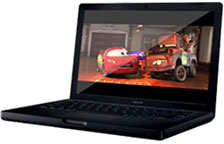 "It's back, it's black and it's baaaaad! Apple's best-value
laptop ever shoehorns Wi-Fi, Bluetooth, a Webcam video conferencing
software and a dual-core Intel processor into a no-flab
package.
"It's back, it's black and it's baaaaad! Apple's best-value
laptop ever shoehorns Wi-Fi, Bluetooth, a Webcam video conferencing
software and a dual-core Intel processor into a no-flab
package.
"OK, that this costs £130 more than the next model down - a white 'Book with an identical spec apart from a 20GB smaller hard drive - is ridiculous. But when has buying an Apple ever been about logic?...
"...Macs are never much cop for TV-viewing (no built-in tuner) or gaming (er, no games), but who cares? There's nothing better than a Mac for organising your digital life, and there's never been a better time to buy a Mac."
Link: Apple MacBook (Black)
Tech Tips and Info
PowerBook G4 and 30" Cinema Display Resolutions
A new Apple Knowledge Base article says:
"When you connect an Apple Cinema Display (30-inch DVI) to a PowerBook G4, you may find that the highest available resolution is 1280 x 800, even though the optimum resolution for the display is 2560 x 1600."
Link: PowerBook G4 and Apple Cinema Display (30-inch DVI) Resolutions
Products and Services
Amplifier Doubles Wireless Range for MacBooks
PR: More than double the wireless range and signal strength available to MacBook users - without any wires! You don't have to open the MacBook case to run a cable from the internal AirPort card. MacBook Connect does the wireless boosting unlike any other product available. The Connect is available from QuickerTek and its dealers for $199.95.
 The Connect productboosts the signal between the internal AirPort card and the AirPort
and AirPort Extreme Base Station or other 802.11 wireless access
point from vendors such as Belkin, dLink, Linksys and others. This
signal boosting then doubles the wireless range of the MacBook -
and maintain fast and satisfying network speeds.
The Connect productboosts the signal between the internal AirPort card and the AirPort
and AirPort Extreme Base Station or other 802.11 wireless access
point from vendors such as Belkin, dLink, Linksys and others. This
signal boosting then doubles the wireless range of the MacBook -
and maintain fast and satisfying network speeds.
The MacBook Connect can be setup using any web browser and since there's no wires, you don't need an engineer to install it. Of course it can't violate your AppleCare warranty since you're not mucking around inside the case. MacBook Connect is powered from either a USB connection or AC adapter and can be attached to the MacBook case or simply rest it on the desk. Connect users access wireless networks no differently than using a standard MacBook. Connect also works with any Mac OS X operating system.
Generating five times the standard wireless range of the stock MacBook is made possible with a 200 milliwatt repeater. RF power is the rating for wireless products and a stock MacBook has less than 50 milliwatts. Improving the RF rating from 30 to 200 milliwatts is what delivers extra wireless range and speed. You can even move your Connect from the MacBook to any other WiFi-ready computer - Mac or Windows - and it will work similarly.
QuickerTek's MacBook Connect combines a more powerful 2dBi external antenna with a design that does not require opening the MacBook case. Later, when you want even more power, you can add one of QuickerTek's higher power antennas.
An Apple AirPort Express and MacBook Connect appear to operate similarly, however they are very different in capability and performance. AirPort Express has a smaller data buffer which limits wireless performance. AirPort Express can only be powered from AC adapter which severely limits mobility. MacBook Connect accepts a variety of external antennas through the included antenna connector, unlike the AirPort Express where there's no access to the RF connector. The Connect generates four to five times more RF output and has a more sensitive receiver than the AirPort Express so that users get greater range, doesn't require alot of extra steps to change networks and it works on all 802.11b/g wireless networks, Mac or Windows.
Like most QuickerTek products, MacBook Connect is backed with a one-year warranty on parts and labor.
QuickerTek has been a recognized leading innovator of antennas and RF products for Apple Power Macintosh G4, G5 as well as Intel models; iMac PPC and Intel; PowerBook; iBook and MacBook computers. QuickerTek products can be purchased online and from authorized dealers.
Link: MacBook Connect
Price of XT-Stand Folding Laptop Stand Reduced
PR: GJB Enterprises' George J Baker tells me that the collapsable XT-Stand laptop stand as of 10/01/2006 has been reduced in price from $59.95 to $39.95.

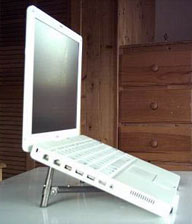
Designed as a true Road Warrior accessory, the folded XT-Stand can be stored and transported in its own multi-usage plastic case, which, along with the stand, is designed to accommodate the four most popular types of digital camera memory cards. The case can store up to 22 of these cards (5 M5 cards, 4 XD cards, 4 CFcards, and 9 SD cards). The box is claimed to be made out of bulletproof material.
Software
Free Focused Scroll Trackpad Driver
PR: Free Focused Scroll is a project to implement an open source driver for Apple PowerBooks. The project was started as an alternative to SideTrack (which isn't free) and an improvement upon iScroll2. It achieves its advanced features by running the trackpad in what is called "absolute" mode. This means that the driver can tell exactly what part of the pad your finger is touching. The Apple driver (and iScroll2) both run the pad in "relative" mode, and while that facilitates a simpler driver because the pad does most of the work, it is very limiting of what you can do.
Most notably running in "absolute" mode allows the driver to support:
- Two-finger scrolling like the new Apple laptops with the new USB trackpads;
- Linear scroll regions that can be placed anywhere. This adds the functionality of a scroll-wheel;
- Hotspots to bind taps in the corners of the trackpad to alternate mouse buttons;
- Ability to remap the physical button to perform any type of mouse click.
Free Focused Scroll should work on all Apple laptops that have an ADB contolled trackpad, including most recent PowerBooks and iBooks. It should not work on the latest Apple PowerBooks that have a newer USB trackpad and support all that fancy two-finger scrolling stuff.
The driver is entirely based on the original Darwin ADB trackpad driver with the information for how to activate `absolute' mode taken from the ScrollPad project. The preferences daemon and the two-finger scrolling code is taken from the iScroll2 project as we didn't really want to reinvent the whole wheel. At some point we intend to remove the iScroll2 scroll code, though. We believe it is possible to make the code much better if it utilises absolute coordinate information instead of just relative movement.
Don't worry about installing this driver, though. The installer will only allow it to be installed on compatible Macs and the uninstaller is pretty foolproof. Plus it's small!
New in version 0.63:
- Updated the installer quite a bit. It now looks a lot more pretty! The error messages should work now to tell you exactly why it thinks it can't install.
System requirements: Mac OS X 10.3.9 or later.
System Support: PPC/Intel
Free
Link: Free Focused Scroll
Bargain 'Books
Bargain 'Books are used unless otherwise indicated. New and refurbished units have a one-year Apple warranty and are eligible for AppleCare.
There are two different versions of WallStreet running at 233 MHz, the cacheless MainStreet version and the later Series II with a level 2 cache. It's not always possible to determine from the vendor's listing which is being offered, so we've included links within this paragraph to the two models. The same goes for the PowerBook G4/667 (VGA) and G4/667 (DVI), the titanium vs. aluminum 15" PowerBook G4 at 1 GHz, and 1.25 GHz to 1.5 GHz 15" PowerBooks.
PowerBook, iBook, and MacBook profiles linked in our Portable Mac Index.
Other World Computing
All include Mac OS 9.2.2, OS X 10.2.8, and Apple's standard iBook software bundle.
- 12" iBook G3/500, 320/10/CD, $199
- 12" iBook G3/500, 320/30/CD, AirPort, $319
- 12" iBook G3/600, 256/30/CD, AirPort, $359
- 12" iBook G3/600, 256/40/CD, AirPort, $369
- 12" iBook G3/700, 256/20/CD, AirPort, $399
Apple Store
- refurb 12" iBook G4/1.2 GHz, 256/30/Combo, APX, $719
- refurb 1.83 GHz MacBook, white, 512/60/Combo, $949
- refurb 2.0 GHz MacBook, white, 512/60/Combo, $1,099
- refurb 2.0 GHz MacBook, black, 512/80/Combo, $1,299
- refurb 15" 2.0 GHz MacBook Pro, 512/80/SD, glossy or matte, $1,699
- refurb 15" 2.16 GHz MacBook Pro, 1024/100/SD, $2,149
- refurb 17" 2.16 GHz MacBook Pro, , 1024/120/SD, $2,399
- refurb 12" PowerBook G4/1.5 GHz, 512/80/SD, APX, BT 2.0, $1,199
- refurb 15" PowerBook G4/1.67 GHz, 512/80/SD, APX, BT 2.0, $1,349
- refurb 17" PowerBook G4/1.67 GHz, 512/100/SD, APX, BT 2.0, $1,799
TechRestore
TechRestore is offering a $25 discount to 'Book Review readers off any PowerBook or iBook in stock. Just enter the code CWM during checkout when ordering online. The coupon code is valid from now through 2007.12.31.
- 12" iBook G3/700, 256/30/Combo, $469.99
- 12" iBook G3/900, 256/30/Combo, $479.99
- 12" iBook G4/1 GHz, 256/30/Combo, 3-Month Warranty, 30-Day Refund, $679.99
- 15" PowerBook G4/1.33 GHz, 512/60/Combo, 3-Month Warranty, 30-Day Refund, $1,249.99
Wegener Media
- 12" iBook 500, 10/192/CD, $329.99
- 12" iBook 600, 15/192/CD, $399.99
- 12" iBook 700, 20/192/Combo, $469.99
- 12" iBook 800, 30/256/Combo, $399.99
- 12" iBook 900, 40/256/Combo, $489.99
- 14" iBook 800, 30/256/Combo, $479
- 14" iBook 900, 40/256/Combo, $529
ExperCom
- 12" iBook G3/600, 256/20/Combo, $319
- 12" iBook G3/800, 256/30/Combo, Scratch & Dent, $349
- 12" iBook G3/700, 256/20/Combo, $349
- 12" iBook G3/800, 128/30/Combo, $369
- 12" iBook G3/800, 640/30/CD, Scratches, $419
- 12" iBook G3/700, 256/20/Combo, $439
- 14" iBook G3/600, 256/20/Combo, $349
- 14" iBook G3/800, 128/40/Combo, $449
- 12" iBook G4/1 GHz, 256/30/SD, AirPort, Scratches, $649
- 12" iBook G4/1 GHz, 256/40/Combo, AP, $659
- 12" PowerBook G4/867, 256/40G/ SuperDrive, $599
- 12" PowerBook G4/1.33 GHz, 256/ 60G/ SuperDrive, AirPort, BT, $899
Baucom Computers
- PowerBook "Kanga" G3/250, 160/5/CD, floppy, $119
- 12" iBook G3/700, 256/20/CD, $325 (add AirPort for $99)
For deals on current and discontinued 'Books, see our 13" MacBook and MacBook Pro, MacBook Air, 13" MacBook Pro, 15" MacBook Pro, 17" MacBook Pro, 12" PowerBook G4, 15" PowerBook G4, 17" PowerBook G4, titanium PowerBook G4, iBook G4, PowerBook G3, and iBook G3 deals.
We also track iPad, iPhone, iPod touch, iPod classic, iPod nano, and iPod shuffle deals.
Join us on Facebook, follow us on Twitter or Google+, or subscribe to our RSS news feed
Links for the Day
- Mac of the Day: PowerBook 500 Series, introduced 1994.05.16. 'Blackbird' includes a 25 to 33 MHz 68040 along with smart batteries and grayscale or color displays.
- Support Low End Mac
Recent Content
About LEM Support Usage Privacy Contact
Follow Low End Mac on Twitter
Join Low End Mac on Facebook
Favorite Sites
MacSurfer
Cult of Mac
Shrine of Apple
MacInTouch
MyAppleMenu
InfoMac
The Mac Observer
Accelerate Your Mac
RetroMacCast
The Vintage Mac Museum
Deal Brothers
DealMac
Mac2Sell
Mac Driver Museum
JAG's House
System 6 Heaven
System 7 Today
the pickle's Low-End Mac FAQ
Affiliates
Amazon.com
The iTunes Store
PC Connection Express
Macgo Blu-ray Player
Parallels Desktop for Mac
eBay

