
New iBooks and PowerBooks, Combo drive upgrade for dual-USB iBooks, SkyLINE 802.11b WiFi PC Card, and more.
Except as noted, prices are in US dollars.
- Apple’s New ‘Books
- CD-RW/DVD Combo Drive Upgrade for iBooks Available from MCE Technologies
- Protect Your G4 iBook or PowerBook with iSkin
- Magma FireWire Drive Kit for CB2 Series Expansion Systems
- SkyLINE 11 Mb Wireless PC Card
- LapLink Announces Next Generation Remote Access Software LapLink Everywhere
- Spire and PB Zone Team Up with Special Deal on Computer Backpacks
- Bargain ‘Books
Apple’s New ‘Books
The big news in the Apple portable world this week was, of course, the release of the latest PowerBook and iBook upgrades. Details have been amply reported elsewhere, so I’ll just make a few comments in general.
It’s very hard to find anything to complain about with the new PowerBooks. They’re faster, better equipped, and cheaper. What’s not to like? I agree with Dan Knight that it’s hard to justify the $700 extra for the 1 GHz unit, which is only 133 MHz faster than the entry-level machine. Of course, there are other enhancements included in the faster, more expensive model, so it depends on how much you want features like the SuperDrive.
The price reductions on the iBook are also very welcome. The $999 price leader only has 16 MB of video RAM (only?), so I wouldn’t really recommend it if you’re planning to run OS X. You need the 32 MB of the higher-end models to fully support Quartz Extreme, and who knows what Apple will come up with next?
I was personally disappointed that they only bumped the high-end model to 800 MHz. IBM has faster G3 750FX chips available, and it’s only an arbitrary marketing decision by Apple to keep the nominal clock speed of the “consumer” ‘Book well below that of the professional machine that prevented them from going to 900 MHz or even 1 GHz (G3 of course).
Nevertheless, these are the most exciting Apple portable upgrades I can recall short of a completely new model announcement. These are certainly the best values Apple has ever offered in portable computers.
CD-RW/DVD Combo Drive Upgrade for iBooks Available from MCE Technologies
MCE Technologies is now offering an internal CD-RW/DVD-ROM Combo Drive designed to replace the original CD-ROM, DVD-ROM, or CD-RW optical drive currently inside dual-USB Apple iBooks (12″ and 14″). The MCE CD-RW/DVD Combo Drive, which must be installed by MCE Technologies, gives iBook owners the ability to not only read CDs and play DVDs, but also to write to CD-R and CD-RW media, all from within their iBook. The MCE iBook Combo Drive Upgrade Service is priced at $249 and is available immediately.
“A large number of iBooks were sold with only a single-function CD-ROM or DVD-ROM internal optical drive. Owners of these computers have voiced their desire to burn CD-R and CD-RW media from within their iBook,” said Arnie Ramirez, President of MCE Technologies. “Our iBook CD-RW/DVD Combo Drive upgrade now gives owners this capability along with the opportunity to take advantage of Apple’s free iTunes and Disc Burner or Finder burning software.”
MCE Technologies has rigorously tested and certified its CD-RW/DVD Combo Drives for use in both the 12.1″ and 14.1″ “Dual USB” (white) iBooks. The MCE CD-RW/DVD Combo Drive is an 8x8x24x8x mechanism and records to CD-R and CD-RW discs at up to 8x speed, reads DVD-ROM discs at up to 8x speed, and reads CD-ROM discs at up to 24x speed. The CD-RW/DVD Combo Drive installed by MCE is bootable, and it is compatible with Mac OS 9, Mac OS X, iTunes, and Disc Burner/Finder burning. In addition, the MCE-installed CD-RW/DVD Combo Drive carries a 1-year warranty.
In order to take advantage of the MCE iBook CD-RW/DVD Combo Drive Upgrade Service, customers must contact MCE and arrange to ship their Apple iBook to MCE Technologies in Irvine, California where the upgrade is performed by a certified MCE technician. Pricing for the MCE CD-RW/DVD Combo Drive Upgrade Service, which includes the drive, installation and 3-day return shipping to the customer, is $249. Turnaround time is generally 2-3 business days.
MCE Technologies designs and markets a wide range of Apple Macintosh-related storage solutions and portable accessories to distributors, dealers, and end users domestically and internationally.
Protect Your G4 iBook or PowerBook with iSkin
If you love your iBook or PowerBook G4, you will want to protect it against everyday hazards caused by spills, dirt, crumbs and other unwanted elements that may get in between the keys.
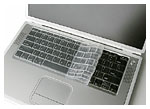
iSkin is precisely molded to protect your iBook or PowerBook G4 keyboard by creating a molded silicone layerabove your keyboard keys. The iSkin keyboard protector also helps protect your iBook or PowerBook’s screen by reducing the occurrence of screen staining caused by finger oils and dirt particles.
The iSkin keyboard protector can be cleaned by either wiping it with a damp cloth or by washing it in a mild soap solution. Washing will remove any oils and build up that may occur over time. Washing does not affect the durability or protective qualities of the iSkin protector.
The iSkin keyboard protector is available in six colors known as Skin Tones. Skin Tones add a tint of color to iBook keyboards and is available in a variety of colors including: Blue Mist (light blue), Bubble Gum (light pink), Creamsicle (light orange), Lemonade (light Yellow), Lime Light (light green), or without color as White Frost (frosted clear).
iSkin keyboard protectors sell for $24.99.
Magma FireWire Drive Kit for CB2 Series Expansion Systems
Magma has announced the newest addition to their 2 Slot expansion line of products – a FireWire Drive Kit specifically designed to add FireWire storage for your portable PCI application.
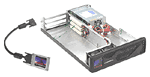
Magma has been selling CardBus-to-PCI Expansion Chassis to the Professional Audio Recording Industry forseveral years now. Historically, they offered their chassis with the option to add a SCSI controller and disk drives. Now, with the growing interest and stability of FireWire storage in the Audio industry, they have designed a special FireWire Drive Kit for their CB2 Series of expansion chassis.
Normally, if you want to use FireWire storage, you purchase an external enclosure that holds 60, 80, or 120 GB of FireWire storage. That’s all the external enclosure does, it holds a disk drive. Imagine being able to purchase an external enclosure that holds FireWire storage, plus gives you two full-length PCI slots so you can add your favorite audio PCI card, like, Digi 001, Pro Tools|HD, MOTU 324, RME Hammerfall, M-Audio, UAD-1, etc…
When you order any 2 Slot expansion chassis from Magma, also order the FireWire Drive Kit, part number FWD80KITCB2. The FireWire Drive Kit includes all the components (including an 80 GB Seagate drive) required to install FireWire storage into a 2 slot expansion chassis and connect to your laptop computer through a 6-pin FireWire port.
Benefits:
- Minimize external enclosures required for your application (one less thing for you to forget when packing up!)
- Integrate the same IDE/ATA disk drive that Digidesign recommends
- If you purchase both a FireWire Drive Kit and a CB2 Series product on the same order, Magma will install (integrate) the kit for you at no additional cost to you!
- FireWire storage is more affordable and more stable than other storage options
- You can still add additional external FireWire storage through a FireWire port on the back of the chassis.
- FWD80KITCB2 includes the following components:
- Seagate Barracuda 80 GB 7200 rpm Ultra ATA/100 disk drive
- IDE-FireWire Converter with Oxford 911 FireWire bridge chipset
- (2) Internal FireWire Cables
- Custom PCI slot cover that does not take up a usable PCI slot – there’s still room to add two PCI cards
- 6 foot external FireWire cable for connection to computer (6-pin to 6 pin)
- If you already have an ATA drive, you can purchase the FireWire Drive Kit from Magma without the disk drive. The part number is FWDKITCB2!
FireWire Drive Kit Prices (CardBus to PCI Expansion Chassis not included)
- FireWire 80 GB Drive kit: includes 80 GB FireWire disk drive and all components required to mount inside CB2 chassis, $349
- FireWire Drive kit: includes all components required to mount (1) internal FireWire drive inside CB2 chassis (disk drive NOT included), $229
SkyLINE 11 Mb Wireless PC Card
The SkyLINE 11 Mb Wireless PC Card is a Type II PCMCIA card that works in both Macintosh PowerBooks and PC notebooks. (For PC Notebooks, a CardBus equipped slot is required.) SkyLINE offers users connectivity to LAN network resources for access to email, the Internet, file servers, printers, and more without wires. In environments, such as schools or businesses with brick, concrete, or asbestos making the deployment of structured network wiring difficult if not impossible, Farallon’s SkyLINE wireless networking is an ideal solution.
SkyLINE is based on the leading IEEE 802.11b 2.4 GHz DSSS wireless standard for easy integration into existing IEEE 802.3 wired Ethernet networks and for compatibility with other 802.11 DSSS wireless solutions like Apple’s AirPort. Through IEEE 802.11 DSSS compatible access points from manufacturers such as Apple, Proxim, Nokia, Lucent, and Nortel, SkyLINE-equipped computers can connect to a wired Ethernet network. SkyLINE users can also create an ad hoc peer-to-peer network between two or more computers for direct file sharing.
SkyLINE 11 Mb features 40-bit WEP encryption for increased security, Farallon test utilities, and at-a-glance link LED to simplify troubleshooting, a unique Control Panel with real-time signal strength meter and network statistics, as well as dynamic configuration capabilities omitting the need for restart every time a change is made. Additionally, in order to get the maximum operating range, SkyLINE 11 Mb will automatically step down from 11 Mbps to 5.5 Mbps, 2 Mbps and 1 Mbps as users distance themselves from the access point.
SkyLINE 11 Mb Wireless PC Card sells for for $119. You can check it out at the Applelinks Store.
LapLink Announces Next Generation Remote Access Software LapLink Everywhere
LapLink Inc. has announced the release of LapLink Everywhere, the next generation of remote access software technology. LapLink Everywhere enables mobile professionals to have complete access to their desktop files and email from anywhere in the world – quickly, easily, and securely.
“Up until now, individuals could purchase device specific software (like for the Blackberry) or application specific software (like Window’s Outlook Web Access) to access limited information from their computers,” said Mark Eppley, CEO of LapLink. “LapLink Everywhere offers the ability to access all of your information from up to three computers from any browser-enabled device – phone, PDA, Internet terminal, PC or an Apple Mac.”
LapLink Everywhere offers “Zero Footprint” remote access to any Internet-connected PC from a laptop, another desktop, Web phone, PDA, Internet cafe, or airport kiosk – allowing confidential work from any device without leaving behind personal files on the device. As long as there is a fully functioning Web browser, the operating system of the remote device or computer does not need to match the home/office based PC. File transfer options use the classic LapLink split screen design and transfer files of any size using a simple, but fast, drag and drop method. File updates are dramatically faster by employing LapLink’s patented “SpeedSync” file updating technologies.
Remote access of Outlook and Outlook Express email, calendar, and contact files is a key feature, offering the ability to send and receive email and also view attachments. In addition, LapLink Everywhere allows user sharing – offering the capability of allowing other people access to view information. Assistants can now access the same calendar while coworkers may be able to access working files. Some of the most sophisticated security features include “MD5” user name/password access, which denies unauthorized client access utilizing SSL and 128-bit advanced encryption standards.
LapLink Everywhere is available for $89.95 for 12 months of service ($7.49 per month) and can be downloaded from the LapLink website (www.laplink.com) or can be ordered by calling (800) 343-8080. To celebrate the launch of LapLink Everywhere, LapLink is offering a free 15-day trial.
LapLink Everywhere is also available in the LapLink Everywhere Deluxe Suite. This suite includes 12 months of LapLink Everywhere service, the LapLink Classic remote control and file transfer gold product with support for USB 2.0 cable transfers, and the new LapLink Remote Network Accelerator (available individually for $99). The LapLink Everywhere Deluxe Suite sells for $169.95 and is available in most retail and online software outlets.
For more information, visit http://www.laplink.com or most retail outlets including Best Buy, CompUSA, Staples, Office Depot, and Fry’s Electronics.
Spire and PB Zone Team Up with Special Deal on Computer Backpacks
Spire and the folks at the PowerBook Zone have teamed up to give you a discount on all Spire products! Just input the coupon code PBZONE when you order and receive 15% off.
Bargain ‘Books
There are two different versions of WallStreet running at 233 MHz, the cacheless MainStreet version and the later Series II with a level 2 cache. It’s not always possible to determine from the vendor’s listing which is being offered, so we’ve included links within this paragraph to the two models. The same goes for the PowerBook G4/667 (Gigabit Ethernet/2001) and G4/667 (DVI).
Small Dog Electronics
- iBook 600 12″, 128/20/CD, factory refurbished, 1 year factory warranty, $869
Baucom Computers
- 3400/200, 144/2 GB/CD/floppy/33.6, $328
- 5300ce/117, 32/1 GB/floppy/10.4″, $144
- 5300cs/100, 56/3 GB/floppy/ 10.4″ dual-scan, $122
FlyMilesMicro
- iBook 500, 128/10 GB/Combo, factory refurbished, $1,099
- iBook 600, 128/20 GB/CD, 12.1″, factory refurbished, $899
- iBook 600, 128/20 GB/Combo, 12.1″, factory refurbished, $1,249
Power Max
- iBook 600, 128/20 GB/CD-ROM, 12.1″ screen, $949
searchword: bookrev20021108
