
I’ve had this Blue and White Power Mac G3 in my office on and off for a few months. I spent several weeks working on it and a Mystic Power Mac G4/450 trying to get them both working reliably. Long story short, the problems turned out to be bad RAM.
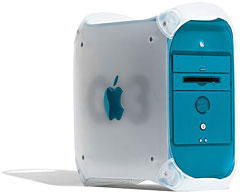 The Blue andWhite was the first Mac with a FireWire port and the first Power Mac with the “drawbridge” case design that Apple used through entire series of G4 Power Macs. It has an ATI Rage 128 video card on a 66 MHz PCI bus (twice the speed of regular PCI) and also has three 64-bit PCI slots (regular PCI is 32-bit).
After removing the troublesome RAM, I ended up with 384 MB.
This machine was an invaluable tool in learning about getting the best YouTube performance from G3 Macs, as it let me run three different versions of OS X and change the resolution and bit-depth of the monitor. (After all the testing, we recommended Mac OS X 10.3 Panther, setting resolution to 800 x 600 or even 640 x 480, and going to thousands of colors instead of millions. Reader weighed in with even more suggestions the following day.)
This computer has two hard drives, an 80 GB 7200 rpm Deskstar, which is one of my favorite drives, and a 60 GB Maxtor DiamondMax Plus 9. Each drive is partitioned and has Mac OS X 10.2.8, 10.3.9, and 10.4.11 installed. I have an Apple mouse and keyboard attached and used a 17″ Samsung 700DF monitor at 1024 x 768 resolution and millions of colors unless otherwise noted.
Only the Deskstar drive was benchmarked.
Speedometer 4.02
The system was tested on 2008.03.18 using Mac OS 9.2.2 with its default set of extensions and control panels. The computer was attached to a 17″ color monitor and tested in 8-bit video mode at 640 x 480 resolution. Virtual memory is off except in the third test. Results are relative to a Quadra 605, which rates 1.0. Numbers are rounded off to one or two decimal places.
The first set of numbers compares performance at different cache settings. (Because Power Macs don’t support 1-, 2-, or 4-bit video, Speedometer 4 was unable to test the graphics.)
cache       CPU  graphics disk    math
128 KB      22.5   n/a    4.58   977.6
  8 MB      23.1   n/a    4.91   976.2
8 MB/VM on  22.5   n/a    4.64   975.6
The best overall results are achieved with the default 8 MB disk cache and virtual memory disabled.
MacBench 5
Virtual memory is turned off. Results are relative to a 300 MHz Power Mac G3, which scores 1000. The system was tested with both minimum and maximum cache sizes.
cache     CPU   math   disk   gr.
128 KB   1140   1159   1753   n/a
  8 MB   1139   1160   2536   n/a
There’s virtually no difference between the math and CPU scores, but you can easily see how much a larger cache boosts the disk test. Our advice: Leave it set to the default setting in the Memory control panel.
Let 1000 Windows Bloom
The system was tested on 2008.03.18. Running OS X 10.2.8 Jaguar, it displayed 1000 windows in 95.4 seconds. The same test took only 64.5 seconds under 10.3.9 Panther, and just 48.6 sec. in 10.4.11 Tiger. Apple has definitely been improving graphics performance as Mac OS X has moved forward.
Power Fractal
This program creates a fractal pattern, which can really bog down a CPU. It does not run under Jaguar. Under Panther, it took 49.6 seconds and scored 287.6 Mflops. Under Tiger, the test took 50.0 seconds and scored 285.3 Mflops.
Xbench
Xbench has been out for some time, and version 1.1.3 runs on all three versions of OS X installed on the Blue and White. It tests a lot of things. Here are the test results using Xbench 1.1.3 for OS X 10.2.8 (100 = 1 GHz G4) and Xbench 1.3 for 10.3 and 10.4 (100 = 2.0 GHz G5):
           10.2.8  10.3.9 10.4.11
Overall     33.4    10.8    11.9
CPU         21.8     9.9     9.6
Threads     25.8    15.0    14.8
Memory      22.4     6.5     6.5
Quartz      39.6    15.9    16.1
OpenGL      49.7    26.4    28.1
User Int.   47.2     5.0     7.0
Drive       72.6    47.5    45.7
We can see where Apple has been tweaking Mac OS X over the years. The overall score is about 10% higher under 10.4 Tiger than 10.3 Panther, but some scores are even better (especially User Interface) while others are lower (CPU and threads), showing where Apple is putting the focus as it moves ahead.
Geekbench
Geekbench only runs in Tiger and OS X 10.5 Leopard, which doesn’t run on G3 Macs. Scores under OS X 10.4.11 are 240 for the Integer test, 230 for floating point, 120 for Memory, 82 for Streams, and 196 overall.
Conclusion
While Mac OS X keeps getting better, G3 hardware is being left further and further behind – and it has been completely abandoned with OS X 10.5. Still, this old workhorse from 1999 performs admirably, and I haven’t even tried to overclock it yet.
Keywords: $blueandwhiteg3
searchword: blueandwhiteg3benchmarks
